惯性聚合 高效追踪和阅读你感兴趣的博客、新闻、科技资讯
阅读原文 在惯性聚合中打开

推荐订阅源

B
Blog
A
About on SuperTechFans
Microsoft Security Blog
Y
Y Combinator Blog
罗磊的独立博客
J
Java Code Geeks
人人都是产品经理
人人都是产品经理
MongoDB | Blog
MongoDB | Blog
The GitHub Blog
The GitHub Blog
G
Google Developers Blog
U
Unit 42
Microsoft Azure Blog
博客园 - Franky
Jina AI
Jina AI
F
Fortinet All Blogs
H
Help Net Security
B
Blog RSS Feed
H
Hackread – Cybersecurity News, Data Breaches, AI and More
Last Week in AI
Last Week in AI
博客园 - 司徒正美
云风的 BLOG
云风的 BLOG
M
MIT News - Artificial intelligence
C
Check Point Blog
GbyAI
GbyAI

博客园 - {:)

[译]删除IE收藏夹下的“链接”文件夹 Javascript Cheat Sheet(Javascript 速查手冊) CSS Cheat-Sheet(CSS速查手冊) 我们不需要企业偶像,我们需要企业英雄 [轉]jQuery selectors (JQuery选择器) 和JQuery Cheat sheet (JQuery 速查手冊) YKWIM - {:) - 博客园 Discover the difference among Types: is operator,typeof keyword and GetType method the status code returned from the server was:500 Don't use GetType() with Page.ClientScript.RegisterClientScriptBlock() DNS 服務器地址被篡改 Outlook2007 連接到Exchange Server 失敗 装了KIS2009之后 10月22日链接篇: ASP.NET, Visual Studio, WPF 和 Silverlight - Scott Guthrie 博客中文版 - 博客堂 The Coding Standard 程序员八荣八耻 SCORM -LMS-SCO Data课件与平台交互机制圖解 解决安装SP3后,Window Media Player 播放器不能播放的问题 解決VS無法拖拽控件到頁面的問題 Some JavaScript Source Code About WebInput Use Refresh() function right in WebGrid with javascript
Communication with the underlying transaction manager has...
{:) · 2008-10-14 · via 博客园 - {:)

与基础事务管理器的通信失败

排除步驟:

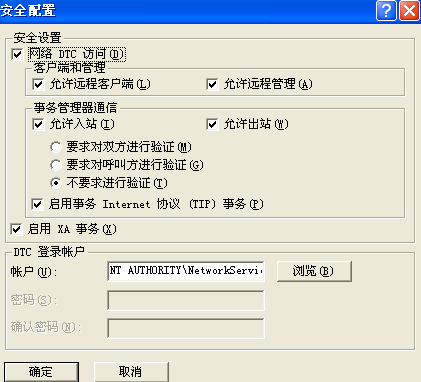
1.檢查MS DTC 設置。【控制面板->性能和维护->管理工具->組件服務->計算機->我的電腦->屬性->MS- DTC 選項卡->安全性配置】

  正確設置如圖檔:【english版】

无标题

  【中文版】

  0003-421x382

2. 檢查防火墻是否對MS DTC作了例外處理。

3.檢查是否作了 host映射。

   a.  在App Server 上ping DB Server IP ,  如果ping不通不行,

   b.  在DB  Server 上ping  App Server IP,不通亦不行。

   c.  用記事本打開App和DB Server上的C:\WINDOWS\system32\drivers\etc\hosts文件,并在“127.0.0.1       localhost ”之後分別作如下對應映射處理:

      App SERVER 的host文件做如下映射: eg: 192.168.7.50 DB-Server[DB Server name].

      DB  SERVER  的host文件做如下映射: eg: 192.168.7.59 App-Server[App Server name].

d.   重複 a、b步驟測試,ping得通,一般都可以解決問題;ping不通的話,接下來處理:

      複製App和DB Server上C:\WINDOWS\system32\drivers\etc\lmhosts.sam文件,并創建一份復件,去除後綴.sam重命名為lmhost文件,用記事本打開,

并作和c 一樣的映射處理,下個 nbtstat –R 命令行。

      然後重複a、b步驟測試。