


An MCP server in Python exposes tools, resources, and prompts to AI hosts through the Model Context Protocol (MCP). You write a small Python program. Cursor, Claude Desktop, or another MCP host starts the program and calls your functions when the model needs live data.
This tutorial builds a local SQLite query server with the official
MCP Python SDK and
FastMCP. You register one tool, connect the server to
Cursor and Claude Desktop,
and confirm the model reads your database at chat time.
For protocol background, start with DigitalOcean’s MCP 101: An Introduction to Model Context Protocol and Understanding Model Context Protocol (MCP).


mcp
package. Pin mcp>=1.27,<2 until the stable 2.x release ships.FastMCP (from mcp.server.fastmcp import FastMCP) registers tools with
@mcp.tool() and runs over stdio by default for local hosts.~/.cursor/mcp.json. Claude Desktop reads
claude_desktop_config.json under both mcpServers keys.print() to stdout or you break
JSON-RPC messages.Before you start, confirm you have:
community.db fileMCP is an open protocol for connecting LLM hosts to external data and actions. Anthropic introduced MCP in November 2024. Hosts speak JSON-RPC over stdio or HTTP transports. Servers expose structured capabilities instead of custom one-off integrations per model.
Large language models predict text. They do not query your database or call your APIs unless a host routes a tool call to a server you control. MCP standardizes that bridge.
| Role | What it does | Example in this tutorial |
|---|---|---|
| Host | UI where you chat | Cursor or Claude Desktop |
| Client | MCP protocol layer inside the host | Built into the host app |
| Server | Your Python code with tools | sqlite-server.py |
| Tool | Function the model requests | get_top_chatters |
When you chat in Cursor or Claude Desktop, the host is the app window. The MCP client inside the host lists available tools, sends your message to the model, and forwards approved tool calls to your server.
get_top_chatters tool if the description matches.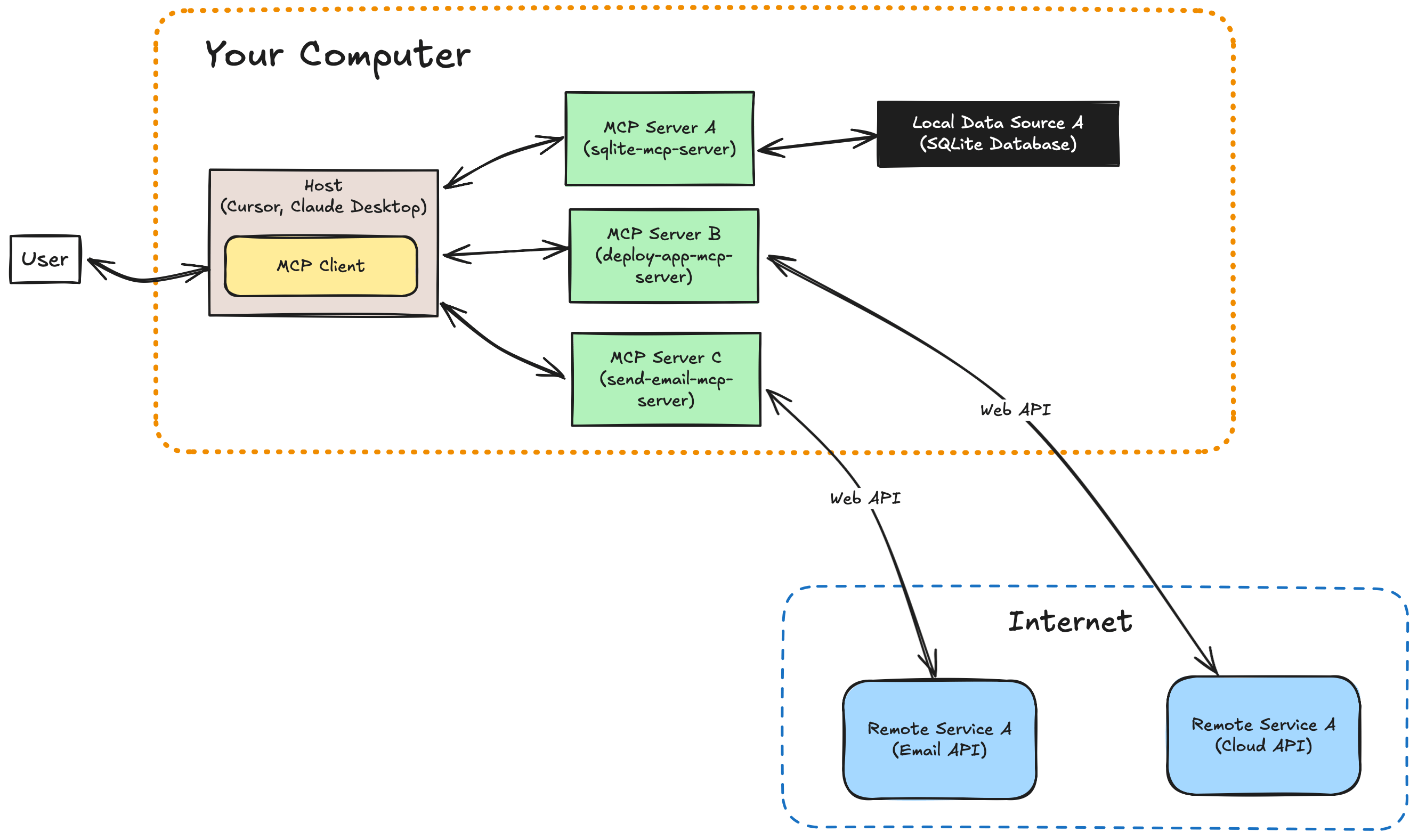
Everything in the diagram runs on your machine for this walkthrough. The host
spawns your server locally. The server opens community.db on disk.
Note: Host and client often share one process. To write a standalone MCP client, follow the Build an MCP client guide.
| Primitive | Who controls it | Purpose |
|---|---|---|
| Tool | Model (with user approval) | Run code: query a DB, call an API |
| Resource | Application | Expose read-only files or records |
| Prompt | User | Ship reusable prompt templates |
This project implements one tool. Resources and prompts follow the same
FastMCP decorators (@mcp.resource(), @mcp.prompt()). See the
MCP Python SDK server docs
for full examples.
You will create a virtual environment, install the SDK, download sample data, and
write sqlite-server.py.
Create and activate a virtual environment:
python3 -m venv mcp-env
source mcp-env/bin/activate
On Windows PowerShell:
python -m venv mcp-env
mcp-env\Scripts\Activate.ps1
Install the MCP Python SDK. Pin below 2.x while v2 is in alpha:
pip install "mcp>=1.27,<2"
Download community.db
into the same folder as your server script. The file contains a chatters table
with name and messages columns.
For SQLite fundamentals in a web app context, see How To Use an SQLite Database in a Flask Application.
Create sqlite-server.py:
# sqlite-server.py
from pathlib import Path

import sqlite3
from mcp.server.fastmcp import FastMCP

DB_PATH = Path(__file__).resolve().parent / "community.db"

mcp = FastMCP("Community Chatters")


@mcp.tool()
def get_top_chatters(limit: int = 10) -> list[dict]:
    """Return chatters ranked by message count."""
    conn = sqlite3.connect(DB_PATH)
    cursor = conn.cursor()
    cursor.execute(
        "SELECT name, messages FROM chatters ORDER BY messages DESC LIMIT ?",
        (limit,),
    )
    rows = cursor.fetchall()
    conn.close()
    return [{"name": name, "messages": messages} for name, messages in rows]


if __name__ == "__main__":
    mcp.run()
FastMCP reads the function name, type hints, and docstring to build the tool
schema. mcp.run() starts the stdio transport, which local hosts expect.
Stdio logging: Do not use print() on stdout in stdio servers. Use
logging or print(..., file=sys.stderr) so JSON-RPC frames stay intact. See
the official server logging notes.
Test the query without the host:
python3 -c "import sqlite3; c=sqlite3.connect('community.db'); print(c.execute('SELECT COUNT(*) FROM chatters').fetchone())"
You should see a row count printed to the terminal.
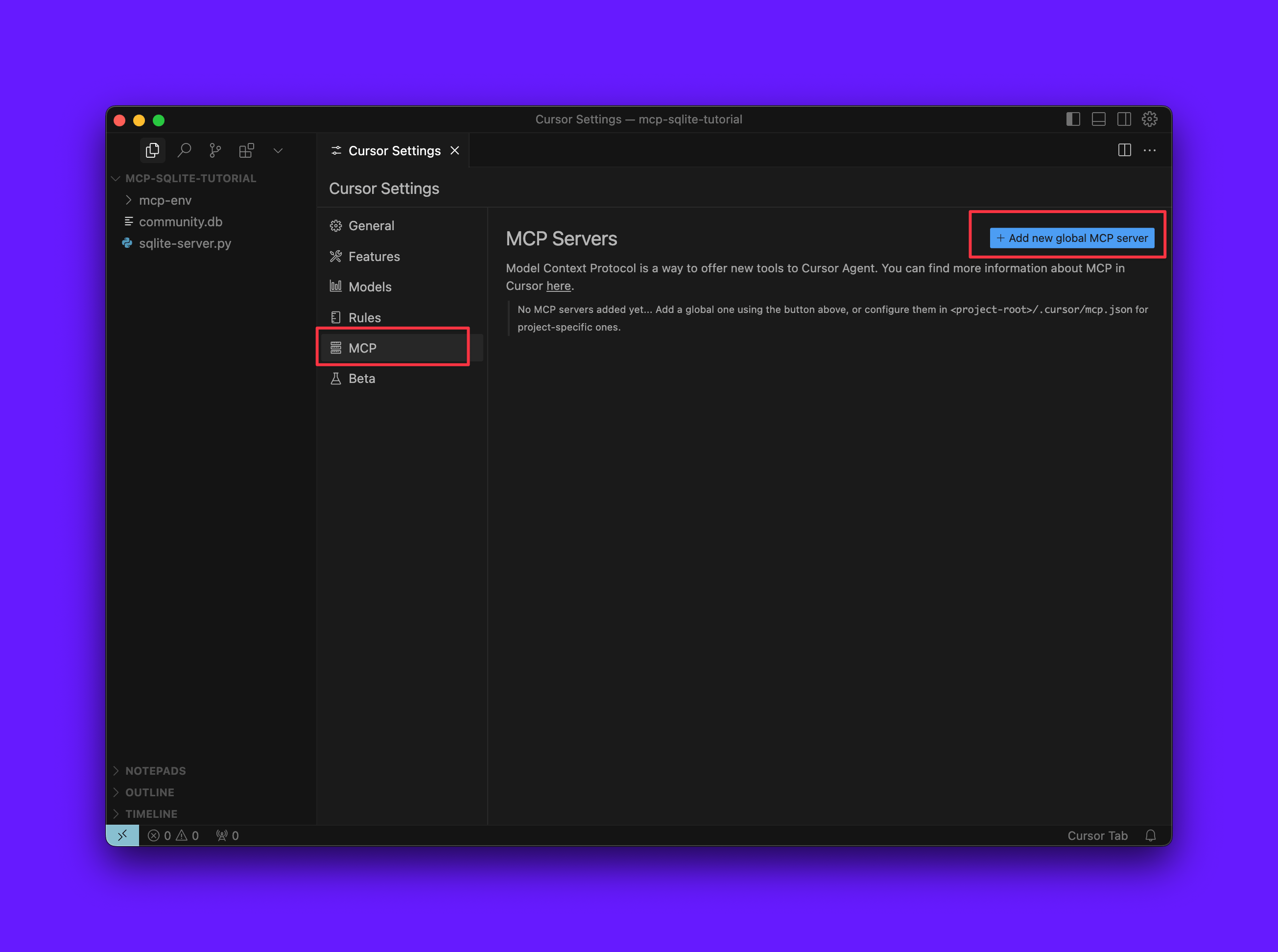
Open Cursor → Settings → MCP and click Add a New Global MCP Server.
Cursor opens ~/.cursor/mcp.json.
Replace the placeholder paths with your absolute paths. Run which python inside
your activated virtualenv to get the interpreter path.
{
  "mcpServers": {
    "sqlite-server": {
      "command": "/absolute/path/to/mcp-env/bin/python",
      "args": [
        "/absolute/path/to/sqlite-server.py"
      ],
      "description": "Query top chatters from the community SQLite database"
    }
  }
}
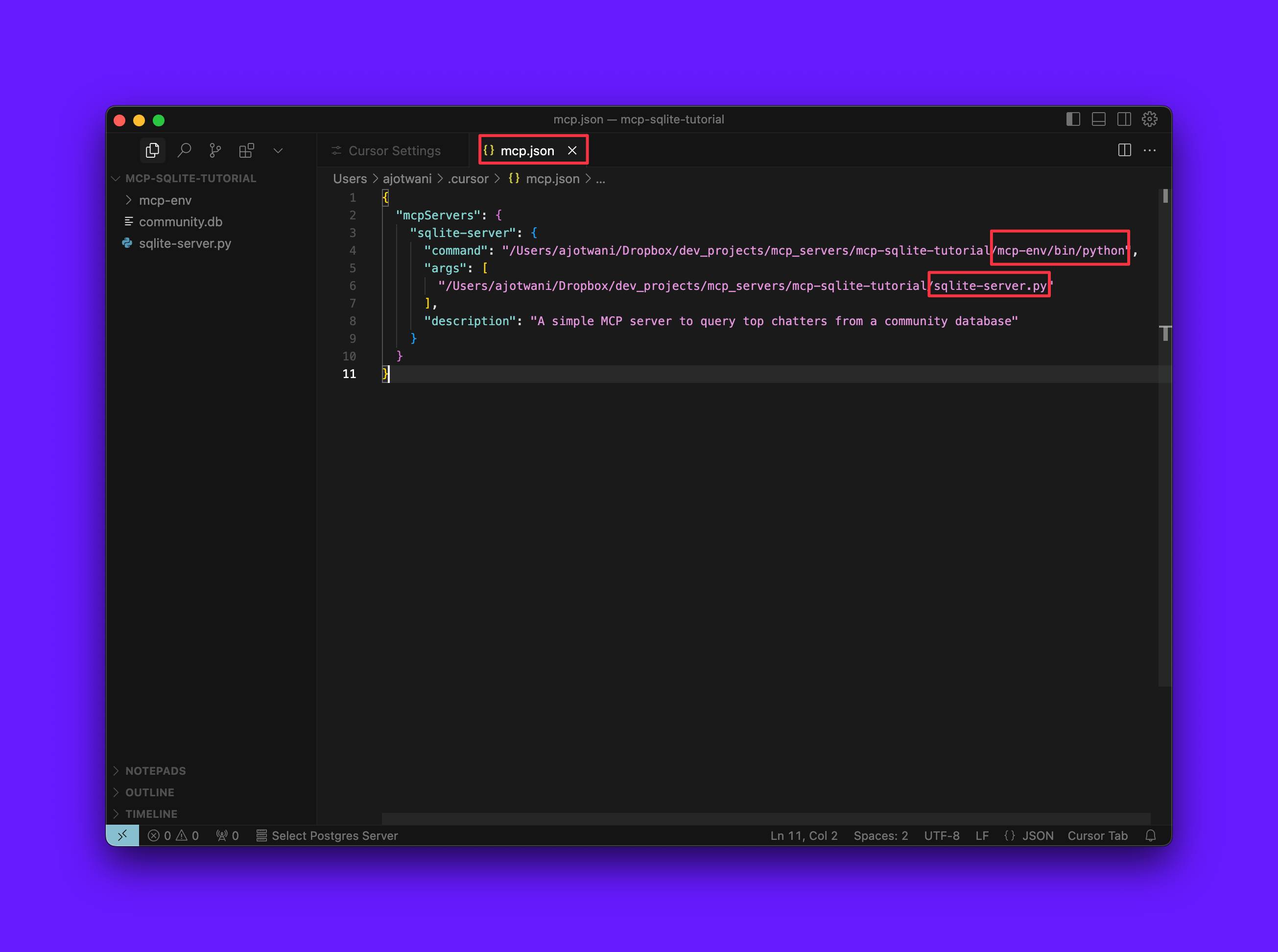
Save the file and return to MCP Settings. A green dot next to the server name means the process started cleanly.
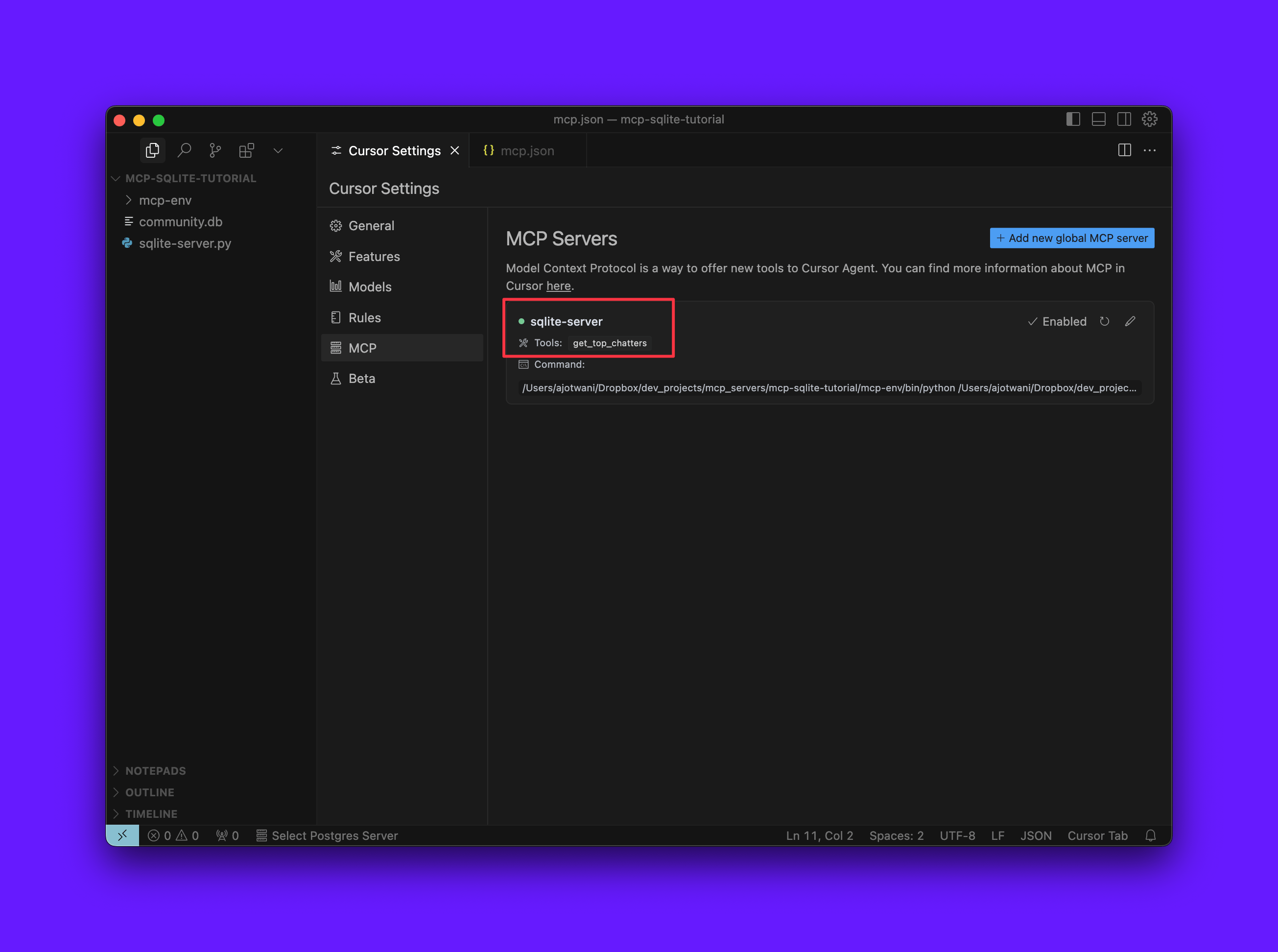
get_top_chatters tool. Approve the prompt.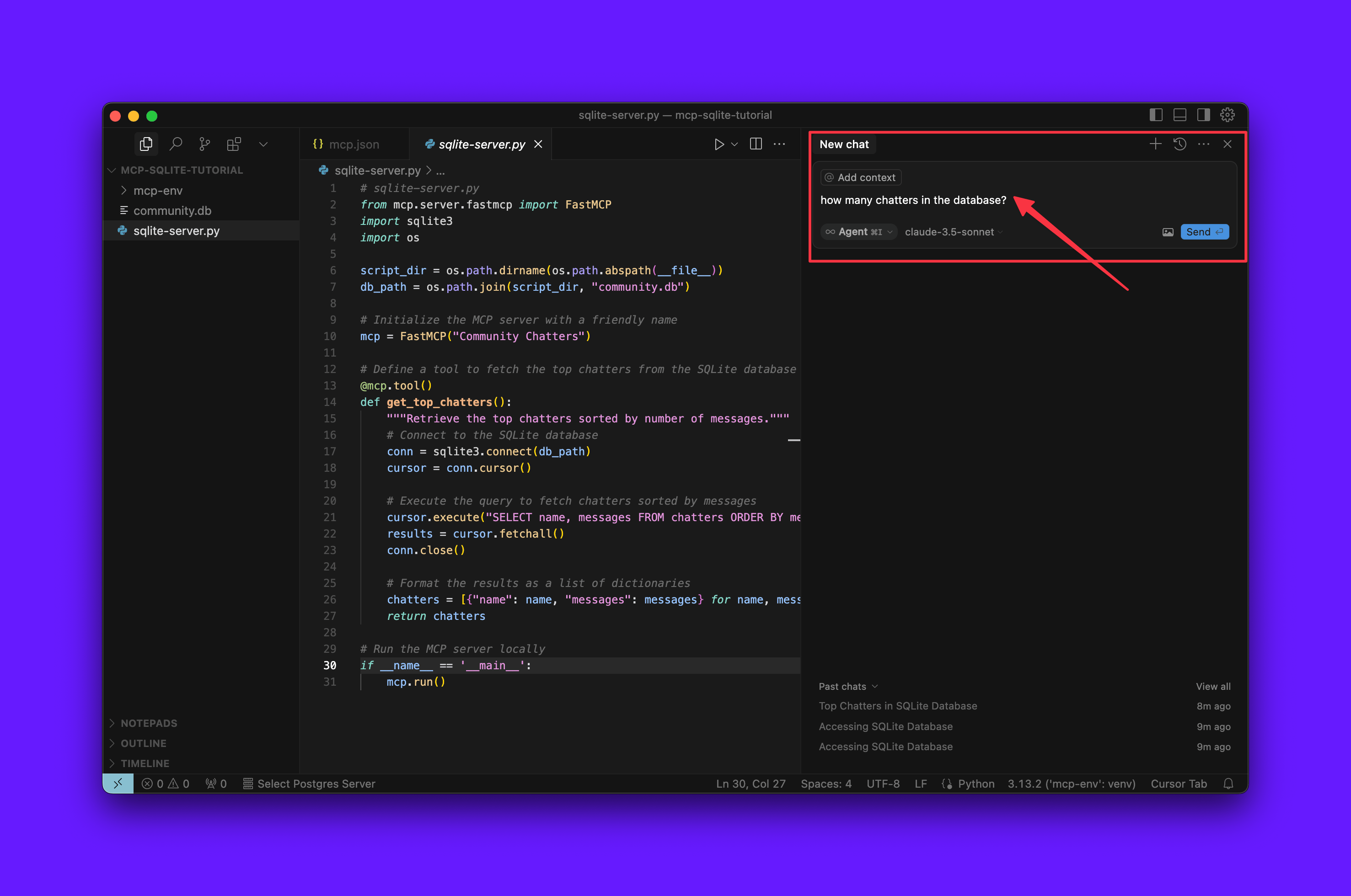
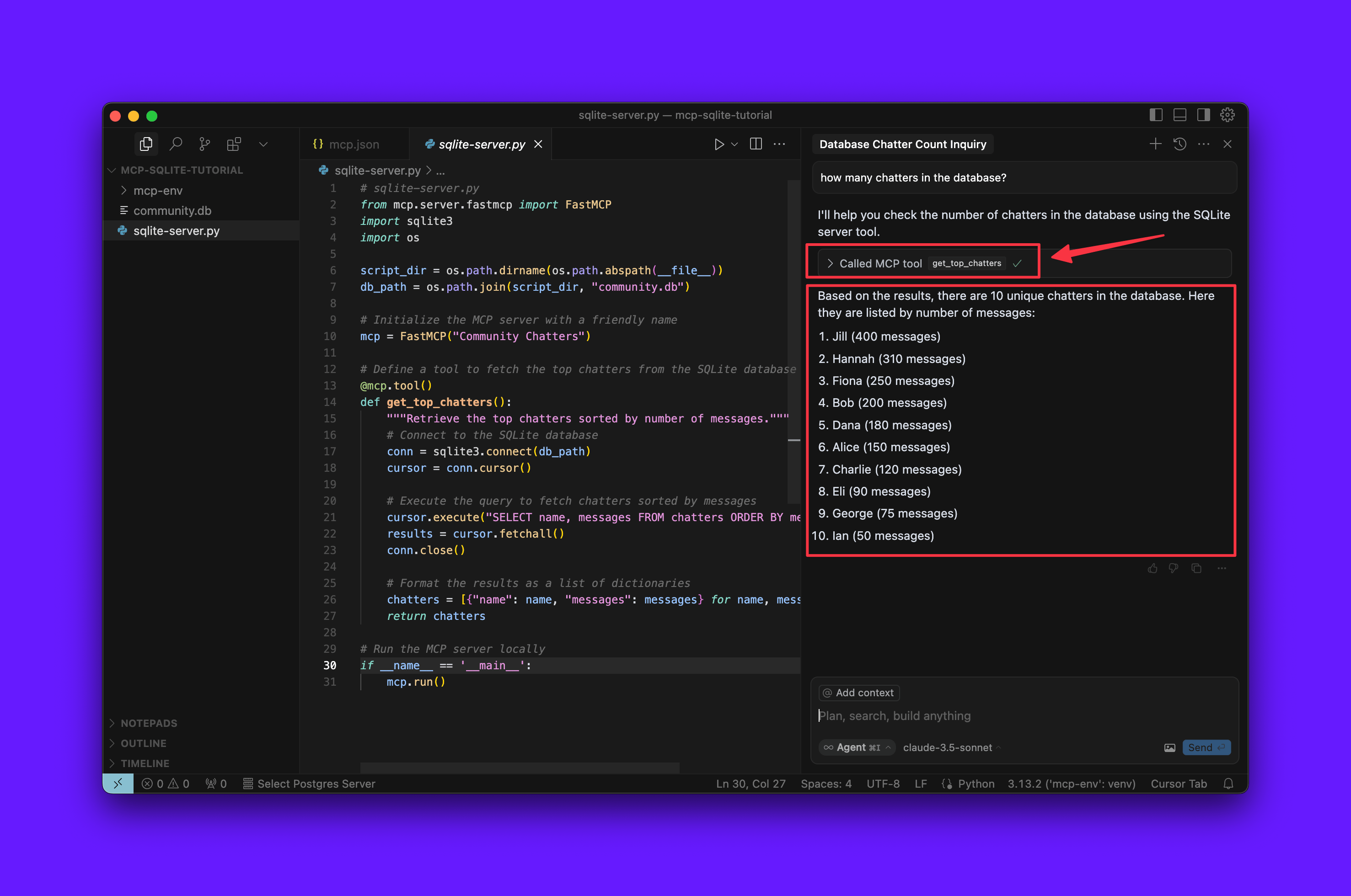
If the tool never appears, see Troubleshooting below.
Claude Desktop uses the same mcpServers object shape as Cursor.
claude_desktop_config.json (macOS:
~/Library/Application Support/Claude/claude_desktop_config.json).command and args paths as Cursor.{
"mcpServers": {
"sqlite-server": {
"command": "/absolute/path/to/mcp-env/bin/python",
"args": [
"/absolute/path/to/sqlite-server.py"
]
}
}
}

Ask Claude: “Show me the top five chatters.” Approve the tool call when prompted.
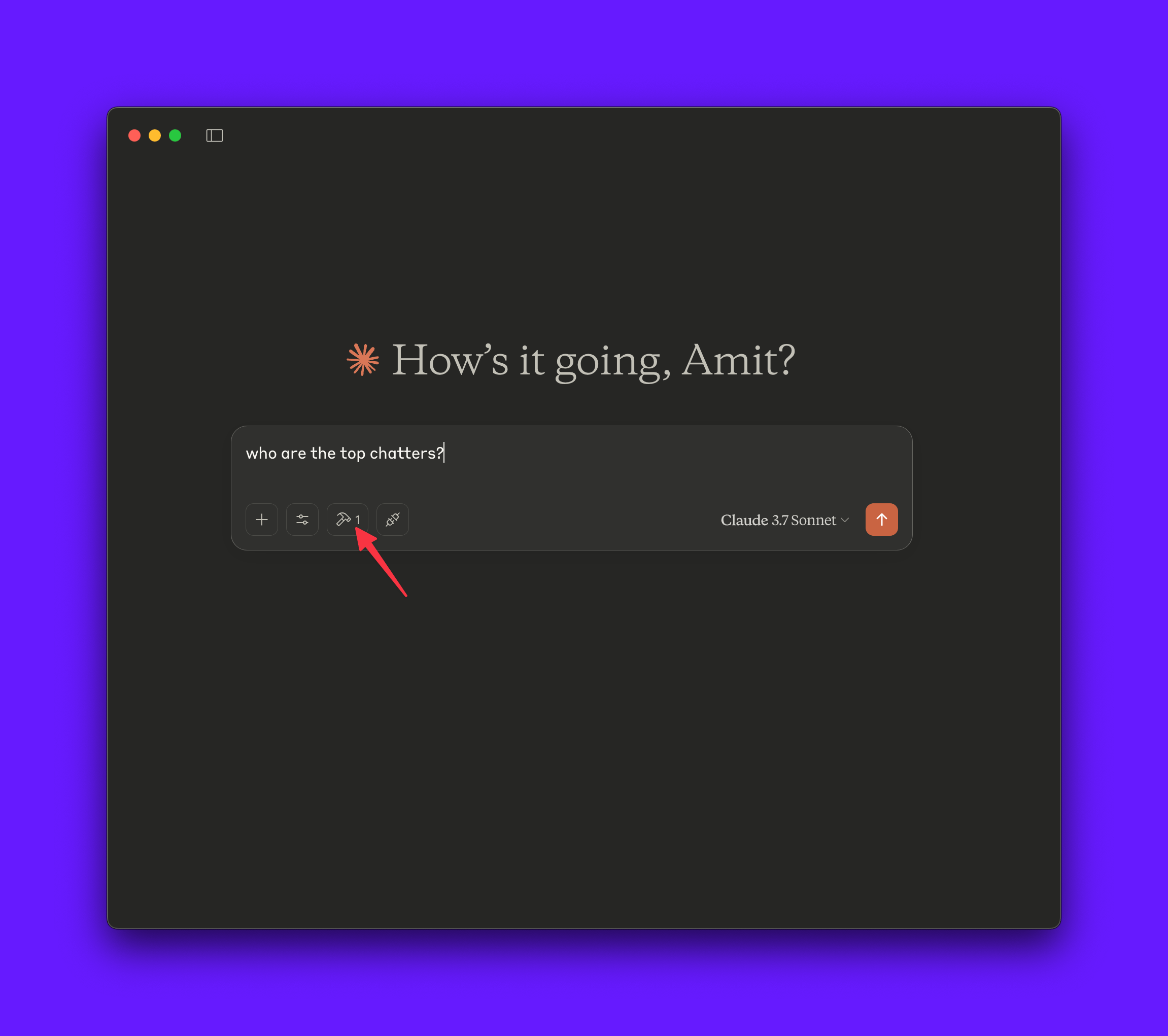
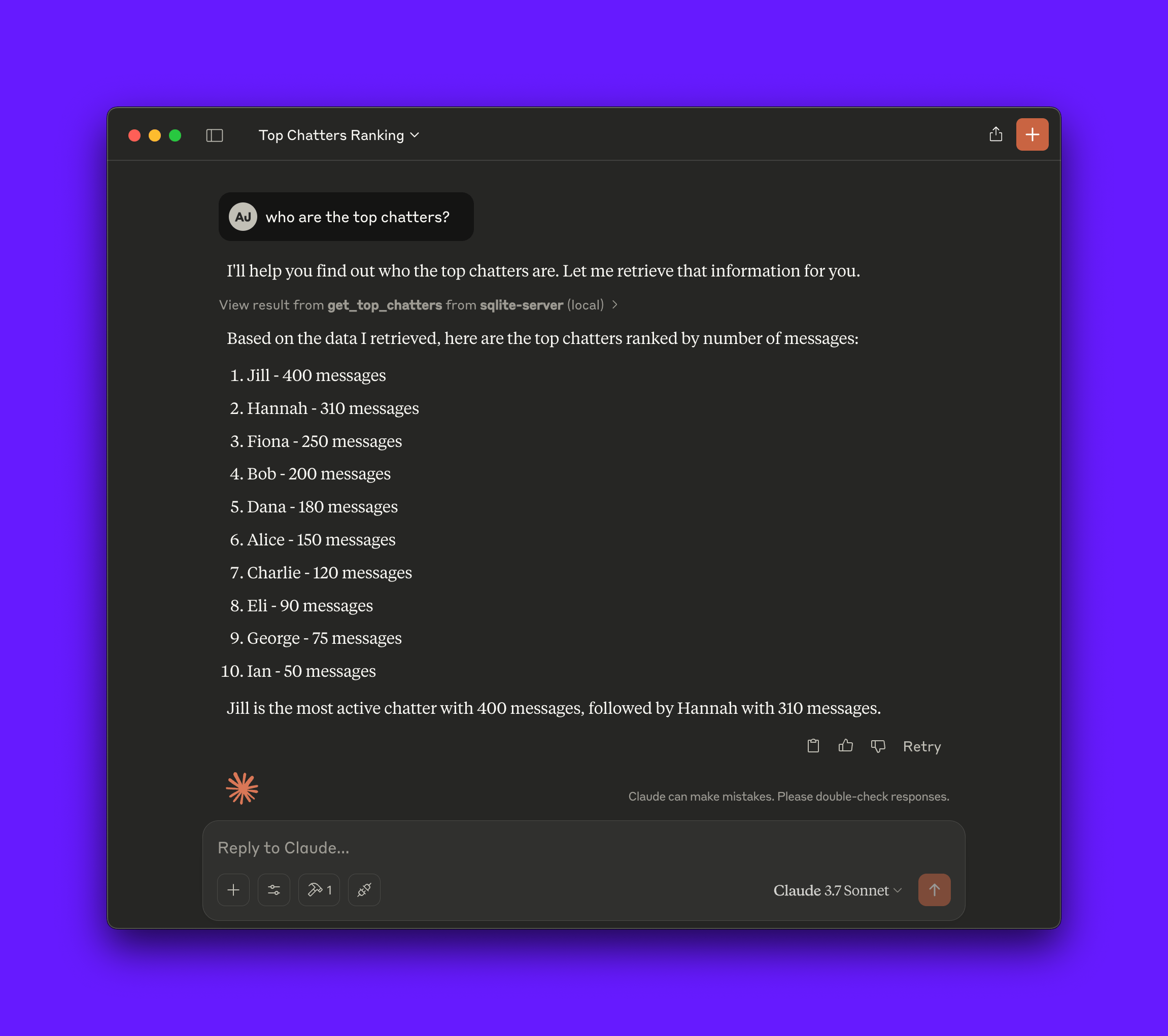
The same Python server now works from two hosts. The model brand changes. The MCP contract stays the same.
| Symptom | Fix |
|---|---|
| Red or missing status in Cursor | Check absolute paths, confirm pip show mcp inside the venv, run the server manually with the same command and args |
| Tool never offered | Improve the tool docstring, restart the host, verify the green dot or tools icon |
ModuleNotFoundError: mcp |
Activate the venv whose Python path you put in mcp.json |
| Empty or error results | Confirm community.db sits beside sqlite-server.py |
| Claude Desktop shows no tools | Use mcpServers, not a top-level servers array. Restart the app after edits |
Claude Desktop writes MCP logs to ~/Library/Logs/Claude/mcp*.log on macOS. See
Connect to local MCP servers
for log locations on other platforms.
MCP in Python means you implement a Model Context Protocol server with the
mcp package (FastMCP on top). The server
exposes tools the host forwards to the model. Python is one supported language.
The TypeScript SDK
serves the same role for Node hosts.
You can use the official mcp package with
FastMCP from mcp.server.fastmcp. Install with
pip install "mcp>=1.27,<2". The standalone
fastmcp project targets the same
ergonomic API for HTTP-first deployments. Start with the official SDK so your
code matches modelcontextprotocol.io
docs.
pip install "mcp>=1.27,<2".FastMCP("ServerName").@mcp.tool().mcp.run() under if __name__ == "__main__":.mcpServers.The create-python-server scaffold generates a starter repo if you prefer a template.
MCP is the protocol specification (messages, transports, capability types). An MCP SDK is a language library that implements the spec. The Python SDK handles JSON-RPC framing, schema generation, and stdio or HTTP transports so you focus on tool logic.
No. MCP uses JSON-RPC messages and a defined capability model (tools, resources, prompts). Hosts spawn stdio servers or connect over Streamable HTTP. REST endpoints are optional. You wrap existing REST APIs inside tool functions, but the wire format is not plain HTTP CRUD.
You built an MCP server in Python with FastMCP, wired SQLite data into Cursor and Claude Desktop, and validated tool calls end to end. The same pattern extends to email gateways, cloud APIs, and deployment workflows.
Grow from this local stdio server into production-oriented patterns:
Run experiments on a DigitalOcean Droplet or ship apps with App Platform. For managed models and knowledge bases, explore the DigitalOcean AI Platform.
 This work is licensed under a Creative Commons Attribution-NonCommercial- ShareAlike 4.0 International License.
此内容由惯性聚合(RSS阅读器)自动聚合整理,仅供阅读参考。 原文来自 — 版权归原作者所有。