






Large language models don’t learn directly from plain text. They require a tokenizer, an algorithm that breaks text into manageable units. The choice of tokenizer influences everything else: Vocabulary size, training speed, memory usage, and ultimately model performance. Developers will often use off‑the‑shelf tokenizers without considering whether they are suitable for their domain or language, or they dive into training on their own without understanding the implications. This article bridges that gap. We’ll cover the basics of how tokenization works, explain popular methods like Byte‑Pair Encoding and SentencePiece, and point you in the right direction for either reusing a pretrained tokenizer or training your own from scratch.
Conceptually, a tokenizer performs two steps. First, it splits the input text into tokens. A token can be any kind of chunk of text: usually words, but also subwords, characters, or others. Second, it converts these tokens into numbers: each token is mapped to a unique integer ID:
Conceptually, a tokenizer performs two steps. First, it splits the input text into tokens. A token can be any kind of chunk of text: usually words, but also subwords, characters, or others. Second, it converts these tokens into numbers: each token is mapped to a unique integer ID.
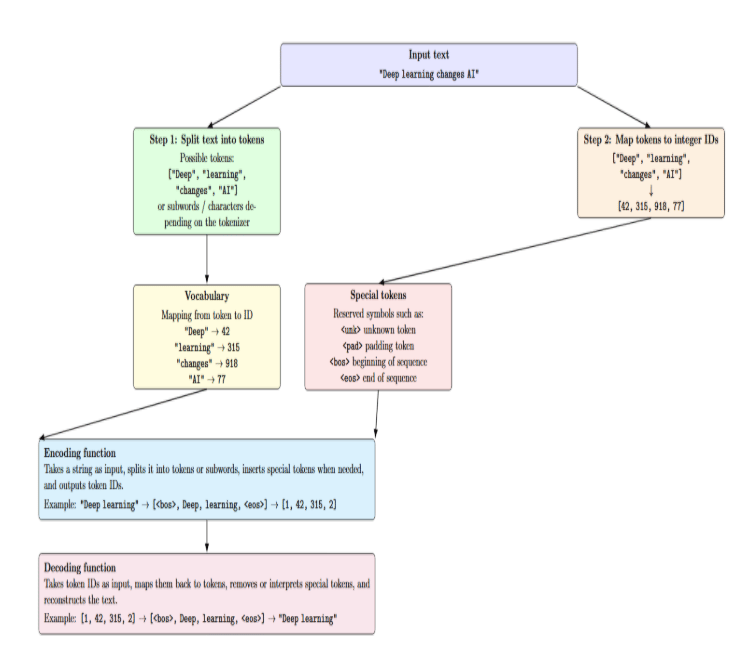
A typical tokenizer consists of:
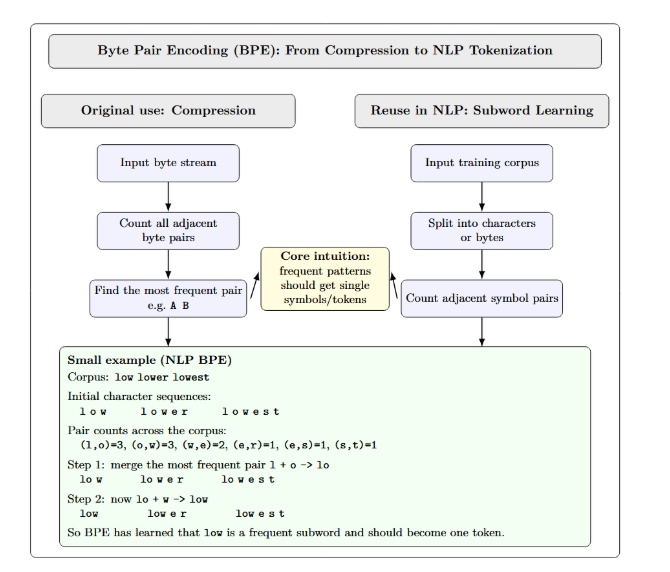
BPE was originally developed as a data compression algorithm: it repeatedly finds the most frequent pair of adjacent bytes, replaces them with a new symbol, and stores a substitution table to enable decompression. NLP BPE tokenization reuses the same merge rule, but applies it to learn subword units, typically starting from characters or bytes. The fundamental loop of counting adjacent pairs and merging the most frequent ones, then repeating, implements the intuition that “frequent patterns should get single tokens.” We have illustrated this in the following diagram:
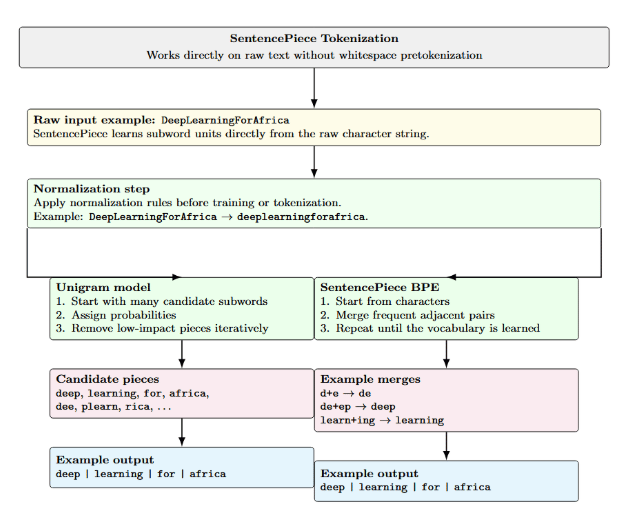
SentencePiece is a tokenizer framework that works directly on raw text. Input is fed as Unicode characters, including whitespace as a token. Unlike traditional tokenizers, it does not rely on whitespace-based pretokenization. SentencePiece supports both the Unigram and BPE algorithms. SentencePiece Unigram model probabilistically assigns scores to tokens and iteratively removes the token that provides the least contribution to the overall likelihood.
SentencePiece’s BPE uses the same merge-based algorithm as standard BPE but operates on raw text instead. Because of that, SentencePiece can work well on multilingual or noisy corpora. SentencePiece allows user-defined special tokens and normalisation rules. It also includes built-in support for subword regularization for data augmentation.
Frameworks like Hugging Face’s AutoTokenizer provide pretrained tokenizers that come with many popular models. Pretrained tokenizers have been trained on massive general- purpose corpora and offer good out‑of‑the‑box performance. However, by using a pretrained tokenizer, you ensure compatibility with an existing model’s vocabulary. Additionally, using a pretrained tokenizer means you don’t need to retrain the embeddings.
Custom tokenizers are trained on a specific corpus. Usually, when building a custom tokenizer, you’re also tokenizing in a specific domain (e.g., medical texts, legal documents, code). With a custom tokenizer, you can add domain‑specific vocabulary and set your own vocabulary size. The downside to a custom tokenizer is that you’ll need to train or otherwise adapt a model from scratch, or use methods like vocabulary interpolation.
A token is an indivisible unit of meaning that your LLM works with. Each token has an ID, which is simply an integer associated with that token in the vocabulary. The vocabulary size is the number of unique tokens (including special tokens) that the tokenizer can recognize. Adjusting vocabulary size affects model complexity:
Selecting an appropriate vocabulary size depends on the corpus language, domain variety, and computational budget.
Training a tokenizer involves learning which subword units best represent your corpus. The process typically includes:
The following table compares BPE and SentencePiece across common criteria. Note how the phrases remain succinct rather than full sentences.
| Criterion | BPE Tokenization | SentencePiece Tokenization |
|---|---|---|
| Training input | Typically requires pretokenized text | Trains directly on raw text (no pretokenization) |
| Algorithm | Greedy pair merging (frequency-based) | Unigram LM or BPE (probabilistic or merge-based) |
| Unknown words | May use <unk> if tokens are unseen | Splits into subwords; <unk> is rare |
| Multilingual support | Less flexible (depends on preprocessing) | Strong multilingual support (language-independent) |
| Training cost | Fast and lightweight | Heavier and slower (especially Unigram LM) |
| Vocabulary behavior | Deterministic merge rules | Probabilistic tokens with likelihoods |
| Whitespace handling | Relies on pre-splitting | Treats whitespace as a token (▁) |
| Tooling | Hugging Face tokenizers, GPT-style BPE | SentencePiece library (.model, .vocab) |
BPE starts with a vocabulary of individual characters. Then, at each iteration, it merges the most frequent adjacent pair of characters. The table below demonstrates a simple merge sequence for the word habanero over four steps, including frequency counts. Each row lists the current vocabulary and the result of the merges at that step.
| Step | Frequent pair (freq) | New token | Vocabulary after merge |
|---|---|---|---|
| 1 | a b (3) |
ab |
a, b, h, n, e, r, o, ab |
| 2 | h ab (3) |
hab |
n, e, r, o, ab, hab |
| 3 | hab a (3) |
haba |
n, e, r, o, hab, haba |
| 4 | haba n (3) |
haban |
e, r, o, hab, haban |
BPE actually continues merging until it has reached a desired vocabulary size. SentencePiece implements a similar concept but may split tokens more aggressively. It does not depend on whitespace, so merges can occur across whitespace boundaries.
With the tokenizers library, it’s easy to train a BPE tokenizer. The example below shows how to build a tokenizer trained on a small corpus of English sentences and then examine its tokenization logic. For more realistic usage, try a larger corpus and play with the vocab_size.
from tokenizers import Tokenizer, models, trainers, pre_tokenizers, processors
# Sample corpus
corpus = [
    "Machine learning is fun and powerful.",
    "Hugging Face provides excellent NLP tools.",
    "Tokenizers transform text into numerical IDs."
]
# Initialize a Byte-Pair Encoding (BPE) model
bpe_model = models.BPE(unk_token="<unk>")
tokenizer = Tokenizer(bpe_model)
# Use whitespace pre-tokenization
tokenizer.pre_tokenizer = pre_tokenizers.Whitespace()
# Trainer for BPE
trainer = trainers.BpeTrainer(
    vocab_size=2000,
    min_frequency=2,
    special_tokens=["<unk>", "<pad>", "<bos>", "<eos>"]
)
# Train the tokenizer on the corpus
tokenizer.train_from_iterator(corpus, trainer)
# Post-processing: add start and end tokens
tokenizer.post_processor = processors.TemplateProcessing(
    single="<bos> $A <eos>",
    pair="<bos> $A <eos> $B:1 <eos>:1",
    special_tokens=[("<bos>", tokenizer.token_to_id("<bos>")), ("<eos>", tokenizer.token_to_id("<eos>"))]
)
# Encode a sentence
encoding = tokenizer.encode("Hugging Face tokenizers are modular and efficient.")
print(encoding.tokens)
print(encoding.ids)
This script performs a simple whitespace pretokenization, trains a BPE model with a vocabulary size of 2000, and adds <bos> and <eos> tokens via the post processor. The final lines encode a new sentence and print the resulting tokens and their IDs. To replicate SentencePiece behavior, you can replace Whitespace with other pre-tokenizers or switch to the sentencepiece library.
Retraining a tokenizer is not always necessary. It takes extra effort and may cause compatibility issues with pretrained models. You might want to train your own tokenizer under the following conditions:
If you decide to train a new tokenizer, evaluate it beyond simple token count. Good practices include:
Tokenization in NLP splits text into smaller units called tokens. Tokenizers like BPE or SentencePiece are types of subword tokenization. They reduce unknown words by splitting them into subwords learned during pretraining. If we suppose that a generic pretrained tokenizer has produced 23 tokens for a given sentence. If you fine-tune or train a tokenizer (BPE/SentencePiece) on your corpus, you may only get 19 tokens because the tokenizer has learned more frequent domain‑specific subwords. The difference per sentence is small, but over long documents or millions of sentences, these reductions compound and can save significant computation.
Here’s a minimal Python example comparing token counts using a pretrained BPE tokenizer from Hugging Face and a SentencePiece tokenizer trained on the same domain:
pip -q install transformers sentencepiece

from transformers import AutoTokenizer
import sentencepiece as spm

# 1. Small domain corpus
corpus = """
Tokenization in NLP splits text into smaller units called tokens.
Domain-specific tokenizers can learn frequent subwords.
This can reduce the number of tokens in technical text.
"""

with open("corpus.txt", "w", encoding="utf-8") as f:
    f.write(corpus)

# 2. Train a tiny SentencePiece tokenizer on the corpus
spm.SentencePieceTrainer.train(
    input="corpus.txt",
    model_prefix="my_tokenizer",
    vocab_size=50,
    model_type="bpe"
)

# 3. Load pretrained Hugging Face tokenizer
hf_tokenizer = AutoTokenizer.from_pretrained("gpt2")

# 4. Load trained SentencePiece tokenizer
sp = spm.SentencePieceProcessor(model_file="my_tokenizer.model")

# 5. Compare token counts on the same sentence
text = "Tokenization in NLP can reduce token count for domain-specific text."

hf_tokens = hf_tokenizer.tokenize(text)
sp_tokens = sp.encode(text, out_type=str)

print("Text:", text)
print("Hugging Face token count:", len(hf_tokens))
print("HF tokens:", hf_tokens)
print()
print("SentencePiece token count:", len(sp_tokens))
print("SentencePiece tokens:", sp_tokens)
The above code installs necessary libraries, builds a small corpus of text, and trains a miniature SentencePiece BPE tokenizer on that corpus of in-domain text. It then loads a pretrained GPT-2 tokenizer from Hugging Face and compares both tokenizers on the same sentence. The purpose is to demonstrate how a tokenizer trained on your own corpus might split text from your domain into fewer or more suitable subwords than a generic pre-trained tokenizer.
Changing the tokenizer while fine-tuning is risky. The model has learned embeddings associated with those token IDs. Switching tokenizers means the model will see tokens distributed differently. If you want to change the tokenizer (add tokens specific to your domain), you can use methods like interpolating between vocabularies or using the transformers.add_tokens method. These methods allow you to expand the vocabulary while keeping the original embeddings. Remember to re‑initialize the embedding matrix for new tokens and carefully monitor performance.
Training a custom tokenizer on your domain typically reduces the number of tokens needed per document. This decreases compute costs and enables longer sequences within the same context window size. Consider splitting a legal document using a general tokenizer into 400 tokens, while a tokenizer pretrained on a legal corpus creates only 350 tokens. Saving 50 tokens per document can decrease attention operations and save memory. The benefits decrease if your domain is similar to the original data used to train the underlying pretrained tokenizer.
Tokenizer choices affect compression, memory usage, and downstream context. Customizing a tokenizer may benefit applications such as summarization or retrieval-augmented generation, where cost per token matters. Yet the benefits must be weighed against the effort and potential compatibility issues.
What is a tokenizer in an LLM? Tokenizers split text into tokens (words/subwords/characters) and map them into numerical IDs, which can be fed into a language model.
How does BPE work? BPE starts with individual characters and iteratively merges the most frequent adjacent pairs to create longer subwords, forming a deterministic vocabulary.
How does SentencePiece differ from BPE? SentencePiece operates on raw text, supports a probabilistic Unigram model and a BPE variant, and better handles multilingual or noise‑rich corpora.
Does tokenization affect LLM cost and context length? Yes. Tokenization determines how many tokens an input produces. Since inference cost and maximum context length are measured in tokens, efficient tokenization can reduce costs and allow longer inputs.
Should I use a pretrained tokenizer or train my own? Use pretrained tokenizers when your domain is similar to the model’s training data or when compatibility matters. Train your own for specialized domains, low‑resource languages or when you need to reduce token count.
Remember that tokenization isn’t just preprocessing -- it fundamentally determines how the LLM “sees” and represents language. While BPE and SentencePiece remain popular, each has its own strengths. BPE is fast and simple, but it relies on pretokenization. SentencePiece is more flexible and allows better multilingual coverage, but it introduces some additional complexity. You can reuse pretrained tokenizers for convenience and compatibility. However, depending on your application (e.g., low-resource languages, domain-specific jargon, context length constraints), training your own tokenizer could yield tangible benefits.
 This work is licensed under a Creative Commons Attribution-NonCommercial- ShareAlike 4.0 International License.
此内容由惯性聚合(RSS阅读器)自动聚合整理,仅供阅读参考。 原文来自 — 版权归原作者所有。