
惯性聚合 高效追踪和阅读你感兴趣的博客、新闻、科技资讯
阅读原文 在惯性聚合中打开

推荐订阅源

T
Threat Research - Cisco Blogs
博客园 - 聂微东
小众软件
小众软件
P
Proofpoint News Feed
Security Archives - TechRepublic
OSCHINA 社区最新新闻
OSCHINA 社区最新新闻
TaoSecurity Blog
TaoSecurity Blog
博客园 - 司徒正美
罗磊的独立博客
N
News and Events Feed by Topic
cs.AI updates on arXiv.org
S
Security Affairs
S
Security @ Cisco Blogs
freeCodeCamp Programming Tutorials: Python, JavaScript, Git & More
The GitHub Blog
The GitHub Blog
月光博客
月光博客
S
Secure Thoughts
P
Proofpoint News Feed
cs.CV updates on arXiv.org
Forbes - Security
Forbes - Security
H
Heimdal Security Blog
W
WeLiveSecurity
K
KPMG report finds enterprise disconnect between AI and its ROI | CIO
L
LangChain Blog
T
The Blog of Author Tim Ferriss
NISL@THU
NISL@THU
Google DeepMind News
Cloudbric
Cloudbric
H
Hacker News: Front Page
The Last Watchdog
The Last Watchdog
Hacker News - Newest:
Hacker News - Newest: "LLM"
C
Cisco Blogs
博客园 - 三生石上(FineUI控件)
博客园_首页
Exploit-DB.com RSS Feed
S
Schneier on Security
Project Zero
Project Zero
SecWiki News
SecWiki News
爱范儿
爱范儿
The Register - Security
AI
AI
H
Hackread – Cybersecurity News, Data Breaches, AI and More
Y
Y Combinator Blog
L
Lohrmann on Cybersecurity
Application and Cybersecurity Blog
P
Privacy International News Feed
J
Java Code Geeks
S
Securelist
C
Cyber Attacks, Cyber Crime and Cyber Security
V
Visual Studio Blog

DigitalOcean Community Tutorials

Mastering grep with Regular Expressions for Efficient Text Search It's Time to Break Up with Your Cloud: Why AI Teams are Switching We Built a Private-Document AI App to Test Platform Security. Here Is What We Could Actually Verify. PostgreSQL Explained: A Complete Beginner-to-Advanced Guide How To Install and Configure Postfix on Ubuntu How To Build a Web Application Using Flask in Python 3 Build AI Reading List with DigitalOcean Functions and Mistral How To Concatenate Strings in Python How to Allow MySQL Remote Access Securely How To Install and Use Docker on Rocky Linux How To Build a Multi-Agent AI System with Docker Agent DSPy Use Cases: Build Optimized LLM Pipelines How To Submit AJAX Forms with jQuery Build an AI-Powered GPU Fleet Optimizer with the DigitalOcean AI Platform ADK Monitor GPU Utilization in Real Time: A Complete Guide Reduce File Size of Images in Linux - CLI and GUI methods Reduce PDF File Size in Linux: Tools and Methods How To Set Up a Private Docker Registry on Ubuntu How To Troubleshoot Terraform: Errors and Fixes How to Use Go Modules Python Multiprocessing Example: Process, Pool & Queue Convert Class Components to Functional Components with React Hooks How To Install and Configure Ansible on Ubuntu LLM Tokenizers Simplified: BPE, SentencePiece, and More How To Monitor System Authentication Logs on Ubuntu How to Use Traceroute and MTR to Diagnose Network Issues How to Deploy Postgres to Kubernetes Cluster Importing Packages in Go: A Complete Guide Create RAID Arrays with mdadm on Ubuntu How To Make an HTTP Server in Go How To Set Up Time Synchronization on Ubuntu How To Use Struct Tags in Go apt-key Deprecation: Add Repositories with GPG on Ubuntu Linux ps Command: 20 Real-World Examples Python struct.pack and struct.unpack for Binary Data Deadlock in Java: Examples, Detection, and Prevention How To Use Find and Locate to Search for Files on Linux Structured Resume Skill Extraction Using Mistral-7B Inference How to Use the Python Main Function How to Set Up NemoClaw on a DigitalOcean Droplet with 1-Click Build an End-to-End RAG Pipeline for LLM Applications From Single to Multi-Agent Systems: Key Infrastructure Needs Back Up Data to Object Storage Using Restic How to Generate Videos with LTX-2.3 on DigitalOcean GPU Droplets How To Install LAMP Stack (Apache, MySQL, PHP) on Ubuntu How to Download Files with cURL How To Use Variadic Functions in Go Generate UUIDs with uuidgen on Linux How To Use EJS to Template Your Node Application How to Install Node.js on Ubuntu (Step-by-Step Guide) MongoDB Indexes: Improve Query Performance with Node.js LLM Tool Calling with DigitalOcean AI Platform and Databases What are Text Diffusion Models? - An Overview Building Long-Term Memory in AI Agents with LangGraph and Mem0 How To Install PHP 7.4 and Set Up a Local Development Environment on Ubuntu 20.04 Build a GraphQL API in Go to Upload Files to Spaces How To Lint and Format Code with ESLint in Visual Studio Code Train YOLO26 for Retail Object Detection on DigitalOcean GPUs How To Work with JSON in MySQL How to Use the JavaScript .map() Method Building a Scalable App with MongoDB Using DigitalOcean's MCP Server How to Create an SSH Key in Linux: Easy Step-by-Step Guide Measure MySQL Query Performance with mysqlslap How To Use *args and **kwargs in Python 3 Nemotron 3 helped me find the perfect dish rack? A2A vs MCP - How These AI Agent Protocols Actually Differ How To Install and Manage Supervisor Docker Container Images with Watchtower on Ubuntu Getting Started with Qwen3.5 Vision-Language Models How To Create a New Sudo-Enabled User on Ubuntu How to Use Ansible to Install and Set Up Docker on Ubuntu How To Enable Remote Desktop Protocol Using xrdp on Ubuntu 22.04 How To Convert a String to a List in Python How To Check If a String Contains Another String in Python How to Read a Properties File in Python Python Command Line Arguments: sys.argv, argparse, getopt Mastering Grep command in Linux/Unix: A Beginner's Tutorial Understanding Python Data Types How to Implement a Stack in C With Code Examples Python os.system() vs subprocess: Run System Commands How To Install and Use Docker Compose on Ubuntu How to Add and Delete Users on Ubuntu How To Order Query Results in Laravel Eloquent How To Define and Use Handlers in Ansible Playbooks How To Install and Use SQLite on Ubuntu How To Install and Use Homebrew on macOS How To Manage DateTime with Carbon in Laravel and PHP How To Install Git on Ubuntu How To Install and Secure Redis on Ubuntu How To Build and Install Go Programs on Linux Using ldflags to Set Version Information for Go Applications How To Build a Node.js Application with Docker How To Add JavaScript to HTML How To Reset Your MySQL or MariaDB Root Password How To Add Images in Markdown How To Set Up a Production Elasticsearch Cluster with Ansible How To Set Up a Firewall Using firewalld on CentOS Understanding Systemd Units and Unit Files How To Set Up Replication in MySQL How To Use the .htaccess File
Crafting a Game from Scratch with GPT-5.4
James Skelton · 2026-03-13 · via DigitalOcean Community Tutorials

Last week, OpenAI released GPT‑5.4 in ChatGPT (as GPT‑5.4 Thinking), their API, and their proprietary coding IDE: Codex. It’s reportedly their most capable and efficient frontier model for professional work, bringing together the best of OpenAI’s recent advances in reasoning, coding, and agentic workflows into a single frontier model. GPT-5.4 incorporates the industry-leading coding capabilities of GPT‑5.3‑Codex⁠ while “improving how the model works across tools, software environments, and professional tasks involving spreadsheets, presentations, and documents” (Source).

In this article, we will look at how to access and make the best use of GPT-5.4 with the help of the DigitalOcean Platform, ChatGPT, and Codex. Readers can expect to learn just how potent this model is, and how to best implement the model into their AI workflows. Follow along for more information on the model itself, and a full demo on how to use it with DigitalOcean AI Platform serverless inference to make a toy game in Python.
Key Takeaways

  • GPT-5.4 unifies frontier reasoning, coding, and agentic workflows in one model. It integrates the advanced coding strengths of GPT-5.3-Codex with improved tool use, computer-operation capabilities, and professional task performance across documents, spreadsheets, and presentations.
  • The model enables powerful long-horizon agent behavior with greater efficiency. With a 1-million-token context window, native computer-use capabilities, tool search, and significantly improved token efficiency, GPT-5.4 supports complex multi-step workflows while reducing latency and cost.
  • Developers can access GPT-5.4 through multiple flexible platforms. ChatGPT, Codex, the OpenAI API, and AI Platform serverless inference each provide distinct advantages, allowing users to integrate GPT-5.4 into everything from casual productivity tasks to advanced software development and automated AI pipelines.

GPT-5.4 Overview

image

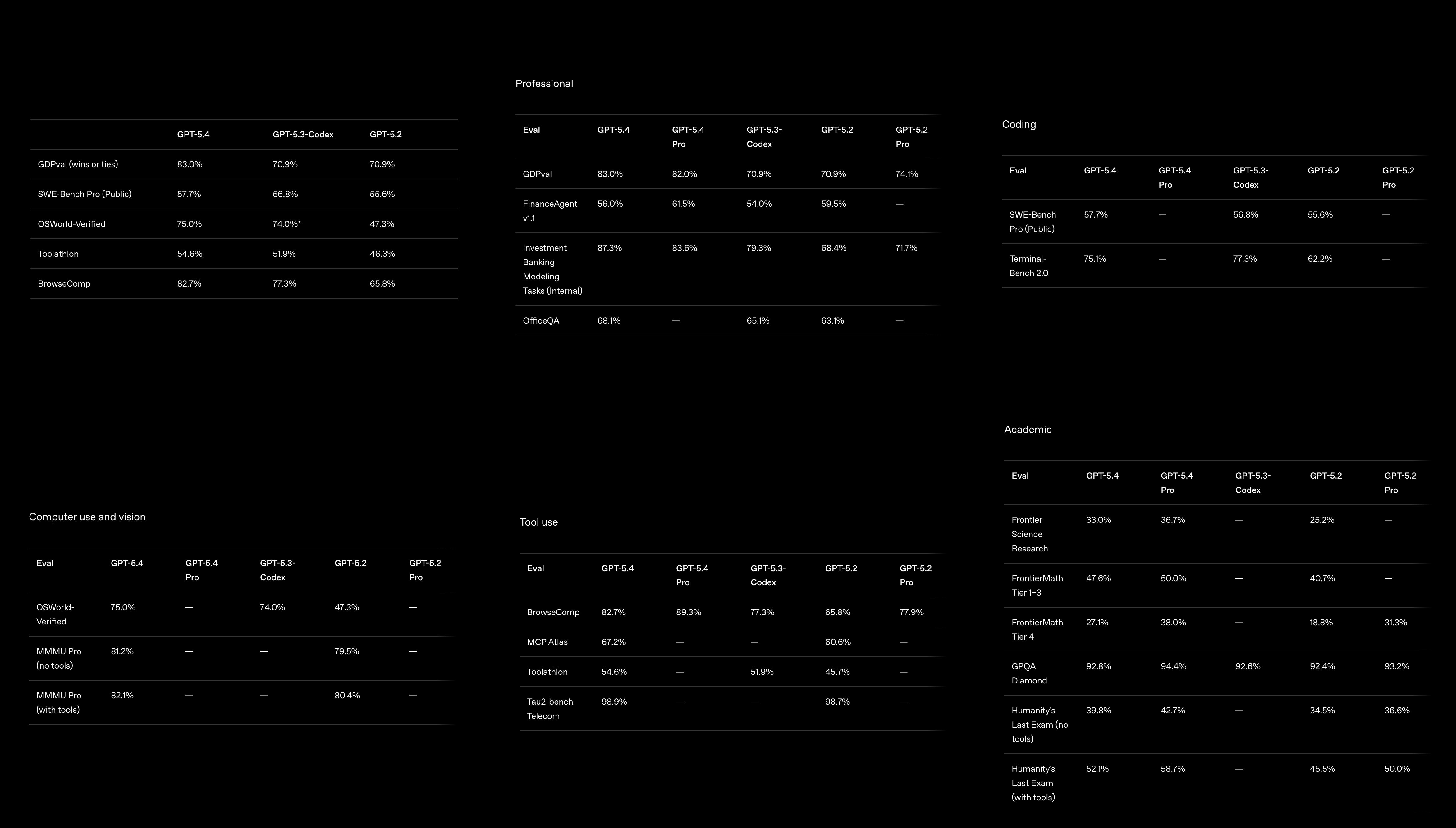
GPT-5.4 is another incremental step forward for Large Language Modeling. As we can see from the image above, GPT-5.4 outperforms its predecessors across nearly all types of tests. We should particularly call out the sharp improvements shown in computer use and tool use capabilities. In addition to the plethora of improvements it has made across all benchmarks over its predecessors, there have also been numerous more subtle improvements we would like to call attention to.

In Codex, AI Platform serverless inference, and the API, GPT‑5.4 is the first general-purpose model they have released with native, state-of-the-art computer-use capabilities. In practice, this means that GPT-5.4 enables agents to operate computers and carry out complex workflows across applications. It supports up to 1 million tokens of context, allowing agents to plan, execute, and verify tasks across long horizons. With this huge amount of detail & its own in-built capabilities, the model can issue instructions to applications like Playwright to direct computer use in experimentation.

GPT-5.4 also enhances how models operate within large ecosystems of tools and integrations by introducing tool search, enabling agents to locate and use the right tools more efficiently without sacrificing capability. In addition, GPT-5.4 is OpenAI’s most token-efficient reasoning model to date, requiring far fewer tokens than GPT-5.2 to solve complex problems: resulting in lower usage costs and faster performance.

In ChatGPT, GPT-5.4 Thinking can now present a preview of its reasoning plan before completing a response, allowing you to guide or adjust its direction while it works and reach an outcome that better matches your needs without extra back-and-forth. It also strengthens deep web research—especially for highly specific questions—while maintaining context more effectively during longer reasoning tasks. Together, these enhancements deliver faster, more relevant, and higher-quality results.

Together with advances in general reasoning, coding, and professional knowledge work, GPT‑5.4 enables more reliable agents, faster developer workflows, and higher-quality outputs across ChatGPT, the API, and Codex.

GPT-5.4 Demo: Creating a Novel Game with GPT-5.4

Getting started with GPT-5.4 is simple, with 4 major ways to quickly access the model on your machine or the web: ChatGPT, Codex, the OpenAI API, and with AI Platform serverless inference. These are all unique tools with their own advantages and disadvantages:
  • ChatGPT: completely contained within your browser or their applications, ChatGPT is the most familiar way most people are using OpenAI’s GPT models. ChatGPT has numerous integrated features and tools that make it an optimal way to use the model for casual users
  • Codex: Codex is the dedicated coding application developed by OpenAI to facilitate developers using the model to engineer novel programs and applications. Check out our tutorial on GPT-5.3-Codex for an indepth look at accessing Codex with GPT Models to write code with AI assistance!
  • API: the API is the ultimate OpenAI access method, and is characterized by its versatility and agentic capabilities, with the API being the fundamental way to integrate the GPT models with tools. The API makes it possible to use OpenAI GPT models within your own custom workflows
  • DigitalOcean AI Platform serverless inference: Serverless Inference from DigitalOcean allows you to use the OpenAI (and many other) GPT models on DigitalOcean infrastructure. Serverless inference lets developers deploy and run OpenAI models without having to manage servers or infrastructure, with DigitalOcean provisioning compute resources and scaling capacity up or down in response to incoming model requests.

image

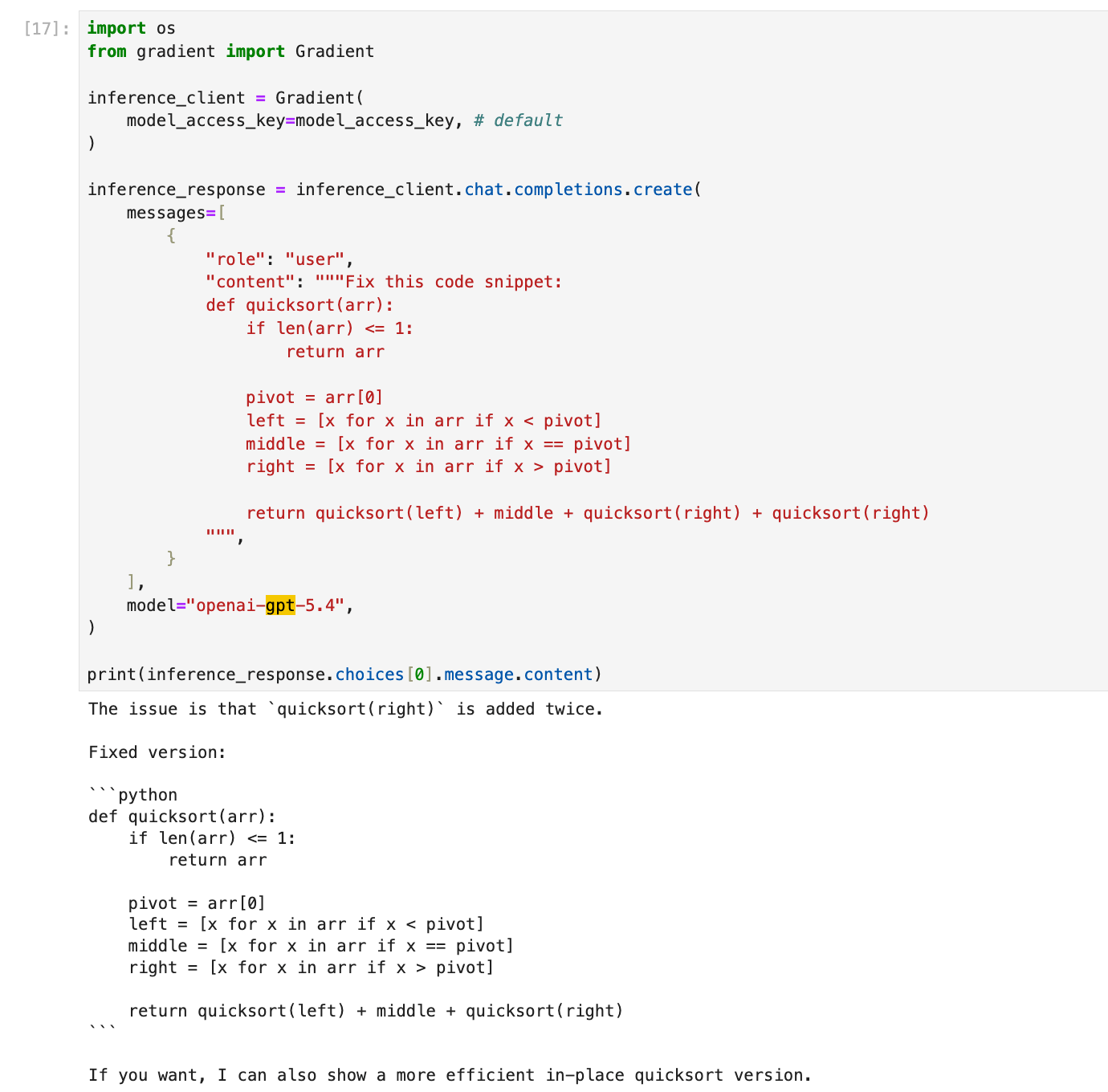
We can see an example of using the AI Platform serverless inference methodology above to fix a small Python code snippet. This ran incredibly quickly to effectively generate the solution. Using the Serverless Inference methodology wherever possible, as it gives the same versatility of the API method with integrations from DigitalOcean to enhance our experience.

For this tutorial, we are going to use Codex, which is optimized for aiding developers, with GPT-5.4 to help us create a completely new, toy video game that we can run on our local machine.

To get started, download and launch Codex. Then, log in following the instructions. Finally, open the project/directory you want to work in with Codex. Once those steps are completed, we are ready to get started with prompting the model to create our project.

Coding a 3D Badminton Game from Scratch with GPT-5.4

To create a novel game with GPT-5.4, we first need an exciting concept to guide our plan. One game we have always loved playing is Badminton & there is really no mainstream video game for the sport, so we are going to make our game around badminton! Let’s craft a prompt around creating a game for Badminton, set Codex to plan mode, and enter in our instructions.

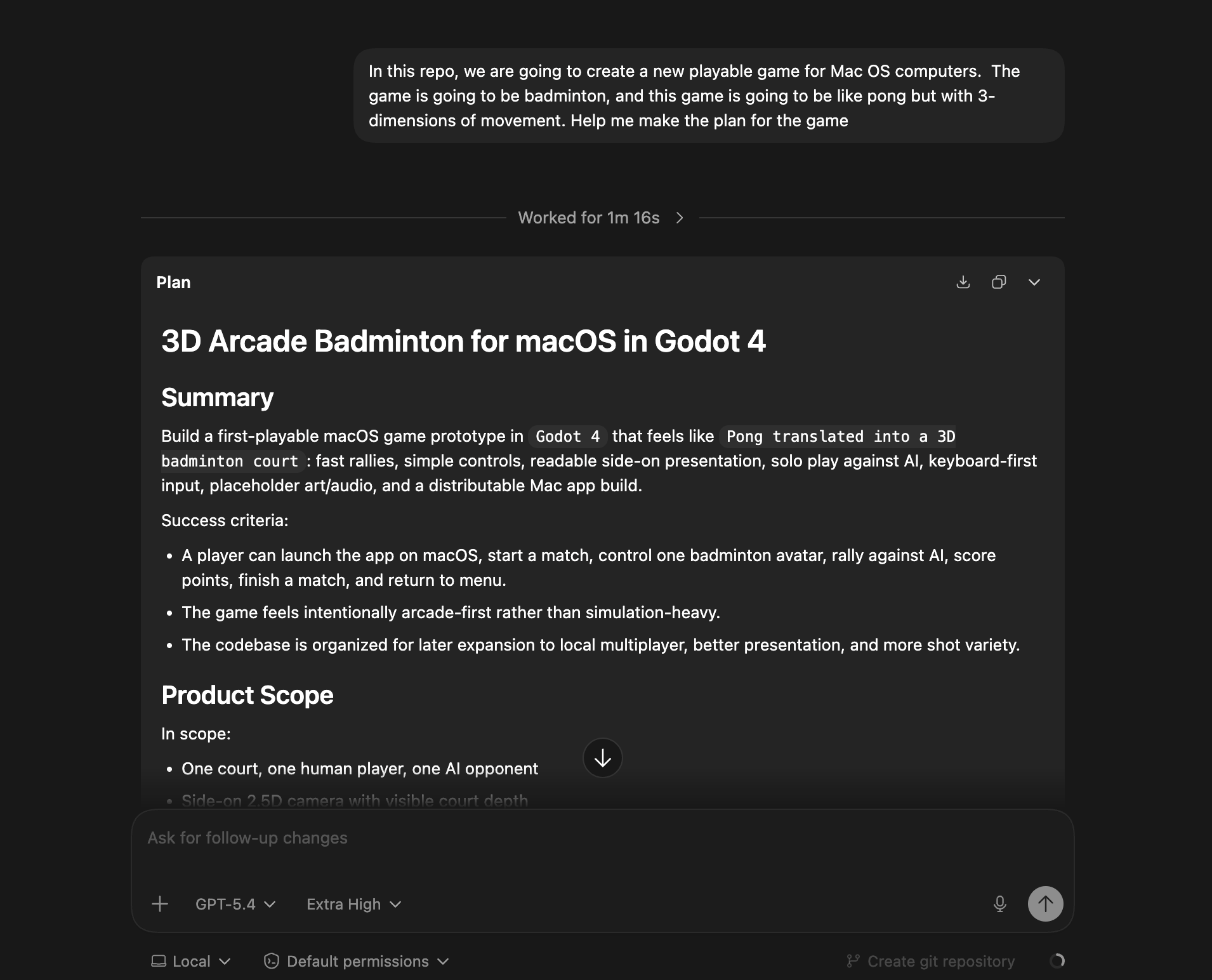
An example prompt could be something like: “In this repo, we are going to create a new playable game for Mac OS computers. The game is going to be badminton, and this game is going to be like pong but with 3-dimensions of movement. Help me make a plan for the game.”
image

As we can see from the image above, this will generate a long plan for GPT-5.4 to follow in later steps. This organizational instruction stage is key to getting the most out of our outputs from the model. We can also use this intermittent stage to make any adjustments we need to the plan. For example, if we would like the game to be viewed from the front or the side. We can manually adjust the instructions for the next step to clarify this important view.

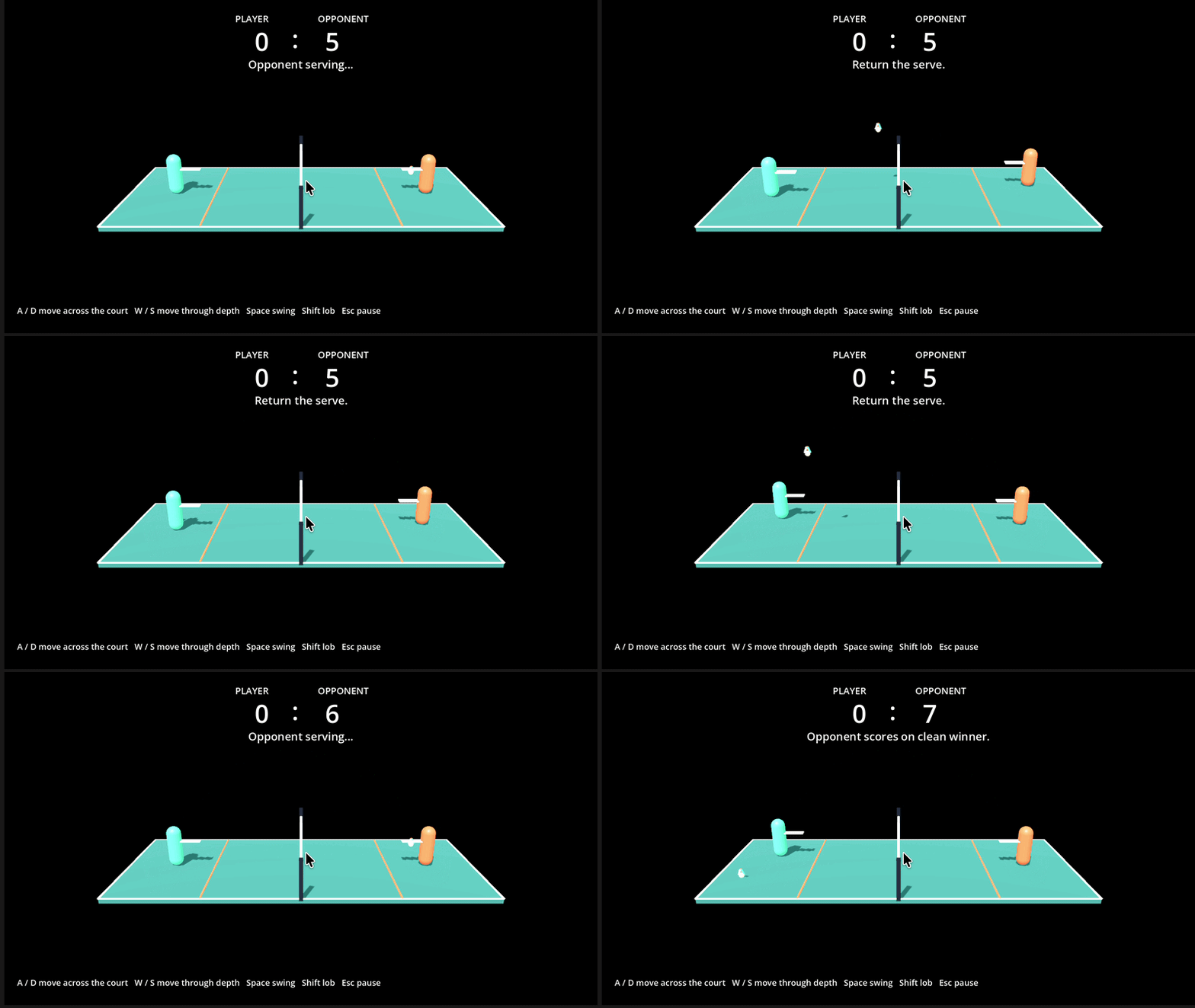
Once that is generated, we can begin generating the application itself. This took 18 minutes for us to generate a fully functional, Godot powered application that can be run on Mac computers. Here is a video of us struggling to compete against the AI controlling the opponent.
image

As we can see, GPT-5.4 completed a fully functional game experience for us that is controlled by keyboard controls. All we needed to do was set up the initial instruction, and wait for the model to run!

The game is completely open-source, and can be downloaded at the main Badminton repo on Github. You will need at least Godot 4.2 to play the game, and it was designed for Mac Silicon computers.

Closing Thoughts

GPT-5.4 represents a meaningful leap forward in making advanced AI genuinely practical for professional and developer workflows. By combining high-powered reasoning, powerful coding capabilities, native computer-use skills, and improved tool integration, it moves beyond simple prompt-response interactions and into the realm of reliable autonomous assistance. Whether accessed through ChatGPT for productivity, Codex for development, the API for custom pipelines, or DigitalOcean’s AI Platform serverless inference for scalable deployment, GPT-5.4 provides flexible paths for integrating frontier intelligence into real-world projects. As models continue to evolve toward longer context, better planning, and tighter tool integration, GPT-5.4 stands as one of the clearest signals yet that highly capable, agent-driven AI systems are becoming practical tools for everyday builders.

Still looking for an answer?

Creative CommonsThis work is licensed under a Creative Commons Attribution-NonCommercial- ShareAlike 4.0 International License.