


You send email from a Linux shell when you want cron alerts, backup notices, or
script output in an inbox. The mail command handles plain text on a server with
a local Mail Transfer Agent (MTA). mutt adds reliable attachments. msmtp
connects to Gmail, Microsoft 365, or any SMTP host that needs a username and
password.
This tutorial walks through installation steps, one-line tests, SMTP setup, and Bash automation.
The following commands were checked on Ubuntu 22.04 LTS, 24.04 LTS and 26.04 LTS. RHEL-family systems use dnf instead of apt.
mailutils on Debian/Ubuntu (sudo apt install mailutils -y) or
mailx on RHEL (sudo dnf install mailx).echo "body" | mail -s "subject" user@example.com.
Use ASCII hyphens in flags (-s), not special dash characters.mail -A file attaches a file on GNU mailutils. mutt -a file is
more reliable for MIME types in scripts.msmtp or a Postfix relay. ssmtp
is obsolete and removed from current Debian/Ubuntu repos.tls_starttls off in msmtp).chmod 600 ~/.msmtprc so only your user reads SMTP credentials.mutt with msmtp when scripts must send attachments through
authenticated SMTP.You will learn about the following tools in this tutorial:
mail / mailxmuttmpacksendmail (MTA interface)msmtp (authenticated SMTP client)mail or mailx commandLinux mail is the classic client for short text messages. On Debian and Ubuntu, mail comes from the mailutils package and often depends on Postfix as the MTA. On RHEL, AlmaLinux, and Rocky Linux, install the mailx package.
mail on Debian and Ubuntu- sudo apt update
- sudo apt install mailutils -y
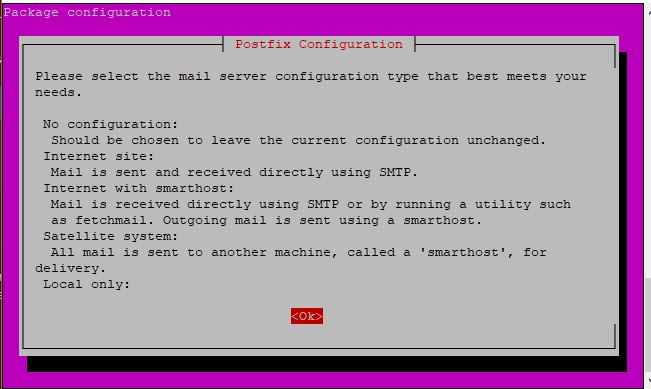
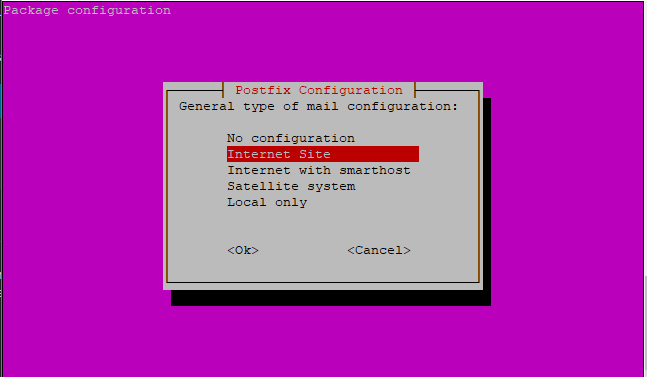
Postfix may prompt you during install. Choose Internet Site unless you run a complex mail hub. Press Tab to move between dialog options, then Enter.
- sudo dnf install mailx -y
On older CentOS 7 systems, yum install mailx still works.
- mail -s "Test Email" email_address
Replace email_address with your address:
- mail -s "Test Email" james@example.com
Press Enter at the Cc: prompt if you do not need a copy. Type the body, press Enter, then press Ctrl+D to send.

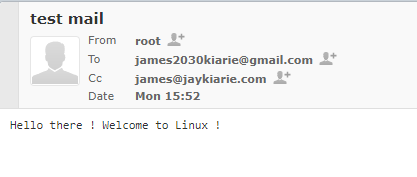
mail command (one line)- echo "sample message" | mail -s "sample mail subject" email_address
Example:
- echo "Hello world" | mail -s "Test" james@example.com
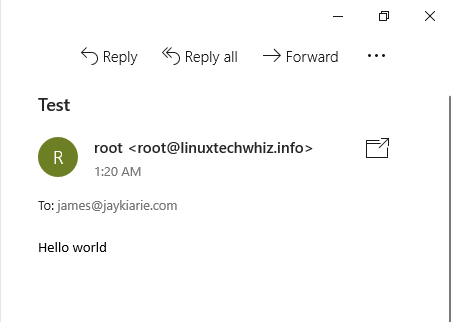
Many providers require a valid sender. Use -r:
- echo "Hello" | mail -s "Test" -r "Server Alerts <alerts@example.com>" james@example.com
mailGNU mailutils uses -A for attachments:
- mail -s "subject" -A message.txt email_address
Example:
- mail -s "Important Notice" -A message.txt james@example.com

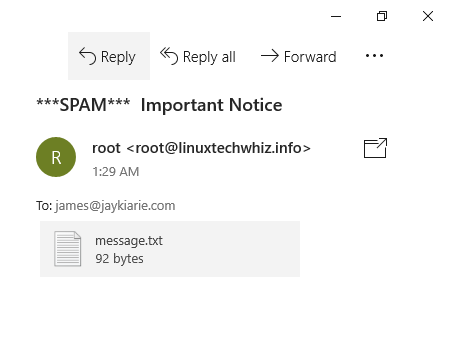
- mail -s "test header" email_address email_address2
mailx commandmailx is the POSIX name for the same family of clients. On current Ubuntu,
mail and mailx often point to the same binary after you install mailutils.
Some distros ship a separate bsd-mailx package with different flags. Run
mailx --version or man mailx on your host before you rely on attachment
syntax.
mailx on Debian and Ubuntu (optional standalone)- sudo apt install bsd-mailx
mailx on RHEL family- sudo dnf install mailx -y
mailx with echo- echo "message body" | mailx -s "subject" email_address
Example:
- echo "Make the most out of Linux!" | mailx -s "Welcome to Linux" james@example.com
mutt commandmutt is a lightweight MUA. Use it when you need dependable MIME attachments or
when you pipe a body from a script.
muttDebian/Ubuntu:
- sudo apt install mutt -y
RHEL family:
- sudo dnf install mutt -y
- mutt -s "Test Email" email_address < /dev/null
Example:
- mutt -s "Greetings" james@example.com < /dev/null
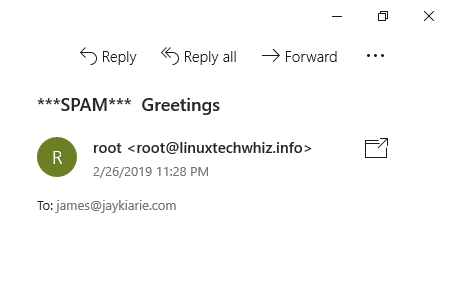
- echo "Message body" | mutt -a "/path/to/file.to.attach" -s "subject of message" -- email_address
Example:
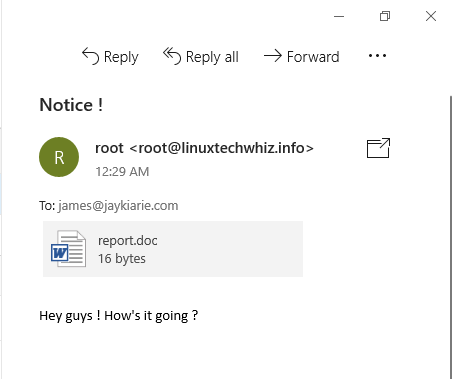
- echo "Hey team, see attached report." | mutt -a report.doc -s "Notice" -- james@example.com
The -- token ends option parsing so the address is not read as a flag.

mutt at msmtpAfter you configure msmtp (section 6), add to ~/.muttrc:
set sendmail="/usr/bin/msmtp"
Then mutt delivers through your SMTP account instead of the default Postfix
queue.
mpack commandmpack encodes a file into a MIME message. It still needs a sendmail-compatible
program to deliver the message.
mpack- sudo apt install mpack -y
- sudo dnf install mpack -y
mpack- mpack -s "Subject here" file email_address
Example:
- mpack -s "Sales Report" report.doc james@example.com

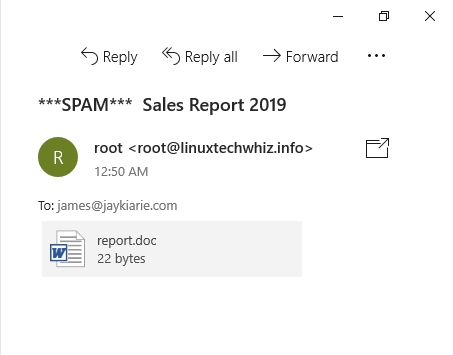
sendmailsendmail here means the sendmail-compatible MTA interface (/usr/sbin/sendmail),
not a tutorial on running a full Sendmail server. Postfix on Ubuntu provides this
binary.
sendmail (Sendmail MTA) on Debian/UbuntuMost Ubuntu users already have Postfix from mailutils. To install the Sendmail
MTA package instead:
- sudo apt install sendmail -y
sendmail on RHEL family- sudo dnf install sendmail -y
sendmail interfaceCreate report.txt:
Hello there!
Send:
- sendmail james@example.com < report.txt
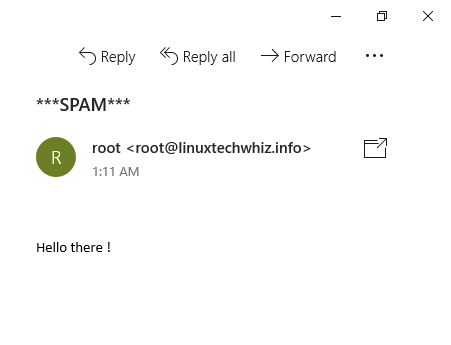
Put headers at the top of the file, then a blank line, then the body:
Subject: Sendmail test email
From: alerts@example.com

Hello there!
msmtp)Gmail, Yahoo, and Microsoft 365 reject unauthenticated relay from random VPS IPs.
Use msmtp as a lightweight SMTP client. ssmtp was common years ago but
is unmaintained and absent from current Debian/Ubuntu repositories. Prefer
msmtp.
msmtpDebian/Ubuntu (includes a sendmail wrapper when you install msmtp-mta):
- sudo apt install msmtp msmtp-mta -y
RHEL family (EPEL may be required on minimal images):
- sudo dnf install msmtp -y
msmtp for Gmail (port 587)Create or edit ~/.msmtprc:
defaults
auth           on
tls            on
tls_trust_file /etc/ssl/certs/ca-certificates.crt
logfile        ~/.msmtp.log

account        gmail
host           smtp.gmail.com
port           587
from           your_gmail_address@gmail.com
user           your_gmail_address@gmail.com
password       your_app_password_here
tls_starttls   on

account default : gmail
Replace the address and password. Google accounts with 2FA need an App Password from the Google Account security page. I have not verified every Workspace admin policy. Some orgs block SMTP entirely.
On RHEL, the CA bundle path might be /etc/pki/tls/certs/ca-bundle.crt. Run:
- ls /etc/ssl/certs/ca-certificates.crt /etc/pki/tls/certs/ca-bundle.crt 2>/dev/null
Lock down the config file:
- chmod 600 ~/.msmtprc
msmtp (port 587)- msmtp -a gmail recipient@example.com <<EOF
- From: your_gmail_address@gmail.com
- To: recipient@example.com
- Subject: Test Email with msmtp
-
- This is the body of the email.
- EOF
mail or mutt to send email with msmtpWith msmtp-mta installed, mail and mutt often pick up /usr/bin/msmtp as
the sendmail binary. You still pass -r for the visible sender when needed:
- echo "This is a test email sent via msmtp." | mail -s "msmtp Test" -r your_gmail_address@gmail.com recipient@example.com
msmtp for Gmail on port 465 (implicit TLS)Some networks block 587. Try this account block instead of the 587 block above:
account gmail465
host           smtp.gmail.com
port           465
from           your_gmail_address@gmail.com
user           your_gmail_address@gmail.com
password       your_app_password_here
tls            on
tls_starttls   off

account default : gmail465
#!/bin/bash

disk_usage=$(df -h / | awk 'NR==2 {print $5}')

if [[ ${disk_usage%\%} -gt 90 ]]; then
  echo "Warning: Disk usage on / is above 90% ($disk_usage)" | \
    mail -s "Disk Space Alert" admin@example.com
fi
Schedule with cron only after you confirm mail delivery from the host.
#!/bin/bash

echo "This is a sample log message." > mylog.txt

echo "Log attached." | mutt -s "Log File" -a mylog.txt -- admin@example.com < /dev/null
For complex MIME, you should prefer mutt over mail -A as it provides a more reliable attachment handling.
| Tool | Best for | Pros | Cons |
|---|---|---|---|
mail / mailx |
Quick text, local MTA already working | Simple one-liners, common on servers | Weak attachment story, no built-in remote SMTP auth |
msmtp |
Scripts that must use Gmail/365 SMTP | Stores credentials in one config file | Send-only, needs provider setup |
mutt |
Attachments and scripted MIME | Solid -a attachment support |
Needs a sendmail binary (msmtp or Postfix) |
mpack |
MIME encode one file | Small utility | Depends on sendmail interface |
sendmail |
System MTA plumbing | Standard pipe interface | Not a friendly MUA for humans |
Postfix is the usual alternative to Sendmail as a full MTA on Linux. For
scripted outbound mail to public providers, Postfix relay plus msmtp covers
most homelab and VPS cases without running Sendmail proper.
Pipe text into mail:
- echo "This is the body of the email." | mail -s "Email Subject" recipient@example.com
Install mailutils on Ubuntu first. Confirm delivery with mailq or your
provider’s sent folder when using SMTP.
Same syntax. Interactive mode:
- mail -s "Subject" user@example.com
Type the body, then press Ctrl+D. One-liner:
- echo "Body text" | mail -s "Subject" user@example.com
msmtp.~/.msmtprc with host, port, user, and password (or App Password).chmod 600 ~/.msmtprc.msmtp -a account_name recipient@example.com and RFC822 headers.Relaying through Postfix is another path. See How To Install and Configure Postfix on Ubuntu 22.04.
Yes. You need either a working local MTA for your domain or an SMTP client like
msmtp for provider mailboxes. Terminal MUAs (mail, mutt) only compose and
hand off the message.
Use msmtp with STARTTLS on port 587, or implicit TLS on port 465. Test
with a here-document that includes From, To, and Subject headers, then a
blank line, then the body.
Both are valid today. 587 expects STARTTLS after connect (tls_starttls on
in msmtp). 465 wraps TLS from the first byte (tls_starttls off). Gmail
documents both. Pick one and match your firewall rules.
sendmail is the traditional interface to the system MTA. You pipe a message file
into /usr/sbin/sendmail. On Ubuntu with Postfix, the binary is provided by
Postfix even though the command name is sendmail. Reading a message ends with
Ctrl+D or a line with only a dot, depending on mode.
Pick the path that matches your delivery target. Local root mail and cron
reports often work with mail plus Postfix. External inboxes need msmtp or a
Postfix relay. Attachments in automation usually mean mutt.
Continue with:
Run alerts and cron jobs on a DigitalOcean Droplet without managing hardware.
 This work is licensed under a Creative Commons Attribution-NonCommercial- ShareAlike 4.0 International License.
此内容由惯性聚合(RSS阅读器)自动聚合整理,仅供阅读参考。 原文来自 — 版权归原作者所有。