A multi-agent system leverages specialized agents to collaboratively handle complex workloads. Unlike single-agent systems, these require supporting infrastructure such as container orchestration, networking layers, messaging backbones, shared memory, and observability tools.
In this article, we’ll take a look at the entire stack required for multi-agent systems from scratch. We’ll cover orchestration patterns, communication protocols, shared memory and state, compute and networking requirements, fault-tolerance, and observability. We’ll touch on real-world frameworks that demonstrate these concepts. By the end, you’ll know how to architect your own robust pipeline for multi-agent workloads, as well as deploy it to Kubernetes or DigitalOcean’s App Platform.
Key Takeaways
- Multi-agent systems differ from single-agent applications because multiple autonomous agents work together to complete complex tasks. This requires infrastructure for orchestration, messaging, state management, and monitoring.
- Agents are the core building blocks of AI systems. Designing a clear architecture improves scalability and maintainability, whether you use dynamic frameworks like AutoGen or deterministic frameworks like LangGraph.
- Centralized orchestrators provide determinism and easier debugging, while decentralized systems offer resilience. Tools like LangGraph support graph‑based workflows with parallel execution and state persistence.
- Asynchronous messaging decouples agents and improves scalability but introduces complexity. Use reliable message brokers, dead‑letter queues, and idempotent handlers to handle failures.
- State management is challenging; choose appropriate memory backends and concurrency controls to prevent context conflicts. Persisting state across interactions enables long‑running workflows.
- Fault tolerance is a must. Implement retries, circuit breakers, and partial task recovery to maintain pipeline continuity.
- Observability—logs, metrics, and traces—provides visibility into multi‑agent behavior and helps diagnose emergent issues.
- DigitalOcean’s compute, storage, networking, and orchestration offerings map well to the multi‑agent stack, making it an attractive platform for deployment.
What Is a Multi-Agent System and Why Different Infrastructure
A single-agent application is simply one AI agent making decisions on its own (say, a chat assistant or code generator). Multi-agent applications are systems of several AI “agents” that coordinate or collaborate with one another. Each agent is a self-contained unit with its own state and purpose (each agent may be a microservice).
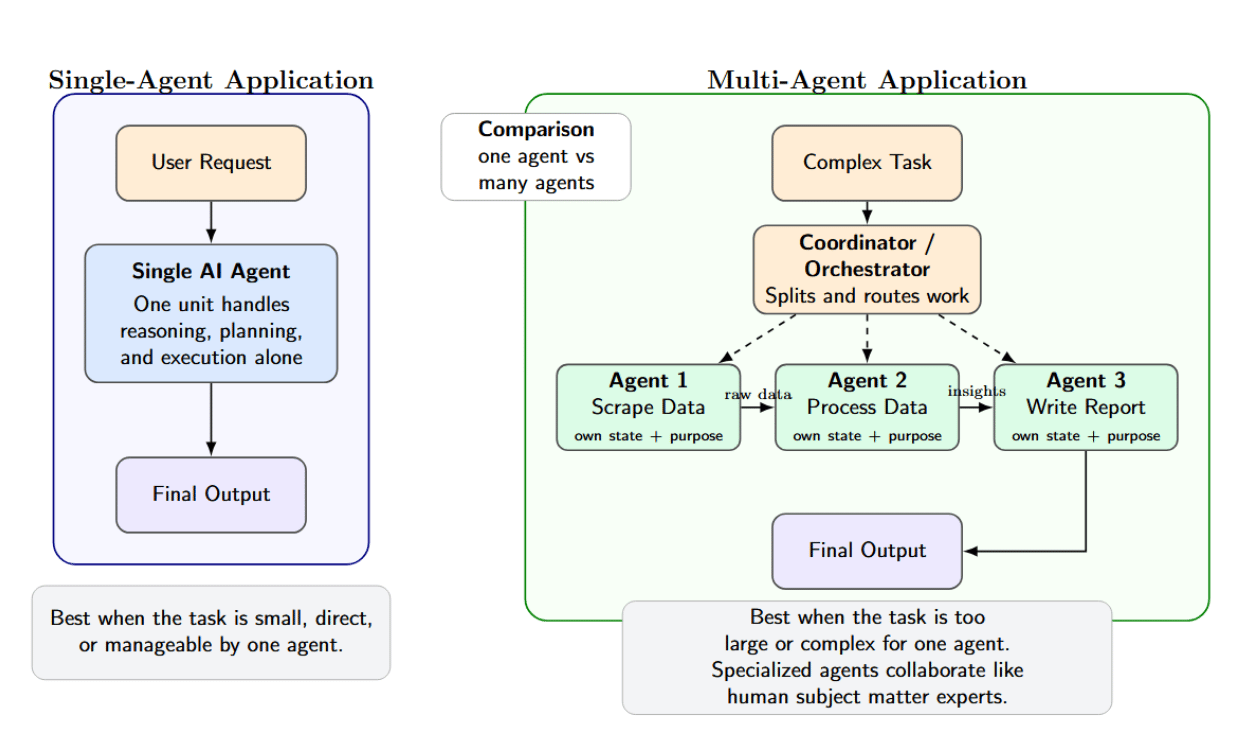
Agents arise naturally when you need to split up a task because it’s too large or complex for one agent to handle. For instance, one agent can scrape data, another process it, and a third write a report. This mimics how human teams solve problems: many subject matter experts, each contributing their own skills and insights.
Running multiple agents concurrently that share work with each other requires additional infrastructure support, such as agent orchestration, communication, and sharing agent state. LangChain lists three motivating factors for building multi-agent systems:
- Context: breaking up the knowledge into pieces so that a single prompt does not exceed token limits.
- Development: letting teams work on developing their own expert agents separately.
- Parallelization: running several tasks in parallel to complete work more quickly.
Core Infrastructure Components for Multi-Agent Systems
A complete multi-agent system stack spans from compute nodes up through observability. Key components include:
| Component |
Option / Protocol |
Characteristics / Use Case |
| Compute |
CPU Droplets, GPU Droplets, K8s Nodes |
Choose based on load (LLM inference often needs GPUs or high-CPU). DigitalOcean offers GPU droplets and managed Kubernetes for scaling. |
| Container Runtime |
Docker, Kubernetes |
Standard for packaging agents. K8s provides auto-scaling, rolling updates, and service discovery. |
| Orchestration |
LangGraph, CrewAI, Agno (Agents themselves) |
Frameworks for defining workflows or “flows” of agents. Each offers control flow constructs: LangGraph with explicit graph of steps, CrewAI with Flows/Crews, Agno with Teams/Workflows. |
| Communication |
HTTP/gRPC (sync), WebSockets, Message Queue (async) |
Synchronous calls (REST/gRPC) are straightforward but tightly coupled. Async messages (Kafka, RabbitMQ) allow decoupling and retries. Emerging agent protocols (A2A, ACP, MCP) layer on these channels. |
| Memory Store |
Vector DB (Chroma, Pinecone, LanceDB), Key-Value DB (Redis), SQL/NoSQL |
Vector DBs support semantic search for context (as in RAG). Key-value or relational DBs store structured state. For example, Agno combines SQLite with a LanceDB vector store for long-term memory. LangGraph persists the short-term state to a database via checkpointing. |
| Observability |
Prometheus/Grafana (metrics), ELK (logs), OpenTelemetry (tracing), Langfuse/Arize (AI observability) |
Must collect agent-level logs and metrics, plus traces of decision sequences. Specialized tools (Langtrace, Langfuse) can record LLM prompts and responses for analysis. As Swept.ai explains, every agent decision should be traceable with context. |
Component choices vary based on scale and requirements. Agents can be deployed as processes or threads (even locally on a single machine) backed by an in-memory queue or SQLite. In production, you would want scalable services (Kubernetes, managed queues, hosted vector DB, etc. ).
Agent Orchestration Patterns
The orchestration pattern defines how work flows through a multi-agent workflow. Common patterns (from LangChain’s multi-agent docs) include:
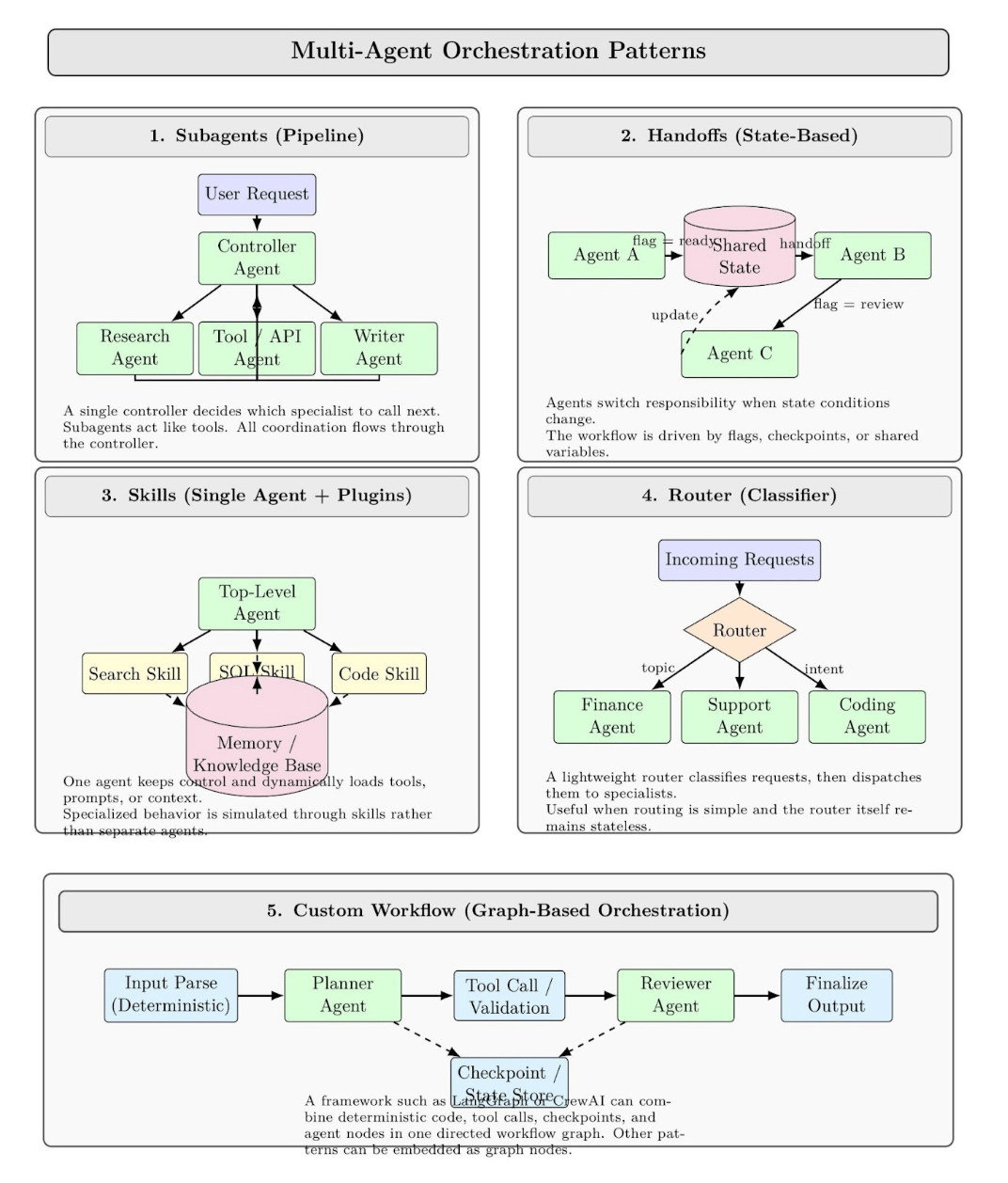
- Subagents (Pipeline): Tasks are routed from a main “controller” agent to sub-agents designed to fulfill specialized tasks as tools. Only the main agent decides who to call next; all communication is routed through the controller agent. Similar in spirit to a traditional service orchestrator.
- Handoffs (State-based): Agents pass tasks to one another based on state. A simple example: Agent A works until it sets a certain flag, then hands off to B, who sets another flag. Tools or sub-agents update a shared state variable to trigger the switching process.
- Skills (Single-Agent + Plugins): A single top-level agent loads “skills” or contexts dynamically as required. While never giving up control, it injects relevant knowledge or prompts into subtasks rather than creating new agents to handle them. This pattern tends to use memories/knowledge bases to simulate agents.
- Router (Classifier): A router classifies all incoming requests (say, by topic) and passes them to one or more specialist agents who then return a response. Think load balancer + filter.
- Custom Workflow: Agent frameworks like LangGraph or CrewAI allow you to script out an entire workflow graph. Deterministic steps (regular code) and agent steps can be mixed. You can also embed other patterns as nodes in the graph.
These patterns have implications for infrastructure. For instance, a router pattern could be implemented as a microservice (the router) that accepts a request, then makes calls to agent services based on some ML classification. A subagent pattern could be implemented as a long-running agent process that calls agent subprocesses or services inside of itself as tools.
Agent Communication Protocols: Synchronous vs Asynchronous
Agents must send messages or calls to each other. This can be synchronous (request-response) or asynchronous (fire-and-forget with a queue). The choice affects latency, throughput, and complexity:
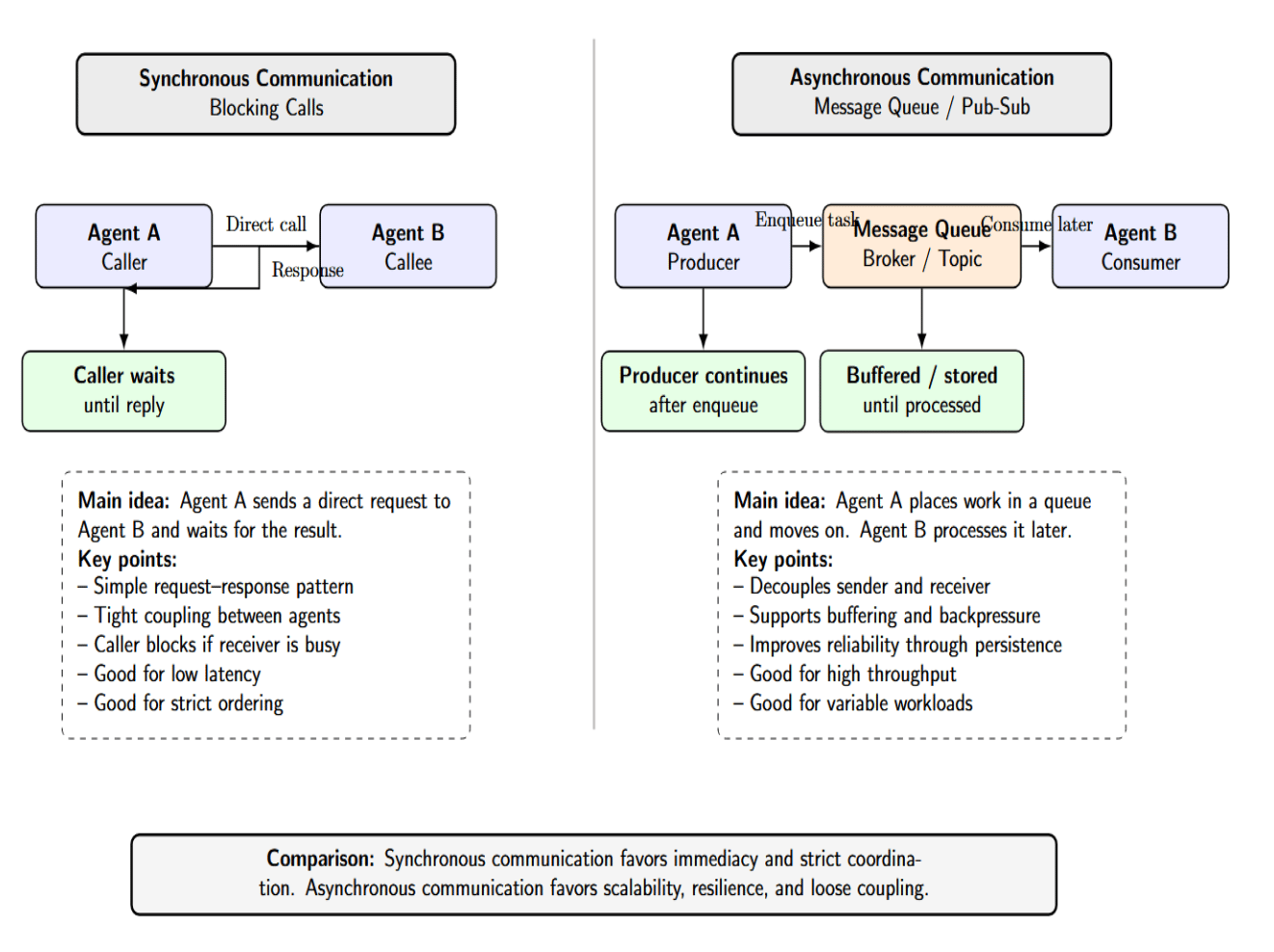
- Synchronous (Blocking Calls): One agent makes a direct call to another agent (via HTTP/gRPC or sockets), and the caller waits for that call to return. This is conceptually simpler, but couples the agents more tightly together. Calls will block if the recipient is busy. Use this for low-latency requirements, or if strict ordering must be preserved.
- Asynchronous (Message Queues / Pub-Sub): Agents enqueue tasks onto a message queue/topic, then move on. Another agent will eventually consume the message when they have capacity. Asynchronous communication decouples agents from each other. It allows buffer requests / apply backpressure, and can be more reliable (since the message will persist until it’s processed).
Choose synchronous calls for straightforward task flows that require low latency (such as an orchestrator calling a lightweight helper function). Choose asynchronous queues for reliability or to handle bursts (such as an agent gathering data and placing it in a queue for processing by an analyzer). Below is a table comparing protocols:
| Protocol / Pattern |
Communication |
Best For |
Notes |
| HTTP/gRPC |
Sync |
Quick queries/responses, RESTful APIs |
Simple setup, but callers block until completion. |
| Message Queue |
Async |
High-throughput, decoupled pipelines |
Reliable (with retries, DLQ), but eventual delivery. |
| A2A |
Async (HTTP/2, SSE) |
Multi-vendor task delegation, enterprise |
Built for cross-vendor agent negotiation. |
| ACP |
Sync/Async (HTTP, MQTT) |
Enterprise workflows, multimodal data |
Supports synchronous commands and async brokers. |
| MCP |
RPC/HTTP |
LLM tool integration |
Standard JSON-RPC for LLMs to call tools. |
| Custom Pub/Sub |
Async |
Event-driven agent networks |
Agent A publishes events; any agent can subscribe. |
Shared Memory Infrastructure
Agents can maintain short-term memory (the context of an ongoing conversation or task) and long-term memory (knowledge that persists across tasks). Coordination across multiple agents requires some type of shared memory. In practice:
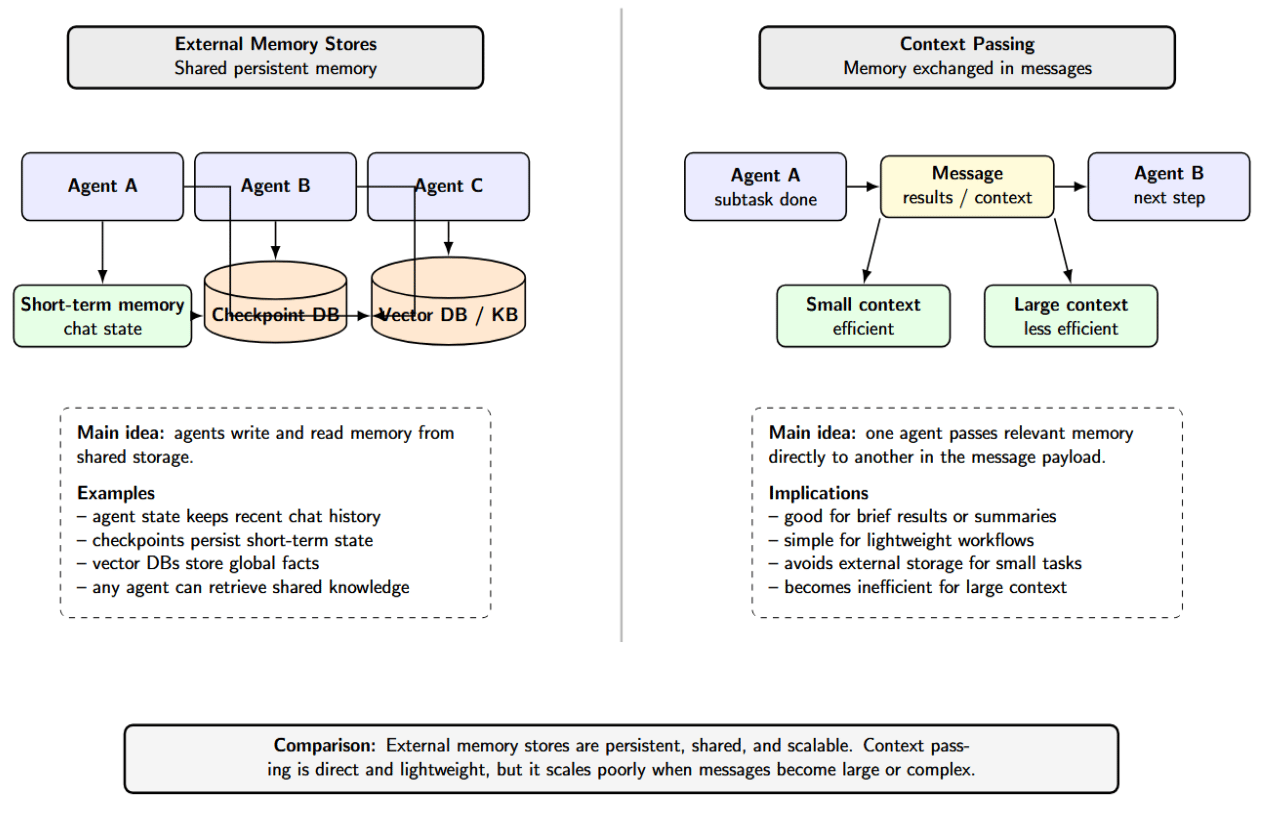
- External Memory Stores: The simplest way to provide memory is to use a database. Agents might each have their own vector store, which indexes accessible facts and prior results. LangGraph implements short-term memory (chat history) as part of the agent’s state, which gets persisted to a database via checkpoints. Global facts can be stored in long-term memory in vector DBs or knowledge bases that are accessible by any agent.
- Context Passing: Agents can share memory by exchanging context in the messages they send to each other. For instance, when Agent A completes running a subtask, it might pass the key results to Agent B in the message. For a large or complex context, this pattern is less efficient than shared storage.
Preventing Conflicts
There are four techniques that consistently reduce context conflicts:
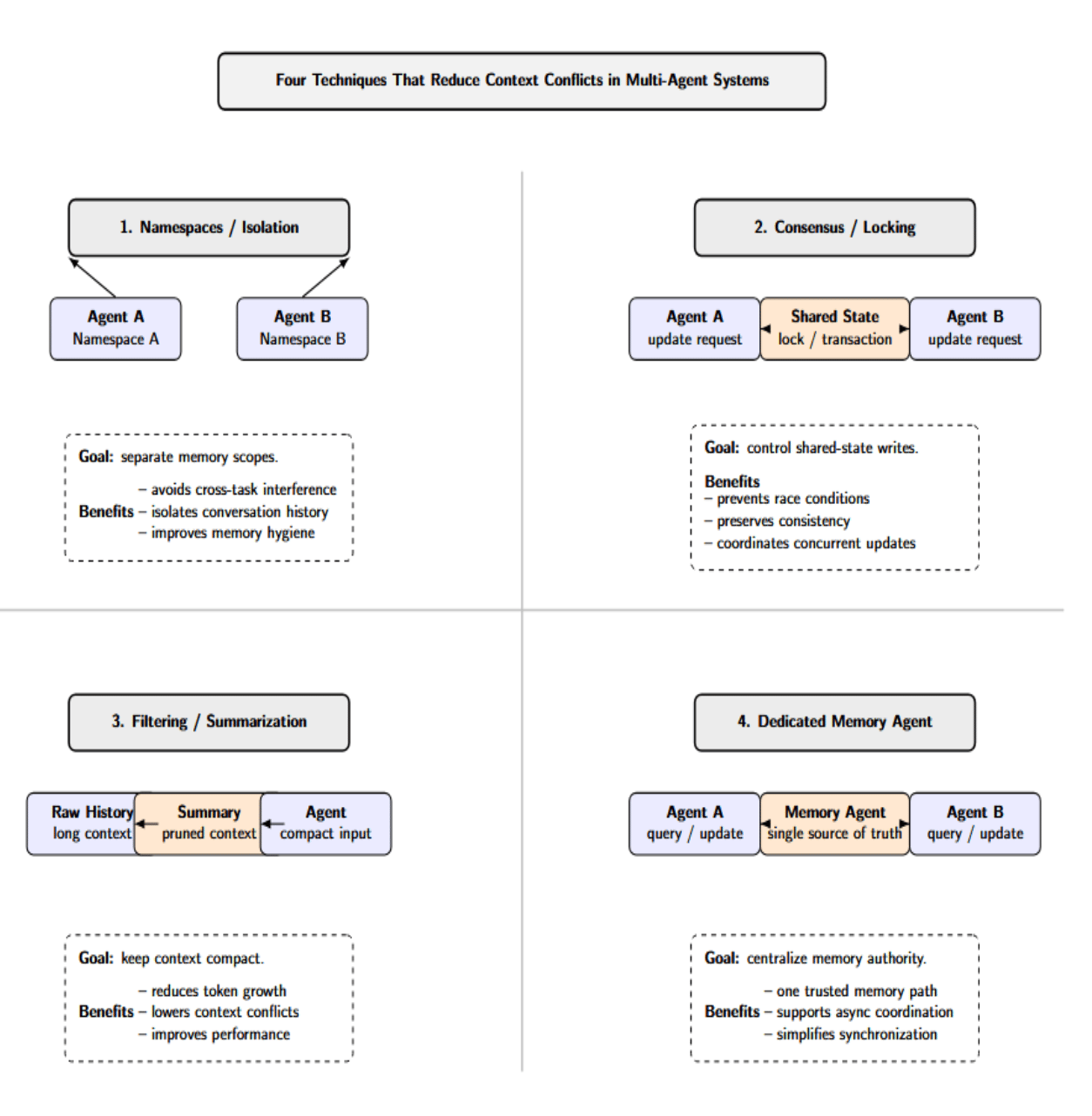
- Namespaces or Isolation: Assign each agent or task its own conversation thread or namespace for memory management.
- Consensus or Locking: Use transactions or consensus protocols when updating shared state to prevent races.
- Filtering and Summarization: Periodically prune or summarize the context used to prevent token blowup. LangGraph notes that allowing your chat history to grow unbounded will start to hurt performance.
- Dedicated Memory Agents: Have one single source of truth and communicate asynchronously. Some architectures solve this by having a dedicated “memory agent” that all other agents have to query.
Most likely, you’ll configure each agent with memory backends that are appropriate for its tasks. One agent may require nothing more than a key-value store. But another agent retrieving documents from external knowledge will likely also use some vector index. The orchestration code is responsible for loading each agent’s memories and merging them appropriately.
Compute and Networking Requirements
Multi-agent systems often need more computing and networking infrastructure than single-agent setups:
- Horizontal Scaling: Agents are typically isolated in their own process/container. Ensure you have enough instances running to support your peak parallel workload. For instance, if you expect to run 4 agents in parallel, all making concurrent calls to your LLM, you might need 4 GPUs or several CPUs. You can find CPU-optimized Droplets as well as GPU Droplets targeted towards heavy AI workloads on DigitalOcean. Managed Kubernetes clusters can scale node pools up and down elastically.
- Vertical Scaling: Some agents may require larger/smaller scale resources (e.g., video or image analysis agent vs plain-text analysis agent). Leverage CPU- or GPU-optimized machine types as needed.
- Networking Topology: Agents frequently communicate with each other over the network. This can refer to services (or pods) communicating over a Kubernetes cluster’s network. Ensure your networking is low-latency if you intend to use any synchronous API calls.
- Load Balancing: To scale out or provide redundancy, you may run multiple instances of the same agent. A load balancer will help evenly distribute tasks (alternatively, message queues can do this inherently).
- Cloud Services: Managed databases (e.g., managed Redis, managed vector DB) and message services (e.g., managed Kafka cluster) will help to offload operational burden.
- Storage: Cloud persistent disk or object storage will be necessary to store logs, model checkpoints, or large datasets you’ve uploaded. If your agents upload files or save session transcripts, provision for file storage (DigitalOcean Spaces, S3).
- Minimum Setup (Dev): You might run two separate agent processes on your local machine. Or perhaps a single small VM with two Docker containers (one per agent) running on a 4-8GB RAM host. Connect them with a local Redis instance or even Python’s built-in multiprocessing queue. GPUs aren’t required for development. Once demand increases, you can scale out to multiple servers or into a Kubernetes cluster.
Run agents within a private network (VPC), use TLS for communication, and firewall rules to prevent unwanted access. Protect sensitive data such as LLM keys and user information. DigitalOcean provides cloud firewall settings, and Kubernetes supports Network Policies to isolate traffic between agents.
Fault Tolerance and Retry Logic in Agentic Pipelines
Failures will occur in your multi-agent pipeline (rate limits, network failures, buggy agents). Design your system to be fault-tolerant:
- Idempotency: Make each agent’s work retry-safe. Say Agent B reads from a database; you’ll want to design for re-running that query so as not to double-write or corrupt the state. Design processes so that retries produce the same outcome or safely abort partial results.
- Message Durability: Tasks should go through a message queue or use durable persistence. If an agent crashes in the middle of a task, it’ll leave the job message there for retrying later. Many brokers allow you to wait until after successful processing before sending an acknowledgement. Failed messages can be pushed back onto the queue or to a dead-letter queue.
- Dead-Letter Queues: Move messages that repeatedly fail to a dead-letter queue (DLQ) and handle them separately. Either perform a human look or do fallback processing. E.g., if Agent C keeps crashing when given a certain input, move that message to DLQ instead of silently dropping it.
- Circuit Breakers: Handle crashed services gracefully. Whether it’s an agent pod crashing or a dependency that’s down, the system should be able to recognize and either reroute tasks or pause. Tools like Kubernetes can automatically restart pods. The orchestrator should also trap exceptions and possibly launch a new agent instance.
- Partial Task Handling: If the agent gets partway through completing work (perhaps it generated half of an answer before failing), you can store its output and resume execution later, either by re-running the same agent or handing off to another. (You’ll need to monitor external state to do this, such as saving to a database.)
- Monitoring and Alerts: Tie your observability tools into fault tolerance. If failure rates for an agent suddenly increase, trigger an alert so a human can intervene.
You should think of the agent pipeline like an event-driven system. For example, many workflows running on the cloud (AWS Step Functions, Azure Durable Functions) will automatically retry failed steps and allow dead-letter queues. You can do many of the same things in the LLM space: put your agent calls in try/except blocks with sleep+retry logic and log failures with context.
Observability for Multi-Agent Systems
Instrumenting/maintaining visibility into a multi-agent system is not as simple as logging/tracing a monolithic application. Surface-level metrics (CPU, API latencies) only paint part of the picture. An HTTP service may return perfectly valid “200 OK” responses for every request, but the response content may be nonsense or hallucinated. We must log not just that a request succeeded, but why each agent made a particular decision. Key aspects include:
- Decision Tracing: Log each agent’s inputs and outputs, along with the reasoning or chain-of-thought if possible. CrewAI conveniently supports this; you can log every LLM prompt/response.
- Hierarchical Tracing: Since Multi-Agent “systems” are inherently hierarchical (there’s the overall workflow, then sub-workflows, then individual agent decisions), the logs should support some sort of drill-down. If a user provides an incorrect final answer, you should be able to query/logs to determine which agent(and which step in its flow) was responsible.
- Cross-Agent Correlation: Since one agent’s output is another agent’s input, you need to correlate these logs between agents. Simply tag every “message” with an ID that the receiving agent references in its own logs. Or use a tracing system (OpenTelemetry). ). E.g., if Agent A asks Agent B to do something, both log statements should have the same trace ID in both logs so you can see the sequence.
- Semantic Logging: In addition to raw metrics (was the request latently responded to?), incorporate semantic checks. Did the output match the schema? Did it violate any business rules/policies? Was the “classification agent” able to correctly interpret the input it was given? Observability should flag unusual or policy-violating decisions.
Use a combination of:
- Distributed Tracing: Jaeger, Zipkin - visualize call graphs.
- Logging: ELK, Fluentd - store centralized logs of prompts/responses.
- Metrics Dashboards: Track metrics that are specific to your agents (tasks processed per agent, errors, latencies, etc).
- AI Observability: Tools like Langfuse, Arize, or even the OpenAI request logs to review model usage.
- Alerting: Alert not only on errors, but also on anomalous decisions (hallucination rate is too high, etc).
Deploying Multi-Agent Systems on DigitalOcean
DigitalOcean offers several options for running multi-agent systems:
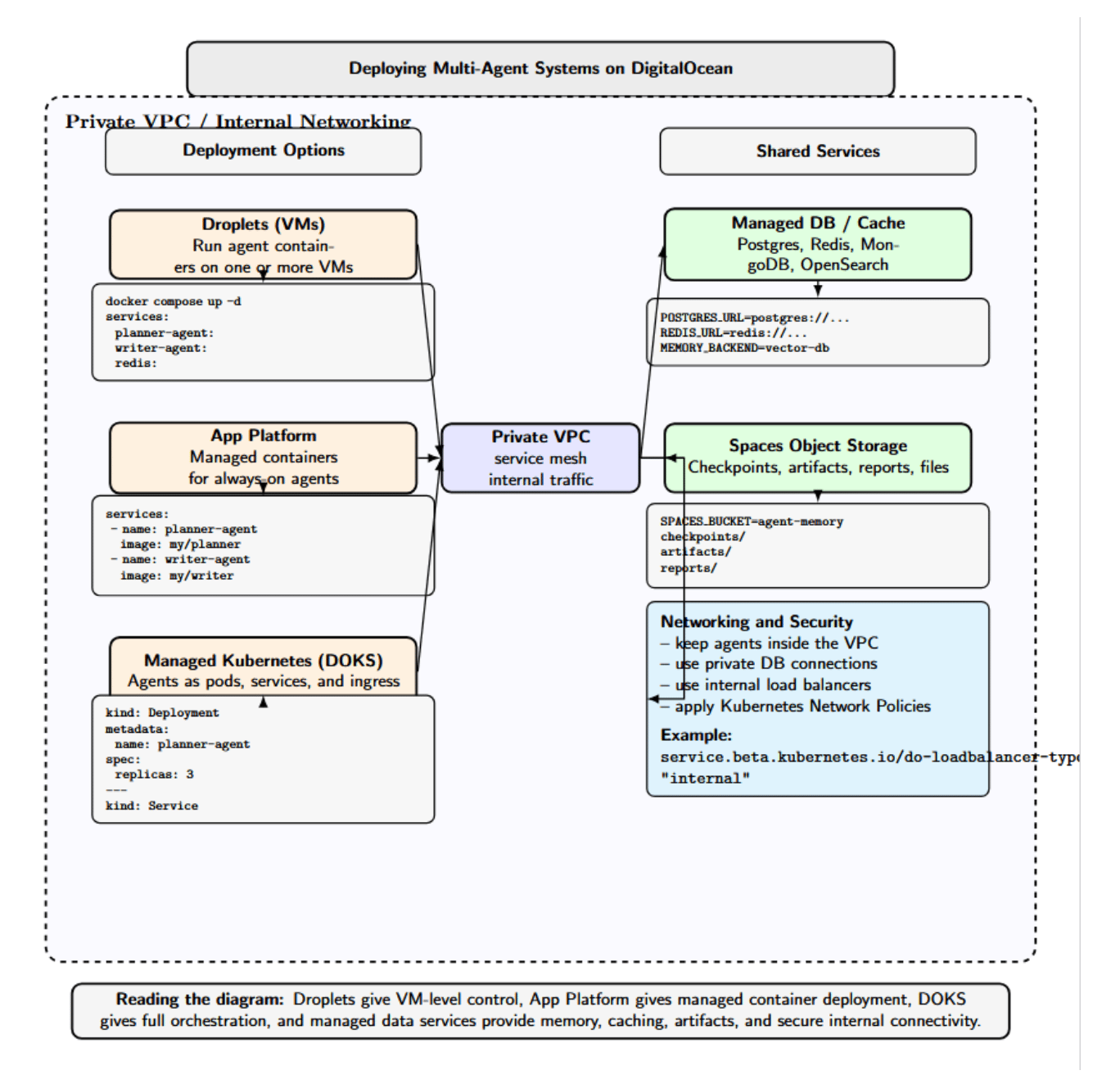
- Droplets (VMs): Each agent service can be deployed to one or more droplets. A small-scale or prototype can run multiple agents in containers on Docker within a single large Droplet. Connect them using DigitalOcean networking (private VPC, load balancers, etc).
- App Platform: Run containerized agents without managing any servers with DigitalOcean App Platform. DigitalOcean’s own OpenClaw, available on App Platform, is designed for always-on multi-agent workloads. App Platform automatically manages the container runtime, networking, and observability for you. Agents can be defined declaratively and scaled independently as demand increases.
- Managed Kubernetes: the DigitalOcean Kubernetes Service lets you orchestrate the agents as Kubernetes pods. Each agent could be deployed as a Deployment or a StatefulSet. Services can be used to expose agents for communication (ClusterIP) or as public endpoints (Ingress). Kubernetes even makes scaling out horizontally and rolling updates easier.
- Managed Databases and Caches: Use DigitalOcean Managed Databases (Postgres, Redis, etc.) or external services for memory stores. DO also provides Spaces (object storage), which can back persistent agent memory.
- Networking and Security: Agents can be run internally within a DigitalOcean VPC, so they’re isolated from the public internet. OpenClaw lets you access an agent’s web UI securely over Tailscale. Kubernetes clusters on DO can leverage Network Policies and private load balancers.
Lastly, take advantage of DigitalOcean’s Monitoring (Droplets & Databases) and Alerts tools to monitor your resource usage and uptime. If you’re building something that will require lots of resources, such as multi-agent systems, lean on DO’s cloud infrastructure and managed services to simplify deployment.
FAQ SECTION
Q1: What is the difference between a single‑agent and a multi‑agent system from an infrastructure perspective?
A single-agent system has a straightforward architecture: one agent handles tasks and state. Once you introduce multiple agents, the complexity multiplies. Agents need to coordinate, pass contextual information to each other, and handle failures. This requires additional pieces of infrastructure, such as a message broker, orchestrator, and shared memory layer.
Q2: What communication protocol should I use between agents in a multi‑agent system?
If the agents are performing small tasks where blocking is acceptable, you can use synchronous request‑response communications. For long‑running and scalable workflows, use asynchronous message passing through a queue. Most systems in production will use a combination of the two approaches.
Q3: How do agents share context and memory in a distributed system?
Agents can share context using a centralized store (e.g., Redis, PostgreSQL) with concurrency control, a distributed memory system with eventual consistency, or task-scoped context passed by the orchestrator. Vector databases can store embeddings for retrieval.
Q4: What happens when one agent in a multi‑agent pipeline fails?
If an agent fails, then nothing downstream of that agent will receive its output. You should add retries with dead‑letter queues and circuit breakers. Persist the intermediate state so you can resume the workflow from that point instead of starting over.
Q5: How do I monitor a multi‑agent system in production?
Add logging, metrics, and distributed tracing to your agents. Pass a correlation ID (or trace ID) across agents to link spans, stitching individual traces into full execution paths for visibility in tools like LangSmith, OpenTelemetry, or Phoenix.
Q6: Can I run multi‑agent systems on Kubernetes?
Absolutely. Kubernetes can serve as the orchestrator for your containerized agents. It has built‑in autoscaling and can integrate with service meshes to provide secure communication. You can even write operators or custom resource controllers to manage long‑running agents. Use operators or custom controllers to manage long‑running tasks.
Q7: What is the minimum infrastructure required to run a two‑agent system in development?
For development, you can run both agents on your local machine or a small cloud instance. Use a simple message broker (like Redis) and a simple orchestrator script. Persist state in a local database. As your system grows to more agents, you can start migrating pieces of your infrastructure to Kubernetes or managed services.
Q8: How does multi‑agent infrastructure differ from a standard microservices architecture?
Both architectures involve multiple independent services. However, multi‑agent systems focus on LLM‑driven agents performing cognitive tasks and require specialized components like memory backends for embeddings, orchestration engines for dynamic workflows, and context sharing. Microservices primarily handle business logic and rely on traditional request‑response patterns.
Conclusion
Building a multi-agent system is not just about adding more agents. Rather, MAS design decisions should be made with infrastructure in mind, including how agents will orchestrate workloads to one another (directly or indirectly), communicate, consume, compute, fail, and be observable. These decisions will vary depending on agents’ collaboration patterns, their state exchange mechanisms, and how reliably the system operates under production load.
With well-defined patterns and open-source frameworks like LangGraph, AutoGen, CrewAI, or Agno, organizations can scale from prototypes to production-ready distributed AI. Leveraging service offerings such as DigitalOcean Droplets, App Platform, Managed Kubernetes, and managed data services can help teams to deploy, scale, and operate multi-agent workloads in a secure and maintainable way.
References and Resources



 This work is licensed under a Creative Commons Attribution-NonCommercial- ShareAlike 4.0 International License.