


Modern applications are undergoing a massive shift. End-users and customers no longer want to hunt through complex navigation menus or rely on rigid, predefined UI buttons to find what they need. They expect conversational, ad-hoc access to their data, asking questions like, “Where is my order from last Tuesday?” or “How does my usage this month compare to last year?” Historically, bridging this gap meant trapping users in a bottleneck, waiting for product teams to design, code, and deploy new UI features for every single unanticipated question.
The naive AI solution to this bottleneck is “Text-to-SQL”: handing an LLM your database schema and letting it translate user questions directly into queries. While this might be acceptable for internal, trusted analysts, it is a security nightmare for untrusted end-users and customers. It exposes your production systems to prompt injection (jailbreaking), hallucinated table names, and potential data leaks.
We need a secure middle ground. We need a system that offers the infinite flexibility of natural language without ever letting the AI directly access the database.
This blueprint outlines a modern architectural pattern using DigitalOcean Managed Databases and the DigitalOcean AI Platform to achieve exactly that. By shifting from direct query generation to Intent-Driven Function Routing (Tool Calling), the AI acts purely as an intelligent dispatcher. It safely brokers flexible, unanticipated data access for untrusted users, protecting your infrastructure while delivering a frictionless user experience.
The naive approach to building natural-language data interfaces is “Text-to-SQL”, giving an LLM your database schema and asking it to write queries based on user prompts. While this might be acceptable for internal, trusted data analysts, for customer-facing applications, it is a security nightmare.
Exposing your schema to untrusted users opens your system to prompt injection, hallucinations (the AI inventing columns that don’t exist), and severe data leaks if a malicious user tricks the AI into querying another tenant’s data or dropping tables. To solve this, modern applications use the Guardrail Pattern.
In the Guardrail Pattern, the AI is placed in a secure zone and never touches your database directly.
get_order_status(order_id).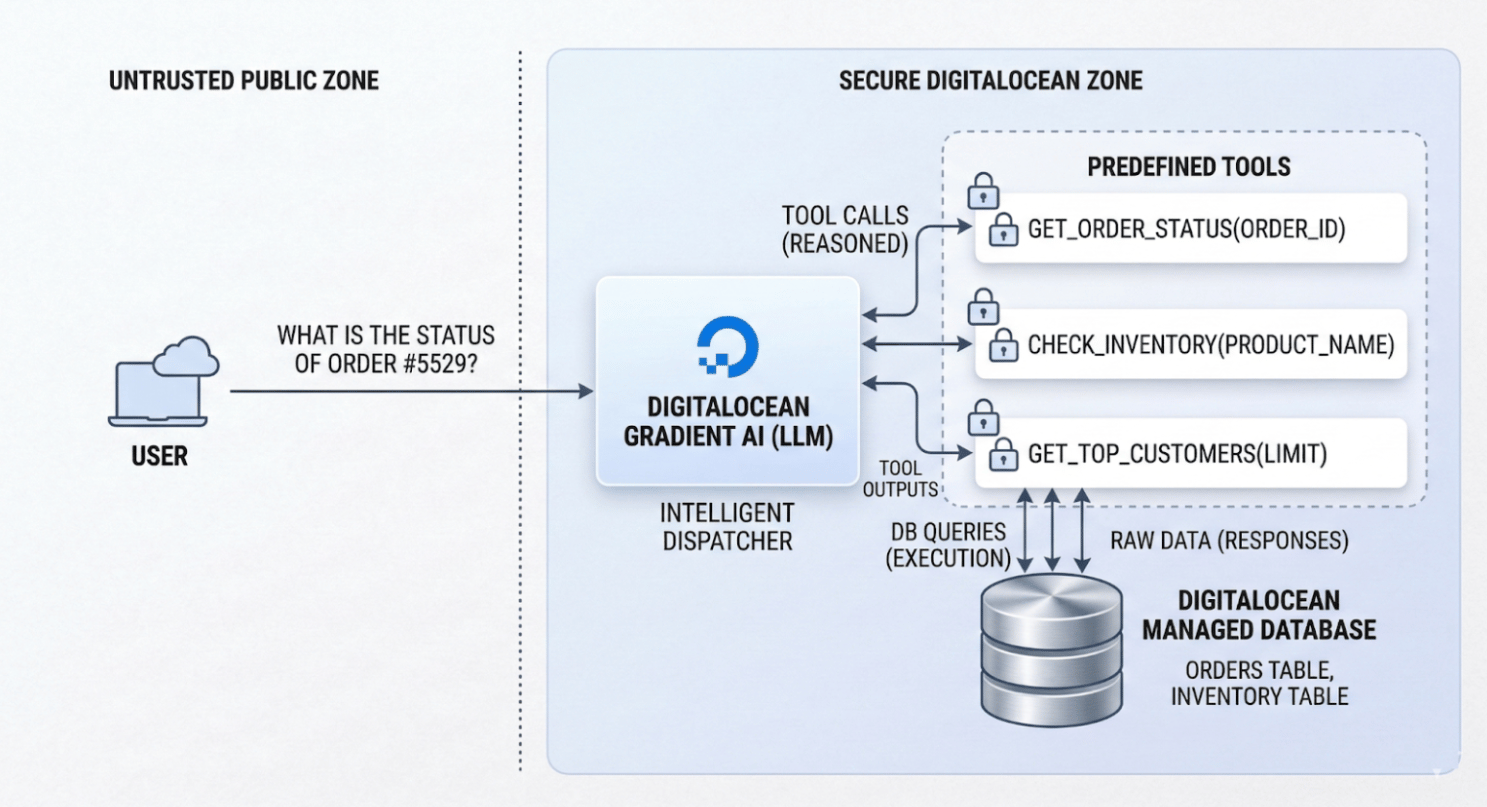
Because the execution layer remains entirely in your backend, you guarantee deterministic, secure data retrieval. The AI handles the messy natural language; your code handles the secure database execution.
A common critique of structured data access is: “Doesn’t this just mean users have to wait for an engineer to write a new Python tool instead of waiting for a custom SQL query?” If tools were rigidly mapped one-to-one with user questions, the answer would be yes. But this is where Tool Chaining changes the engineering ROI entirely.
Instead of building hyper-specific endpoints for every possible user question, your engineering team only needs to write foundational, primitive functions (e.g., get_user_orders and get_product_specs). Because the LLM is a reasoning engine, it can dynamically chain these primitive tools together to answer incredibly complex, unanticipated questions.
For example, if a customer asks, “Based on my last three orders, which of your new products am I most likely to enjoy?” the LLM can autonomously:
get_user_orders tool.get_product_specs tool based on those results.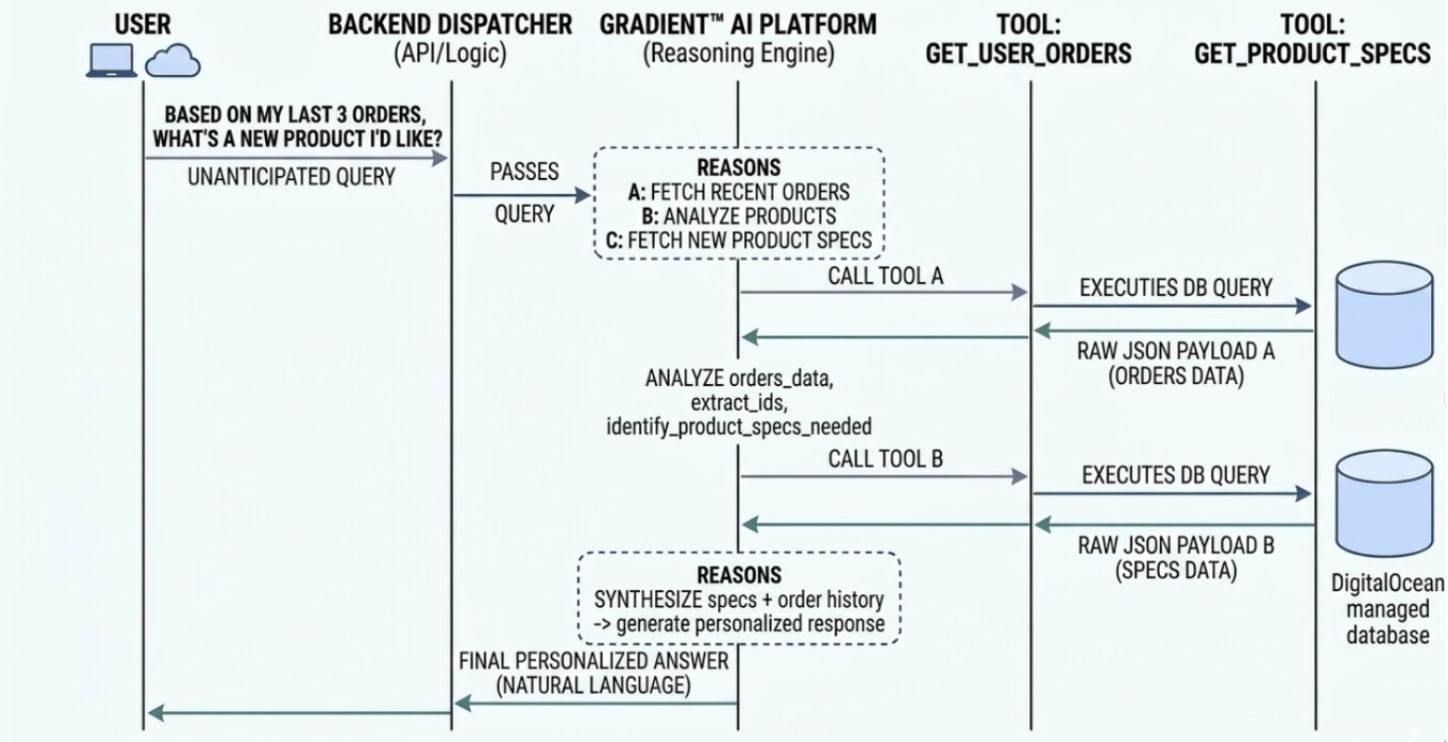
The engineer never had to build a complex, dedicated “Recommendation Endpoint.” Providing secure access to a few basic building blocks helps the AI retrieve data in combinations you never anticipated, providing massive flexibility without requiring new code for every request.
To demonstrate how this architecture functions in practice, we will explore two distinct paths using a shared hypothetical scenario: A customer asking, “What is the current status of my order #5529?”
For both examples, we assume you have a DigitalOcean Managed MySQL database with an orders table.
This path uses DigitalOcean AI Platform agents to handle the conversational state and the intelligence of when to route to a function. It is a “declarative” approach because you define your tools via schemas and let the Agent handle the orchestration.
In this model, your backend acts as a serverless fulfillment worker. When the Agent identifies the user’s intent to query data, it securely triggers a DigitalOcean Function to execute the SQL query.
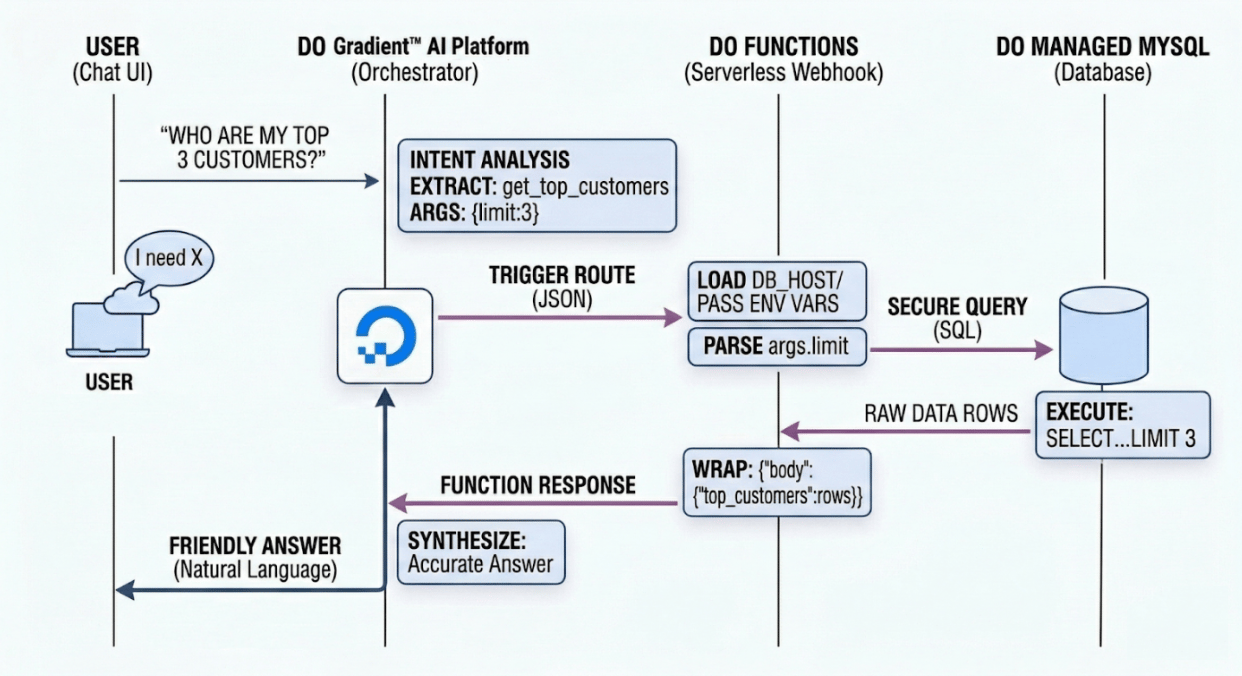
You can create agents using the DigitalOcean API, CLI, Control Panel, or the Agent Development Kit. When configuring the agent, you give it strict system instructions to govern its behavior. For more details, refer to how to create agents on the DigitalOcean AI Platform.
Example Instruction: “You are a database auditor. Use your tools to answer questions about customer metrics securely. Do not guess data if a tool fails.”
You need to first create a serverless function using DigitalOcean Functions that executes your secure database logic. Refer to How to Create Functions for more details. Make sure the function meets the requirements described in this section.
Note on Function Limits: When designing DO Functions, keep the platform’s execution limits in mind. By default, functions have a timeout (e.g., 15 minutes max, but usually much lower for synchronous web requests) and memory limits (configurable from 128 MB - 1 GB, defaulting to 256 MB). Ensure your database query is optimized so it doesn’t cause the function to time out. You will also need to bundle dependencies like mysql-connector-python into your deployment package.
Example Python DO Function (main.py):
Refer to this guide for adding environment variables.
import os
import mysql.connector

# Credentials injected via DO Functions Environment Variables
# Best Practice: Never hardcode credentials in the function. Use Environment Variables.

DB_HOST = os.environ.get('DB_HOST')
DB_PORT = os.environ.get('DB_PORT', 25060) # Defaults to DO's standard 25060
DB_USER = os.environ.get('DB_USER')
DB_PASS = os.environ.get('DB_PASS')
DB_NAME = os.environ.get('DB_NAME')

def main(args):
    """
    The entry point for DigitalOcean Functions.
    The Agent passes input data inside the 'args' dictionary.
    """
    # Extract the limit parameter passed by the Agent (defaults to 5 if missing)
    limit = args.get("parameters", {}).get("limit", 5)

    conn = None
    cur = None
    try:
        # 1. CONNECT TO DO MANAGED MYSQL
        conn = mysql.connector.connect(
            host=DB_HOST,
            port=int(DB_PORT), # Explicitly cast to integer
            user=DB_USER,
            password=DB_PASS,
            database=DB_NAME,
            ssl_ca="ca-certificate.crt" # Required for DO Managed DBs
        )
        cur = conn.cursor(dictionary=True) # Return rows as dictionaries

        # 2. EXECUTE SECURE SQL
        # Using parameterized queries to prevent SQL injection
        query = "SELECT customer_id, name, total_spent FROM customers ORDER BY total_spent DESC LIMIT %s"
        cur.execute(query, (int(limit),))
        results = cur.fetchall()

        # 3. RETURN DATA TO THE AGENT
        # DO Functions must return a dictionary. The 'body' contains the JSON response.
        return {
            "body": {
                "top_customers": results
            }
        }

    except mysql.connector.Error as err:
        print(f"Database error: {err}")
        return {
            "statusCode": 500,
            "body": {"error": "Internal database error"}
        }
    except Exception as err:
        print(f"Unexpected error: {err}")
        return {
            "statusCode": 500,
            "body": {"error": "Internal server error"}
        }
    finally:
        if cur is not None:
            try:
                cur.close()
            except Exception:
                pass
        if conn is not None:
            try:
                conn.close()
            except Exception:
                pass
In the Agent’s routing configuration, add a new function route. This links the Agent’s “brain” to the specific DigitalOcean Function you just deployed. You can do this via the DigitalOcean Control Panel by following the steps in this guide: Add a Function Route Using the Control Panel.
The schema provides a detailed description of the inputs, outputs, and the logic required for the agent to call and use your database function. The agent uses this to understand when to trigger the route.
Specify input schema parameters by following the format of the example in the code block below. You can add as many input schema parameters as you need, but be aware more parameters and longer descriptions will incur more token usage.
The input schema supports the OpenAPI parameters JSON specification format for defining parameter details.
Example Input Schema for the Agent:
{
  "parameters": [
    {
      "name": "limit",
      "in": "query",
      "description": "The number of top customers to return (e.g., 3, 5, or 10).",
      "required": false,
      "schema": {
        "type": "integer"
      }
    }
  ]
}
When a user asks the Agent, “Who are our top 10 customers?”, the Agent matches the intent, generates the payload {“parameters”: {“limit”: 10}}, and triggers the DO Function. The Function securely queries MySQL and returns the raw data, which the Agent then synthesizes into a natural-language report.
In the DigitalOcean AI Platform, the Output Schema field requires the specific structure of the data returned by your function. While the platform documentation mentions it is optional, providing this schema is the most effective way to prevent the LLM from hallucinating data points that aren’t there.
Here is the simplified JSON structure for the Define output schema section in the Control Panel, followed by the descriptive paragraph for your documentation.
The Output Schema JSON:
{
  "body": {
    "type": "object",
    "properties": {
      "top_customers": {
        "type": "array",
        "description": "An array containing customer records retrieved from the database.",
        "items": {
          "type": "object",
          "properties": {
            "customer_id": {
              "type": "integer",
              "description": "The unique identifier for the customer."
            },
            "name": {
              "type": "string",
              "description": "The full name of the customer."
            },
            "total_spent": {
              "type": "number",
              "description": "The total revenue generated by this customer."
            }
          }
        }
      }
    }
  }
}
By providing this output schema, you eliminate hallucinations. When the Agent receives the payload from the DigitalOcean Function, it knows exactly that total_spent is a number and name is a string, allowing it to accurately generate a response like: “Our top customer is Jane Doe, who has spent $4,500.”
To understand how this path works in practice, let’s look at a real-world interaction between a business user and the AI Agent.
For this scenario, let’s assume our DigitalOcean Managed MySQL database contains a table named customers with the following records:
| customer_id | name | total_spent |
|---|---|---|
| 1 | Stark Industries | 125000.00 |
| 2 | Acme Corp | 54000.50 |
| 3 | Initech | 41200.00 |
| 4 | Globex Corporation | 38500.75 |
A business stakeholder asks the AI:
Who are our top 2 customers? I need to know the revenue gap between the `#1` and `#2` spots to calculate our client concentration.
This is where the “Intent-Driven” architecture takes over. The system follows a three-step loop:
Intent Mapping: The AI analyzes the prompt. It identifies that “top 2” maps to the get_top_customers tool and intelligently sets the limit parameter to 2.
Secure Execution: Instead of the AI writing SQL, it sends a structured JSON request to your DigitalOcean Function (Path A) or Local Script (Path B). Your code executes the hardcoded query:
SELECT name, total_spent FROM customers ORDER BY total_spent DESC LIMIT 2;
Data Retrieval: The database returns the raw data for Stark Industries and Acme Corp.
The AI receives the raw data, performs the subtraction ($125,000.00 - $54,000.50 = $70,999.50$), and synthesizes a natural language response:
"Our top two customers are **Stark Industries** ($125,000.00) and **Acme Corp** ($54,000.50). The revenue gap between the #1 and #2 spots is currently **$70,999.50**, which you can use to assess your client concentration levels."
While DigitalOcean AI Platform agents rely on DigitalOcean Agents to manage the conversational state and trigger your functions, Serverless Inference is designed for developers who need absolute control over the orchestration. In this model, you use DigitalOcean Serverless Inference as a stateless “intelligence engine”.
You don’t upload your data to the AI; instead, you ask the AI what data it needs, you fetch it locally from your DigitalOcean Managed Database, and then you send only the relevant results back to the AI for a final summary.
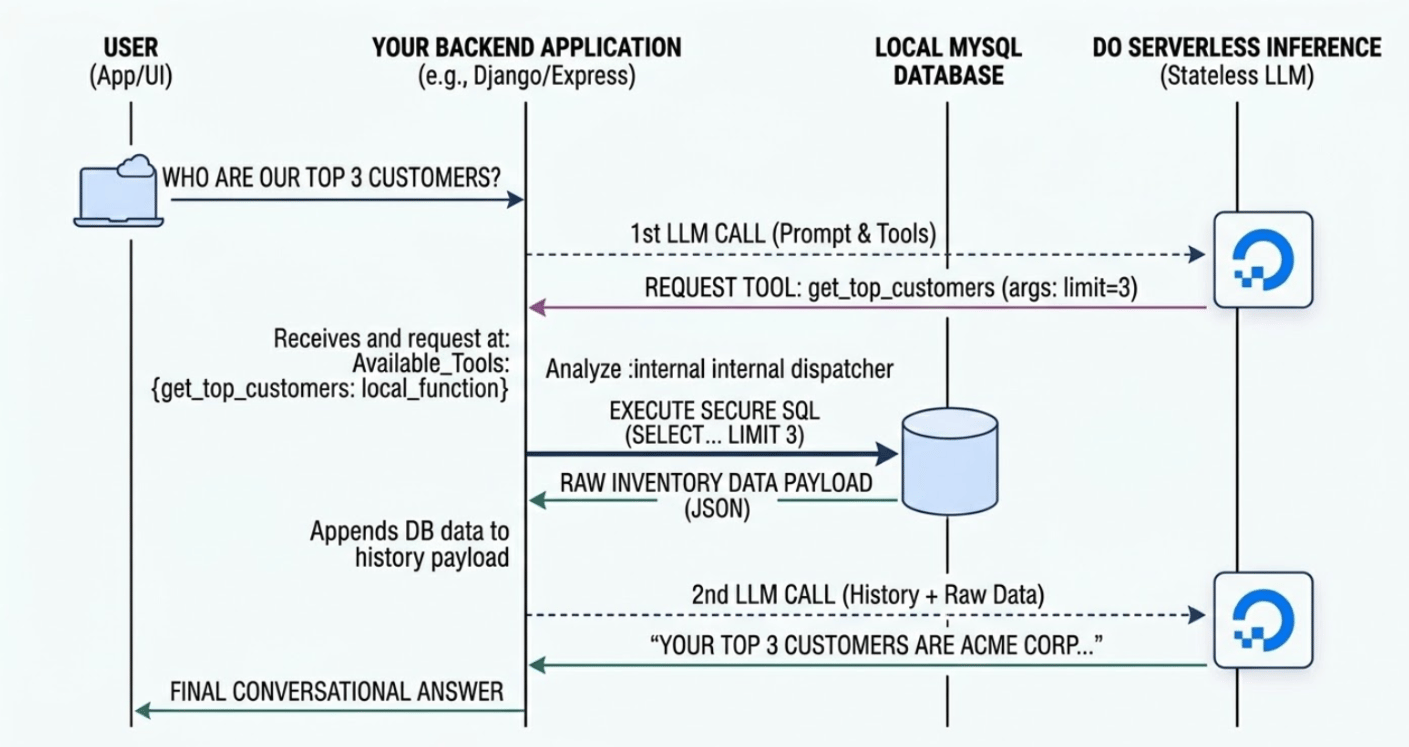
Before writing code, you must generate a Model Access Key in the DigitalOcean Control Panel under the DigitalOcean AI Platform section. Serverless Inference on DO is optimized for high-throughput and low-latency, meaning your application can scale without managing GPU clusters.
Refer to this guide for gathering access keys.
In your backend (e.g., Django, FastAPI, or Express), you write standard Python functions. The AI will never see this code, it only sees the “Function Signature” (the name and description) that you provide in the next step.
Example Python Tool:
import mysql.connector
import os
import json
from decimal import Decimal

# Best Practice: Never hardcode credentials in the function. Use Environment Variables.
DB_HOST = os.environ.get('DB_HOST')
DB_PORT = os.environ.get('DB_PORT', 25060)
DB_USER = os.environ.get('DB_USER')
DB_PASS = os.environ.get('DB_PASS')
DB_NAME = os.environ.get('DB_NAME')

def get_top_customers_db(limit=5):
    """Secure, hardcoded function to query the MySQL DB locally."""
    try:
        conn = mysql.connector.connect(
            host=DB_HOST,
            port=int(DB_PORT),
            user=DB_USER,
            password=DB_PASS,
            database=DB_NAME,
            ssl_ca="ca-certificate.crt" # Required for DO Managed DBs
        )
        cur = conn.cursor(dictionary=True)

        # Parameterized query to prevent SQL injection
        query = "SELECT customer_id, name, total_spent FROM customers ORDER BY total_spent DESC LIMIT %s"
        cur.execute(query, (int(limit),))
        raw_results = cur.fetchall()

        # Clean up Decimal types for JSON serialization
        results = []
        for row in raw_results:
            if isinstance(row.get('total_spent'), Decimal):
                row['total_spent'] = float(row['total_spent'])
            results.append(row)

        cur.close()
        conn.close()
        return json.dumps({"top_customers": results})

    except mysql.connector.Error as err:
        return json.dumps({"error": f"Database connection failed: {err}"})
You must describe your functions to the LLM using the OpenAI-compatible JSON schema. This acts as the “Menu” that you pass to the Serverless Inference endpoint so the model knows what capabilities are available.
tools_definition = [
    {
        "type": "function",
        "function": {
            "name": "get_top_customers",
            "description": "Retrieves the highest spending customers from the database. Use the limit parameter to specify the count.",
            "parameters": {
                "type": "object",
                "properties": {
                    "limit": {
                        "type": "integer",
                        "description": "The number of top customers to return (e.g., 5)."
                    }
                },
                "required": ["limit"]
            }
        }
    }
]
The “Loop” is the logic that coordinates the conversation. When you call the DigitalOcean Serverless Inference endpoint, the model will respond with a tool_calls request if it determines it needs database data to answer the user’s prompt.
from openai import OpenAI
import os
import json

# Best Practice: Never hardcode credentials in the function. Use Environment Variables.
DO_API_KEY = os.environ.get("DO_INFERENCE_API_KEY")
INFERENCE_URL = os.environ.get("DO_SERVERLESS_INFERENCE_URL", "https://inference.do-ai.run/v1/")

# Initialize the client
client = OpenAI(
    api_key=DO_API_KEY,
    base_url=INFERENCE_URL
)

MODEL = "llama3.3-70b-instruct"

def run_secure_conversation(user_prompt):
    messages = [{"role": "user", "content": user_prompt}]

    # 1. INITIAL LLM CALL: Ask the AI how to handle the prompt
    response = client.chat.completions.create(
        model=MODEL,
        messages=messages,
        tools=tools_definition,
        tool_choice="auto"
    )

    response_message = response.choices[0].message

    # 2. CHECK IF A TOOL CALL IS REQUESTED
    if response_message.tool_calls:
        available_tools = {
            "get_top_customers": get_top_customers_db,
        }
        messages.append(response_message)

        for tool_call in response_message.tool_calls:
            function_name = tool_call.function.name
            function_to_call = available_tools.get(function_name)

            if function_to_call:
                # 3. EXECUTE THE SECURE FUNCTION LOCALLY
                function_args = json.loads(tool_call.function.arguments)
                limit_arg = function_args.get("limit", 5)

                db_response_json = function_to_call(limit=limit_arg)

                # Append the raw data back to the conversation history
                messages.append({
                    "tool_call_id": tool_call.id,
                    "role": "tool",
                    "name": function_name,
                    "content": db_response_json,
                })

        # 4. FINAL LLM CALL: Send history + raw data back for synthesis
        final_response = client.chat.completions.create(
            model=MODEL,
            messages=messages,
        )
        return final_response.choices[0].message.content

    return response_message.content
To see the power of DigitalOcean Serverless Inference combined with a local dispatcher, let’s look at a real-world trace of the script in action.
For this terminal session, our DigitalOcean Managed MySQL database is populated with the following dummy data:
| customer_id | name | total_spent |
|---|---|---|
| 1 | Stark Industries | 125000.00 |
| 2 | Acme Corp | 54000.50 |
| 3 | Initech | 41200.00 |
| 4 | Globex Corporation | 38500.75 |
The user runs the script and asks a conversational question about the data:
Who are my top 3 customers and how much have they spent?
When the user hits enter, the following “thinking” loop occurs:
get_top_customers with limit=3.get_top_customers_db function, it safely executes the SQL query against your Managed Database.This is exactly what you will see in your terminal:
$ python app.py
Ask your database a question: Who are my top 3 customers and how much have they spent?
--> [System] Executing SQL: Top 3 Customers

Based on the provided data, your top 3 customers are:

1. Stark Industries - $125,000.00
2. Acme Corp - $54,000.50
3. Initech - $41,200.00

These customers have spent the most with your company, with Stark Industries being the largest spender.
Notice the line --> [System] Executing SQL: Top 3 Customers. This is the moment of maximum security. It proves that the AI did not write the SQL itself; it simply requested to use a tool that you wrote. Your database credentials never left your environment, and the LLM only saw the specific 3 rows it needed to answer the question.
ca-certificate.crt never leave your secure DigitalOcean environment.The examples provided above represent the foundational blueprint of an intent-driven data interface. Because you control the application logic, and because the AI acts strictly as a dispatcher, this architecture is inherently modular. You can extend it to serve complex, enterprise-scale requirements without re-engineering the core.
You don’t need a separate AI agent for every team. You can build a single, unified “Data Gateway” that serves multiple departments by simply expanding the tools array.
get_leave_balance tool querying an internal employee database.lookup_shipping_status tool querying your tracking tables.get_quarterly_pipeline tool that aggregates MySQL CRM data.The LLM is intelligent enough to analyze a user’s prompt and route it to the correct department’s tool automatically.
Modern models are capable of multi-step reasoning, meaning the AI can call multiple tools in sequence to answer a single complex question.
get_largest_order(date="yesterday") to retrieve a customer_id.5529).get_customer_details(customer_id="5529").While read-only analytics are the safest starting point, you can use Function Routing to safely execute database writes (UPDATE or INSERT). Because the AI only outputs a JSON parameter request, your DigitalOcean Function or backend can enforce strict validation (RBAC, input sanitization, and business logic) before any data is changed.
Your tools are not restricted to your DigitalOcean Managed Databases. Your backend dispatcher can route requests to third-party APIs just as easily. You could provide a tool called refund_customer that, when triggered, tells your backend to hit a payment gateway API (like Stripe) after verifying the order status in MySQL.
Because this architecture enforces a strict boundary between the AI’s intent parsing and your backend’s execution layer, you unlock powerful capabilities that are otherwise too risky to implement with untrusted users.
Traditional Text-to-SQL is strictly limited to SELECT statements because allowing an LLM to generate UPDATE, INSERT, or DELETE commands based on user prompts is catastrophically dangerous. However, with the Guardrail Pattern, executing state changes becomes perfectly safe.
Because the LLM only outputs structured JSON intent, you can safely expose tools that perform actions—such as process_refund(order_id) or update_shipping_address(order_id, new_address).
The security is guaranteed by your DigitalOcean backend infrastructure. When the Agent triggers the process_refund tool route, your backend receives the request and can execute complex validation:
Only after your code validates these parameters does it execute the database UPDATE. The AI never touches the transaction logic.
One of the most profound benefits of this architecture addresses the fundamental bottleneck of software development: knowing what to build next.
In a traditional application, if a user wants to know something your UI doesn’t support, they leave frustrated, and you never know why. In an intent-driven interface, what happens when a customer asks a question and the Agent doesn’t have the right tool to answer it?
Instead of these queries falling into a black hole, they become your most valuable data stream.
You can pipe your Agent’s chat logs, specifically the conversations where the Agent replied, “I don’t have access to that information”, into a secondary, internal Developer Agent. This secondary agent analyzes what your customers are trying to do and automatically generates a prioritized backlog for your engineering team.
It can even go a step further: by analyzing the user’s prompt, the Developer Agent can draft the exact schema and the Python starter code for the missing DigitalOcean Function. This creates a “Metadata Flywheel,” transforming your engineering pipeline from reactive ticket-taking to proactive, data-driven development based on actual customer intent.
An intent driven interface stays secure when your application never exposes database credentials or schemas to the AI system. The approach in this tutorial keeps all DigitalOcean Managed Databases access inside DigitalOcean Functions or your backend code, where you enforce role checks, tenant isolation, and parameterized queries before any request reaches the cluster.
DigitalOcean Managed Databases provide automated backups, high availability, and private networking by default, which reduces operational risk for data facing workloads. When you pair those features with strict function routes or local tools, you get predictable performance and secure query execution for AI driven requests without extra infrastructure work.
The DigitalOcean AI Platform supplies the agents and serverless inference endpoints, which translate natural language into structured tool calls. Agents manage chat history and routing to functions, while serverless inference models handle the reasoning loop when your backend runs the orchestration code and forwards only the minimal data needed for each answer.
Agents fit best when you want a managed conversational layer with built in memory, routing, and configuration through schemas and routes. Serverless Inference fits best when your team needs tighter control over prompts, authentication, logging, and tool orchestration inside an existing framework such as Django or Express.
The logic that checks tenant ownership and access rules lives in your tools and functions, not in the AI layer. Each tool verifies user identity and tenant context before running a query on DigitalOcean Managed Databases, which prevents cross tenant data access even when users share the same agent or model.
Building natural language interfaces for end-users does not mean you have to sacrifice security, nor does it mean you must lock your data behind rigid, static UI dashboards.
The naive approach of exposing your database schema to an LLM is a non-starter for customer-facing applications. By adopting an Intent-Driven Architecture using DigitalOcean Managed Databases for highly available, optimized query execution and DigitalOcean Agents & Functions for secure intent processing via Tool Calling, teams can deliver magical, highly flexible experiences.
You protect your infrastructure, eliminate SQL injection and hallucination risks, and, most importantly, empower your customers to find exactly what they need, exactly when they need it.
To move from architecture to implementation, start with these resources:
此内容由惯性聚合(RSS阅读器)自动聚合整理,仅供阅读参考。 原文来自 — 版权归原作者所有。