





Checking if a string contains another substring is a common task when working with Python. String manipulation is a common task in any programming language. Python provides two common ways to check if a string contains another string.
in operator is the most readable and idiomatic way to check if a substring exists in a string. It returns True or False directly.find() returns the index of the first match, or -1 if not found. Use it when you need the position, not just a boolean result.index() behaves like find() but raises a ValueError if the substring is absent. Use it only when you expect the substring to always be present.re.search() is the right choice for case-insensitive checks, pattern matching, or when the substring contains special characters.re.escape() when searching for user-provided input that may contain regex special characters like $, ., or *.re.IGNORECASE is passed to re.search().in operatorPython string supports in operator. So we can use it to check if a string is part of another string or not. The in operator syntax is:
sub in str
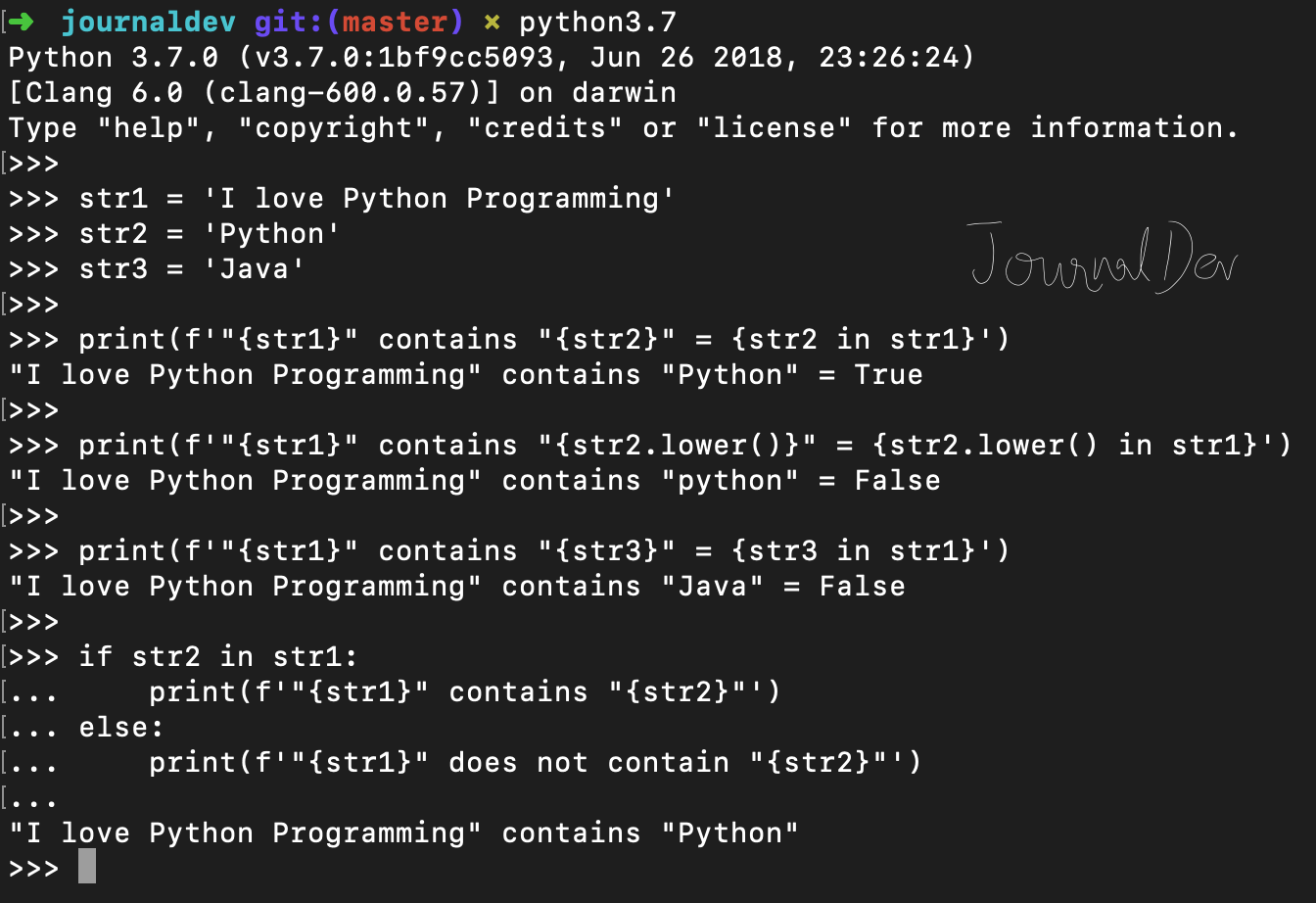
It returns True if “sub” string is part of “str”, otherwise it returns False. Let’s look at some examples of using in operator in Python.
str1 = 'I love Python Programming'

str2 = 'Python'

str3 = 'Java'

print(f'"{str1}" contains "{str2}" = {str2 in str1}')
print(f'"{str1}" contains "{str2.lower()}" = {str2.lower() in str1}')
print(f'"{str1}" contains "{str3}" = {str3 in str1}')

if str2 in str1:
    print(f'"{str1}" contains "{str2}"')
else:
    print(f'"{str1}" does not contain "{str2}"')
Output:
"I love Python Programming" contains "Python" = True
"I love Python Programming" contains "python" = False
"I love Python Programming" contains "Java" = False
"I love Python Programming" contains "Python"
If you are not familiar with f-prefixed strings in Python, it’s a new way for string formatting introduced in Python 3.6. You can read more about it at f-strings in Python.
When we use in operator, internally it calls __contains__() function. We can use this function directly too, however it’s recommended to use in operator for readability purposes.
s = 'abc'

print('s contains a =', s.__contains__('a'))
print('s contains A =', s.__contains__('A'))
print('s contains X =', s.__contains__('X'))
Output:
s contains a = True
s contains A = False
s contains X = False
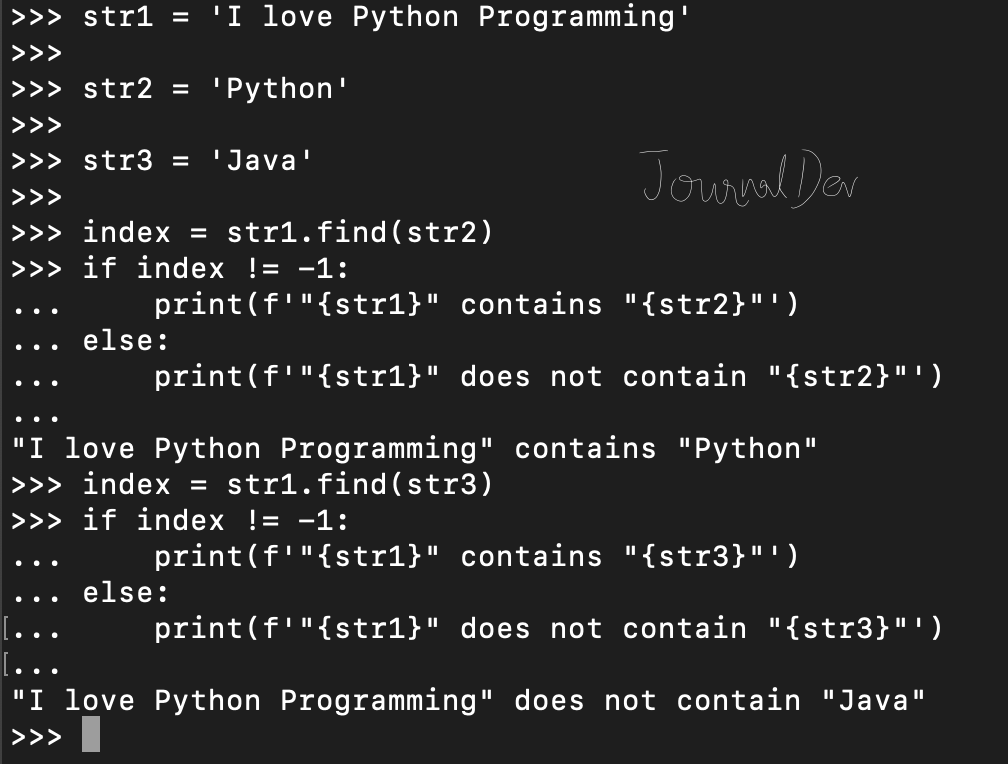
find() to check if a string contains another substringWe can also use string find() function to check if string contains a substring or not. This function returns the first index position where substring is found, else returns -1.
str1 = 'I love Python Programming'

str2 = 'Python'

str3 = 'Java'

index = str1.find(str2)
if index != -1:
    print(f'"{str1}" contains "{str2}"')
else:
    print(f'"{str1}" does not contain "{str2}"')

index = str1.find(str3)
if index != -1:
    print(f'"{str1}" contains "{str3}"')
else:
    print(f'"{str1}" does not contain "{str3}"')
Output:
"I love Python Programming" contains "Python"
"I love Python Programming" does not contain "Java"
index() MethodThe index() method is similar to find() but raises a ValueError if the substring is not found.
text = "Python programming is fun"
index = text.index("fun")
print(index)  # Output: 21
Use index() when you expect the substring always to be present and want an error if it’s missing.
re.search())Regular expressions offer a powerful way to perform advanced pattern matching in strings. They allow for complex searches and extractions of data, making them a valuable tool in many applications.
In the following example, we use the re.search() function to search for the string “python” within the text “Learning Python is fun!”. The re.IGNORECASE flag is used to make the search case-insensitive, ensuring that the function matches “python”, “Python”, “PYTHON”, or any other variation of the string.
import re
text = "Learning Python is fun!"
match = re.search(r"python", text, re.IGNORECASE)
print(bool(match))  # Output: True
Understanding Regex Flags:
Regular expression flags are used to modify the behavior of the search function. Here are some common flags and their effects:
re.IGNORECASE (re.I): This flag makes the search case-insensitive, allowing the function to match strings regardless of their case. For example, it would match “python”, “Python”, “PYTHON”, or any other variation of the string.re.MULTILINE (re.M): This flag treats ^ and $ as the start and end of each line, not just the string. This is useful when working with multi-line strings and you want to match patterns at the start or end of each line.re.DOTALL (re.S): This flag allows the . character to match newline characters. By default, . does not match newline characters, but with this flag, it does.Example:
Here’s an example of how to use multiple flags together to compile a regular expression pattern. In this case, we’re using re.IGNORECASE and re.MULTILINE to create a pattern that matches the string “hello” at the start of each line, regardless of case.
pattern = re.compile(r"^hello", re.IGNORECASE | re.MULTILINE)
Using re.IGNORECASE allows case-insensitive searches, making it useful for handling user input or inconsistent casing. This is particularly important when working with user-generated content, where the case of the input may vary.
When searching for substrings that include special characters, it’s crucial to handle them correctly to ensure accurate matching. Special characters in regular expressions have specific meanings, such as $ indicating the end of a string or . matching any character except a newline. If these characters are part of the substring you’re searching for, they need to be escaped to be treated as literal characters.
The re.escape() function is designed to escape all special characters in a string, making it suitable for use in regular expressions. This function is particularly useful when working with user input or dynamic data that may contain special characters.
Here’s an example of how to use re.escape() to search for a substring that includes special characters:
import re
text = "Price: $10.99"
pattern = re.escape("$10.99")  # Escaping the special character $
match = re.search(pattern, text)
print(bool(match))  # Output: True
In this example, the $ character in the substring $10.99 is a special character in regular expressions. Without escaping, it would be interpreted as the end of the string, leading to incorrect matching. By using re.escape(), the $ is treated as a literal character, ensuring that the search matches the intended substring correctly.
| Method | Return Type | Case Sensitivity | Error Handling | Use Case |
|---|---|---|---|---|
in |
Boolean (True/False) | Case-sensitive | No errors | Quick check for substring presence |
find() |
Integer (index or -1) | Case-sensitive | Returns -1 if not found |
Finding position without exceptions |
index() |
Integer (index) | Case-sensitive | Raises ValueError if not found | Ensuring substring is present |
re.search() |
Match object or None | Can be case-insensitive (re.IGNORECASE) | No errors | Advanced pattern matching |
You can use the in operator, the find() method, or regular expressions to check if a string contains a substring in Python. The in operator returns True if the substring is found, while the find() method returns the index of the first occurrence of the substring, or -1 if it’s not found. Regular expressions offer more advanced pattern matching and can be used for complex substring checks.
text = "Learning Python is fun!"
substring = "Python"
if substring in text:
    print(f'"{text}" contains "{substring}"')
else:
    print(f'"{text}" does not contain "{substring}"')
in and find()?The in operator checks if a substring is present in a string and returns a boolean value. The find() method returns the index of the first occurrence of the substring, or -1 if it’s not found.
text = "Learning Python is fun!"
substring = "Python"
if text.find(substring) != -1:
    print(f'"{text}" contains "{substring}"')
else:
    print(f'"{text}" does not contain "{substring}"')
To perform a case-insensitive string check, you can use the re.IGNORECASE flag with regular expressions. This flag makes the search case-insensitive, allowing the function to match strings regardless of their case.
import re
text = "Learning Python is fun!"
match = re.search(r"python", text, re.IGNORECASE)
print(bool(match))  # Output: True
You should use regular expressions for substring checks when you need more advanced pattern matching, such as matching a substring at the start of each line, or when you need to handle special characters in the substring.
import re
text = "Learning Python is fun!"
match = re.search(r"^Learning", text)
print(bool(match))  # Output: True
To handle special characters in substring checks, you can use the re.escape() function to escape all special characters in a string, making it suitable for use in regular expressions. This function is particularly useful when working with user input or dynamic data that may contain special characters.
import re
text = "Price: $10.99"
pattern = re.escape("$10.99")  # Escaping the special character $
match = re.search(pattern, text)
print(bool(match))  # Output: True
In this tutorial, you covered four methods for checking if a string contains another string in Python: the in operator for simple boolean checks, find() for index-based lookups, index() for cases where the substring must be present, and re.search() for pattern matching and case-insensitive checks. You also saw how to handle special characters safely using re.escape().
For most use cases, in is the right default. Reach for re.search() when your requirements go beyond exact, case-sensitive matching.
To continue working with Python strings:
 This work is licensed under a Creative Commons Attribution-NonCommercial- ShareAlike 4.0 International License.
此内容由惯性聚合(RSS阅读器)自动聚合整理,仅供阅读参考。 原文来自 — 版权归原作者所有。