


Every AI agent eventually runs into the same structural problem: the model can reason, but it cannot act without tools. Someone has to run those tools, for example, fetch the search results, query the database, call the API, and that someone is usually your code.
Most teams build this the same way. The model returns a tool call. Your code catches it, runs the tool, formats the result, and sends it back. Repeat until the model has what it needs to answer. The loop works, but it means your team owns the full tool layer: connections, credentials, retry logic, error handling, and observability. None of that is your product — it’s just the behind-the-scenes infrastructure that is working.
There is an alternative: move tool execution into the inference layer itself, so the tools run as part of the API call rather than between API calls.
DigitalOcean’s Server-Side Tools for Inference Engine does this. This article explains what that shift actually changes, the architecture, the latency profile, and the cases where it does not make sense, so you can decide whether it fits your use case.
Server-Side Tools for DigitalOcean Inference Engine let you add tool execution directly into inference requests. You use your existing Model Access Key, with no new credentials and no new API surface. The tools are available through Serverless Inference and Dedicated Inference.
You can connect five types of external capabilities to an inference request today:
1. Web Search, powered by Exa Real-time web search backed by Exa’s neural search index. The model decides when to search, runs the query, and uses the results in its response. You control how many searches run per request (max_uses: 1 to 5) and how many results each search returns (max_results: 1 to 10). Priced at $10 per 1,000 requests.
2. Web Fetch, powered by Exa Fetches and extracts content from specific URLs during inference. Exa’s extraction returns clean, parsed text rather than raw HTML, which reduces the tokens the model has to process. No extra charge beyond standard token costs.
3. Knowledge Base Retrieval Lets the model query your private data. You provide a knowledge base ID, and the API retrieves relevant content and includes it in the response automatically.
4. Customer-owned MCP Servers Connects the model to any remote Model Context Protocol server you operate. You pass the server URL and a bearer token in the request. DigitalOcean handles the MCP connection, tool discovery, and execution. You control which tools from your server the model can call using the allowed_tools parameter.
5. Tool Search (Anthropic and OpenAI models) Once you have more than around 20 to 30 tool definitions, loading all of them on every request adds meaningful input token cost. At 50 or more common in agents that connect to multiple internal systems, each exposing several tools the overhead can run to hundreds of tokens per request. Multiplied across thousands of requests per day, that cost compounds quickly. Tool Search solves this by lazy-loading tool definitions. Tools marked with defer_loading: true are only loaded into context when the model needs them, not on every request.
For Anthropic models, this works via the Messages API using a search tool (tool_search_tool_regex_20251119 for pattern matching or tool_search_tool_bm25_20251119 for natural language queries). For OpenAI models, it works via the Responses API with GPT-5.4+ using type: "tool_search".
# Tool Search with Anthropic (Messages API)
import anthropic

client = anthropic.Anthropic(
    base_url="https://inference.do-ai.run/v1",
    api_key="your-model-access-key"
)

response = client.messages.create(
    model="anthropic-claude-opus-4.8",
    max_tokens=2048,
    messages=[{"role": "user", "content": "What is the weather in zip code 94107?"}],
    tools=[
        # The search tool loads immediately
        {
            "type": "tool_search_tool_regex_20251119",
            "name": "tool_search_tool_regex"
        },
        # These tools only load when the model searches for them
        {
            "name": "get_weather_by_zip",
            "description": "Return current weather conditions for a US zip code.",
            "input_schema": {
                "type": "object",
                "properties": {
                    "zip_code": {"type": "string"},
                    "unit": {"type": "string", "enum": ["celsius", "fahrenheit"]}
                },
                "required": ["zip_code"]
            },
            "defer_loading": True
        },
        {
            "name": "search_files",
            "description": "Search through files in the workspace",
            "input_schema": {
                "type": "object",
                "properties": {
                    "query": {"type": "string"}
                },
                "required": ["query"]
            },
            "defer_loading": True
        }
    ]
)
The model searches for the tool it needs, loads only that definition, then calls it. This matters most once you are past 20 to 30 tools above that threshold, the input token savings on every request start to add up.
# Standard web search
from openai import OpenAI

client = OpenAI(
    base_url="https://inference.do-ai.run/v1",
    api_key="your-model-access-key"
)

response = client.chat.completions.create(
    model="openai-gpt-4o",
    messages=[{"role": "user", "content": "What changed in DigitalOcean pricing this month?"}],
    tools=[{"type": "web_search", "max_uses": 3, "max_results": 5}]
)

# One request, one response
print(response.choices[0].message.content)
Without server-side tools, this same task takes three steps: send the message to the model, get back a tool call instruction, run the search yourself, then send the results back for the final answer. With server-side tools, all of that happens within a single API call.
A research agent that can search the web and fetch pages can answer questions that need real-time information: current pricing, recent product changes, news that happened after the model’s training cutoff, or anything that needs multiple sources combined.
response = client.chat.completions.create(
    model="openai-gpt-4o",
    messages=[{
        "role": "user",
        "content": "Summarize the key changes to Kubernetes networking in the last 6 months and their implications for teams running microservices."
    }],
    tools=[{
        "type": "web_search",
        "max_uses": 5,
        "max_results": 5
    }]
)
The model decides when to search, what to search for, how many times, and when it has enough information to write the summary. Your application code stays the same regardless of how many searches the agent runs internally.
Without server-side tools, you would implement the loop yourself: catch the tool call, call a search API, append results to the conversation, call the model again, and repeat until the model produces a final answer.
Teams that have already built MCP servers for internal tools (project management, scheduling, CRM, internal APIs) can connect them to any inference request without changing their application code.
response = client.chat.completions.create(
    model="openai-gpt-4o",
    messages=[{
        "role": "user",
        "content": "Pull the open support tickets for our enterprise tier and draft a weekly digest for the team."
    }],
    tools=[{
        "type": "mcp",
        "server_label": "internal-crm",
        "server_url": "https://tools.yourcompany.com/mcp",
        "authorization": "Bearer your-mcp-token",
        "allowed_tools": ["list-tickets", "get-ticket-details", "get-customer-info"]
    }]
)
The allowed_tools list controls what the model is allowed to do on your MCP server. If you leave it out, the model can call every tool your server exposes, so it is good practice to list only what the current task needs.
Your MCP server needs to be publicly reachable because the inference layer connects from DigitalOcean’s network, not from wherever your application runs. If your server currently only accepts internal traffic, you will need to expose it.
More complex agents combine multiple tool types in a single request. A due diligence agent might web-search for recent news about a company, fetch its pricing page, and query an internal knowledge base for your existing relationship, all in one inference call.
response = client.chat.completions.create(
    model="openai-gpt-4o",
    messages=[{
        "role": "user",
        "content": "We're evaluating Acme Corp as a vendor. What's their current product, recent news, and do we have any history with them?"
    }],
    tools=[
        {
            "type": "web_search",
            "max_uses": 3,
            "max_results": 5
        },
        {
            "type": "knowledge_base_retrieval",
            "knowledge_base_id": "vendor-history-kb"
        }
    ]
)
The model decides which tools to use and in what order based on the task in the prompt.
Client-side execution means your application code runs the tool. You send the user’s message to the model. The model replies with “I need to search for X.” Your code runs the search. You send the result back. The model gives the final answer. Everything runs in your own process, so it is fast but you write and maintain every step.
Server-side execution means DigitalOcean runs the tool for you. You send one request, and the tool call, execution, and result all happen before your response comes back. The cost is that a network call to an external service now happens inside the request, and that time adds to your total response time.
When your code runs the tool, the time depends on what that tool does:
You see every millisecond of this in your logs.
When DigitalOcean calls a tool on your behalf, the time that call takes is added to your response time. Two tools have meaningfully different latency profiles.
Web search: DO’s web search is powered by Exa, which maintains a pre-built neural index rather than crawling the web on each request. In a 2026 benchmark across 15 search API providers, Exa was specifically measured and fell in the index-based tier: under 400ms at median with little variance between median and p95. The same benchmark found that real-time SERP APIs which fetch live results on every request ran at 600 to 700ms at median with much higher variance, and p95 exceeding 5 seconds for several providers. That tail risk applies to real-time crawlers, not to the index-based backend DO uses.
Customer-owned MCP servers: The risk here is cold starts. When an MCP server has not handled a request recently, it has to restart before it can respond. For a Node.js-based MCP server, loading the runtime and modules alone can take over 2 seconds. If your server is not kept running between requests, the first call in a new conversation pays that startup cost every time.
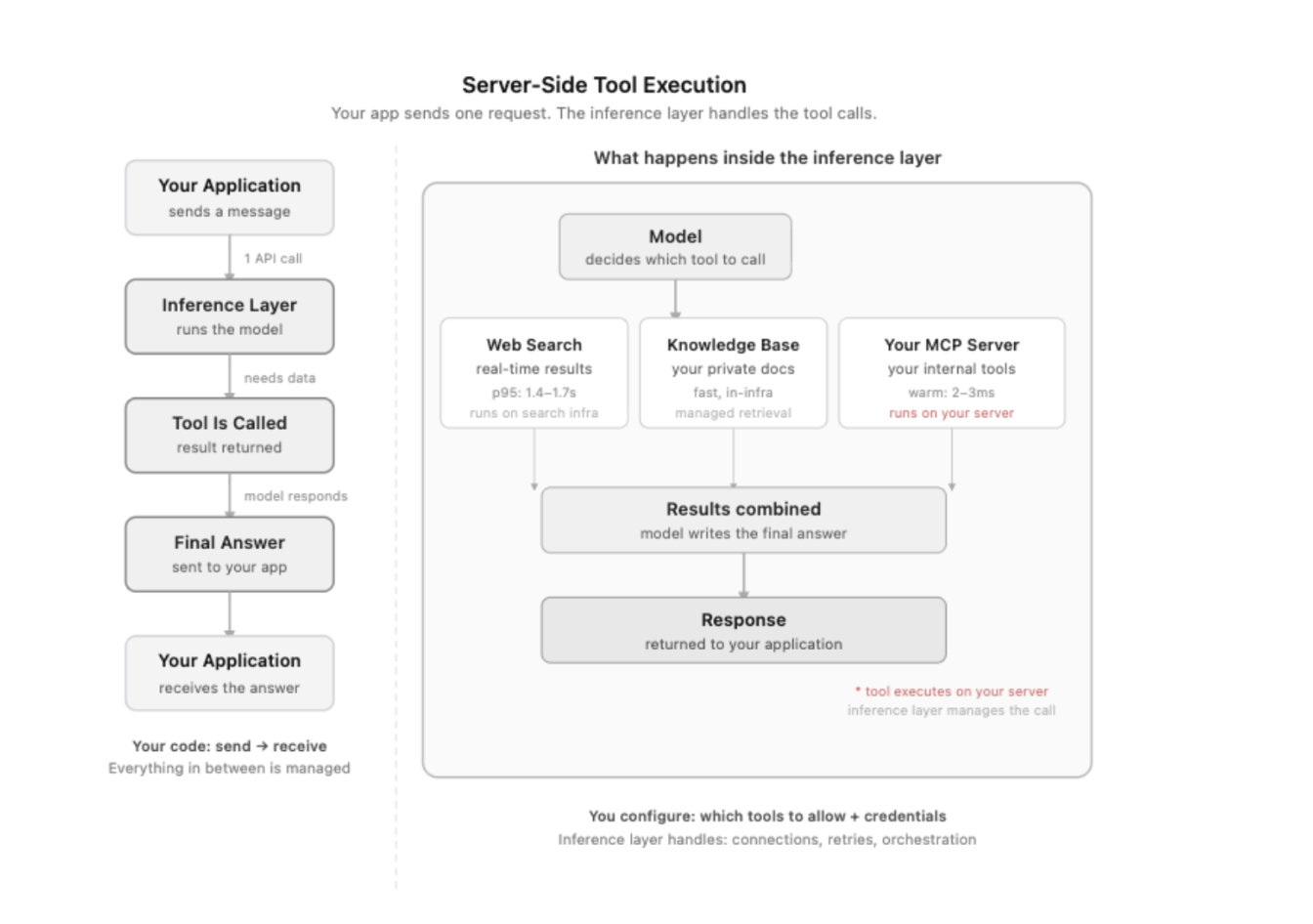
Each tool call adds time to the total response. One tool call is usually fine. The problem is when an agent makes several tool calls in a row: each one stacks on top of the last.
For example, a research agent that runs 3 web searches in sequence using DO’s Exa-backed search: at under 400ms median per call, 3 sequential searches add roughly 1.2 seconds of search time before the model generates a response.
That is the typical case for index-based search. For comparison, real-time search APIs run at 600 to 700ms median per call, and at p95, several providers in the Proxyway 2026 benchmark exceeded 5 seconds per call, pushing 3 sequential calls past 15 seconds. The tail risk depends on which backend you use. Tool calls stack, and each one you add increases the chance of hitting the slow tail.
If your agent is doing research, answering complex questions, or running in the background, a few extra seconds per task is not a problem. But if you are building a voice assistant or a real-time app where users expect a response in under a second, every tool call matters. In those cases, client-side tools or faster single-step tasks are a better fit.
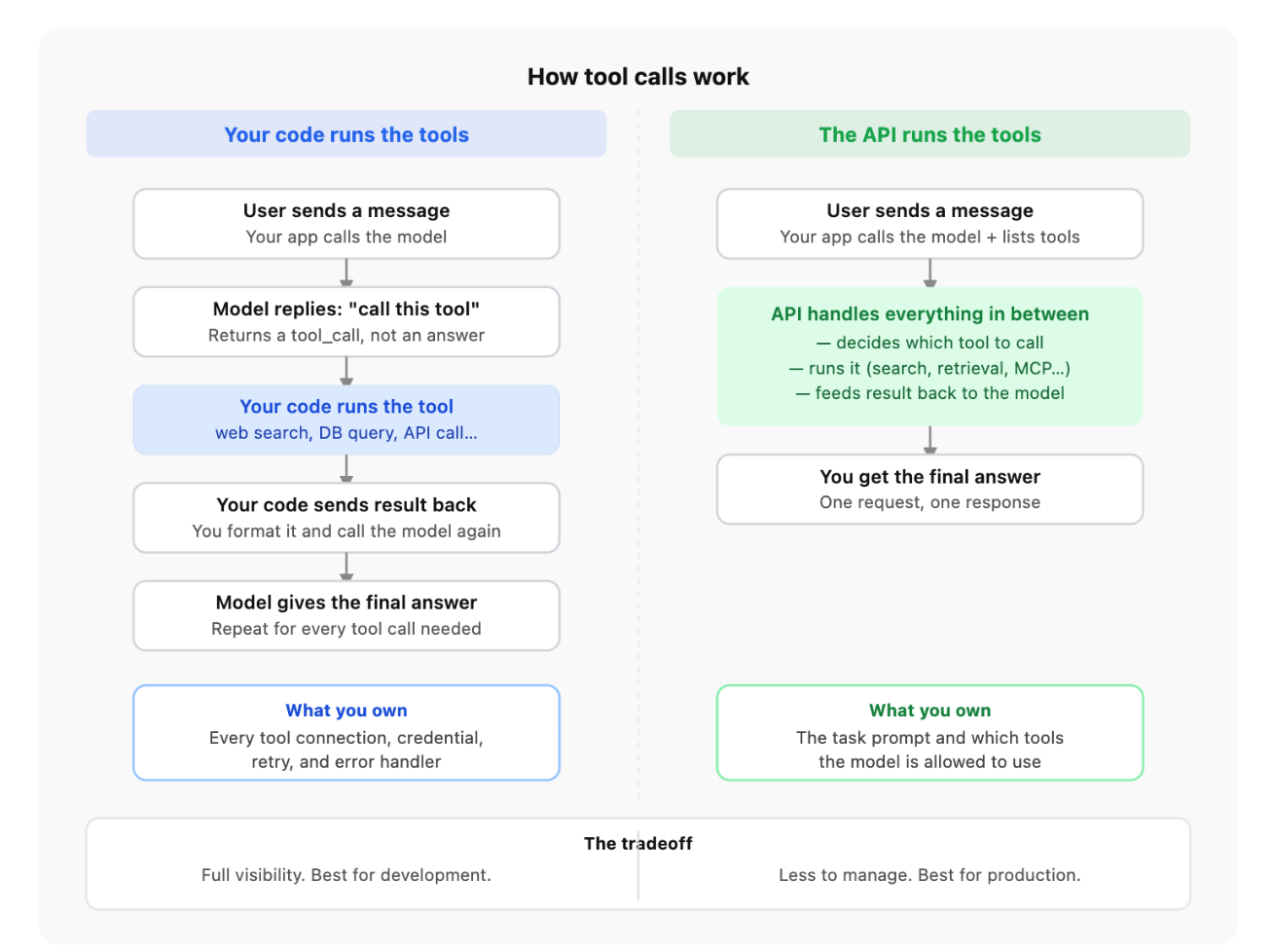
When tool execution moves server-side, you no longer manage the connection lifecycle, retries, or scaling for those tools. Keep these three considerations in mind before starting with server-side tools.
With client-side tools, a failure throws an exception and your code catches it. With server-side tools, if a web search returns no useful results, the model continues reasoning with whatever it got. It will not necessarily tell you the search came up empty.
The fix is simple: write it into your system prompt. “If the knowledge base returns no relevant results, say so and ask the user to rephrase,” gives the model a clear path instead of letting it guess. Explicit instructions for the empty-result case make your agent predictably useful, not just usually useful.
Read tools (web search, web fetch, knowledge base retrieval) are safe to retry. A request times out, you try again, nothing changes.
Write operations through customer-owned MCP servers need more care. If a request times out, you do not know whether the action executed. The right pattern is to assign each write operation a unique request ID that your MCP server uses to deduplicate retries. This gives you safe retries without double-writes.
DO-managed tools and your MCP server have separate failure paths. If all tools stop working, that points to the managed infrastructure layer. If web search keeps working but MCP calls fail, that points to your server.
Build your alerting to distinguish between these two cases. “Tool failure” as a single alert category is hard to act on. “DO-managed tools down” vs. “MCP server unreachable” tells you exactly where to look.
You do not want to manage tool infrastructure. The connection lifecycle, credential management, retries, and scaling for web search and retrieval are real engineering work. Moving it to a managed layer makes sense when that overhead is higher than the loss of direct control.
Credentials should not be in your application code. Web APIs, internal systems, and third-party services often require secrets. Server-side tools let you keep credentials closer to the tools that use them rather than routing them through your application.
Multiple agents or team members need access to the same tools. Client-side tools are scoped to wherever your code runs. Server-side tools are available to any agent making requests to your inference endpoint with no duplicated setup.
You need web search or real-time retrieval. Web search and knowledge base retrieval would otherwise require wiring a search provider yourself and writing the loop to handle tool calls. Server-side tools handle that for you.
You are already using DigitalOcean Inference. If you have a Model Access Key, enabling server-side tools is a single additional field in your existing API call.
You are in development and need full visibility. Client-side execution is transparent. You can log every tool call, inspect payloads, set breakpoints, and reproduce failures locally. Server-side execution requires the tracing API to get equivalent visibility.
Tools are fast, local, and do not make network calls. Functions that run in-memory (schema validation, string parsing, calculations) add sub-millisecond overhead client-side. Moving them server-side adds a network round-trip for no benefit.
Your latency budget has no room. If you are building a voice assistant where users expect a response in under 400ms and model inference alone takes 300ms, every tool call’s round-trip matters.
Tool logic depends on your application state. Tools that depend on local session data, in-memory state, or database connections your server holds are harder to expose as MCP servers. Keep them client-side.
You need control over retry behavior. Client-side, you decide exactly what happens when a tool fails: retry, use a fallback, or propagate a specific error to the user. Server-side retry behavior is determined by the inference layer.
Server-side is the right default when managing tool infrastructure is the problem, which it usually is in production. Client-side is the right default when you need to see exactly what is happening, which is almost always true in development.
Build with client-side tools first. Add observability until you understand the failure modes. Move to server-side for production deployment when the infrastructure overhead exceeds the debugging benefit.
If you have built agents with LangChain or the OpenAI API, here is how the approaches differ.
LangChain tools are client-side by design. You define tools as Python functions, LangChain wraps them in a loop, and you run the whole process in your own code. You get maximum visibility and control. The cost is that you own the infrastructure: connections, retries, error handling, and credential management are your responsibility. LangChain does not manage tool execution for you; it structures the loop you write.
OpenAI’s Responses API built-in tools (web search, code interpreter, file search) are the closest architectural match to DO’s server-side tools. OpenAI manages execution inside the inference request; you declare the tools and get one response. But there is a real architectural consequence to how OpenAI’s tools are built: they are tied to OpenAI’s model layer. If you build a research agent on GPT-4o with built-in web search today, and later want to run that same agent on Claude, you have to rebuild the tool layer from scratch — because OpenAI’s built-in tools only work with OpenAI models. DO’s server-side tools keep the tool layer separate from the model. You configure your tools once and can run them with any model on DO’s catalog. Swapping the underlying model does not require changing how your tools are set up. You can also connect customer-owned MCP servers in addition to the built-in tools.
DO’s server-side tools are closer to the OpenAI model than to LangChain in terms of how they work: managed execution, single-request flow. But they extend that model to customer-owned infrastructure via MCP. The trade-off is the same in all three cases: managed execution means less direct visibility into what happened inside the tool call. You trade observability for less infrastructure to manage.
For teams already running LangChain in production, server-side tools reduce the infrastructure you maintain but do not replace the agent logic you have already built. For teams evaluating which approach to start with, server-side tools make the most sense when you want to ship without owning a tool layer.
MCP (Model Context Protocol) is a standard way for an AI model to connect to external tools and data sources. Think of it as a plugin system: you build a small server that exposes your internal tools, like a database lookup or a CRM search, and the model can call those tools during a conversation.
For example: you have an internal API that looks up customer contracts. You wrap it in an MCP server. When a user asks “show me the open contracts for Acme Corp,” the model calls your tool directly instead of you hardcoding that logic into the prompt.
The key question is who manages that connection.
With client-side MCP, your application code manages the connection to the MCP server directly. The model tells your code “I need to call this tool,” your code makes the call, gets the result, and sends it back to the model.
What the latency looks like:
You can log every tool call, see exactly what was sent and received, set your own timeouts, and handle failures however you want. If something breaks, you can reproduce it locally.
Example: You are building a coding assistant that can check whether a function exists in your codebase. You have an MCP server running locally that indexes your repo. When a developer asks “does this utility already exist?”, the model calls your local MCP server, which searches the index and returns the result in about 1ms. Everything runs on your machine. No external network call, no credentials to manage, and you can see exactly what the model asked for and what came back.
With server-side MCP, you do not manage the connection. You tell DigitalOcean’s inference layer where your MCP server lives and what tools it is allowed to use. When the model needs a tool, DO connects to your server, makes the call, and includes the result in the response, all without your application code doing anything in between.
What the latency looks like:
A warm HTTP call to a remote MCP server takes 2 to 3ms a typical baseline for a low-latency HTTP connection to a nearby server. But real-world MCP traffic does not stay warm. Research across production MCP deployments shows a median tool call latency of 320ms, a p95 of 1,840ms, and a p99 of 6,200ms. The long tail is almost entirely cold starts. When a Node.js MCP server starts cold, module loading alone can take over 2,000ms before the first tool call is even made.
If your server is not pre-warmed or kept alive between sessions, the first call in a new conversation pays that startup cost. At p99, that is over 6 seconds before your agent does anything useful. The p99 is not a property of MCP itself — it reflects cold-start outliers across a wide range of server implementations in the study. A well-maintained server that stays warm between requests will run much closer to the 2 to 3ms warm baseline. The long tail is a cold-start problem, not an MCP problem. Keep your MCP servers running and connections alive.
Example: Same coding assistant, but now deployed and used by your whole team. Instead of every developer running a local MCP server, you expose one shared MCP server over the internet. That server stays warm because it is handling requests continuously. Calls come in at 2 to 3ms instead of 2,000ms+. Each inference request includes the URL and a token. DO’s infrastructure handles the connection, and your team’s agents all use the same tool without anyone having to set up a local server.
{
  "type": "mcp",
  "server_label": "my-internal-api",
  "server_url": "https://api.mycompany.com/mcp",
  "authorization": "Bearer your-secret",
  "allowed_tools": ["get-contract", "list-open-items", "search-customers"]
}
Who does the work. With client-side MCP, your application code opens the connection, calls the tool, waits for the result, and sends it back to the model. With server-side MCP, that responsibility moves to DigitalOcean’s infrastructure. Your code sends one request; everything else happens on their side.
Where your credentials live. Client-side, your API keys and secrets sit inside your application (environment variables, a secrets manager, or config files). Server-side, you pass the credentials directly in the inference request over HTTPS. Both approaches work; the right choice depends on how your team manages secrets.
How much you can see. Client-side gives you full visibility: every tool call is in your own logs, you can see exactly what was sent and what came back, and you can debug locally. Server-side, tool calls happen inside the inference layer, so you need to use the tracing API to get that same level of detail.
Who is responsible for slow starts. Cold starts are still your problem either way. DigitalOcean manages the connection from its side, but if your MCP server has not received a request in a while and needs to restart, that startup time (often 2,000ms or more for Node.js servers) still shows up in your response latency. With a shared server-side setup, traffic from multiple agents keeps the server warm automatically.
Whether your server needs to be on the internet. Client-side MCP connects from wherever your application runs: your private network, your local machine, or an internal server. Server-side MCP connects from DigitalOcean’s network, which means your MCP server must have a public URL. If your tools sit behind a firewall or in a private network, client-side is the only option without additional networking work.
Whether multiple agents can share the same tools. Client-side tools are tied to the machine or process running your code. If three different agents need the same tool, each needs its own connection. Server-side tools are available to any agent that uses your inference endpoint with no duplicated setup.
What happens when a tool fails. Client-side, you write the logic: retry, fall back to a different data source, or return a specific error to the user. Server-side, the inference layer handles retries with its own defaults. For most production use cases, the defaults are fine. But if your agent needs precise control over what happens after a tool fails, client-side gives you that.
When your tools run inside your own code, debugging is straightforward: something fails, you see the error, you fix it. When tools run inside the inference layer, you lose that direct view. Three things are worth setting up before you ship.
With client-side tools, every tool call is in your own logs. With server-side tools, that detail lives inside DigitalOcean’s infrastructure. Use the Agent Tracing API to see what each tool call cost. Without it, a slow response could be the model, a web search, or a cold MCP server, and you will not know which.
Overall response time is too broad a metric for agent workloads. Track how long each individual tool call takes, how many tool calls each request makes, and how often a tool returns nothing useful. DigitalOcean’s Control Panel gives you aggregate inference metrics; per-tool breakdown requires the tracing API or your own instrumentation.
“The agent did not work” can mean two different things: the tool broke (search timed out, knowledge base returned nothing), or the tool worked but the model still gave the wrong answer. These need different fixes. One is an infrastructure problem; the other is a prompt problem. Tracking them as one metric makes both harder to diagnose.
What tools can I use server-side today? Web search, web fetch, knowledge base retrieval, customer-owned MCP servers, and Tool Search (lazy-loading for Anthropic and OpenAI models).
Does it cost extra to use server-side tools? Knowledge base retrieval, MCP, and Tool Search do not add cost beyond standard inference pricing. Web search is charged at $10 per 1,000 requests.
Can I mix client-side and server-side tools in the same agent? Yes. You can pass server-side tool definitions in the inference request and still handle other tools in your own code. They work independently.
Does my MCP server need to be on the public internet? Yes, for server-side MCP. DigitalOcean’s inference layer connects to your server from its own network, so your server needs a public URL. If that is not possible, use client-side MCP instead.
What happens if a server-side tool fails mid-request? The model continues with whatever partial result it got. It will not always tell you the tool returned nothing useful. Write explicit instructions in your system prompt for what to do when a tool returns no results.
How do I debug slow responses when tools run server-side? Use the Agent Tracing API. It shows you the time spent per tool call so you can tell whether the model or a specific tool is the bottleneck.
What is Tool Search and when should I use it?
Tool Search lazy-loads tool definitions. Tools marked defer_loading: true are only loaded when the model needs them, not on every request. Use it when your agent has many tools and you want to reduce input token usage.
When should I stick with client-side tools? When you are still in development and need to debug easily, when your tools run on a private network, or when your latency budget is very tight and every network round-trip matters.
Moving tool execution server-side changes where the complexity lives. The infrastructure you would otherwise own (connections, credentials, retries, scaling) moves to a managed layer. Your agent code gets smaller, and the operational surface your team is responsible for shrinks.
But the hard parts of building agents do not move with it. Designing for tool failures, keeping MCP servers warm, separating tool errors from model errors, knowing what to instrument: those remain your job. The difference is that you are doing that work on top of stable infrastructure instead of while also keeping the plumbing running.
These tradeoffs are the same regardless of which provider you use. The architecture decision does not change based on where you run inference.
If you are deciding right now, here is the short version: use server-side tools if your main problem is infrastructure overhead, such as credentials, connections, retries, and scaling. Use client-side tools if your main problem is visibility or control. And if you are not sure yet, start client-side, understand the failure modes, then move server-side when the infrastructure cost outweighs the debugging benefit.
 This work is licensed under a Creative Commons Attribution-NonCommercial- ShareAlike 4.0 International License.
此内容由惯性聚合(RSS阅读器)自动聚合整理,仅供阅读参考。 原文来自 — 版权归原作者所有。