

惯性聚合 高效追踪和阅读你感兴趣的博客、新闻、科技资讯
阅读原文 在惯性聚合中打开

推荐订阅源

宝玉的分享
宝玉的分享
T
Threat Research - Cisco Blogs
H
Hacker News: Front Page
N
News and Events Feed by Topic
Know Your Adversary
Know Your Adversary
Cisco Talos Blog
Cisco Talos Blog
SecWiki News
SecWiki News
C
Cisco Blogs
D
Darknet – Hacking Tools, Hacker News & Cyber Security
T
Tor Project blog
K
Kaspersky official blog
Forbes - Security
Forbes - Security
Webroot Blog
Webroot Blog
Schneier on Security
P
Privacy & Cybersecurity Law Blog
H
Heimdal Security Blog
Y
Y Combinator Blog
The GitHub Blog
The GitHub Blog
S
SegmentFault 最新的问题
V
Vulnerabilities – Threatpost
T
Tenable Blog
T
Tailwind CSS Blog
P
Privacy International News Feed
WordPress大学
WordPress大学
大猫的无限游戏
大猫的无限游戏
小众软件
小众软件
博客园 - Franky
Hacker News: Ask HN
Hacker News: Ask HN
Jina AI
Jina AI
C
Cybersecurity and Infrastructure Security Agency CISA
CTFtime.org: upcoming CTF events
雷峰网
雷峰网
Vercel News
Vercel News
A
About on SuperTechFans
爱范儿
爱范儿
Simon Willison's Weblog
AWS News Blog
AWS News Blog
The Last Watchdog
The Last Watchdog
Engineering at Meta
Engineering at Meta
Spread Privacy
Spread Privacy
Security Archives - TechRepublic
博客园 - 司徒正美
量子位
博客园 - 三生石上(FineUI控件)
J
Java Code Geeks
Hacker News - Newest:
Hacker News - Newest: "LLM"
Recorded Future
Recorded Future
H
Hackread – Cybersecurity News, Data Breaches, AI and More
Martin Fowler
Martin Fowler
Project Zero
Project Zero

DigitalOcean Community Tutorials

Mastering grep with Regular Expressions for Efficient Text Search It's Time to Break Up with Your Cloud: Why AI Teams are Switching We Built a Private-Document AI App to Test Platform Security. Here Is What We Could Actually Verify. PostgreSQL Explained: A Complete Beginner-to-Advanced Guide How To Install and Configure Postfix on Ubuntu How To Build a Web Application Using Flask in Python 3 Build AI Reading List with DigitalOcean Functions and Mistral How To Concatenate Strings in Python How to Allow MySQL Remote Access Securely How To Install and Use Docker on Rocky Linux How To Build a Multi-Agent AI System with Docker Agent DSPy Use Cases: Build Optimized LLM Pipelines How To Submit AJAX Forms with jQuery Build an AI-Powered GPU Fleet Optimizer with the DigitalOcean AI Platform ADK Monitor GPU Utilization in Real Time: A Complete Guide Reduce File Size of Images in Linux - CLI and GUI methods Reduce PDF File Size in Linux: Tools and Methods How To Set Up a Private Docker Registry on Ubuntu How To Troubleshoot Terraform: Errors and Fixes How to Use Go Modules Python Multiprocessing Example: Process, Pool & Queue Convert Class Components to Functional Components with React Hooks How To Install and Configure Ansible on Ubuntu LLM Tokenizers Simplified: BPE, SentencePiece, and More How To Monitor System Authentication Logs on Ubuntu How to Use Traceroute and MTR to Diagnose Network Issues How to Deploy Postgres to Kubernetes Cluster Importing Packages in Go: A Complete Guide Create RAID Arrays with mdadm on Ubuntu How To Make an HTTP Server in Go How To Set Up Time Synchronization on Ubuntu How To Use Struct Tags in Go apt-key Deprecation: Add Repositories with GPG on Ubuntu Linux ps Command: 20 Real-World Examples Python struct.pack and struct.unpack for Binary Data Deadlock in Java: Examples, Detection, and Prevention How To Use Find and Locate to Search for Files on Linux Structured Resume Skill Extraction Using Mistral-7B Inference How to Use the Python Main Function How to Set Up NemoClaw on a DigitalOcean Droplet with 1-Click Build an End-to-End RAG Pipeline for LLM Applications From Single to Multi-Agent Systems: Key Infrastructure Needs Back Up Data to Object Storage Using Restic How To Install LAMP Stack (Apache, MySQL, PHP) on Ubuntu How to Download Files with cURL How To Use Variadic Functions in Go Generate UUIDs with uuidgen on Linux How To Use EJS to Template Your Node Application How to Install Node.js on Ubuntu (Step-by-Step Guide) MongoDB Indexes: Improve Query Performance with Node.js LLM Tool Calling with DigitalOcean AI Platform and Databases What are Text Diffusion Models? - An Overview Crafting a Game from Scratch with GPT-5.4 Building Long-Term Memory in AI Agents with LangGraph and Mem0 How To Install PHP 7.4 and Set Up a Local Development Environment on Ubuntu 20.04 Build a GraphQL API in Go to Upload Files to Spaces How To Lint and Format Code with ESLint in Visual Studio Code Train YOLO26 for Retail Object Detection on DigitalOcean GPUs How To Work with JSON in MySQL How to Use the JavaScript .map() Method Building a Scalable App with MongoDB Using DigitalOcean's MCP Server How to Create an SSH Key in Linux: Easy Step-by-Step Guide Measure MySQL Query Performance with mysqlslap How To Use *args and **kwargs in Python 3 Nemotron 3 helped me find the perfect dish rack? A2A vs MCP - How These AI Agent Protocols Actually Differ How To Install and Manage Supervisor Docker Container Images with Watchtower on Ubuntu Getting Started with Qwen3.5 Vision-Language Models How To Create a New Sudo-Enabled User on Ubuntu How to Use Ansible to Install and Set Up Docker on Ubuntu How To Enable Remote Desktop Protocol Using xrdp on Ubuntu 22.04 How To Convert a String to a List in Python How To Check If a String Contains Another String in Python How to Read a Properties File in Python Python Command Line Arguments: sys.argv, argparse, getopt Mastering Grep command in Linux/Unix: A Beginner's Tutorial Understanding Python Data Types How to Implement a Stack in C With Code Examples Python os.system() vs subprocess: Run System Commands How To Install and Use Docker Compose on Ubuntu How to Add and Delete Users on Ubuntu How To Order Query Results in Laravel Eloquent How To Define and Use Handlers in Ansible Playbooks How To Install and Use SQLite on Ubuntu How To Install and Use Homebrew on macOS How To Manage DateTime with Carbon in Laravel and PHP How To Install Git on Ubuntu How To Install and Secure Redis on Ubuntu How To Build and Install Go Programs on Linux Using ldflags to Set Version Information for Go Applications How To Build a Node.js Application with Docker How To Add JavaScript to HTML How To Reset Your MySQL or MariaDB Root Password How To Add Images in Markdown How To Set Up a Production Elasticsearch Cluster with Ansible How To Set Up a Firewall Using firewalld on CentOS Understanding Systemd Units and Unit Files How To Set Up Replication in MySQL How To Use the .htaccess File
How to Generate Videos with LTX-2.3 on DigitalOcean GPU Droplets
2026-03-19 · via DigitalOcean Community Tutorials

LTX-2 has proven already to be one of the most exciting projects in Computer Vision. With their promise, which so far has been kept, to release iterative updates of their existing model suite, they have ushered in a revolution for low-cost video generation. This has been shown demonstrably by the awesome new model, LTX-2.3.

In this follow-up to our introduction to LTX-2, we are going to show how you can use LTX-2.3 to create even more complicated, expressive, and versatile videos than ever before with open-source technologies. We will start with a brief overview of what’s new in LTX-2.3, before jumping into a step-by-step demo on running LTX-2.3 using the ComfyUI and a DigitalOcean GPU Droplet.

Key Takeaways

  • Significant Iterative Improvements: LTX-2.3 marks a major leap over its predecessor, specifically addressing previous weaknesses in image-to-video generation (reducing “freezing” and the Ken Burns effect) and enhancing prompt adherence through a text connector that is four times larger.
  • Production-Ready Fidelity: The model introduces native portrait video support (up to 1080×1920) and a rebuilt latent space. This results in sharper fine details—such as hair and text—and cleaner, artifact-free audio alignment for more professional outputs.
  • Accessible High-End Workflows: By pairing open-source tools like ComfyUI with scalable cloud infrastructure like DigitalOcean GPU Droplets (specifically H100/H200 GPUs), individual creators can now execute complex, production-grade video generation that was previously reserved for high-budget research teams.

New Features and Improvements in LTX-2.3

LTX-2.3 is the iterative step forward from LTX-2 from Ligthtricks. LTX-2.3 was released with a plethora of improvements: namely in prompt adherence and audio. In this section, we will outline each of the reported improvements in LTX-2.3, and discuss what they mean for generating your own videos.

  • Sharper Fine Detail: The architects rebuilt the latent space with an updated Variational Autoencoder trained on higher-quality data. This means that fine textures like hair, text, and edge detail are better preserved through the full generation pipeline. We found in our tests that these improvements are present and noticeable.
  • Tighter Prompt Adherence: LTX-2.3 allegedly uses a “4x larger text connector” to enable understanding of more complex prompts. This includes prompting multiple subjects, navigating spatial relationships, stylistic instructions, and more now resolving accurately. In our experimentation, we found that LTX-2.3 does indeed have better prompt adherence, and can handle much longer and more complex prompts with better strength.
  • Stronger Image-to-Video: One problem with the original release was its relative weakness at image-to-video generation. LTX-2.3 reportedly features less freezing, less Ken Burns, and more realistic motion. With better visual consistency from the input frame, there are fewer generations we need to throw away. Paired with the improvements to prompt adherence and detail, this makes the model now quite strong for image-to-video modeling.
  • Cleaner Audio: They filtered their training data and added a new vocoder. Together, this leads to fewer artifacts, fewer unexpected drops, and tighter alignment across text-to-video and audio-conditioned workflows. In practice, this makes the audio pair much more cleanly with the video outputs

Running LTX-2.3 with a GPU Droplet

To get started with LTX-2.3, the first thing we need is sufficient GPU computing power to run the models. We recommend sourcing this power from the Cloud, somewhere like DigitalOcean. With DigitalOcean’s GPU Droplets, we can get our GPU power anywhere with internet connection & access to some of the most powerful and versatile machines available for AI. Create an account and login to get access to your machine as needed.

Once you have logged in, navigate to the “Manage” drop-down menu in the left-hand sidebar of the DigitalOcean dashboard, and select GPU Droplets. Once on the GPU Droplet page, search for and click the button that says “Create GPU Droplet”. From there, choose the Data Center region that is best for your location, and then select a type of GPU. We recommend an H100 or H200 at least for this task. Add an SSH key (this is critical), and create the machine.

SSH into your GPU Droplet from your local machine. From there, navigate to the working directory of your choice. With that, we are ready to begin setting up the ComfyUI.

Setting up the ComfyUI for LTX-2.3

To get started with LTX-2.3, we first need the requisite model files. We are going to use the base template provided by the Comfy Org for this, so the following series of downloads will correctly fill the model directories we are using with the required files. Paste the following into your remote machine terminal:

git clone https://github.com/Comfy-Org/ComfyUI
cd ComfyUI
python3 -m venv venv
source venv/bin/activate
pip install -r requirements.txt
cd models/checkpoints
wget https://huggingface.co/Lightricks/LTX-2.3-fp8/resolve/main/ltx-2.3-22b-dev-fp8.safetensors
cd ../text_encoders/
wget https://huggingface.co/Comfy-Org/ltx-2/resolve/main/split_files/text_encoders/gemma_3_12B_it_fp4_mixed.safetensors
cd ../loras/
wget https://huggingface.co/Lightricks/LTX-2.3/resolve/main/ltx-2.3-22b-distilled-lora-384.safetensors
wget https://huggingface.co/Comfy-Org/ltx-2/resolve/main/split_files/loras/gemma-3-12b-it-abliterated_lora_rank64_bf16.safetensors
cd ../latent_upscale_models/
wget https://huggingface.co/Lightricks/LTX-2.3/resolve/main/ltx-2.3-spatial-upscaler-x2-1.0.safetensors
python main.py

Save the output. Then, get your machine’s Public IPv4 address, and, in a separate terminal window on your own machine, paste the following:

ssh -N -L 8188:127.0.0.1:8188 root@<your remote machine’s public IPv4 address>

Now we can take the output from the first terminal window and open the address in our local machine’s browser.

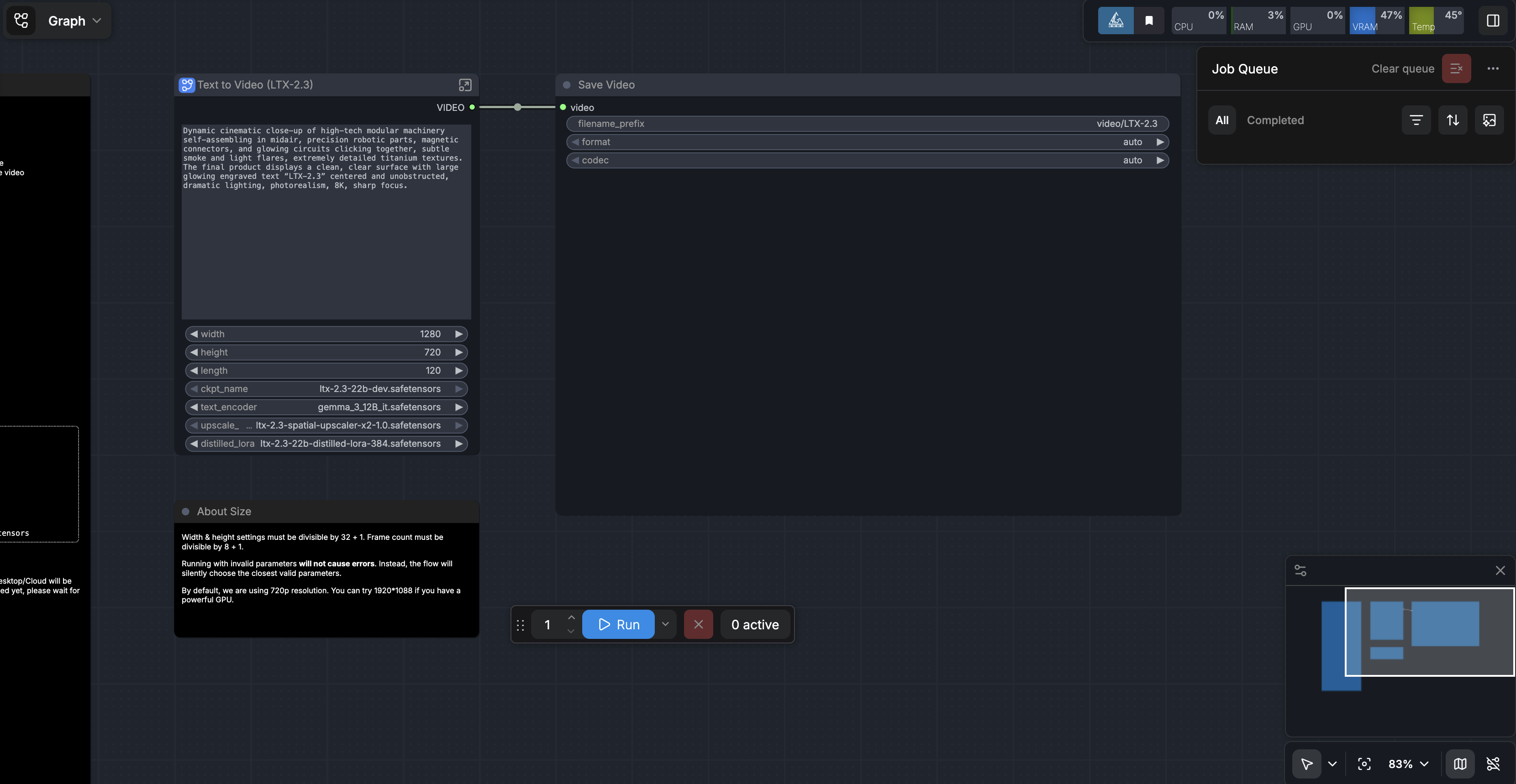
We have a template link you can access. Download the template, and upload it to the ComfyUI. If everything worked, it should look like this.
image

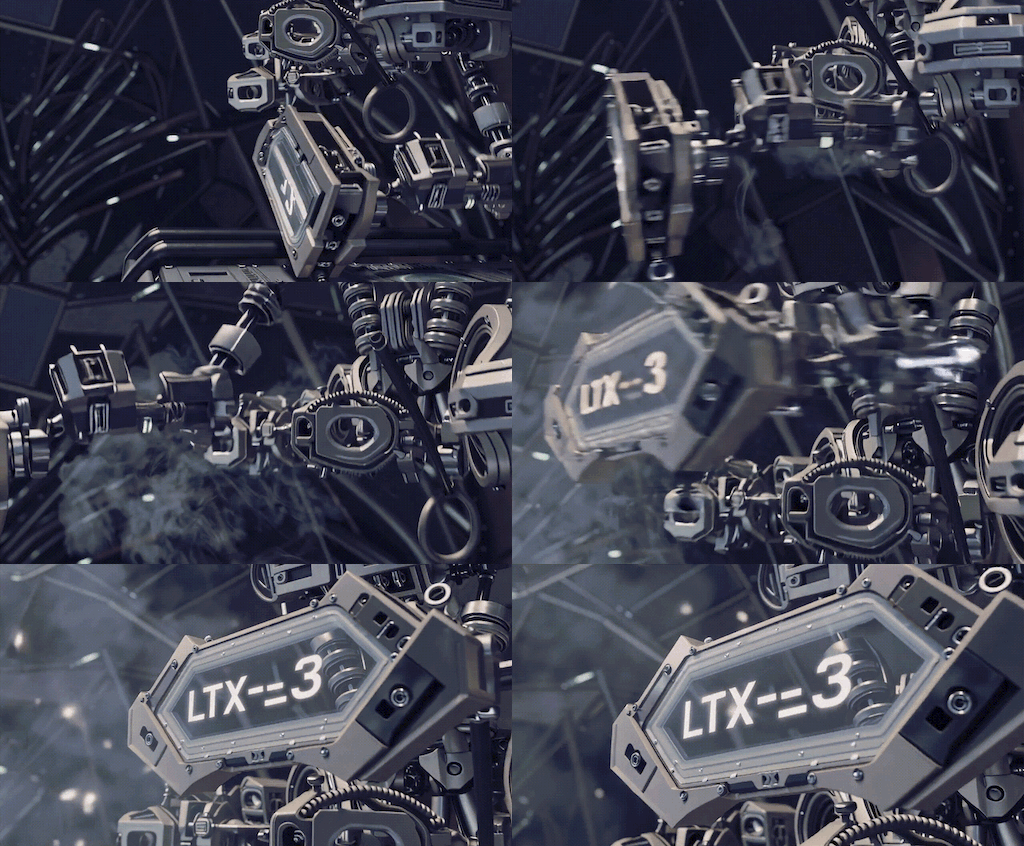
Then, when you run the prompt you should get a video like the following (but with sound):
image

From here, you are free to try and test the limits of LTX-2.3! We recommend testing your old LTX-2 prompts against the new model, testing the improved image-to-video capabilities, and taking full advantage of the speed and efficiency of the LTX-2.3 model using the GPU Droplet at your disposal. In our experience so far, LTX-2.3 is excellent for animating static images for media purposes, and creating wholesale videos from scratch in various styles like anime or cinematic realism.

Closing Thoughts

LTX-2.3 represents a meaningful step forward for open-source video generation, bringing higher fidelity, stronger prompt control, and more reliable audio into a workflow that is increasingly practical for real-world use. When paired with DigitalOcean GPU Droplets, what was once limited to large research teams or expensive proprietary tools is now accessible to individual developers, creators, and small teams. The combination of powerful cloud hardware and flexible tooling like ComfyUI creates an environment where experimentation is fast, scalable, and relatively affordable.

More importantly, LTX-2.3 signals where this space is heading: toward models that can reliably translate complex creative intent into polished, production-ready video. Whether you are animating still images, prototyping visual ideas, or building entirely new forms of media, the barrier to entry continues to drop. As these models improve and infrastructure becomes even more efficient, we are quickly approaching a future where high-quality video generation is as routine as image generation is today.

Was this helpful?

Creative CommonsThis work is licensed under a Creative Commons Attribution-NonCommercial- ShareAlike 4.0 International License.