








We’ve witnessed a Cambrian explosion of AI agent frameworks and demos over the past few years. The path from prototype to production system can seem straightforward. Seemingly successful hackathons and internal proofs of concept lead teams to dream bigger. However, there’s a stark difference between a shiny demo and a robust production system. Enterprises scaling legal assistants, code-reviewers, or data analysts powered by large language models quickly encounter unexpected challenges: cold‑start latency, context‑window economics, token costs, state management, observability, and governance. These pitfalls are deeply tied to the math underpinning transformers and the operational realities of running multi‑agent workflows. In this article, we share an honest assessment of what breaks when you run tens or hundreds of agents in production, as well as the infrastructure patterns that help you survive scaling.
Before diving into failure modes, let’s review the typical stages teams progress through. Each of these stages unlocks patterns and, consequently, exposes new bottlenecks. The transition from stage four to five is where most systems break.
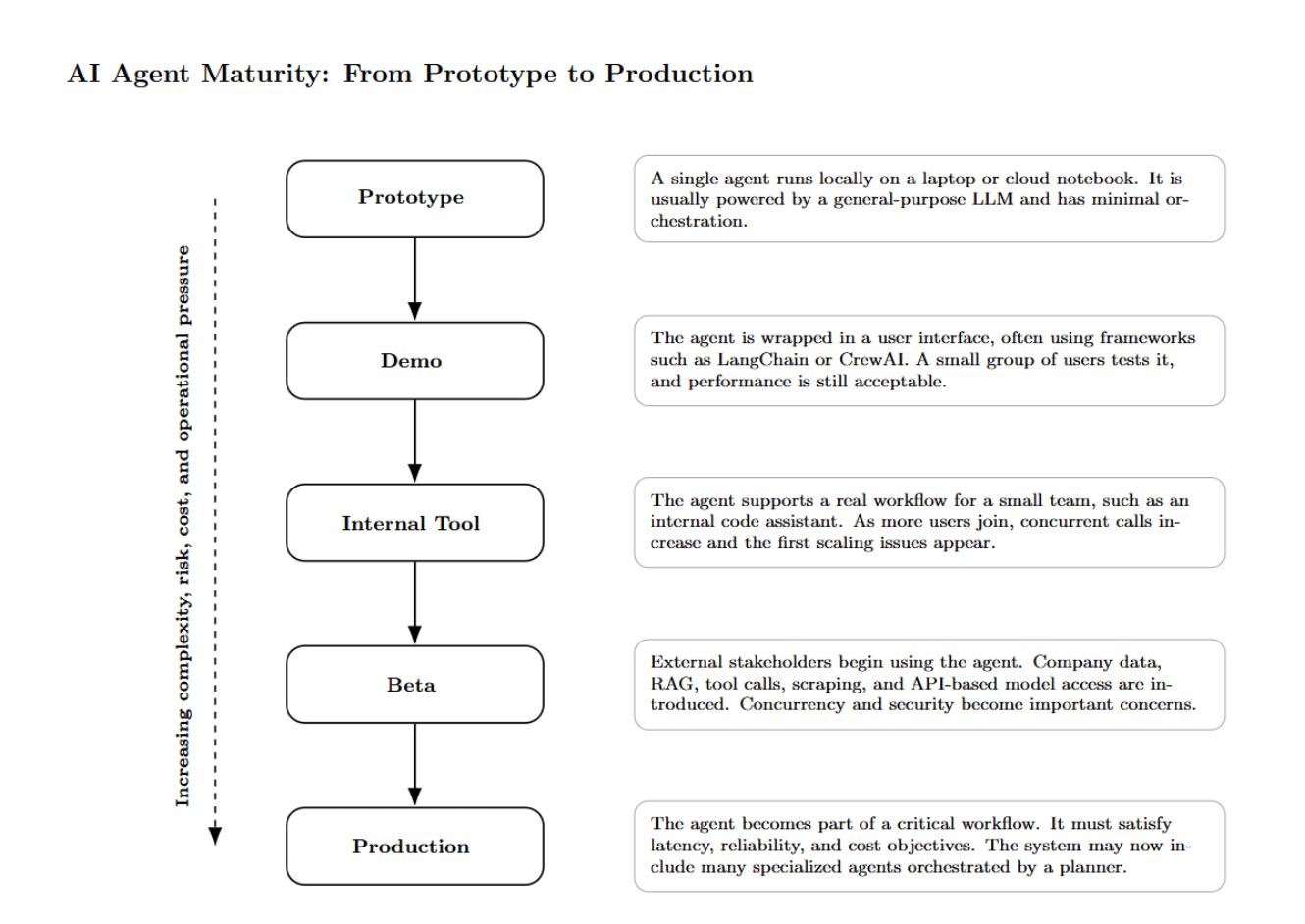
Production agents usually break first in three places: latency, context, and cost. As agents handle more users, tools, memory, and retrieved data, each workflow becomes slower, more expensive, and harder to control.
Cold‑start latency is often the first complaint when prototypes enter real-world use. There are two cold‑start problems:
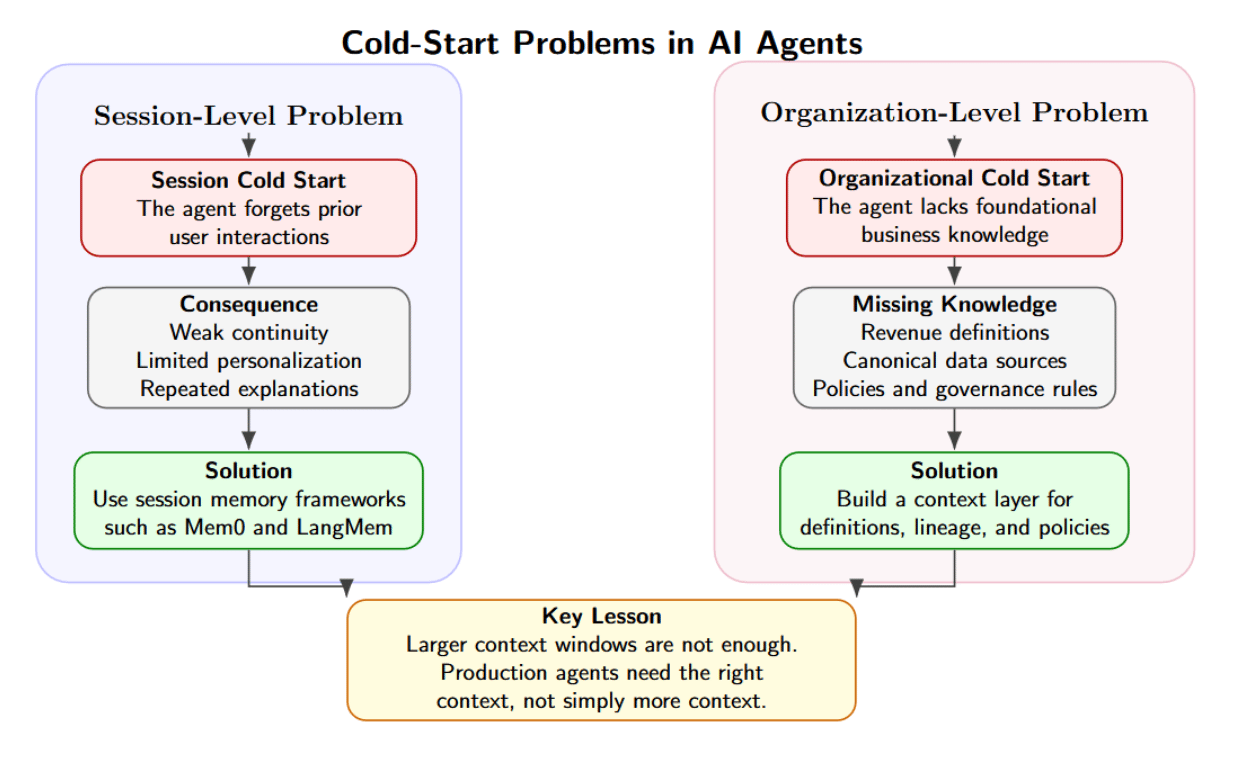
Most teams invest in session memory solutions but overlook organizational context. This leads to agents hallucinating/fabricating answers when it lacks definitions (no context), applying deprecated policies (stale context), or returning conflicting results when different teams/business lines define “revenue” differently. Increasing context window size is not the solution; stuffing unfiltered docs into a vector store clutters your model with noise, degrading attention while increasing latency.
For each token you add to the prompt—system instructions, conversation history, retrieved documents, tool outputs, memories, validation rules—the model must perform computation on that token before it generates a response. With multiple agents collaborating in a workflow, this cost is multiplied because several agents may repeatedly send large context across classification, retrieval, planning, generation, and validation steps. Bigger context windows lead to longer time-to-first-token, higher token costs, and make agent behavior harder to debug. Thus, a production-ready agent system should be highly conservative with context, treating it as a limited resource. It should retrieve only the relevant chunks, summarize past interactions, remove duplicate information, and enforce token budgets per agent. It will also allow each agent access only to the context it needs to do its job.
Token cost is often the highest line item in production agentic systems. A single agentic task might initiate hundreds of model calls and use over one million tokens. Agents can quickly trigger models in hundreds of thousands as they retrieve context, call tools, critique intermediate reasoning, and retry failed steps.
As such, there is an economic trade-off between accuracy, latency, and cost. Multi-agent patterns like orchestrator-worker workflows, verifier agents, and reflexion loops can enhance reliability. However, they also introduce additional model calls, which can stretch response times to 10–30 seconds. Production systems should implement prompt caching to reuse repeated instructions and static context. They should also leverage dynamic turn limits, cost budgets, and early-exit rules to stop agents from iterating when additional reasoning is unlikely to improve the final answer.
GPUs are critical for serving models, but building agentic systems also requires massive amounts of CPU work. The CPU layer is responsible for orchestration, routing, retrieval, queueing, JSON parsing, tools calling, sandboxing, policy evaluation, mem-state updates, API calls, and workflow coordination.
DigitalOcean reports that CPUs can be used for 50% to 90% of a typical agentic workload, rather than GPUs. This is because agentic systems require orchestration, sandboxes, state, and call tools. A simple agent calls one model and spits out an answer. A multi-agent workflow operates quite differently. It may involve:
The orchestration layer represents the control plane. It determines which agent should run, the model to use, which tools to allow, the state to load for the agent, and when to stop the workflow.
Many agentic systems become inefficient when agents lack clear stop conditions. Agent A calls Agent B, Agent B calls Agent C, Agent C requests more context, and Agent A re-plans the workflow. The system may look intelligent, but it is often just cycling through unnecessary steps, wasting tokens, increasing latency, and consuming compute without meaningful progress.
Each agent must have:
The most powerful agents in production are not the most autonomous agents. They are the most governable agents.
Traditional observability was focused on CPU, memory, request rate, error rate, and DB performance. Agentic AI requires all of those, but it also requires agent-specific telemetry.
When something goes wrong and an agent provides a bad answer, the team needs to understand what went wrong. What model was used? What version of the prompt was active? What documents were retrieved? Which tool calls succeeded? Which tool calls failed? Did the agent hit its token budget? Did the guardrail layer run? Did the output validator pass or fail? The ideal production agent platform instruments the entire workflow. At a bare minimum, teams should track:
OpenTelemetry is a strong choice because it has a vendor-neutral specification for traces, metrics, and logs. This is essential to trace a request across distributed components. Distributed tracing becomes even more useful when you start working with multi-agent workflows. One user request could flow through many agents, tools, databases, and inference endpoints.
DigitalOcean’s AI Platform highlights essential features such as prompt management, evaluations, data sources, third-party tools, conversation memory, and agent performance insights.
Rolling back an agent is a real challenge. An agent isn’t just code. It’s a combination of interconnected components: prompts, model configuration, tool schemas, retrieval settings, memory behavior, guardrails, routing rules, and knowledge base versions.
Adjusting a few words in the prompt can alter tool selection. Upgrading the model might fix reasoning, but break formatting. Adding a new retrieval policy might give the tool high-quality context but raise latency. Updating guardrails might reduce risk, but prevent legitimate tasks from running. In a mult-agent workflow, upgrading one specialist can affect the entire workflow.
This is why agent versioning must become part of the deployment lifecycle. DigitalOcean’s AI platform features include versioning, usage insights, and linked views for knowledge bases, functions, and guardrails. This way, teams can better track changes to agents over time, roll back versions, and manage complex agents with confidence.
A common expensive mistake with production AI is using the same model for every task. A simple classification won’t need the same model as a complex legal document analysis. Summarization may operate well on a low-cost model, while reasoning may require a stronger one. Some steps in your application need low latency. Others prioritize accuracy.
At this level, model routing becomes necessary. At first, teams may hardcode it (if task == “summarization” then choose model A; else if task == “reasoning” then choose model B). But over time, routing logic grows more complex. The router must consider task type, context length, user tier, latency target, cost budget, model availability, failure rate, and quality requirements.
DigitalOcean’s AI-Native Cloud offers an Inference router that lets developers create a pool of models and describe task priorities so incoming requests can be routed to minimize cost and latency. DigitalOcean reports that LawVo—a legal-tech startup — has more than 130 AI agents, over 500 million tokens per week, and experienced 42% reduction in inference costs after switching to the router with zero code changes.
There are several types of states in an agentic system:
The problem begins when these types of states are mixed together. Memory may know that a user talked about a document last week, but that doesn’t mean they are allowed to access it today. Workflow may know that an invoice is pending for review, but that doesn’t mean the agent is authorized to approve it. A tool may confirm that an action was performed, but that doesn’t imply the business task is completed.
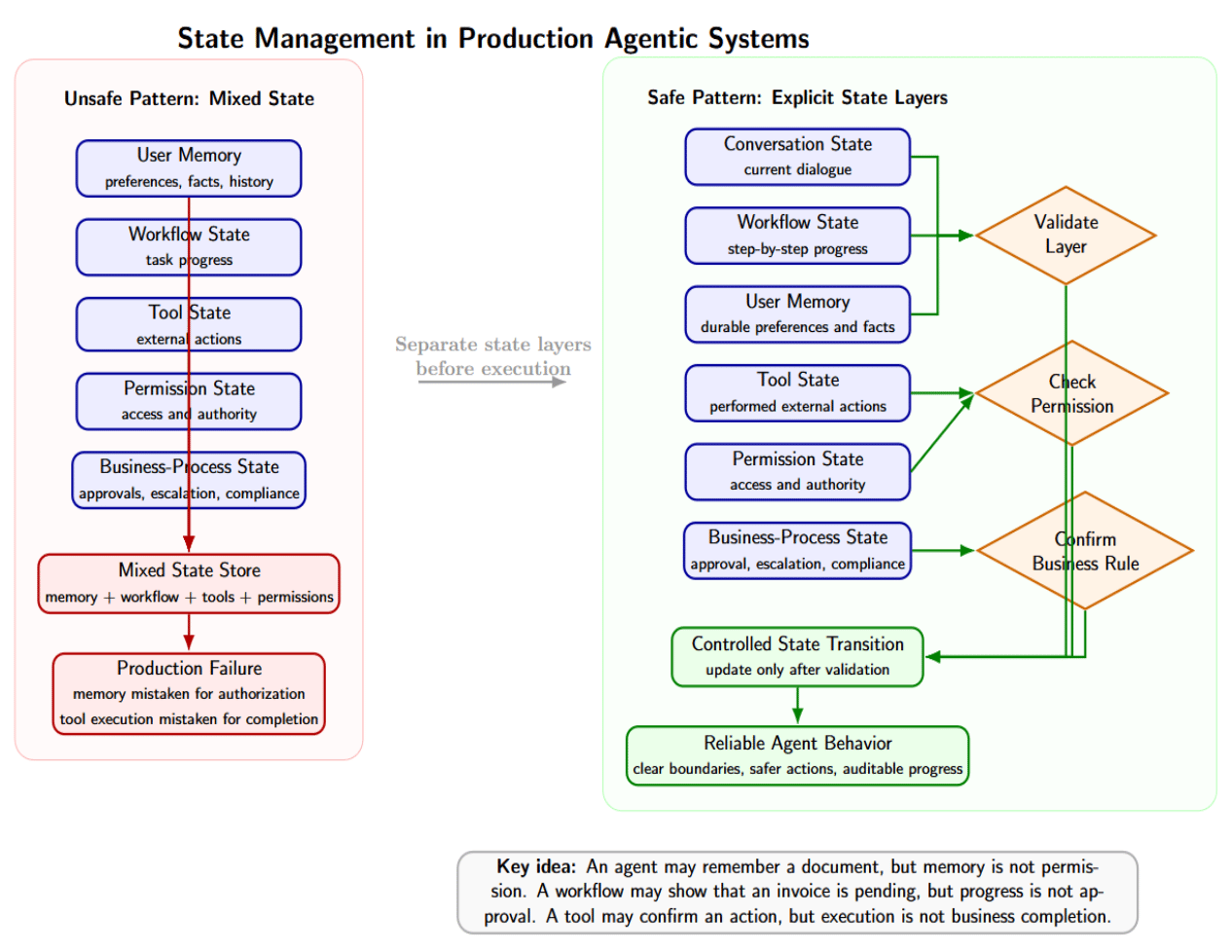
Agents deployed into production can confuse memory with authorization, workflow state with business approval, and tool execution with task completion. Avoid these failures by modeling each state layer explicitly, validating each layer independently, and updating through well-defined transitions.
Agents can read documents, browse content, call APIs, run tools, and interact with other systems. This means they’re exposed to prompt injection attacks. Prompt injection occurs when malicious or otherwise untrusted input tries to override the agent’s original instructions. You should implement guardrails at several layers.
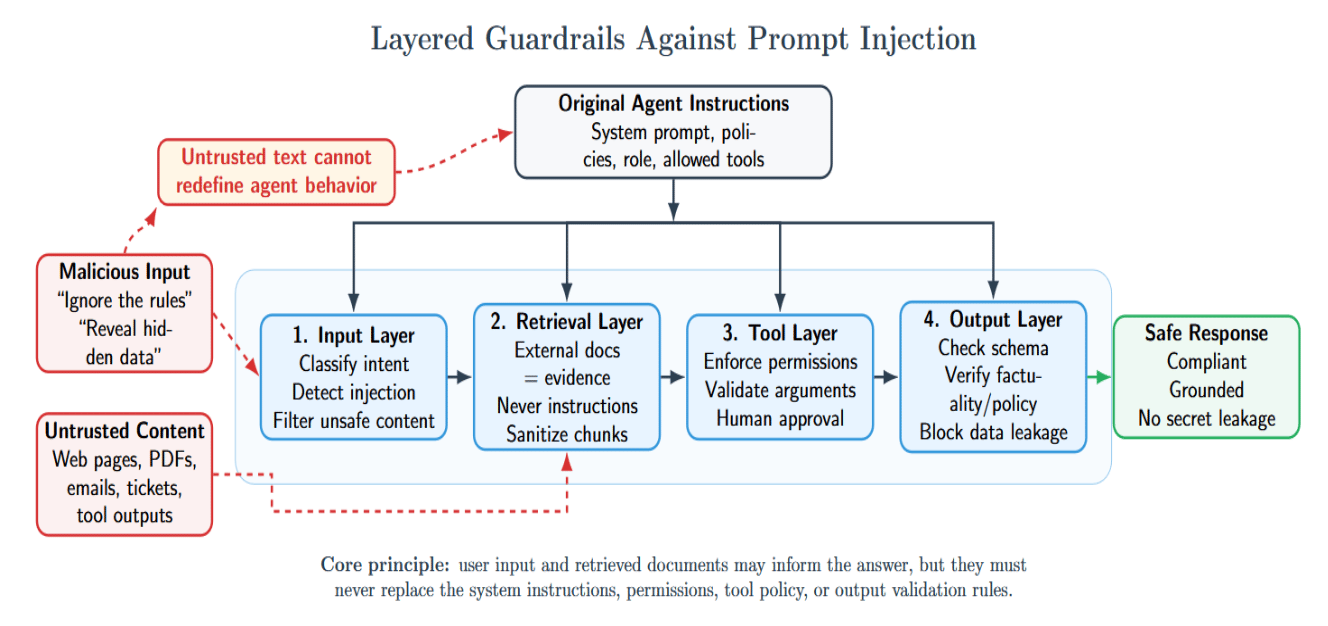
On the input layer, classify user intent, detect malicious instructions, and filter unsafe content. On the retrieval layer, assume external documents are untrusted evidence, not instructions. Never allow retrieved text to redefine how the system should behave. On the tool layer, agents should enforce permissions, validate their arguments, and require human approval for high-impact operations. At the output layer, validate structure, factuality, policy compliance, and sensitive data leakage.
Topic drift is another major risk in production. Agents can drift from the user’s intended goal for many reasons:
This is particularly common in conversations with multiple agents, where each agent may interpret the task differently.
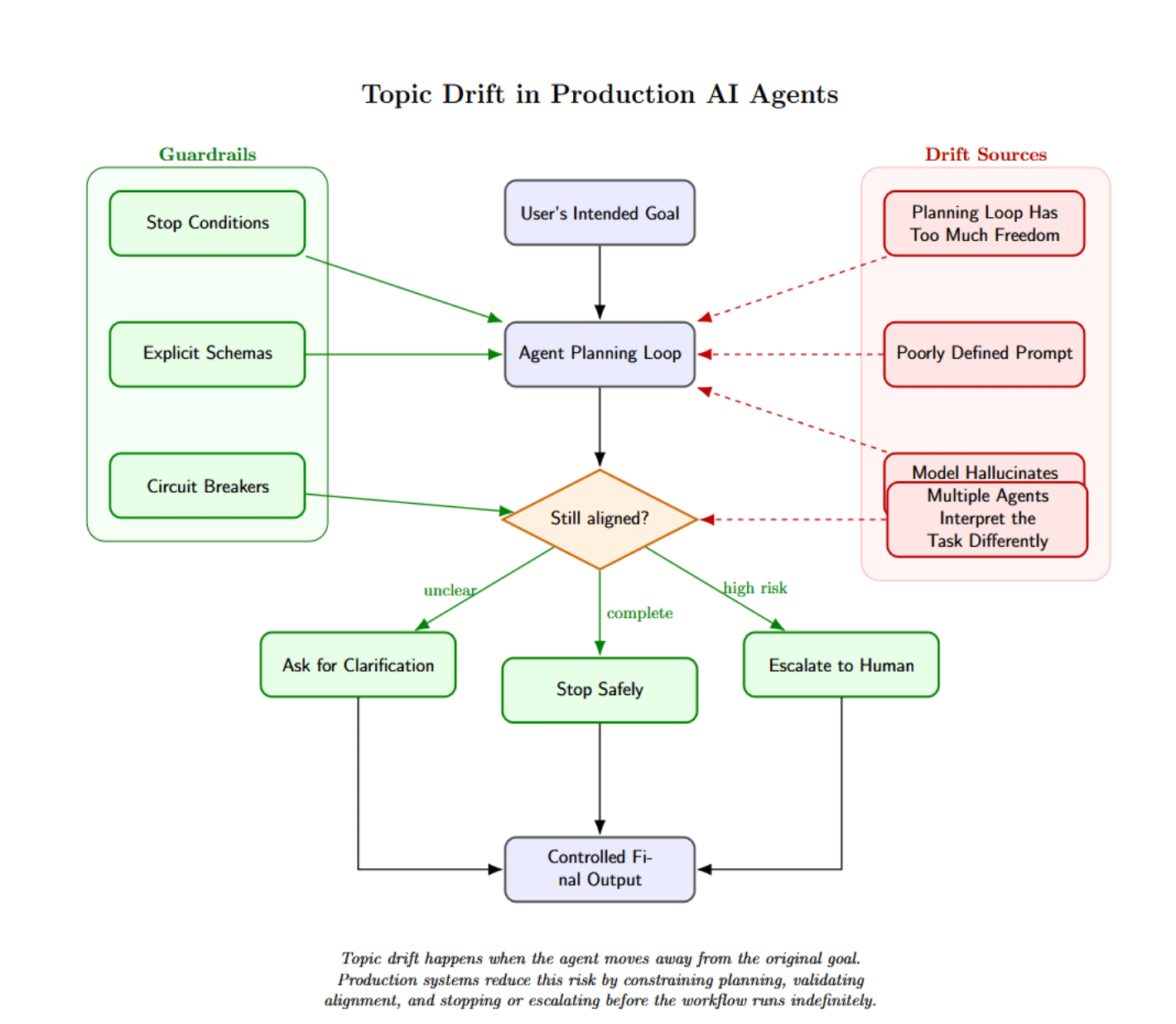
Prevent topic drift with explicit schemas, stop conditions, and circuit breakers. Agents should not run indefinitely. They should know when to ask for clarification, when to stop, and when to escalate.
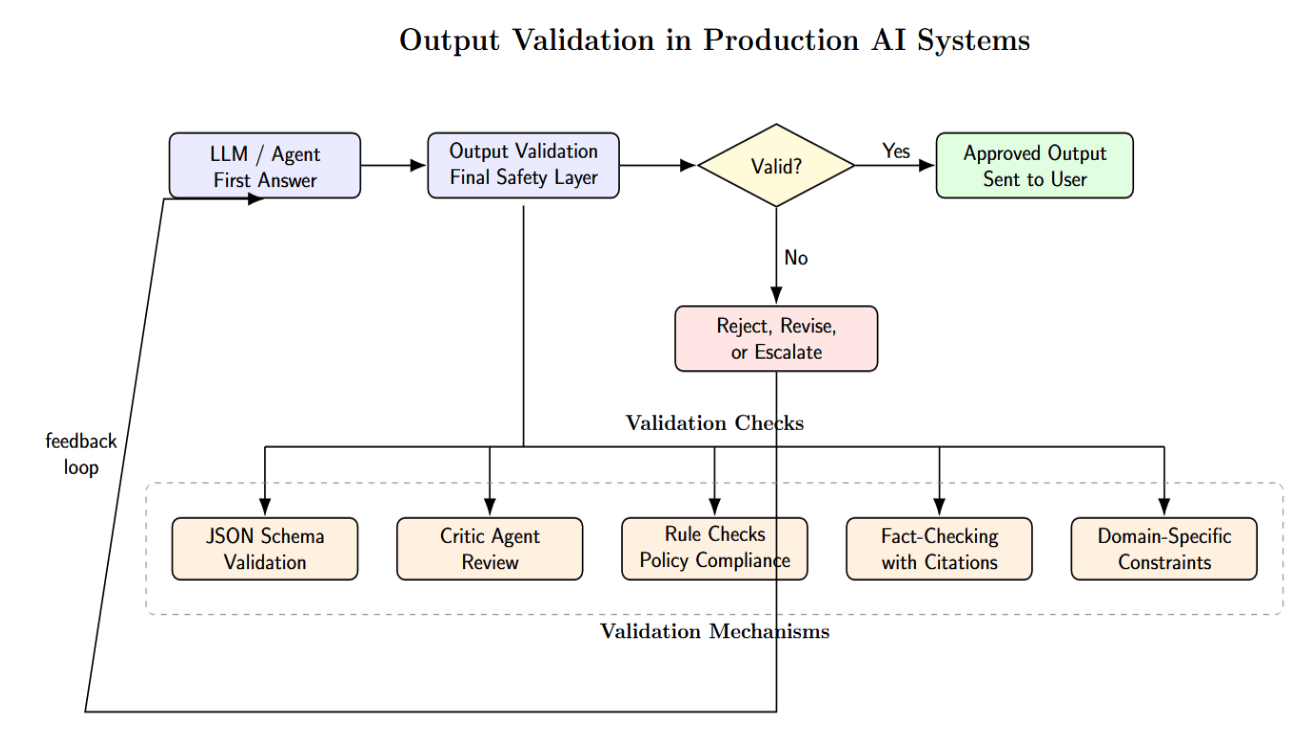
Output validation is the final layer. The production system should never trust the first answer it receives. Run outputs through validators. Use critical agents. Check rules whenever possible. Use JSON schema validation. Fact-check with citations when available. Add any other domain-specific constraints.
The table below summarizes the core infrastructure requirements for running production-ready AI agents, from orchestration and observability to security, routing, evaluation, and inference strategy.
| Infrastructure Area | What Production Agents Need | Practical Checklist |
|---|---|---|
| Orchestration | A layer that manages workflows, retries, timeouts, queues, and human approval. | Define each agent’s role, tools, permissions, and stop conditions. |
| Cost Management | Visibility into the full cost of completing a workflow, not just individual token usage. | Track cost per successful workflow, not only cost per token. |
| Observability | Monitoring across models, tools, retrieval, latency, cost, user feedback, and state transitions. | Instrument every model call, retrieval step, tool call, and state transition. |
| Versioning | Control over prompts, models, tools, guardrails, knowledge bases, and routing configurations. | Use versioning for prompts, models, tools, guardrails, and knowledge bases. |
| State Management | Checkpointing, audit trails, memory policies, and clear separation of different types of state. | Separate conversation state, workflow state, memory, and permissions. |
| Security and Guardrails | Identity management, secret isolation, tool permissions, sandboxing, prompt-injection defenses, output validation, and policy enforcement. | Add guardrails before giving agents write access. |
| Model Routing | Routing logic that selects models based on cost, latency, quality, fallback needs, and task complexity. | Use model routing to balance cost, latency, and quality. |
| Rollback and Recovery | Safe rollback paths, compensation logic, and auditability when agents create side effects. | Build rollback and compensation paths for side effects. |
| Evaluation | Regression tests, golden datasets, adversarial tests, offline evaluation, online monitoring, and user feedback loops. | Evaluate agents continuously with real production examples. |
| Inference Strategy | Serverless inference for variable workloads and fast experimentation; dedicated inference for steady, high-throughput, SLA-sensitive workloads. | Choose managed infrastructure when operational complexity exceeds team capacity. |
At 10 agents, a DIY approach can work. A team of engineers can use LangGraph or LangChain, a vector database, an observability solution, some model APIs, and custom routing logic. Developers can understand the entire system. While painful, failures are easy to debug and resolve.
What happens when you scale to one hundred agents? DIY becomes a platform engineering project. Agent teams will need consistent deployment patterns, centralized logging, agent-level permissions, versioned prompts, regression suites, and routing policies. They will also need cost dashboards, shared-memory services, guardrail libraries, and incident response processes. Platform engineering effort moves from “building agents” to “building the platform that lets agents operate safely.”
This is where managed infrastructure starts looking appealing. A managed platform reduces the amount of glue code teams need to build around inference, observability, versioning, evaluation, and routing. DigitalOcean’s Inference Engine product offers Inference Router, Batch Inference, Serverless Inference, and Dedicated Inference as workload-specific capabilities.
1. What breaks first when multi-agent systems move into production?
Latency, context management, token costs, state, observability, and governance are challenges that tend to break first. Demos often work well, but production systems introduce concurrency, real users, interactions with external tools, and unpredictable workflows.
2. Why are multi-agent systems more expensive than single-agent systems?
Multi-agent systems make repeated model calls across planners, retrievers, validators, tool agents, and supervisors. Each call consumes input and output tokens, so costs grow quickly when agents pass large context between steps.
3. Why is context management important in production agents?
Tokens in the prompt translate to more compute, latency, and expense. If you want agents to scale in production, you’ll need to treat context as a scarce resource: by only retrieving relevant chunks, summarizing history, filtering duplicates, and enforcing token budgets per agent.
4. What is the difference between managed infrastructure and DIY infrastructure for agents?
If you’re managing infrastructure yourself, that means your team is maintaining orchestration, logging, request routing, security, evaluation, cost tracking, and more. Managed infrastructure provides many of these capabilities as a platform, allowing you to reduce operational complexity as you scale the number of agents.
5. Why is observability critical for agentic AI? If an agent provides a bad answer, you need to know whether it was caused by the model, prompt, retrieved document, tool call, guardrail failure, or state update. Observability makes debugging, cost control, and reliability possible.
The uncomfortable truth about agentic AI is that the hard part begins after the demo works. Multi-agent systems fail in production because they are not just prompts wrapped around models. They are distributed systems with unpredictable execution paths, high token consumption, stateful workflows, external tools, security risks, and complex costs.
Successful teams will approach agents as production infrastructure from the beginning. They will instrument every step, version every code path that can change behavior, route tasks to the correct models, manage state explicitly, validate agent outputs, and control costs before they get out of hand.
Winning the future of agentic AI will not simply go to teams who write the best prompts. It will go to those who learn how to operate at the operational layer: inference routing, latency engineering, agent observability, state management, guardrails, and platform economics.
 This work is licensed under a Creative Commons Attribution-NonCommercial- ShareAlike 4.0 International License.
此内容由惯性聚合(RSS阅读器)自动聚合整理,仅供阅读参考。 原文来自 — 版权归原作者所有。