


2020-03-08 13:18 叶伟民 阅读(496) 评论() 收藏 举报
此文是《.NET内存管理宝典 提高代码质量、性能和可扩展性》(英文名《Pro .NET Memory Management: For Better Code, Performance, and Scalability》)一书的售后服务系列文章之一。
在《.NET内存管理宝典 提高代码质量、性能和可扩展性》一书(目前我还在翻译本书,预计年底出版)的第3章 “内存测量”里的“WinDbg”一节中,有提到:
还有一个有用的工具可以用于WinDbg - 命令树窗口。由于一次又一次地键入所有命令非常麻烦,因此你可以创建一个包含可用命令的结构化列表的文件。然后,通过使用.cmdtree <file>命令,只需单击一下即可创建具有所有这些命令的专用窗口。
这一段超级有用,但是原著讲得十分笼统。因此我打算专门写一篇blog来体现它的威力。然而在写的过程中,发现了如下这篇blog已经写得很好了,我已经没有再重新专门写一篇的必要了,因此我决定就转载这一篇文章:
原文出处:https://www.cnblogs.com/yilang/p/11952873.html 并且我在此对该文作者表示感谢,给与一个大大的赞
.cmdtree cmdfile
1、使用命令创建文本文件test.wl,使用以下示例作为模板。您可以按所需方式修改{}之间的节:

windbg ANSI Command Tree 1.0

title {"Common Commands"}

body

{"Common Commands"}

 {"Information"}

  {"Time of dump"} {".time"}

  {"Process being debugged"} {"|"}

  {"Dump Location"} {"||"}

  {"Create server on port 9999"} {".server tcp:port=9999"}

  {"Show remote connections"} {".clients"}

  {"Process Environment Block"} {"!peb"}

 {"Logging"}

  {"Open Log"} {".logopen /t /u /d"}

  {"Close Log"} {".logclose"}

 {"Modules"}

  {"All Modules"} {"lm D sm"}

  {"Loaded Modules"} {"lmo D sm"}

  {"Loaded Modules (verbose)"} {"lmvo D sm"}

  {"Modules w/o symbols"} {"lme D sm"}

 {"Stacks"}

  {"Set frame length to 2000"} {".kframes 2000"}

  {"Dump current stack w/ DML"} {"kpM 1000"}

  {"Dump stacks without private info"} {"knL 1000"}

  {"Dump stacks with all parameters"} {"kPn 1000"}

  {"Dump stacks (distance from last frame)"} {"kf 1000"}

  {"Dump stacks with Frame Pointer Omission"} {"kvn 1000"}

  {"Dump all stack"} {"~*kbn 1000"}

  {"Dump unique stacks"} {"!uniqstack -pn"}

  {"Thread environment block"} {"!teb"}

  {"Move to next frame"} {".f+"}

  {"Move to previous frame"} {".f-"}

 {"Memory"}

  {"Dump heaps"} {"!heap -a"}

 {"Automated Task"}

  {"!analyze"} {"!analyze -v"}

  {"Locks"} {"!ntsdexts.locks"}

  {"CPU time for User and Kernel Mode"} {"!runaway 7"}

 {"Managed"}

  {"Load sos"} {".loadby sos mscorwks"}

  {"clrstack"} {"!clrstack"}

  {"Threads"} {"!threads"}

  {"Stack Objects"} {"!dso"}

  {"Exceptions"} {"!dae"}
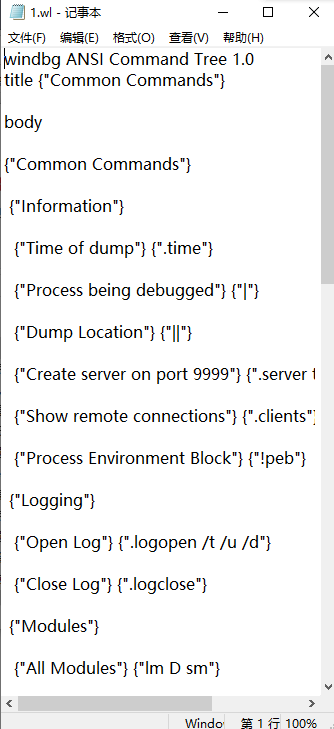
2、将文本文件保存在任何目录,建议是安装WinDbg的同一文件夹中。
3、打开转储文件,加载符号,然后使用以下命令:
.cmdtree xxx\test.wl
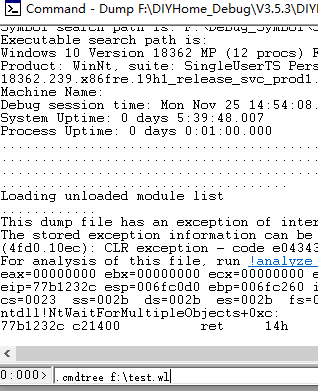
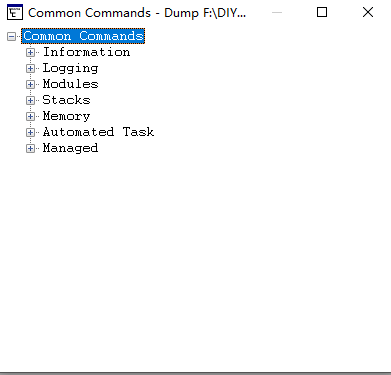
4、上面的命令将创建一个包含您的命令的新WinDbg窗口。您可以双击树状图窗口中的一个项目来执行该命令。

此内容由惯性聚合(RSS阅读器)自动聚合整理,仅供阅读参考。 原文来自 — 版权归原作者所有。