





在最近的应用中,遇到这样一个需求,要在客户端做一个提醒小程序,比如说待批流程数提醒,应用看似挺简单的,可惜的是sharepoint的对像模型不支持客户端应用,所以变得有点麻烦了。为了能够使用moss 的对像模型开发,只能往服务端着手了,这时web service可是发挥出巨大的作用。下面我大概的说明一下应用逻辑:
自定义一个web Service,在这个web service中自定义函数,实现业务需求的数据,这个过程就可以调用对像模型帮忙处理数据了。开发好后,将这个web service部置到moss服务器上。这时,客户端就可以引用web service的方式,实现客户端与服务器端的数据交互。
具体的实现过程如下:
一:建立Webservice项目
1.使用vs2008建立一个webserivce项目来实现我们的webservice,如下图所示:
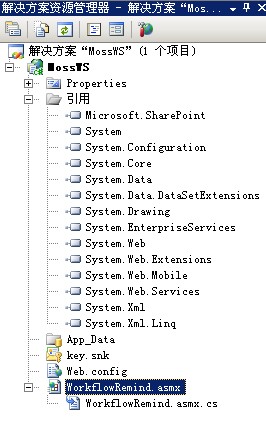
为workflowRemind.asmx编写代码如下:
 Code
Code
二.生成.wsdl,.disco文件
(1).copy webservice生成的bin到要部署的sharepoint 网站的虚拟目录bin下
(2).打开layouts目录(layouts地址C:\Program Files\Common Files\Microsoft Shared\web server extensions\12\TEMPLATE\LAYOUTS),拷贝webservice下的.asmx文件到layouts下
(3).开始--运行,输入cmd,转向layouts目录,运行
disco http://服务器:端口号/_layouts/WorkflowRemind.asmx
注:若没有disco.exe文件,则需要安装microsoft sdks,打开C:\Program Files\Microsoft SDKs\Windows\v6.0A\Bin,拷贝disco.exe到layouts目录下,运行disco http://服务器:端口号/_layouts/WorkflowRemind.asmx。
完成后会生成webservice文件WorkflowRemind.disco和WorkflowRemind.wsdl文件。
三、修改.wsdl,.disco文件
1.将WorkflowRemind.disco和WorkflowRemind.wsdl文件中的<?xml version="1.0" encoding="utf-8"?>该语句替换为以下语句:
<%@ Page Language="C#" Inherits="System.Web.UI.Page" %>
<%@ Assembly Name="Microsoft.SharePoint, Version=12.0.0.0, Culture=neutral, PublicKeyToken=71e9bce111e9429c" %>
<%@ Import Namespace="Microsoft.SharePoint.Utilities" %>
<%@ Import Namespace="Microsoft.SharePoint" %>
<% Response.ContentType = "text/xml"; %>
实际上就是把原来的纯xml变换成为一个page来解析。并且这个页面的解析是通过moss处理的。
2.将WorkflowRemind.disco中的
    <contractRef ref="http://moss/_layouts/WorkflowRemind.asmx?wsdl" docRef="http://moss/_layouts/WorkflowRemind.asmx" xmlns="http://schemas.xmlsoap.org/disco/scl/" />
    <soap address="http://moss/_layouts/WorkflowRemind.asmx" xmlns:q1="http://tempuri.org/" binding="q1:WorkflowRemindSoap" xmlns="http://schemas.xmlsoap.org/disco/soap/" />
    <soap address="http://moss/_layouts/WorkflowRemind.asmx" xmlns:q2="http://tempuri.org/" binding="q2:WorkflowRemindSoap12" xmlns="http://schemas.xmlsoap.org/disco/soap/" />
替换为:
<contractRef ref=<% SPHttpUtility.AddQuote(SPHttpUtility.HtmlEncode(SPWeb.OriginalBaseUrl(Request) + "?wsdl"),Response.Output); %> docRef=<% SPHttpUtility.AddQuote(SPHttpUtility.HtmlEncode(SPWeb.OriginalBaseUrl(Request)), Response.Output); %> xmlns="http://schemas.xmlsoap.org/disco/scl/" />
<soap address=<% SPHttpUtility.AddQuote(SPHttpUtility.HtmlEncode(SPWeb.OriginalBaseUrl(Request)),Response.Output); %> xmlns:q1="http://tempuri.org/" binding="q1:HelloWorld" xmlns="http://schemas.xmlsoap.org/disco/soap/" />
<soap address=<% SPHttpUtility.AddQuote(SPHttpUtility.HtmlEncode(SPWeb.OriginalBaseUrl(Request)),Response.Output); %> xmlns:q2="http://tempuri.org/" binding="q2:ServiceSoap12" xmlns="http://schemas.xmlsoap.org/disco/soap/" />3.将service.wsdl中的
<soap:address location="http://moss/_layouts/WorkflowRemind.asmx" />和 <soap12:address location="http://moss/_layouts/WorkflowRemind.asmx" />
替换为:
<soap:address location=<% SPHttpUtility.AddQuote(SPHttpUtility.HtmlEncode(SPWeb.OriginalBaseUrl(Request)),Response.Output); %> />
和
<soap12:address location=<%SPHttpUtility.AddQuote(SPHttpUtility.HtmlEncode(SPWeb.OriginalBaseUrl(Request)),Response.Output); %> />
对于contractRef 还有soap address这两个节的更改,实际上是在页面里面重新编码了soap的查询url,这样做的目的也是为了moss托管的web service可以在运行时根据动态的请求来正确定位。
4.将WorkflowRemind.disco和WorkflowRemind.wsdl改名为WorkflowReminddisco.aspx和WorkflowRemindwsdl.aspx
四:部署webservice
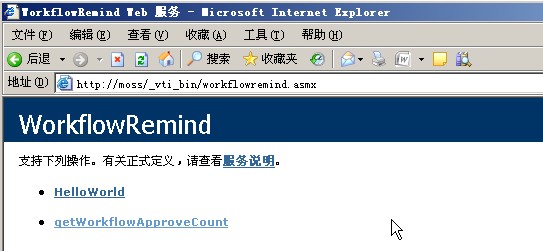
将WorkflowReminddisco.aspx,WorkflowRemindwsdl.aspx 和WorkflowRemind.asmx三个文件拷贝到c:\Program Files\Common Files\Microsoft Shared\Web Server Extensions\12\ISAPI目录中,然后我们就可以通过以下地址来检测我们部署是否成功了。http://moss/_vti_bin/WorkflowRemind.asmx.
如下图所示:
五:客户端调用
新建一个winform项目,添加一个web引用,地址为:http://moss/_vti_bin/WorkflowRemind.asmx,
为窗体编写代码如下:
Code
效果如下图所示:
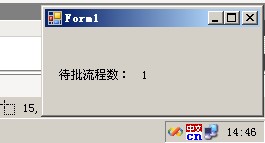
至此,整个过程已经完成。
此内容由惯性聚合(RSS阅读器)自动聚合整理,仅供阅读参考。 原文来自 — 版权归原作者所有。