






.Net对POP3邮件系统已经集成了相应的功能,但是如果是基于Exchange server的邮件系统,相对就比较复杂。如果仅仅是发送,可以简单地调用CDO来实现(参见我以前的一篇文章http://www.cnblogs.com/Moosdau/archive/2007/09/28/908834.html),但是如果要接收或进行其它一些更复杂一些操作,CDO就无法实现。
事实上,Exchange Server 2003根本不支持与.Net直接交互,据说Exchange Server 2007开放了一组Web Service接口,如果使用了Exchange Server 2007,则可以直接通过Web Service接口直接与Exchange server交互,不过我们公司目前还是使用exchange server 2003,所以也没有测试这组接口要如何使用。
对使用exchange server 2003的环境来说,代价最低的应该说就是调用outlook的功能了,以下列举与outlook交互的一些常用操作。
首先,在项目中添加对outlook组件的引用(Project—>Add Reference—>切换到COM标签页—>选择Microsoft Outlook 14.0 Object Library),这里outlook的具体版本号取决于本地安装的outlook版本,我安装的是outlook 2010, 所以显示的版本号是14.0,这个关系不大,各个版本之间的代码似乎是完全相同的。
以下代码列举收件箱中的未读邮件:
            var app = new Microsoft.Office.Interop.Outlook.Application();
            var ns = app.GetNamespace("MAPI");
            ns.Logon("Outlook", Type.Missing, false, false);

            var inbox = ns.GetDefaultFolder(Microsoft.Office.Interop.Outlook.OlDefaultFolders.olFolderInbox);
            for (int i = 1; i <= inbox.Items.Count; i++)
            {
                if (inbox.Items[i].UnRead)
                {
                    txtMailList.Text += inbox.Items[i].Subject + System.Environment.NewLine;
                }
            }
            ns.Logoff();
            Marshal.ReleaseComObject(inbox);
            Marshal.ReleaseComObject(ns);
            Marshal.ReleaseComObject(app);
            inbox = null;
            ns = null;
            app = null;
上述代码第三行中出现的“Outlook”字样,这是Outlook自动创建的默认profile名称,如果曾经修改过这个profile,或者本地包含多个profile,或者不确定profile名称,请点击控制面板-->User Accounts-->邮件,如下图:
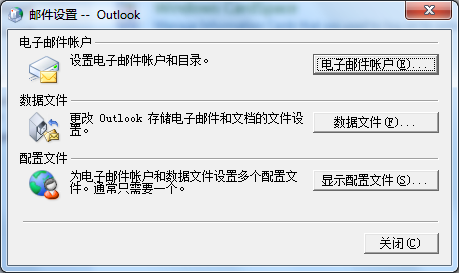
点击“显示配置文件”:
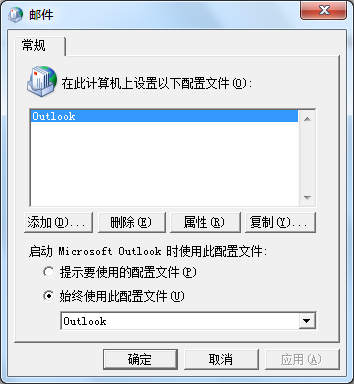
即可看到配置文件的名称。
用循环枚举收件箱的项目时,需要注意从1开始编号。
如果要读取本地数据文件中的邮件:
var localFolder = ns.Stores["Local"].GetRootFolder().Folders["Archieve"];
如果要删除文件中的邮件,注意每删除一封索引号都会重新编号,所以不能递增循环, 而必须从大到小递减循环。
如果需要调用exchange server解析别名的功能:
                string alias = "Marvin Yan";
                var recipient = app.Session.CreateRecipient(alias);
                if (!recipient.Resolve())
                {
                      //alias can't be recoganized.
                }
根据recipient获取smtp地址(username@server 格式的邮件地址):
string mailAddr = recipient.AddressEntry.GetExchangeUser().PrimarySmtpAddress;
如果要回复一封已有邮件:
                        var mail = item.Reply();
                        mail.To = item.SenderEmailAddress;
                        mail.Subject = "Hello";
                        mail.HTMLBody = "F.Y.I.<br />" + mail.HTMLBody;
                        mail.Send();
创建一封新的邮件并发送的代码如下:
            var mail = app.CreateItem(Microsoft.Office.Interop.Outlook.OlItemType.olMailItem);
            mail.HTMLBody = "Hello!";
            //Add an attachment.
            String attachName = "hello";
            int attachPos = (int)mail.Body.Length + 1;
            int attachType = (int)Microsoft.Office.Interop.Outlook.OlAttachmentType.olByValue;
            //now attached the file
            mail.Attachments.Add(@"C:\\hello.txt", attachType, attachPos, attachName);
            //Subject line
            mail.Subject = "test";
            // Add a recipient.
            var oRecip = mail.Recipients.Add("xx@xxx.com");
            oRecip.Resolve();
            // Send.
            mail.Send();
此内容由惯性聚合(RSS阅读器)自动聚合整理,仅供阅读参考。 原文来自 — 版权归原作者所有。