











Some Common Operations using LINQ To XML - Part III
In this article, we will explore some common ‘How Do I’ kind of examples using LINQ to XML. This article is the final part of our 3-part LINQ to XML series. I assume you are familiar with LINQ. If not, you can start off with LINQ to XML by checking some tutorials at Getting Ready for .NET 3.5 and LINQ – Exploring C# 3.0 – Part I and over here for VB.NET.
The first two parts of the LINQ to XML Series can be found over here:
We will be using a sample file called ‘Employees.xml’ for our samples. The mark up will be as follows:
<?xml version="1.0" encoding="utf-8" ?>
<Employees>
<Employee>
<EmpId>1</EmpId>
<Name>Sam</Name>
<Sex>Male</Sex>
<Phone Type="Home">423-555-0124</Phone>
<Phone Type="Work">424-555-0545</Phone>
<Address>
<Street>7A Cox Street</Street>
<City>Acampo</City>
<State>CA</State>
<Zip>95220</Zip>
<Country>USA</Country>
</Address>
</Employee>
<Employee>
<EmpId>2</EmpId>
<Name>Lucy</Name>
<Sex>Female</Sex>
<Phone Type="Home">143-555-0763</Phone>
<Phone Type="Work">434-555-0567</Phone>
<Address>
<Street>Jess Bay</Street>
<City>Alta</City>
<State>CA</State>
<Zip>95701</Zip>
<Country>USA</Country>
</Address>
</Employee>
<Employee>
<EmpId>3</EmpId>
<Name>Kate</Name>
<Sex>Female</Sex>
<Phone Type="Home">166-555-0231</Phone>
<Phone Type="Work">233-555-0442</Phone>
<Address>
<Street>23 Boxen Street</Street>
<City>Milford</City>
<State>CA</State>
<Zip>96121</Zip>
<Country>USA</Country>
</Address>
</Employee>
<Employee>
<EmpId>4</EmpId>
<Name>Chris</Name>
<Sex>Male</Sex>
<Phone Type="Home">564-555-0122</Phone>
<Phone Type="Work">442-555-0154</Phone>
<Address>
<Street>124 Kutbay</Street>
<City>Montara</City>
<State>CA</State>
<Zip>94037</Zip>
<Country>USA</Country>
</Address>
</Employee>
</Employees>
The application is a console application targeting .NET 3.5 Framework. I have used query expressions instead of Lambda expression in these samples. It is just a matter of preference and you are free to use any of these. Use the following namespaces while testing the samples: System.IO; System.Collections.Generic; System.Linq; System.Xml.Linq; System.IO;
17. Add a new Element at runtime using LINQ to XML
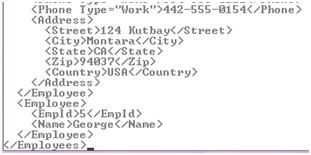
You can add a new Element to an XML document at runtime by using the Add() method of XElement. The new Element gets added as the last element of the XML document.
C#
XElement xEle = XElement.Load("..\\..\\Employees.xml");
xEle.Add(new XElement("Employee",
new XElement("EmpId", 5),
new XElement("Name", "George")));
Console.Write(xEle);
VB.NET
Dim xEle As XElement = XElement.Load("..\..\Employees.xml")
xEle.Add(New XElement("Employee", _
New XElement("EmpId", 5), _
New XElement("Name", "George")))
Console.Write(xEle)
18. Add a new Element as the First Child using LINQ to XML
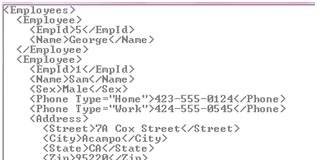
In the previous example, by default the new Element gets added to the end of the XML document. If you want to add the Element as the First Child, use the ‘AddFirst()’ method
C#
XElement xEle = XElement.Load("..\\..\\Employees.xml");
xEle.AddFirst(new XElement("Employee",
new XElement("EmpId", 5),
new XElement("Name", "George")));
Console.Write(xEle);
VB.NET
Dim xEle As XElement = XElement.Load("..\..\Employees.xml")
xEle.AddFirst(New XElement("Employee", _
New XElement("EmpId", 5), _
New XElement("Name", "George")))
Console.Write(xEle)
19. Add an attribute to an Element using LINQ to XML
To add an attribute to an Element, use the following code:
C#
XElement xEle = XElement.Load("..\\..\\Employees.xml");
xEle.Add(new XElement("Employee",
new XElement("EmpId", 5),
new XElement("Phone", "423-555-4224", new XAttribute("Type", "Home"))));
Console.Write(xEle);
VB.NET
Dim xEle As XElement = XElement.Load("..\..\Employees.xml")
xEle.Add(New XElement("Employee", _
New XElement("EmpId", 5), _
New XElement("Phone", "423-555-4224", _
New XAttribute("Type", "Home"))))
Console.Write(xEle)

20. Replace Contents of an Element/Elements using LINQ to XML
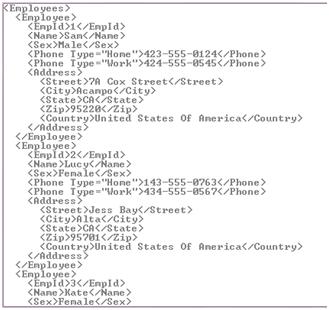
Let us say that in the XML file, you want to change the Country from “USA” to “United States of America” for all the Elements. Here’s how to do so:
C#
XElement xEle = XElement.Load("..\\..\\Employees.xml");
var countries = xEle.Elements("Employee").Elements("Address").Elements("Country").ToList();
foreach (XElement cEle in countries)
cEle.ReplaceNodes("United States Of America");
Console.Write(xEle);
VB.NET
Dim xEle As XElement = XElement.Load("..\..\Employees.xml")
Dim countries = xEle.Elements("Employee").Elements("Address").Elements("Country").ToList()
For Each cEle As XElement In countries
cEle.ReplaceNodes("United States Of America")
Next cEle
Console.Write(xEle)
21. Remove an attribute from all the Elements using LINQ to XML
Let us say if you want to remove the Type attribute ( <Phone Type=”Home”>) attribute for all the elements, then here’s how to do it.
C#
XElement xEle = XElement.Load("..\\..\\Employees.xml");
var phone = xEle.Elements("Employee").Elements("Phone").ToList();
foreach (XElement pEle in phone)
pEle.RemoveAttributes();
Console.Write(xEle);
VB.NET
Dim xEle As XElement = XElement.Load("..\..\Employees.xml")
Dim phone = xEle.Elements("Employee").Elements("Phone").ToList()
For Each pEle As XElement In phone
pEle.RemoveAttributes()
Next pEle
Console.Write(xEle)
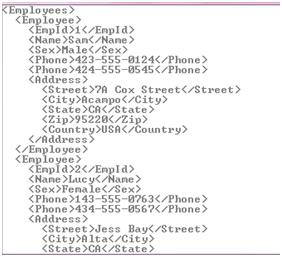
To remove attribute of one Element based on a condition, traverse to that Element and SetAttributeValue("Type", null); You can also use SetAttributeValue(XName,object) to update an attribute value.
22. Delete an Element based on a condition using LINQ to XML
If you want to delete an entire element based on a condition, here’s how to do it. We are deleting the entire Address Element
C#
XElement xEle = XElement.Load("..\\..\\Employees.xml");
var addr = xEle.Elements("Employee").ToList();
foreach (XElement addEle in addr)
addEle.SetElementValue("Address", null);
Console.Write(xEle);
VB.NET
Dim xEle As XElement = XElement.Load("..\..\Employees.xml")
Dim addr = xEle.Elements("Employee").ToList()
For Each addEle As XElement In addr
addEle.SetElementValue("Address", Nothing)
Next addEle
Console.Write(xEle)
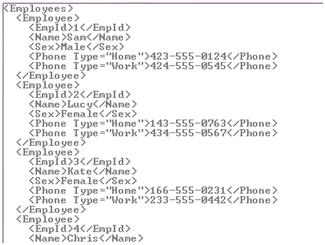
SetElementValue() can also be used to Update the content of an Element.
23. Remove ‘n’ number of Elements using LINQ to XML
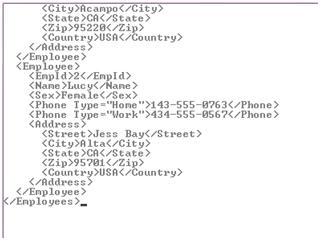
If you have a requirement where you have to remove ‘n’ number of Elements; For E.g. To remove the last 2 Elements, then here’s how to do it
C#
XElement xEle = XElement.Load("..\\..\\Employees.xml");
var emps = xEle.Descendants("Employee");
emps.Reverse().Take(2).Remove();
Console.Write(xEle);
VB.NET
Dim xEle As XElement = XElement.Load("..\..\Employees.xml")
Dim emps = xEle.Descendants("Employee")
emps.Reverse().Take(2).Remove()
Console.Write(xEle)
24. Save/Persists Changes to the XML using LINQ to XML
All the manipulations we have done so far were in the memory and were not persisted in the XML file. If you have been wondering how to persist changes to the XML, once it is modified, then here’s how to do so. It’s quite simple. You just need to call the Save() method. It’s also worth observing that the structure of the code shown below is similar to the structure of the end result (XML document). That’s one of the benefits of LINQ to XML, that it makes life easier for developers by making it so easy to create and structure XML documents.
C#
XElement xEle = XElement.Load("..\\..\\Employees.xml");
xEle.Add(new XElement("Employee",
new XElement("EmpId", 5),
new XElement("Name", "George"),
new XElement("Sex", "Male"),
new XElement("Phone", "423-555-4224", new XAttribute("Type", "Home")),
new XElement("Phone", "424-555-0545", new XAttribute("Type", "Work")),
new XElement("Address",
new XElement("Street", "Fred Park, East Bay"),
new XElement("City", "Acampo"),
new XElement("State", "CA"),
new XElement("Zip", "95220"),
new XElement("Country", "USA"))));
xEle.Save("..\\..\\Employees.xml");
Console.WriteLine(xEle);
Console.ReadLine();
VB.NET
Dim xEle As XElement = XElement.Load("..\..\Employees.xml")
xEle.Add(New XElement("Employee", _
New XElement("EmpId", 5), _
New XElement("Name", "George"), _
New XElement("Sex", "Male"), _
New XElement("Phone", "423-555-4224", _
New XAttribute("Type", "Home")), _
New XElement("Phone", "424-555-0545", _
New XAttribute("Type", "Work")), _
New XElement("Address", _
New XElement("Street", "Fred Park, East Bay"), _
New XElement("City", "Acampo"), _
New XElement("State", "CA"), _
New XElement("Zip", "95220"), _
New XElement("Country", "USA"))))
xEle.Save("..\..\Employees.xml")
Console.WriteLine(xEle)
Console.ReadLine()
Well with that, we conclude the series of some 'more' commonly used 'How Do I' operations while using LINQ to XML. Through this series, we have only attempted to scratch the surface of what can be done using LINQ to XML. LINQ to XML is an amazing API and in the forthcoming articles, we will explore some advanced usages. The entire source of the article in C# and VB.NET can be downloaded over here. I hope you liked the article and I thank you for viewing it.
//****************************************
by: Amen cnblogs博客 转载请注明出处
//****************************************
此内容由惯性聚合(RSS阅读器)自动聚合整理,仅供阅读参考。 原文来自 — 版权归原作者所有。