


Some Common Operations using LINQ To XML - Part I
In this article, we will explore some common ‘How Do I’ kind of examples using LINQ to XML. This article is the Part I of the 3-part LINQ to XML series. I assume you are familiar with LINQ. If not, you can start off with LINQ to XML by checking some tutorials at Getting Ready for .NET 3.5 and LINQ – Exploring C# 3.0 – Part I and over here.
We will be using a sample file called ‘Employees.xml’ for our demonstrations. The mark up will be as follows:
<?xml version="1.0" encoding="utf-8" ?>
<Employees>
<Employee>
<EmpId>1</EmpId>
<Name>Sam</Name>
<Sex>Male</Sex>
<Phone Type="Home">423-555-0124</Phone>
<Phone Type="Work">424-555-0545</Phone>
<Address>
<Street>7A Cox Street</Street>
<City>Acampo</City>
<State>CA</State>
<Zip>95220</Zip>
<Country>USA</Country>
</Address>
</Employee>
<Employee>
<EmpId>2</EmpId>
<Name>Lucy</Name>
<Sex>Female</Sex>
<Phone Type="Home">143-555-0763</Phone>
<Phone Type="Work">434-555-0567</Phone>
<Address>
<Street>Jess Bay</Street>
<City>Alta</City>
<State>CA</State>
<Zip>95701</Zip>
<Country>USA</Country>
</Address>
</Employee>
<Employee>
<EmpId>3</EmpId>
<Name>Kate</Name>
<Sex>Female</Sex>
<Phone Type="Home">166-555-0231</Phone>
<Phone Type="Work">233-555-0442</Phone>
<Address>
<Street>23 Boxen Street</Street>
<City>Milford</City>
<State>CA</State>
<Zip>96121</Zip>
<Country>USA</Country>
</Address>
</Employee>
<Employee>
<EmpId>4</EmpId>
<Name>Chris</Name>
<Sex>Male</Sex>
<Phone Type="Home">564-555-0122</Phone>
<Phone Type="Work">442-555-0154</Phone>
<Address>
<Street>124 Kutbay</Street>
<City>Montara</City>
<State>CA</State>
<Zip>94037</Zip>
<Country>USA</Country>
</Address>
</Employee>
</Employees>
The application is a console application targeting .NET 3.5 framework. I have also used query expressions 'at places' instead of Lambda expression in these samples. It is just a matter of preference and you are free to use any of these. Use the following namespaces while testing the samples: System; System.Collections.Generic; System.Linq; System.Text; System.Xml; System.Xml.Linq;
1. How Do I Read XML using LINQ to XML
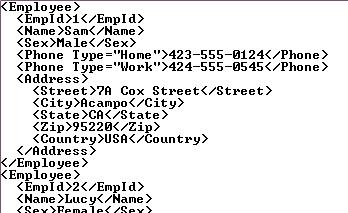
There are two ways to do so: Using the XElement class or the XDocument class. Both the classes contain the ‘Load()’ method which accepts a file, a URL or XMLReader and allows XML to be loaded. The primary difference between both the classes is that an XDocument can contain XML declaration, XML Document Type (DTD) and processing instructions. Moreover an XDocument contains one root XElement.
Using XElement
C#
XElement xelement = XElement.Load("..\\..\\Employees.xml");
IEnumerable<XElement> employees = xelement.Elements();
// Read the entire XML
foreach (var employee in employees)
{
Console.WriteLine(employee);
}
VB.NET
Dim xelement As XElement = XElement.Load("..\..\Employees.xml")
Dim employees As IEnumerable(Of XElement) = xelement.Elements()
' Read the entire XML
For Each employee In employees
Console.WriteLine(employee)
Next employee
Output:
Using XDocument
C#
XDocument xdocument = XDocument.Load("..\\..\\Employees.xml");
IEnumerable<XElement> employees = xdocument.Elements();
foreach (var employee in employees)
{
Console.WriteLine(employee);
}
VB.NET
Dim xdocument As XDocument = XDocument.Load("..\..\Employees.xml")
Dim employees As IEnumerable(Of XElement) = xdocument.Elements()
For Each employee In employees
Console.WriteLine(employee)
Next employee
Output:
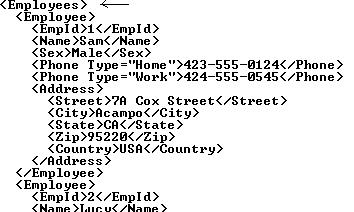
Note 1: As you can observe, XDocument contains a single root element (Employees).
Note 2: In order to generate an output similar to the one using XElement, use “xdocument.Root.Elements()” instead of “xdocument.Elements()”
Note 3: VB.NET users can use a new feature called XML Literals which allows you to incorporate XML directly.
2. How Do I Access a Single Element using LINQ to XML
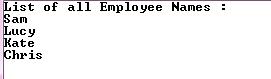
Let us see how to access the name of all the Employees and list them over here
C#
XElement xelement = XElement.Load("..\\..\\Employees.xml");
IEnumerable<XElement> employees = xelement.Elements();
Console.WriteLine("List of all Employee Names :");
foreach (var employee in employees)
{
Console.WriteLine(employee.Element("Name").Value);
}
VB.NET
Dim xelement As XElement = XElement.Load("..\..\Employees.xml")
Dim employees As IEnumerable(Of XElement) = xelement.Elements()
Console.WriteLine("List of all Employee Names :")
For Each employee In employees
Console.WriteLine(employee.Element("Name").Value)
Next employee
Output:
3. How Do I Access Multiple Elements using LINQ to XML
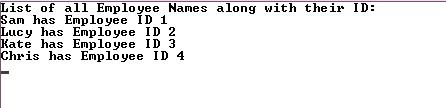
Let us see how to access the name of all Employees and also list the ID along with it
C#
XElement xelement = XElement.Load("..\\..\\Employees.xml");
IEnumerable<XElement> employees = xelement.Elements();
Console.WriteLine("List of all Employee Names along with their ID:");
foreach (var employee in employees)
{
Console.WriteLine("{0} has Employee ID {1}",
employee.Element("Name").Value,
employee.Element("EmpId").Value);
}
VB.NET
Dim xelement As XElement = XElement.Load("..\..\Employees.xml")
Dim employees As IEnumerable(Of XElement) = xelement.Elements()
Console.WriteLine("List of all Employee Names along with their ID:")
For Each employee In employees
Console.WriteLine("{0} has Employee ID {1}", employee.Element("Name").Value, employee.Element("EmpId").Value)
Next employee
Output:
4. How Do I Access all Elements having a Specific Attribute using LINQ to XML
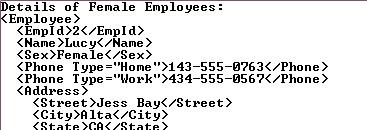
Let us see how to access details of all Female Employees
C#
XElement xelement = XElement.Load("..\\..\\Employees.xml");
var name = from nm in xelement.Elements("Employee")
where (string)nm.Element("Sex") == "Female"
select nm;
Console.WriteLine("Details of Female Employees:");
foreach (XElement xEle in name)
Console.WriteLine(xEle);
VB.NET
Dim xelement As XElement = XElement.Load("..\..\Employees.xml")
Dim name = _
From nm In xelement.Elements("Employee") _
Where CStr(nm.Element("Sex")) = "Female" _
Select nm
Console.WriteLine("Details of Female Employees:")
For Each xEle As XElement In name
Console.WriteLine(xEle)
Next xEle
Output:
5. How Do I Access Specific Element having a Specific Attribute using LINQ to XML
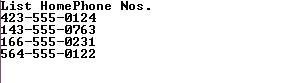
Let us see how to list all the Home Phone Nos.
C#
XElement xelement = XElement.Load("..\\..\\Employees.xml");
var homePhone = from phoneno in xelement.Elements("Employee")
where (string)phoneno.Element("Phone").Attribute("Type") == "Home"
select phoneno;
Console.WriteLine("List HomePhone Nos.");
foreach (XElement xEle in homePhone)
{
Console.WriteLine(xEle.Element("Phone").Value);
}
VB.NET
Dim xelement As XElement = XElement.Load("..\..\Employees.xml")
Dim homePhone = _
From phoneno In xelement.Elements("Employee") _
Where CStr(phoneno.Element("Phone").Attribute("Type")) = "Home" _
Select phoneno
Console.WriteLine("List HomePhone Nos.")
For Each xEle As XElement In homePhone
Console.WriteLine(xEle.Element("Phone").Value)
Next xEle
Output:
6. How Do I Find an Element within another Element using LINQ to XML
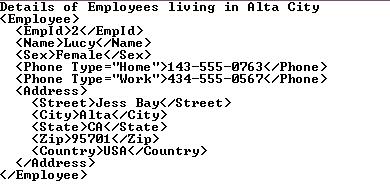
Let us see how to find the details of Employees living in 'Alta' City
C#
XElement xelement = XElement.Load("..\\..\\Employees.xml");
var addresses = from address in xelement.Elements("Employee")
where (string)address.Element("Address").Element("City") == "Alta"
select address;
Console.WriteLine("Details of Employees living in Alta City");
foreach (XElement xEle in addresses)
Console.WriteLine(xEle);
VB.NET
Dim xelement As XElement = XElement.Load("..\..\Employees.xml")
Dim addresses = _
From address In xelement.Elements("Employee") _
Where CStr(address.Element("Address").Element("City")) = "Alta" _
Select address
Console.WriteLine("Details of Employees living in Alta City")
For Each xEle As XElement In addresses
Console.WriteLine(xEle)
Next xEle
Output:
7. How Do I Find Nested Elements (using Descendants Axis) using LINQ to XML
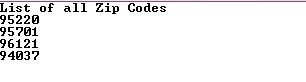
Let us see how to list all the zip codes in the XML file
C#
XElement xelement = XElement.Load("..\\..\\Employees.xml");
Console.WriteLine("List of all Zip Codes");
foreach (XElement xEle in xelement.Descendants("Zip"))
{
Console.WriteLine((string)xEle);
}
VB.NET
Dim xelement As XElement = XElement.Load("..\..\Employees.xml")
Console.WriteLine("List of all Zip Codes")
For Each xEle As XElement In xelement.Descendants("Zip")
Console.WriteLine(CStr(xEle))
Next xEle
Output:
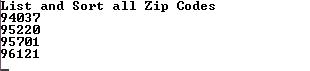
8. How do I apply Sorting on Elements using LINQ to XML
Let us see how to List and Sort all Zip Codes in ascending order
C#
XElement xelement = XElement.Load("..\\..\\Employees.xml");
IEnumerable<string> codes = from code in xelement.Elements("Employee")
let zip = (string)code.Element("Address").Element("Zip")
orderby zip
select zip;
Console.WriteLine("List and Sort all Zip Codes");
foreach (string zp in codes)
Console.WriteLine(zp);
VB.NET
Dim xelement As XElement = XElement.Load("..\..\Employees.xml")
Dim codes As IEnumerable(Of String) = _
From code In xelement.Elements("Employee") _
Let zip = CStr(code.Element("Address").Element("Zip")) _
Order By zip _
Select zip
Console.WriteLine("List and Sort all Zip Codes")
For Each zp As String In codes
Console.WriteLine(zp)
Next zp
Output:
Well those were some commonly used operations while using LINQ to XML. In the Part 2 of this series, we will see some more operations and also explore how to create XML content and also save them. I hope you liked the article and I thank you for viewing it.
//****************************************
by: Amen cnblogs博客 转载请注明出处
//****************************************
此内容由惯性聚合(RSS阅读器)自动聚合整理,仅供阅读参考。 原文来自 — 版权归原作者所有。