




惯性聚合 高效追踪和阅读你感兴趣的博客、新闻、科技资讯
阅读原文 在惯性聚合中打开

推荐订阅源

S
Secure Thoughts
Security Latest
Security Latest
Simon Willison's Weblog
O
OpenAI News
GbyAI
GbyAI
L
LINUX DO - 最新话题
A
Arctic Wolf
T
Tor Project blog
G
GRAHAM CLULEY
I
InfoQ
博客园_首页
IT之家
IT之家
The Register - Security
Exploit-DB.com RSS Feed
P
Proofpoint News Feed
The GitHub Blog
The GitHub Blog
Blog — PlanetScale
Blog — PlanetScale
N
Netflix TechBlog - Medium
K
Kaspersky official blog
博客园 - 三生石上(FineUI控件)
S
SegmentFault 最新的问题
U
Unit 42
PCI Perspectives
PCI Perspectives
量子位
P
Palo Alto Networks Blog
S
Securelist
T
Troy Hunt's Blog
博客园 - 【当耐特】
Recorded Future
Recorded Future
K
KPMG report finds enterprise disconnect between AI and its ROI | CIO
S
Security Affairs
Engineering at Meta
Engineering at Meta
T
The Blog of Author Tim Ferriss
博客园 - 聂微东
罗磊的独立博客
N
News and Events Feed by Topic
人人都是产品经理
人人都是产品经理
B
Blog RSS Feed
NISL@THU
NISL@THU
C
Cisco Blogs
T
Threatpost
有赞技术团队
有赞技术团队
Forbes - Security
Forbes - Security
Hugging Face - Blog
Hugging Face - Blog
Last Week in AI
Last Week in AI
T
The Exploit Database - CXSecurity.com
Cloudbric
Cloudbric
Cyberwarzone
Cyberwarzone
Google DeepMind News
C
Cyber Attacks, Cyber Crime and Cyber Security

博客园 - 齐世昌

.resources文件转.resx 文件 同一Session中的aspx页面的并发限制 Diving Into Lync Client Logins Passing JavaScript Objects to Managed Code UI抑制限制(UI Suppression Limitations) JSON对象末尾多余逗号问题 T430 Windows 8 的USB3.0无法识别 【翻译】数据库上的IO已冻结,不需要任何用户操作 【翻译】为Web Forms添加捆绑(Bundling)和压缩(Minification) 推荐一个在线压缩JavaScript和CSS的网站 Windows 8不支持Windows XP 模式 又是一年(2012年) 本地测试网址推荐 text-overflow: ellipsis 在IE8、9下显示问题 Windows Server 2012 不支持SharePoint Server 2010(KB2724471) VirtualPathUtility.IsAppRelative的bug? 神奇的img 受信任站点在Windows 7 和Windows XP的注册表中的不同 contenteditable属性浏览器支持情况(基本支持)-工作草稿
禁用笔记本WiFi热点网络连接问题
齐世昌 · 2013-03-31 · via 博客园 - 齐世昌

有时我们会通过启动笔记本WiFi热点,以便移动设备使用笔记本网络连接到Internet。

在启动笔记本WiFi热点后,一不小心禁用了网络连接中的WiFi热点连接。很悲催的事情就发生了,你会发现那个网络连接看不到了。你再用命令启动WiFi热点时,会提示"无法启动承载网络。组或资源的状态不是执行请求操作的正确状态。"。

网上有人说在设备管理器的网络适配器中,有一个"Microsoft 托管网络虚拟适配器"被禁用了,需要启用下。如果你去找了,你还真找不找。你需要在管理员权限下运行一下以下命令:

netsh wlan set hostednetwork mode=disallow

netsh wlan set hostednetwork mode=allow
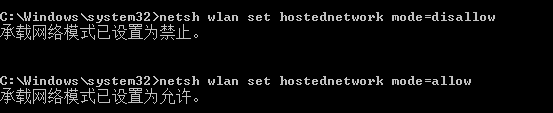
通过命令把承载网络禁用、再启用下。你就可以找到上面提到的"Microsoft 托管网络虚拟适配器"了
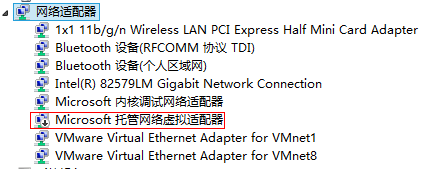
当你启用了以后,你会发现它神奇的在网络适配器中消失了。

但你在命令行中启动WiFi热点时,会发现已经可以正常启动了。
