


惯性聚合 高效追踪和阅读你感兴趣的博客、新闻、科技资讯
阅读原文 在惯性聚合中打开

推荐订阅源

美团技术团队
D
DataBreaches.Net
OSCHINA 社区最新新闻
OSCHINA 社区最新新闻
D
Docker
N
Netflix TechBlog - Medium
Cyber Security Advisories - MS-ISAC
C
Check Point Blog
腾讯CDC
Stack Overflow Blog
Stack Overflow Blog
V
Visual Studio Blog
IT之家
IT之家
月光博客
月光博客
U
Unit 42
K
Kaspersky official blog
T
Threatpost
cs.AI updates on arXiv.org
GbyAI
GbyAI
P
Proofpoint News Feed
Last Week in AI
Last Week in AI
云风的 BLOG
云风的 BLOG
酷 壳 – CoolShell
酷 壳 – CoolShell
I
InfoQ
Engineering at Meta
Engineering at Meta
Recorded Future
Recorded Future
Exploit-DB.com RSS Feed
freeCodeCamp Programming Tutorials: Python, JavaScript, Git & More
S
Security @ Cisco Blogs
MyScale Blog
MyScale Blog
大猫的无限游戏
大猫的无限游戏
Security Archives - TechRepublic
Webroot Blog
Webroot Blog
cs.CV updates on arXiv.org
Hacker News - Newest:
Hacker News - Newest: "LLM"
S
Schneier on Security
S
Secure Thoughts
The Register - Security
B
Blog RSS Feed
The Last Watchdog
The Last Watchdog
P
Palo Alto Networks Blog
爱范儿
爱范儿
B
Blog
让小产品的独立变现更简单 - ezindie.com
N
News and Events Feed by Topic
阮一峰的网络日志
阮一峰的网络日志
L
LINUX DO - 热门话题
C
Cisco Blogs
Spread Privacy
Spread Privacy
F
Full Disclosure
博客园 - 聂微东
T
The Blog of Author Tim Ferriss

博客园 - 齐世昌

.resources文件转.resx 文件 同一Session中的aspx页面的并发限制 Diving Into Lync Client Logins Passing JavaScript Objects to Managed Code UI抑制限制(UI Suppression Limitations) JSON对象末尾多余逗号问题 T430 Windows 8 的USB3.0无法识别 【翻译】数据库上的IO已冻结,不需要任何用户操作 【翻译】为Web Forms添加捆绑(Bundling)和压缩(Minification) 禁用笔记本WiFi热点网络连接问题 推荐一个在线压缩JavaScript和CSS的网站 Windows 8不支持Windows XP 模式 又是一年(2012年) 本地测试网址推荐 Windows Server 2012 不支持SharePoint Server 2010(KB2724471) VirtualPathUtility.IsAppRelative的bug? 神奇的img 受信任站点在Windows 7 和Windows XP的注册表中的不同 contenteditable属性浏览器支持情况(基本支持)-工作草稿
text-overflow: ellipsis 在IE8、9下显示问题
齐世昌 · 2012-10-31 · via 博客园 - 齐世昌

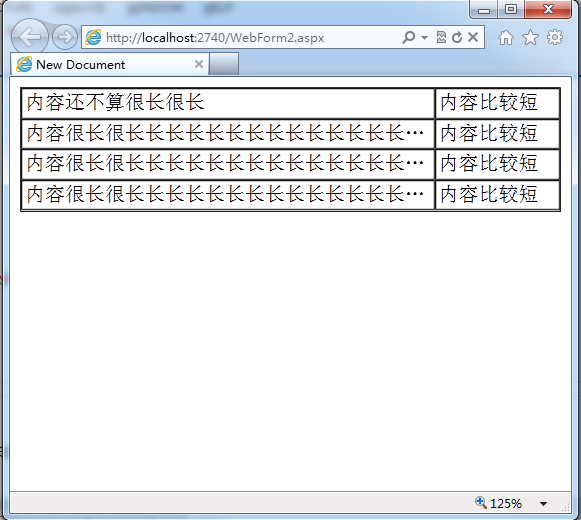
通过样式可以使在table中如果td中的内容过长时,过长的部分显示为省略号。

如下图所示:
image

样式也很简单,代码如下:

<!DOCTYPE html>


<html>
<head>
    <title>New Document </title>
    <style>
        .ctl {
            table-layout: fixed;
        }

            .ctl td {
                text-overflow: ellipsis;
                overflow: hidden;
                white-space: nowrap;
                padding: 2px;
            }
    </style>

</head>

<body>
    <table cellspacing="0" cellpadding="1" width="100%" class="ctl" border="1">
        <colgroup>
            <col>
            <col width="100">
        </colgroup>
        <tbody>
            <tr>
                <td>内容还不算很长很长</td>
                <td>内容比较短</td>
            </tr>
            <tr>
                <td>内容很长很长长长长长长长长长长长长长长长长长长长长长长长长长长长长长长</td>
                <td>内容比较短</td>
            </tr>
            <tr>
                <td>内容很长很长长长长长长长长长长长长长长长长长长长长长长长长长长长长长长</td>
                <td>内容比较短</td>
            </tr>
            <tr>
                <td>内容很长很长长长长长长长长长长长长长长长长长长长长长长长长长长长长长长</td>
                <td>内容比较短</td>
            </tr>
        </tbody>
    </table>
</body>
</html>

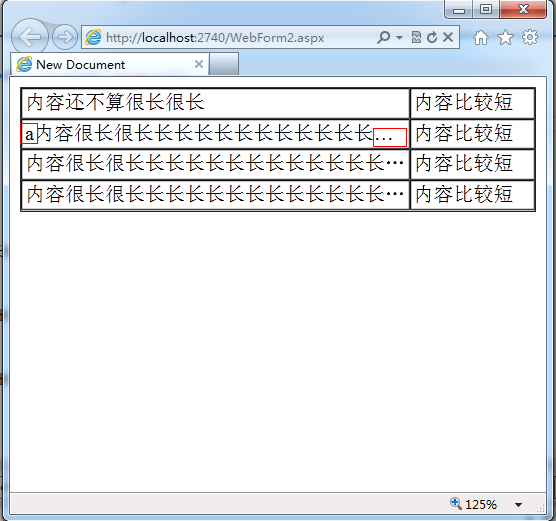
现在的实现在IE8或者9下,如果以内容字母开头,显示效果就会出现不一致的情况。效果如下:
image

看来IE自动识别的字体。

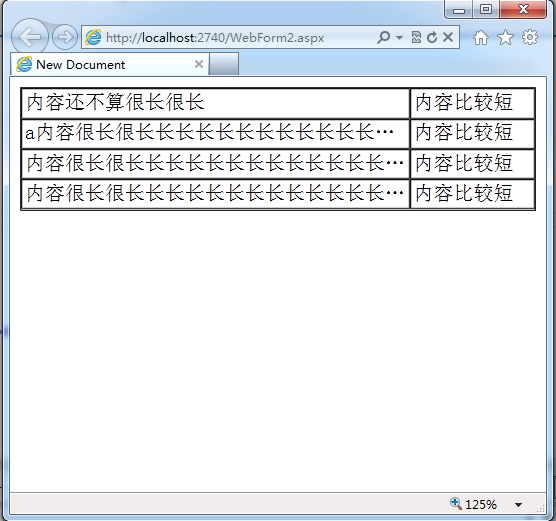
如果为设置字体后呢,先设置为font-family:宋体;效果如下:
image

设置为font-family:Arial;效果如下:

image

如果要想保证效果统一,必须要设置字体,而且必须要设置为中文字体了。