







右上角加号 => 创建新的仓库,如图

仓库名称:设置一个仓库名称
.gitignore:项目是什么类型,这里就选择什么类型
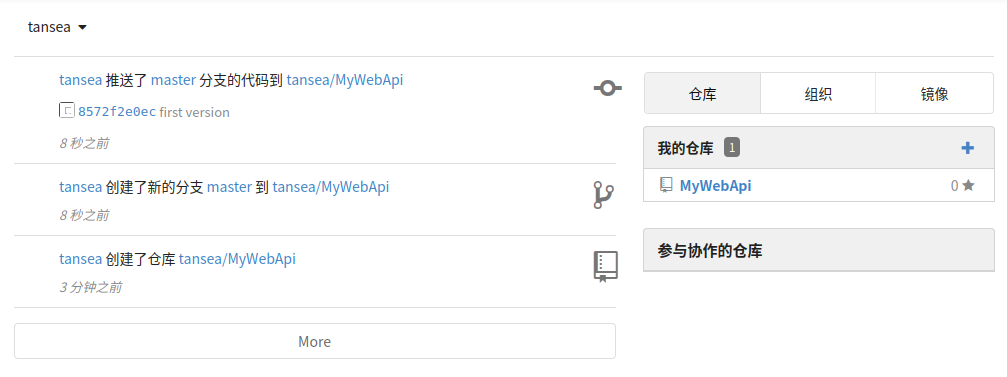
测试通过,能正常的拉取和推送
因为在添加Web钩子时,推送地址默认禁用了本地网络地址,这里需要修改一下gogs的配置
sudo nano /home/git/gogs/custom/conf/app.ini
找到security节点,在下面添加配置信息LOCAL_NETWORK_ALLOWLIST = 192.168.86.130

重启使配置生效
sudo systemctl daemon-reload
sudo systemctl restart gogs
选择要新建Web钩子的仓库 => 仓库设置 => 管理Web钩子 => 添加新的 Web 钩子 => Gogs

推送地址:http://192.168.86.130:8080/generic-webhook-trigger/invoke?token=gogs-webhook-token-2025,token部分自定义,要和后面保持一致
选择只推送push事件
右上角New Item => Enter an item name => Pipeline

Configure => Triggers
勾选 Generic Webhook Trigger
Token: gogs-webhook-token-2025  一定要和上面的推送地址里的token保持一致
勾选 Print post content: 调试时打印请求内容
勾选 Print contributed variables: 查看解析出的变量
Configure => Definition => Pipeline script
将下面代码复制到Script内
pipeline {
    agent any

    environment {
        PROJECT_NAME = "mywebapi"
        DOCKER_IMAGE = "mywebapi"
        IMAGE_NAME = "mywebapi:latest"
        CONTAINER_NAME = "mywebapi"
    }

    stages {
        stage('拉取代码') {
            steps {
                echo "🔄 正在拉取代码..."
                git url: 'http://192.168.86.130:3000/tansea/MyWebApi.git', branch: 'master'
            }
        }

        stage('构建 Docker 镜像') {
            steps {
                echo "🐋 构建本地镜像..."
                sh "docker build --pull=false -t ${IMAGE_NAME} ."
            }
        }

        stage('停止并删除旧容器') {
            steps {
                script {
                    try {
                        echo "🧹 检查是否存在旧容器..."
                        def containerExists = sh(
                            script: "docker inspect ${CONTAINER_NAME} > /dev/null 2>&1 && echo true || echo false",
                            returnStdout: true
                        ).trim()

                        if (containerExists == "true") {
                            echo "⏹️ 正在停止旧容器..."
                            sh "docker stop ${CONTAINER_NAME}"
                            echo "🗑️ 正在删除旧容器..."
                            sh "docker rm ${CONTAINER_NAME}"
                        } else {
                            echo "ℹ️ 未找到旧容器,跳过停止和删除步骤"
                        }
                    } catch (Exception e) {
                        echo "⚠️ 检查容器状态时发生异常:${e}"
                    }
                }
            }
        }

        stage('启动新容器') {
            steps {
                echo "🚀 启动容器..."
                sh """
                    docker run -d \
                        --name ${CONTAINER_NAME} \
                        -p 5000:80 \
                        ${IMAGE_NAME}
                """
            }
        }
    }

    post {
        always {
            script {
                // 清理悬空镜像
                sh 'docker image prune -f'
            }
        }
        success {
            echo "✅ 构建和部署成功!"
        }
        failure {
            echo "❌ 构建失败!"
        }
    }
}

将下面的内容复制到Dockerfile
# 使用 .NET SDK 镜像作为构建环境
FROM mcr.microsoft.com/dotnet/sdk:8.0 AS build-env
WORKDIR /app

# 恢复依赖并构建发布
COPY . ./
WORKDIR /app/MyWebApi
RUN dotnet restore && \
    dotnet build -c Release && \
    dotnet publish -c Release -o /app/publish

# 构建最终运行镜像
FROM mcr.microsoft.com/dotnet/aspnet:8.0 AS runtime
WORKDIR /app
COPY --from=build-env /app/publish .
ENTRYPOINT ["dotnet", "MyWebApi.dll"]
第一次生成会比较慢,要拉取dotnet_sdk:8.0和dotnet_aspnet:8.0,可以先拉取,当然也可以跳过这一步
docker pull mcr.microsoft.com/dotnet/sdk:8.0
docker pull mcr.microsoft.com/dotnet/aspnet:8.0
查看是否拉取成功
如果能查到结果,表示拉取成功了
推送代码到Git,查看Jenkins是否会响应Webhook构建项目以及项目是否成功构建。如果成功构建就可以通过http://192.168.86.130:5000/swagger/index.html访问到服务。如果没有构建,在日志里查看原因。

此内容由惯性聚合(RSS阅读器)自动聚合整理,仅供阅读参考。 原文来自 — 版权归原作者所有。