






一、XML的表示方式
|
Name |
Address |
City |
State |
Zip |
|
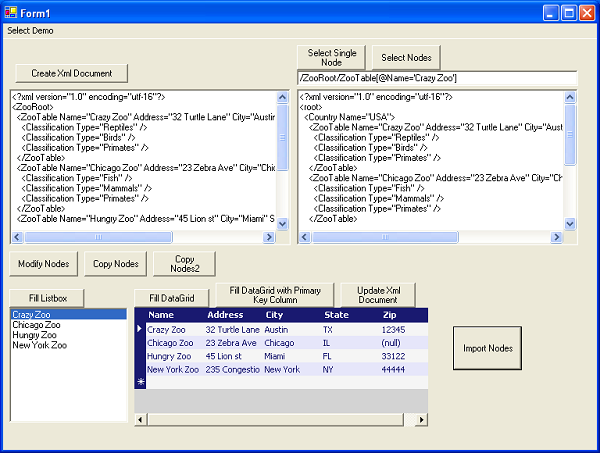
Crazy Zoo |
32 Turtle Lane |
Austin |
Tx |
12345 |
|
Chicago Zoo |
23 Zebra Ave |
Chicago |
IL |
(null) |
|
Hungry Zoo |
45 Lion st |
Miami |
FL |
33122 |
对于以上这样一个二维表,用XML的话有两种标识方式:
1.用“属性”来表示
每一列对应一个元素中的属性,表示空值时就是忽略掉这个属性就可以了
<?xml version="1.0" encoding="utf-8" ?>
<ZooRoot>
<ZooTable Name="Crazy Zoo" Address="32 Turtle Lane"
City="Austin" State="TX" Zip="12345" />
<ZooTable Name="Chicago Zoo" Address="23 Zebra Ave"
City="Chicago" State="IL" />
<ZooTable Name="Hungry Zoo" Address="45 Lion st"
City="Miami" State="FL" Zip="33122" />
</ZooRoot>
2.用“元素”来表示
<?xml version="1.0" encoding="utf-8" ?>
<ZooRoot>
<ZooTable>
<Name>Crazy Zoo</Name>
<Address>32 Turtle Lane</Address>
<City>Austin</City>
<State>TX</State>
<Zip>12345</Zip>
</ZooTable>
<ZooTable>
<Name>Chicago Zoo</Name>
<Address>23 Zebra Ave</Address>
<City>Chicago</City>
<State>IL</State>
</ZooTable>
<ZooTable>
<Name>Hungry Zoo</Name>
<Address>45 Lion st</Address>
<City>Miami</City>
<State>FL</State>
<Zip>33122</Zip>
</ZooTable>
</ZooRoot>
二、使用xmlhelper
1. 创建一个xml文档,并在文档中创建根节点
XmlDocument doc = XmlHelper.CreateXmlDocument();
XmlNode newNode = doc.CreateElement("ZooRoot");
XmlNode rootNode = doc.AppendChild(newNode);
2. 接下来创建整个用属性表示的文档
///
/// First Row
///
newNode = doc.CreateElement("ZooTable");
XmlHelper.CreateAttribute(newNode, "Name", "Crazy Zoo");
XmlHelper.CreateAttribute(newNode, "Address", "32 Turtle Lane");
XmlHelper.CreateAttribute(newNode, "City", "Austin");
XmlHelper.CreateAttribute(newNode, "State", "TX");
XmlHelper.CreateAttribute(newNode, "Zip", "12345");
rootNode.AppendChild(newNode);
///
/// Second Row
///
newNode = doc.CreateElement("ZooTable");
XmlHelper.CreateAttribute(newNode, "Name", "Chicago Zoo");
XmlHelper.CreateAttribute(newNode, "Address", "23 Zebra Ave");
XmlHelper.CreateAttribute(newNode, "City", "Chicago");
XmlHelper.CreateAttribute(newNode, "State", "IL");
rootNode.AppendChild(newNode);
///
/// Third Row
///
newNode = doc.CreateElement("ZooTable");
XmlHelper.CreateAttribute(newNode, "Name", "Hungry Zoo");
XmlHelper.CreateAttribute(newNode, "Address", "45 Lion st");
XmlHelper.CreateAttribute(newNode, "City", "Miami");
XmlHelper.CreateAttribute(newNode, "State", "FL");
XmlHelper.CreateAttribute(newNode, "Zip", "33122");
rootNode.AppendChild(newNode);
3. Xpath 的查询
3.1 查找单个元素
string xpathQuery = "/ZooRoot/ZooTable[@Name='Chicago Zoo']";
XmlNode selectedNode = doc.SelectSingleNode(xpathQuery);
基于属性的查找
string xpathQuery = "/ZooRoot/ZooTable/Name='Chicago Zoo'";
XmlNode selectedNode = doc.SelectSingleNode(xpathQuery);
基于元素值的查找
string xpathQuery =
"/ZooRoot/ZooTable/Name='Chicago Zoo' and @City=’Chicago’";
XmlNode selectedNode = doc.SelectSingleNode(xpathQuery);
可以是有多个条件
3.2 返回多条记录
string xpathQuery =
"/ZooRoot/ZooTable/[@Name='Chicago Zoo']/Classification";
XmlNodeList nodeList = doc.SelectNodes(xpathQuery);
string xpathQuery =
"/ZooRoot/ZooTable/[@Name='Chicago Zoo']/child::*";
XmlNodeList nodeList = doc.SelectNodes(xpathQuery);
4 在已存的XML文件节点中插入新节点
string xpathQuery = "/ZooRoot/ZooTable";
XmlNodeList nodeList = doc.SelectNodes(xpathQuery);
然后使用foreach遍历
int index = 0;
foreach (XmlNode nodeFromList in nodeList)
{
///
/// each 'nodeFromList' is going to
/// be the parent node to which
/// we need to add the 'Classification' child nodes
///
foreach (string classificationName in classificationData[index])
{
newNode = doc.CreateElement("Classification");
XmlHelper.CreateAttribute(newNode, "Type",
classificationName);
nodeFromList.AppendChild(newNode);
}
index++;
}
5. 在现存的节点中修改属性值
XmlNodeList nodeList = doc.SelectNodes(
"/ZooRoot/ZooTable/Classification[@Type='Primates']");
foreach (XmlNode node in nodeList)
{
XmlHelper.SetAttributeValue(node, "Type", "Monkeys");
}
6. 复制一个同类型节点,并修改为新的值
///
/// Get Access to the node that we need to copy
///
XmlNode nodeToCopy = doc.SelectSingleNode(
"/ZooRoot/ZooTable[@Name='Chicago Zoo']");
///
/// Copy the node
///
//true means that child nodes will be copied as well
XmlNode newNode = doc.ImportNode(nodeToCopy, true);
///
/// Change the attributes that are different
///
XmlHelper.SetAttributeValue(newNode, "Name", "New York Zoo");
XmlHelper.SetAttributeValue(newNode, "Address",
"235 Congestion Ave");
XmlHelper.SetAttributeValue(newNode, "City", "New York");
XmlHelper.SetAttributeValue(newNode, "State", "NY");
XmlHelper.SetAttributeValue(newNode, "Zip", "44444");
///
/// Add child node. Note that the new node
/// shares the same parent as the node
/// we are copying from, so we might as well
/// access the parent node from the node
/// that we are copying from.
///
nodeToCopy.ParentNode.AppendChild(newNode);
7. 复制属性值
///
/// Create a new node and set its attributes
///
XmlNode newNode = doc.CreateElement("ZooTable");
XmlHelper.CreateAttribute(newNode, "Name", "New York Zoo");
XmlHelper.CreateAttribute(newNode, "Address",
"235 Congestion Ave");
XmlHelper.CreateAttribute(newNode, "City", "New York");
XmlHelper.CreateAttribute(newNode, "State", "NY");
XmlHelper.CreateAttribute(newNode, "Zip", "44444");
/// Get Access to the node that we need to copy
///
XmlNode nodeToCopy = doc.SelectSingleNode(
"/ZooRoot/ZooTable[@Name='Chicago Zoo']");
///
/// Copy all the attributes of the child nodes
///
foreach (XmlNode childNode in nodeToCopy.ChildNodes)
{
XmlNode newChildNode = doc.CreateElement("Classification");
XmlHelper.CreateAttribute(newChildNode, "Type", "");
XmlHelper.CopyAttribute(childNode, newChildNode, "Type");
newNode.AppendChild(newChildNode);
}
///
/// Add child node. Note that the new node
/// shares the same parent as the node
/// we are copying from, so we might as well
/// access the parent node from the node
/// that we are copying from.
///
nodeToCopy.ParentNode.AppendChild(newNode);
8. 作为datatable的数据源
8.1 将xmlNodeList转换为Datatable
XmlHelper.GetDataTable( XmlNodeList nodelist )
8.2 将xmlNodeList转换为Datatable,并设置一列为主键
XmlHelper.GetDataTable( XmlNodeList nodelist,
string primaryKeyColumn, bool autoIncrement)
8.3 将xml从datatable到nodelist的更新
XmlHelper.UpdateChildNodesWithDataTable(XmlNode parentNode,
DataTable table, string keyField)
8.4 将datarow中的数据作为属性复制到一个xmlnode中
XmlHelper.CopyAttributes(DataRow fromRow, XmlNode toNode)
8.5 返回一个属性数组,对应二维表中的一列
XmlHelper.GetAttributeArray(XmlNodeList nodeList, string attributeName)
XmlNodeList nodeList = doc.SelectNodes("/ZooRoot/ZooTable");
this.lstZoos.DataSource =
XmlHelper.GetAttributeArray(nodeList, "Name");
以上是将某一列作为某个listbox控件的数据源的示例
XmlNodeList nodeList = doc.SelectNodes("/ZooRoot/ZooTable");
this.grdZoos.DataSource = XmlHelper.GetDataTable(nodeList);
以上对将多条数据(nodelist)作为datagrid控件的数据源
从datatable更新xml的示例
///
/// Get access to the DataTable that was modified in DataGrid
///
DataTable table = (DataTable)this.grdZoos.DataSource;
///
/// Get access to the parent node whose child are
/// part of the datatable
///
XmlNode parentNode = doc.SelectSingleNode("/ZooRoot");
///
/// Update the XmlDocument with changes made on DataGrid
///
XmlHelper.UpdateChildNodesWithDataTable(parentNode,
table, "Name");
8.6 从一个xml节点导入到另一个xml节点
///
/// Create a master XmlDocument that will organize data by Country
///
XmlDocument docMaster = XmlHelper.CreateXmlDocument();
XmlNode newNode = docMaster.CreateElement("root");
XmlNode rootNode = docMaster.AppendChild(newNode);
newNode = docMaster.CreateElement("Country");
XmlHelper.CreateAttribute(newNode, "Name", "USA");
XmlNode usaRoot = rootNode.AppendChild(newNode);
///
/// Select the nodes to be imported
///
XmlNodeList nodeList = doc.SelectNodes("/ZooRoot/ZooTable");
///
/// Import nodes
///
foreach (XmlNode sourceNode in nodeList)
{
newNode = docMaster.ImportNode(sourceNode, true);
usaRoot.AppendChild(newNode);
}
this.txtQueryResults.Text = XmlHelper.DocumentToString(docMaster);
9. xmlhelper的调试
XmlHelper.DocumentToString 和 XmlHelper.NodeToString 这两个方法通常用来调试。
Trace.WriteLine(XmlHelper.NodeToString(currentNode))
10. Insert方法
XmlHelper.Insert(XmlDocument doc, string xpath)
XmlHelper.Insert(XmlDocument doc, string xpath,
string[] fields, string[] values)
XmlHelper.Insert(XmlDocument doc, string xpath,
NameValueCollection nameValuePairs)
System.Collections.Specialized.NameValueCollection
XmlHelper.Insert(XmlDocument doc, string xpath, DataRow rowValues)
XmlHelper.Insert(XmlDocument doc,
string xpath, DataTable table) ////// Create the XmlDocument and specify name of the root node///
doc = XmlHelper.CreateXmlDocument("ZooRoot");////// First Row///
string[] fields = new string[]
{"Name", "Address", "City", "State", "Zip"};
string[] values = new string[]
{"Crazy Zoo", "32 Turtle Lane", "Austin", "TX", "12345"};
XmlHelper.Insert(doc, "ZooTable", fields, values);////// Second Row (Zip is missing)///
string[] fields2 = new string[]
{"Name", "Address", "City", "State"};
values = new string[]
{"Chicago Zoo", "23 Zebra Ave", "Chicago", "IL"};
XmlHelper.Insert(doc, "ZooTable", fields2, values);////// Third Row///
values = new string[]
{"Hungry Zoo", "45 Lion st", "Miami", "FL", "33122"};
XmlHelper.Insert(doc, "ZooTable", fields, values);
////// Insert Classification Data///
values = new string[]{"Reptiles", "Birds", "Primates"};
XmlHelper.Insert(doc,
"ZooTable[@Name='Crazy Zoo']/Classification", "Type", values);
values
= new string[] {"Fish", "Mammals", "Primates"};values
= new string[] {"Arachnids", "Rodents"};11. Update方法
XmlHelper.Update(doc,
"ZooTable/Classification[@Type='Primates']", "Type", "Monkeys");
12. Delete方法
XmlHelper.Delete(XmlDocument doc, string xpath)
XmlHelper.Delete(XmlDocument doc, string xpath, string field)
13. Query方法,返回一个datatable
XmlHelper.Query(XmlDocument doc, string xpath)
XmlHelper.QueryScalar(XmlDocument doc, string xpath, string field)
XmlHelper.QueryField(XmlDocument doc, string xpath, string field)
此内容由惯性聚合(RSS阅读器)自动聚合整理,仅供阅读参考。 原文来自 — 版权归原作者所有。