




方式二
Provider=Microsoft.Jet.OLEDB.4.0;Data Source=数据库文件路径;Persist Security Info=False;Jet OLEDB:Database Password=密码
常用访问数据库模式:SqlClient模式、OleDb模式和Odbc模式.
如果 OleDbConnection 超出范围,则不会将其关闭。因此,必须通过调用 Close 或 Dispose,或通过在 Using 语句中使用 OleDbConnection 对象来显式关闭此连接。
源自:http://msdn.microsoft.com/zh-cn/library/vstudio/system.data.oledb.oledbconnection.aspx
Public void InsertRow(string connectionString, string insertSQL)
{
using (OleDbConnection connection = new OleDbConnection(connectionString))
{
// The insertSQL string contains a SQL statement that// inserts a new row in the source table.
OleDbCommand command = new OleDbCommand(insertSQL);
// Set the Connection to the new OleDbConnection.
command.Connection = connection;
// Open the connection and execute the insert command.
try
{
connection.Open();
command.ExecuteNonQuery();
}
catch (Exception ex)
{
Console.WriteLine(ex.Message);
}
// The connection is automatically closed when the// code exits the using block.
}
}
知识点: 连接字符串的几个常用参数:
Provider:这个属性用于设置或返回连接提供程序的名称,仅用于OleDbConnection对象。
Connection Timeout或Connect Timeout:在中止尝试并产生异常前,等待连接到服务器的连接时间长度(以秒为单位)。默认是15秒。
Initail Catalog:数据库的名称。
Data Source:连接打开时使用的SQL Server名称,或者是Microsoft Access数据库的文件名。
Password:SQL Server帐户的登录密码。
User ID:SQL Server登录帐户。
Integrated Security或Trusted Connection:此参数决定是否是安全连接。可能的值有True、False和SSPI(SSPI是True的同义词)。
Persist Security Info:当设置为False时,如果连接是打开的或曾经处于打开状态,那么安全敏感信息(如密码)不会作为连接的一部分返回。设置属性值为True可能有安全风险。False是默认值。
问题一:从索引0处开始,初始化字符串的格式不符合规范.
情况一:连接字符串没有写对。 如"dsn=XX"写成"XX".
情况二:DbConnection 实例用错,用成了 "SqlConnection" 应该用" OdbcConnection"或者" OleDbConnection".
问题二:[IM002] [Microsoft][ODBC 驱动程序管理器] 未发现数据源名称并且未指定默认驱动程序
问题三:未在本地计算机上注册"Microsoft.Jet.OLEDB.4.0" 提供程序
情况一:连接字符串是否拼写正确。
情况二:DSN是建立在(用户DSN,系统DSN,文件DSN).
知识点:DSN(Data Source Name,数据源名称).文件DSN:建立一个DSN的文件,信息存在文件里。系统DSN:建立一个系统级的DSN,对该系统的所用登录用户可用.
用户DSN:只对建立它的用户可用。
对于发布网站,应该用于系统DSN。如果mdb文件有密码,还有注意填写密码。
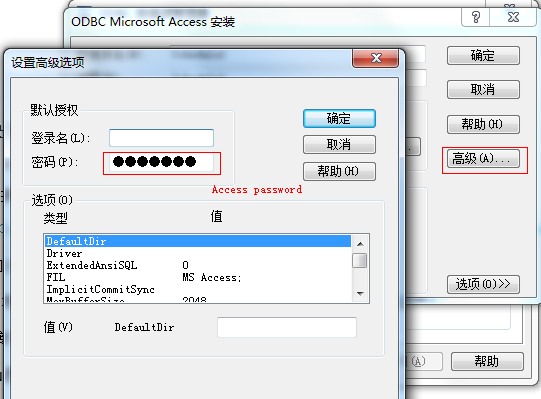
情况三:对于 64位操作系统.
Odbc:C:\Windows\SysWOW64\odbcad32.exe.或者在命令行 输入 "odbcad32.exe"
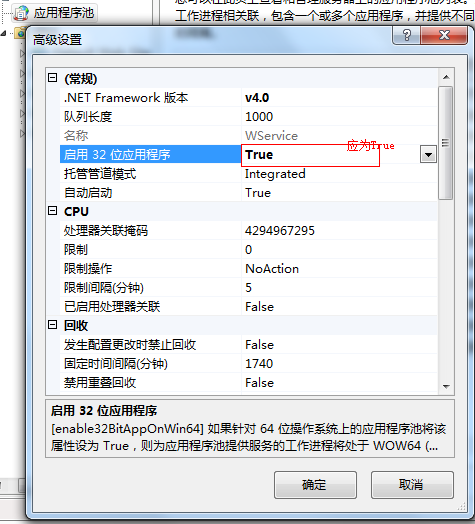
IIS:应用程序池,启用32位应用程序。
此内容由惯性聚合(RSS阅读器)自动聚合整理,仅供阅读参考。 原文来自 — 版权归原作者所有。