







“ODP.NET Managed”发布已经有一段时间了,近期正好有一个新项目,想尝试用一下,参考园子里的文章:《.NET Oracle Developer的福音——ODP.NET Managed正式推出》 到Oracle官网 下载 ODP.NET_Managed121010.zip 大约1.9M,解压后目录结构如下:
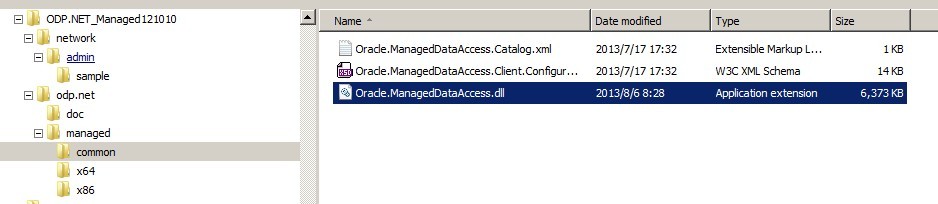
核心的dll,就是common目录下的Oracle.ManagedDataAccess.dll,不象ODP.NET以前的版本,这次终于不用区分x86/x64版本了,不管是32位还是64位,都是同一个dll。
至于manged/x64、managed/x86这二个目录,是用来向.NET x86或.NET x64的GAC注册程序集的,运行相关的configure.bat后,会自动将common中的Oracle.ManagedDataAccess.dll放入GAC,这样在vs中添加引用时,能自动找到GAC中的相关命名空间
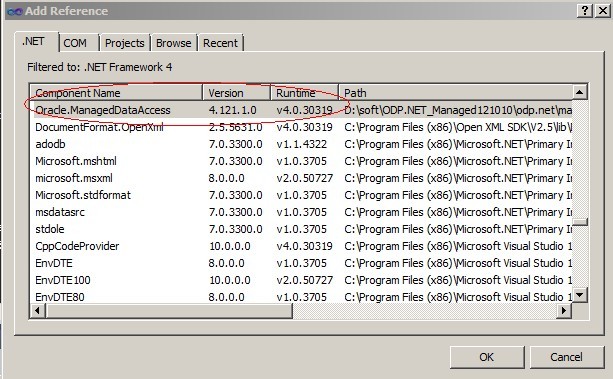
运行了configure.bat的机器上,应用程序的bin目录下不必包括Oracle.ManagedDataAccess.dll,就能正常运行了。
注:configure.bat这一步是可选的,添加引用时,完全也可以通过直接浏览Oracle.ManagedDataAccess.dll所在位置,将该dll复制到bin目录下.
下面是最基本的使用代码:

 1 using System;
 2 using System.Data;
 3 using Oracle.ManagedDataAccess.Client;
 4
 5 namespace ODP.NET
 6 {
 7     class Program
 8     {
 9         static void Main(string[] args)
10         {
11             OracleConnection conn = null;
12             try
13             {
14                 conn = OpenConn();
15                 var cmd = conn.CreateCommand();
16                 cmd.CommandText = "select * from s_awb_master where rownum=1";
17                 cmd.CommandType = CommandType.Text;
18                 var reader = cmd.ExecuteReader();
19                 while (reader.Read())
20                 {
21                     Console.WriteLine(string.Format("AwbPre:{0},AwbNo:{1}", reader["AwbPre"], reader["AwbNo"]));
22                 }
23             }
24             catch (Exception ex)
25             {
26                 Console.WriteLine(ex.Message);
27             }
28             finally
29             {
30                 CloseConn(conn);
31             }
32             Console.Read();
33         }
34
35
36         static OracleConnection OpenConn()
37         {
38             OracleConnection conn = new OracleConnection();
39             conn.ConnectionString = "Data Source=(DESCRIPTION=(ADDRESS=(PROTOCOL=TCP)(HOST=***.***.***.***)(PORT=1521))(CONNECT_DATA=(SERVICE_NAME=***)));Persist Security Info=True;User ID=***;Password=***;";
40             conn.Open();
41             return conn;
42         }
43
44         static void CloseConn(OracleConnection conn)
45         {
46             if (conn == null) { return; }
47             try
48             {
49                 if (conn.State != ConnectionState.Closed)
50                 {
51                     conn.Close();
52                 }
53             }
54             catch (Exception e)
55             {
56                 Console.WriteLine(e.Message);
57             }
58             finally
59             {
60                 conn.Dispose();
61             }
62         }
63     }
64 }
最后附上dll下载:https://files.cnblogs.com/yjmyzz/Oracle.ManagedDataAccess.zip
此内容由惯性聚合(RSS阅读器)自动聚合整理,仅供阅读参考。 原文来自 — 版权归原作者所有。