




Not long ago, creating a solid presentation, a clean infographic, or a sharp data visualization meant you either knew your way around design software or you paid someone who did. That has changed, though. There's now a slew of AI-powered tools that let pretty much anyone put together professional-looking visuals and interactive graphics in minutes.
Obviously, these tools are still rolling out, but there's a range of options out there you can play with right now. Here's a guide to some of the best visual AI tools.
Why would you want to use visual AI tools?
The goal of visual AI tools is largely to help you with the technical side of things, so you can focus on the vision for how they should look — and describe that vision in natural language.
You May Also Like
In terms of what people actually use them for, a few areas stand out. Turning raw data or statistics into infographics is a big one — instead of manually placing numbers, icons, and text blocks yourself, you feed a tool your data and get back something structured and visual. Flowcharts and process diagrams are another great way to use these tools, particularly when you're mapping out a complicated workflow and really don't want to spend an hour dragging connector lines around.
The biggest time-saver might be building full presentations from raw text. You can take a rough outline or a messy block of notes and end up with a multi-slide deck in only a few minutes. Beyond that, these tools handle tasks such as creating custom background graphics, generating data visualizations and charts, and even creating video content for courses. Even something straightforward, like adding visual elements to documents to improve engagement and accessibility, gets a lot faster when AI is making layout and styling decisions.
None of this means the tools nail everything, but when it comes to speed and ease of use, they can be pretty helpful.
Design and presentation platforms
When you need to build presentations, diagrams, or infographics without staring at a blank canvas, there are a handful of consumer-friendly platforms with AI features that handle most of the heavy lifting. You'll also find AI tools in familiar software suites. If you're working in Word or PowerPoint, take advantage of Microsoft Copilot. If you prefer the Google Workspace suite, Gemini can quickly generate slides, charts, graphs, and more.
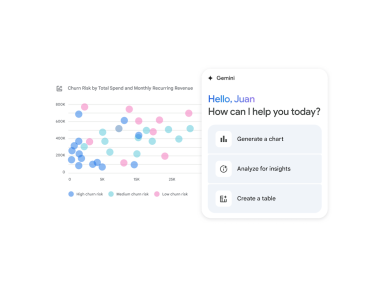
Gemini can analyze and visualize data for you. Credit: Google
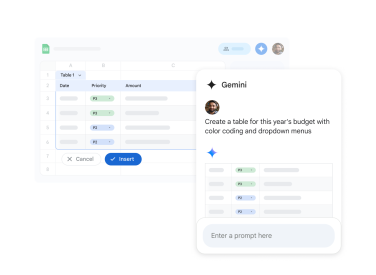
Use Gemini to turn Google Sheets data into charts and graphs. Credit: Google
Canva is another widely used tool in this space. It used to be a more manual visual builder, but over the past few years, it has developed its Magic Studio suite, which can generate full presentations from a single text prompt. All you have to do is describe what your presentation is about, and Canva puts together a structured deck that you can then tweak to your liking. There's also Magic Write, which taps into a large language model to expand, refine, and summarize written content. For people who've never opened design software in their lives, the fact that Canva handles both the visual layout and the writing makes it one of the most complete options out there.
FigJam AI, which lives within the Figma ecosystem, offers a slightly different angle. It's especially good at automated diagram generation. You give it text inputs, and it converts them into flowcharts, mind maps, organizational diagrams, and so on. FigJam can automatically reorganize and categorize content, too — you can just dump a pile of unstructured ideas into it, and it'll sort them into logical groupings with visual structure. That's useful when you're trying to make sense of complex information before turning it into a formal presentation.
Mashable Light Speed
Venngage is more specialized, zeroing in on infographics and visual content designed specifically for educational materials. If you're a teacher looking to convert lesson plans or data sets into visually engaging handouts, Venngage was built with exactly that workflow in mind.
Custom image and graphics generation
By now, most major AI services have image generation baked in somewhere. Anthropic is one of the few exceptions, but the AI company just rolled out a new design tool specifically to help make charts, graphs, and documents. So, no matter which AI chatbot you prefer, it can probably help you with your next presentation.
If you prefer working in ChatGPT, the popular AI chatbot excels at image generation and data visualization. You can even create custom, interactive visualizations that demonstrate a particular scientific principle or data set.
There are also a number of AI image generator models that are used in professional tools. These include the likes of Midjourney, which launched in 2022 and quickly built a reputation for producing highly detailed, aesthetically impressive images from text prompts. Adobe Firefly is Adobe's consumer-facing take on generative visuals, and its big advantage is tight integration with Adobe's broader creative suite. Stable Diffusion takes the open-source route, which appeals to more technical users who want deeper control over how generation works or who'd prefer not to depend on a subscription service.
Practically speaking, these tools all let you do similar things. The quality gap between AI-generated images and traditional stock photography has closed a lot, though it hasn't vanished completely — AI images still occasionally produce weird artifacts or inconsistencies that a trained eye will spot.
Video and animation tools
Video production has always been one of the most time-consuming and expensive forms of content creation. AI is starting to shift that, especially for educational and training content.
Synthesia is the standout consumer-facing tool here. It generates realistic, animated videos and voiceovers entirely from text. You write a script, pick an AI-generated presenter (or build a custom one), and the platform produces a video that looks surprisingly close to a traditional talking-head setup. What's also nice is how easy it makes updating content; if you need to change a line in your script or update a statistic, you just regenerate the video instead of reshooting the whole thing.
This is particularly valuable for creating course materials and educational content when you don't have the luxury of traditional production timelines. Think about an online course creator who needs 30 lesson videos, or a company rolling out training materials across multiple languages. That said, while the tech has gotten dramatically better, AI-generated presenters still often land in uncanny valley territory. The movements and expressions can feel off, which may affect how viewers receive the content. For a lot of use cases, the speed and cost trade-off is worth it, but it's not a perfect stand-in for a real person on camera in every situation.
Don't forget to check your work
Before you go all-in on AI-generated visuals, there are a few practical realities worth considering. Quality and accuracy concerns are probably at the top of the list. AI-generated images can contain errors, inconsistencies, or visual representations that are misleading. You will need to verify that charts, graphs, and infographics accurately represent the information they're supposed to convey. On top of that, generated designs can come across as generic or cookie-cutter if you don't put time into customizing the output.
There's also a learning curve that's easy to underestimate. These tools get marketed as effortless, but using them well still requires knowing how to write good prompts and having at least a basic understanding of design principles. Of course, the cost of these tools also matters. Plenty of platforms have free tiers, but those tend to come with limitations. Getting to the premium features usually means a subscription or usage-based pricing, and those costs stack up fast if you're bouncing between multiple tools across different categories. Educational or enterprise discounts sometimes exist, but they're not always easy to find.
And finally, you will want to disclose that you used AI. There's a growing expectation around being upfront when visuals are AI-generated. Using fully AI-produced graphics in educational or professional settings without acknowledging it raises ethical questions about transparency. As norms and rules in this space continue to take shape, leaning toward disclosure is generally both the safer and more responsible call.