




但上面的例子中,只能播放单一文件,如果要是多个文件选择多个声卡同时播放呢?想到使用多线程来实现,再次封装多线程播放类
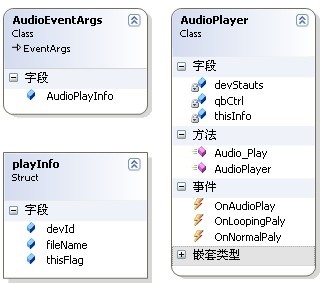
AudioPalyer类,有三个事件,当播放时触发OnAudioPlay事件,当循环播放时触发OnLoopingPlay事件,当正常播放时触发OnNormalPlay事件,代码如下:
using System;
using System.Collections.Generic;
using System.Linq;
using System.Text;
using QBAudioLib;
using System.Threading;namespace QBAudioThread
{
public struct playInfo
{
public Guid devId;
public string fileName;
public PlayFlags thisFlag;
}
public class AudioEventArgs : EventArgs
{
public playInfo AudioPlayInfo;
}
public class AudioPlayer
{
QBAudioCtrl qbCtrl;
DeviceStatus devStauts;
playInfo thisInfo;
public delegate void DefEventHandler(object sender,AudioEventArgs args);
public event DefEventHandler OnAudioPlay;//开始播放事件
public event EventHandler OnNormalPaly;//默认正常播放时事件
public event EventHandler OnLoopingPaly;//循环播放时事件
public AudioPlayer(playInfo iPlay)
{
thisInfo = iPlay;
}
public void Audio_Play()
{
Monitor.Enter(this);
qbCtrl = new QBAudioCtrl(thisInfo.devId, thisInfo.fileName);
qbCtrl.Dev_Play(thisInfo.thisFlag);
devStauts = qbCtrl.GetDeviceStatus();
//开始播放激发的事件
if (devStauts.isPlaying == true)
{
AudioEventArgs thisArgs = new AudioEventArgs();
thisArgs.AudioPlayInfo = thisInfo;
OnAudioPlay(this, thisArgs);
}
if (devStauts.isLooping == false)
{//默认播放激发的事件
OnNormalPaly(this, new EventArgs());
}
else
{//循环播放激发的事件
OnLoopingPaly(this, new EventArgs());
}
Monitor.Exit(this);
Thread.Sleep(1000);
}
}
}
界面实现:

 代码
代码
using System;
using System.Collections.Generic;
using System.ComponentModel;
using System.Data;
using System.Drawing;
using System.Linq;
using System.Text;
using System.Windows.Forms;
using QBAudioLib;
using System.Threading;namespace QBAudioThread
{
public partial class Form2 : Form
{
PlayFlags thisFlags;
DataTable dt = new DataTable();
Thread threadPlay;public Form2()
{
InitializeComponent();
}
private void Form2_Load(object sender, EventArgs e)dt.Columns.Add(
"devId", typeof(Guid));dataGridView1.DataSource
= dt;}
private void btn_play_Click(object sender, EventArgs e)//播放 threadPlay.Start();
threadPlay.IsBackground
}
}
}
}
void myPlayer_OnLoopingPaly(object sender, EventArgs e)}
private void radioButton1_CheckedChanged(object sender, EventArgs e)//选择默认播放}
private void btn_clear_Click(object sender, EventArgs e)//清除列表 }
}
此内容由惯性聚合(RSS阅读器)自动聚合整理,仅供阅读参考。 原文来自 — 版权归原作者所有。