惯性聚合 高效追踪和阅读你感兴趣的博客、新闻、科技资讯
阅读原文 在惯性聚合中打开

推荐订阅源

Forbes - Security
Forbes - Security
GbyAI
GbyAI
OSCHINA 社区最新新闻
OSCHINA 社区最新新闻
S
SegmentFault 最新的问题
Y
Y Combinator Blog
Recorded Future
Recorded Future
博客园 - Franky
I
InfoQ
T
The Blog of Author Tim Ferriss
Recent Announcements
Cyber Security Advisories - MS-ISAC
博客园_首页
阮一峰的网络日志
阮一峰的网络日志
T
Tailwind CSS Blog
Cyberwarzone
Cyberwarzone
The Register - Security
H
Hackread – Cybersecurity News, Data Breaches, AI and More
Threat Intelligence Blog | Flashpoint
雷峰网
雷峰网
P
Palo Alto Networks Blog
G
GRAHAM CLULEY
Cloudbric
Cloudbric
CTFtime.org: upcoming CTF events
MongoDB | Blog
MongoDB | Blog
F
Full Disclosure
Google DeepMind News
Recent Commits to openclaw:main
C
Check Point Blog
爱范儿
爱范儿
The GitHub Blog
The GitHub Blog
cs.AI updates on arXiv.org
W
WeLiveSecurity
T
Threat Research - Cisco Blogs
U
Unit 42
N
Netflix TechBlog - Medium
The Cloudflare Blog
Spread Privacy
Spread Privacy
Microsoft Azure Blog
美团技术团队
T
Troy Hunt's Blog
Engineering at Meta
Engineering at Meta
H
Heimdal Security Blog
TaoSecurity Blog
TaoSecurity Blog
C
Cybersecurity and Infrastructure Security Agency CISA
T
Tenable Blog
B
Blog
S
Securelist
H
Hacker News: Front Page
Google Online Security Blog
G
Google Developers Blog

博客园 - barney

更好的执行 浅谈代码生成工具《CodeSmith》的使用(1) 数据库设计经验 ie8 自动设置 兼容性 代码 求助 一个彩票的算法问题 ! 使用VS2005调试ASP程序 基于.NET平台的Windows编程实战 zhuan最近的一些想法与大家分享 机会来了,你做好准备了吗? XPath详解,总结 ASP.NET分页存储过程自定义用户控件 常用js 大全 [转载]《穷爸爸,富爸爸》读后感 VS2005中的代码格式化 四款PDF文档制作软件 VS2005(c#)项目调试问题解决方案集锦 VS2005中调试javascript 未能向文件“.csproj.FileListAbsolute.txt”写入命令行 对路径 的访问被拒绝。2008年05月27日 星期二 下午 05:16 sql使用convert转化
如何创建一个标准的Windows服务
barney · 2009-06-10 · via 博客园 - barney

如何创建一个标准的Windows服务

在很多时候,我们需要一个定时器,当间隔某段时间或者在某一个时刻的时候,触发某个业务的处理,这个时候,我们就可能需要引入Windows服务来做这个事情,如某些数据的同步操作、某些工作任务的创建或者侦听某些端口的工作等等。
做过Windows Forms开发的人,对开发Windows服务可能会熟悉一些,其实它本身应该算是一个Windows Forms程序。基本上整个Windows服务的程序分为几个部分:安装操作实现、程序启动、服务操作等。
本例子创建一个Windows服务,服务可以在整点运行,也可以在某段间隔时间运行,通过配置指定相关的参数。
完整的服务代码请下载文件进行学习:https://files.cnblogs.com/wuhuacong/AutoSyncService.rar

1)安装操作类的实现
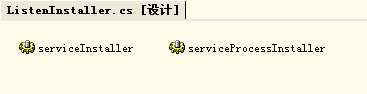
首先需要继承System.Configuration.Install.Installer类,并且需要增加ServiceProcessInstaller、ServiceInstaller两个对象来处理,另外您需要重载BeforeUninstall 和 AfterInstall 来实现服务在安装前后的启动和停止操作。
WinserviceInstaller.png

Code

2)程序启动
程序的启动很简单,基本上是自动创建服务程序的时候就生成了,这里列出来解析是为了说明服务调试的操作。
程序的启动是在Main函数里面,添加下面的代码即可

Code

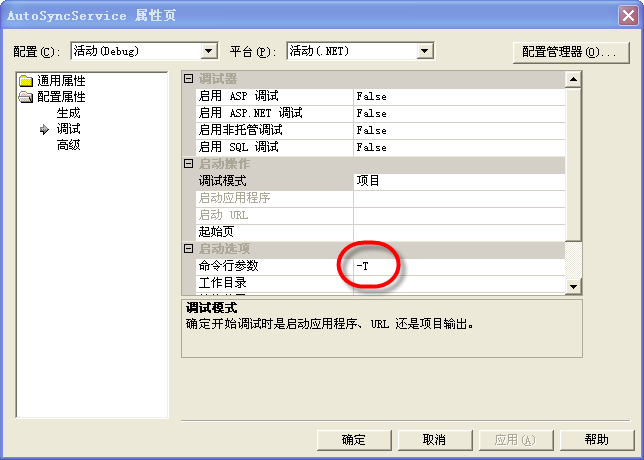
上面是标准的启动代码,但很多时候,我们需要调试服务,因此会加入一个跳转的开关

Code

上面的操作就是为了可以使用普通的调试功能调试Windows服务,其中的"-T"是在开发工具VS的IDE上设置的一个参数, 如下图所示。
WinserviceDebug.png

3)服务操作
首先需要创建一个集成自System.ServiceProcess.ServiceBase的服务类,如SocketService服务类,在SocketService类的构造函数中,您可能需要初始化一些信息,如创建一个定时器,修改服务器类的名称,读取配置参数等信息,以便初始化服务类的参数。
接着您需要重载服务基类的一些函数:OnStart、OnStop、OnContinue、OnPause、OnShutdown和定时器的触发函数timerReAlarm_Elapsed。完整的类如下

Code

4. 使用InstallUtil来安装和卸载服务
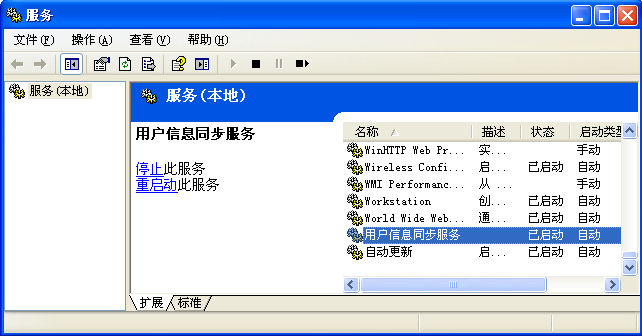
安装和卸载Windows服务,需要使用InstallUtil工具类进行操作,该工具是Dotnet框架附带的一个工具,在%SystemRoot%\Microsoft.NET\Framework\*** 对应的目录中。
其中App.config中的内容如下

Code

安装Windows服务的命令如下:
Code

winservice.png
卸载Windows服务的命令如下:

Code

主要研究技术:代码生成工具、Visio二次开发