







Connection Allowlist is a new browser security mechanism that lets a document declare, up front, the exact set of destinations it's permitted to open network connections to. Anything not on the list is blocked by the browser before the connection leaves the machine. It's currently a WICG proposal (repo here) running as a Chrome origin trial, and Report URI now collects the violation reports it emits.
This post covers how the mechanism works, how it differs from CSP, and the shape of the reports.

What it does
Before any outbound connection is established, the browser checks the destination against the allowlist. If it doesn't match, the connection is blocked at the network layer. This applies regardless of what initiated the connection — the policy is a property of the document, not of the code running in it.
The connection types covered are deliberately broad: fetch()/XHR, subresource requests, WebSocket, WebTransport, DNS prefetch, preload, navigations, redirects and WebRTC are all evaluated against the same list.
Connection-Allowlist: (response-origin "https://cdn.example.com" "https://api.example.com/*")Two categories get a stricter default and their own parameters:
- Redirects are blocked by default. The reasoning in the spec is that once a
request has left the client, the server it went to controls where it's
redirected next, so a matching initial URL is no guarantee. You opt back in
withredirects=allow. - WebRTC is blocked by default (
webrtc=block), because peer connections
use dynamic endpoint discovery that URL patterns can't meaningfully describe.webrtc=allowpermits it.
Local schemes (data:, about:) bypass the check. The mechanism only governs network communication — it does nothing about content injection or XSS. It's a containment control: it limits where an already-running script can send data, not whether that script can run.
How this differs from CSP
Content Security Policy can already restrict many outbound connections, with features like connect-src, form-action and others, so it's worth clarifying how Connection Allowlist differs.
Simply put, Connection Allowlist incorporates all outbound connections without the need for an extensive set of directives that would be required in CSP, and some of which you can't currently exert control over. Any outbound connection from the page is in scope. Period.
The two mechanisms complement each other rather than compete. CSP remains the right control for deciding which scripts, styles, images, frames and other resources a page is allowed to load and execute, while Connection Allowlist adds a broader network boundary around where that page can communicate. Used together, CSP helps prevent untrusted code and content from entering the page in the first place, and Connection Allowlist limits the damage if malicious code does run by further restricting where it can send data. For sensitive applications, the strongest position is to deploy both: CSP for content and execution control, and Connection Allowlist for outbound network containment.
Reports
As with any powerful feature, you're going to want to test this before you deploy, and for that, we have the typical format of Report-Only header.
Connection-Allowlist-Report-Only: (response-origin "https://api.example.com/*"); report-to=default
Violations are delivered through the Reporting API to the endpoint named by the report-to group. The report type is connection-allowlist and the body identifies the destination that was blocked:
{
  "type": "connection-allowlist",
  "body": {
    "url": "https://report-uri.com/account",
    "connection": "https://blocked.example/collect.js",
    "allowlist": ["https://api.example.com/*"],
    "disposition": "report"
  }
}
connection is the destination that tripped the policy, allowlist is the
declared policy, disposition is enforce or report, and url is the page that the browser was visiting when this happened.
Report-only is how you deploy this without the risk of breaking anything: serve it, collect what your pages actually connect to, refine the allowlist until it's clean, then switch to the enforcing header. During the origin trial, reporting is limited to document contexts — dedicated, shared and service workers aren't covered yet.
Availability
The feature is a Chrome origin trial (announcement) running from Chrome 148 to 151, after which Chrome will assess whether the feature is ready to progress towards shipping.
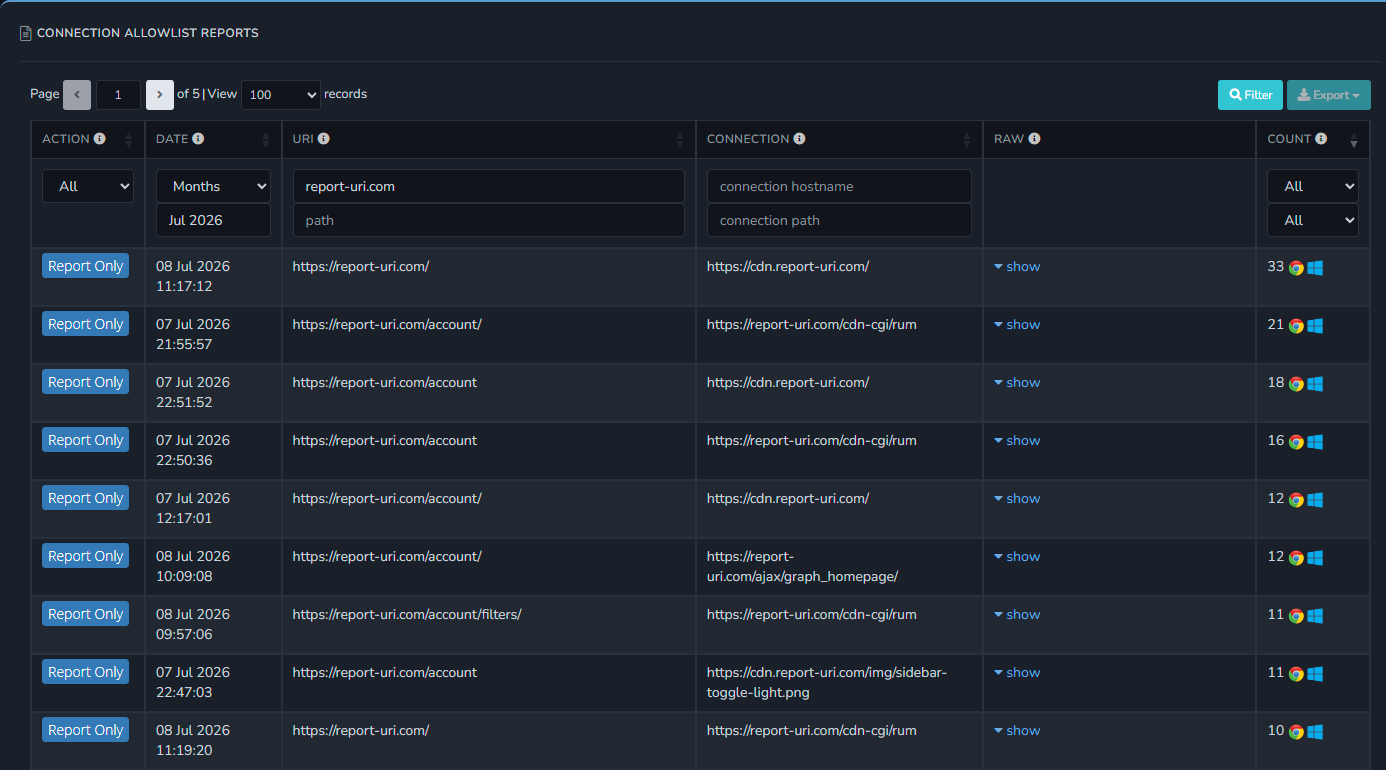
Report URI collects Connection Allowlist reports already, currently behind a beta flag. It works the same way as the existing browser report types: point thereport-to group of your Connection-Allowlist-Report-Only header at your Report URI group and the reports land on a Connection Allowlist reports page, showing the page URL, the blocked connection, the enforce/report-only disposition, the raw report and counts.
If you'd like to join to the beta, please reach out to support@ and we'll add your account.
Have you enjoyed this post or found it helpful?
☕️ Consider buying me a coffee to say thanks!
🔔 Subscribe for free notifications when I publish!
🤩 Become a member and support my content!
Tags: Connection Allowlist, 1.1.1.1