惯性聚合 高效追踪和阅读你感兴趣的博客、新闻、科技资讯
阅读原文 在惯性聚合中打开

推荐订阅源

Google DeepMind News
C
Check Point Blog
J
Java Code Geeks
腾讯CDC
Martin Fowler
Martin Fowler
MongoDB | Blog
MongoDB | Blog
H
Hackread – Cybersecurity News, Data Breaches, AI and More
博客园 - 三生石上(FineUI控件)
Apple Machine Learning Research
大猫的无限游戏
大猫的无限游戏
Engineering at Meta
Engineering at Meta
罗磊的独立博客
Last Week in AI
Last Week in AI
B
Blog
IT之家
IT之家
S
SegmentFault 最新的问题
D
DataBreaches.Net
Cyber Security Advisories - MS-ISAC
GbyAI
GbyAI
博客园 - 聂微东
U
Unit 42
有赞技术团队
有赞技术团队
Y
Y Combinator Blog
MyScale Blog
MyScale Blog

博客园 - Bob-wei

Visual Studio 配置额外工具 Windows Terminal 等 CMakeList.txt Windows Terminal 配置文件 C# 7.2 中 In参数( in parameter )的性能比较 JavaScript 的 parseInt(x), parseFloat(x), Number(x), +x, ~~x, x>>>0, isNaN(x) 区别和结果 Windows Terminal 配置 git-bash,集成右键菜单,集成VSCode 恢复WIn10 2004的“要使用本计算机,用户必须输入用户名和密码”选项 plantuml server with math docker image aspnetcore singleton service in app.use [bash] 编写7zz函数替换7z压缩命令 Chrome 不跟随 macOS 系统主题改变深色模式 VSCode的浅色主题(Default Light+)侧边活动栏改为浅色 VSCode_Extensions C++ in VSCode 用户中心 - 博客园 C# 私有字段前缀 _ 的设置(VS2019, .editorconfig) 重新调整动态vhdx占用的空间 通过git-bash一句话获得当前目录的全部csproj文件绝对路径 devdocs
dotnet 跨平台编译发布
Bob-wei · 2019-05-25 · via 博客园 - Bob-wei

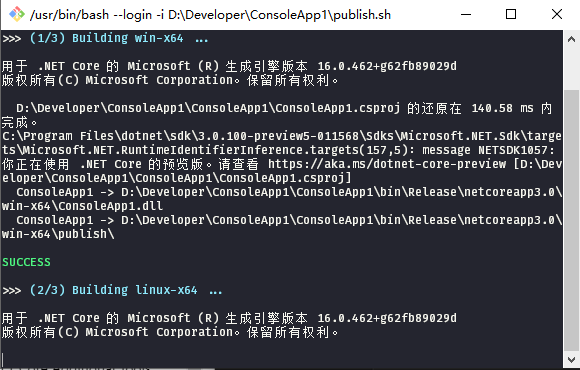
dotnet publish 命令,bash脚本如下(Windows安装git即可建议sh关联)

publish.sh

#!/usr/bin/env bash

# one line command: 
# array=( win-x64 linux-x64 osx-x64 ); for i in "${array[@]}"; do printf "\n>>> building $i ...\n\n"; dotnet publish -r $i -c Release -p:PublishSingleFile=true; done

set +x +e
# runtime array: https://docs.microsoft.com/en-us/dotnet/core/rid-catalog
array=( win-x64 linux-x64 osx-x64 )
config='Release'
# publish args: https://docs.microsoft.com/en-us/dotnet/core/tools/dotnet-publish
args=''
declare -i count=${#array[*]}
declare -i num=1
printf '>>> \033[1;36mClean bin folder ...\033[0m\n\n'
find . -type d \( -iname 'bin' -o -iname 'obj' \) | xargs rm -rf
printf '\033[1;36mOK\033[0m\n'
for i in "${array[@]}"; do
    printf "\n>>> \033[1;36m($num/$count) Building $i ...\033[0m\n\n"
    dotnet publish -r $i -c $config -p:PublishSingleFile=true $args
    if [ $? = 0 ]; then
        printf '\n\033[1;32m'SUCCESS'\033[0m\n'
    else
        printf '\n\033[1;31m'ERROR: $?'\033[0m\n'
    fi
    let num+=1
done
printf "\n\033[1;36mAll done. 10s to exit ...\033[0m\n"
sleep 10s