
惯性聚合 高效追踪和阅读你感兴趣的博客、新闻、科技资讯
阅读原文 在惯性聚合中打开

推荐订阅源

D
Docker
爱范儿
爱范儿
T
The Exploit Database - CXSecurity.com
量子位
T
Tailwind CSS Blog
T
Threatpost
The GitHub Blog
The GitHub Blog
AWS News Blog
AWS News Blog
云风的 BLOG
云风的 BLOG
K
Kaspersky official blog
P
Proofpoint News Feed
博客园 - 司徒正美
L
LangChain Blog
T
Threat Research - Cisco Blogs
C
CERT Recently Published Vulnerability Notes
罗磊的独立博客
酷 壳 – CoolShell
酷 壳 – CoolShell
博客园 - 叶小钗
S
Secure Thoughts
The Last Watchdog
The Last Watchdog
Spread Privacy
Spread Privacy
H
Hacker News: Front Page
T
Troy Hunt's Blog
Cyber Security Advisories - MS-ISAC
Google DeepMind News
W
WeLiveSecurity
A
Arctic Wolf
Apple Machine Learning Research
cs.AI updates on arXiv.org
P
Proofpoint News Feed
T
Tor Project blog
T
The Blog of Author Tim Ferriss
I
Intezer
P
Privacy & Cybersecurity Law Blog
美团技术团队
N
Netflix TechBlog - Medium
博客园_首页
OSCHINA 社区最新新闻
OSCHINA 社区最新新闻
V
Vulnerabilities – Threatpost
Application and Cybersecurity Blog
G
Google Developers Blog
Attack and Defense Labs
T
Tenable Blog
月光博客
月光博客
Stack Overflow Blog
Stack Overflow Blog
J
Java Code Geeks
腾讯CDC
Microsoft Security Blog
A
About on SuperTechFans
Last Week in AI
Last Week in AI

博客园 - 账号难注册

PowerDesigner生成PowerBuilder扩展属性~ ASP.NET收发邮件 解决Android应用安装快完毕时提示签名冲突 Android SDK ADT下载地址 控制面板中java设置项如何删除 关于IIS服务器证书续订 使用SqlLocalDB命令行管理LocalDB Web Deploy安装时显示Web Management Service无法启动 加密web.config extjs组件添加事件监听的三种方式 (转)asp.net中获得客户端的IP地址 HashPasswordForStoringInConfigFile中的Md5算法并非常用的Md5算法 (转)C#实现MD5加密 pb将datawindow数据导出EXCEL (转)笔记320 SQLSERVER中的加密函数 2013-7-11 Sqlserver2005附加数据库时出错提示操作系统错误5(拒绝访问)错误5120的解决办法 PowerDesigner中Name与Code同步的问题 (转) PowerDesigner中Table视图同时显示Code和Name SQLServer2012在登录远程服务器实例时报错:尝试读取或写入受保护的内存
如何清除SQL Server Management Studio的最近服务器列表
账号难注册 · 2014-06-10 · via 博客园 - 账号难注册

SQL Server Management Studio (SSMS) 的“连接到服务器”对话框会记录用户所有访问过的服务器名称,这个功能对于经常连接多个数据库的人来说确实挺方便的。
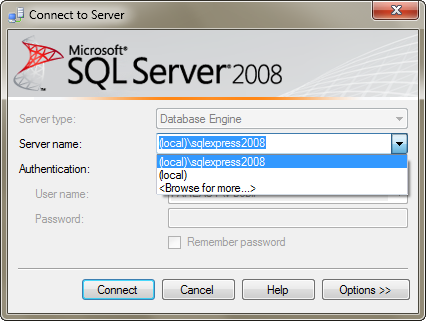
不过使用了一段时间之后,这个列表会变得很长。里面还有很多服务器名称都已经失效了,很想把这个列表清空了。但是很郁闷在SSMS的界面找不到可以清空该列表的地方,于是我Google了一把,找到了答案。

对于 SQL Server 2005 Management Studio,可以删除以下文件清空该列表:

WinXP: C:\Documents and Settings\<user>\Application Data\Microsoft\Microsoft SQL Server\90\Tools\Shell\mru.dat
Vista/Win7: C:\Users\<user>\AppData\Roaming\Microsoft\Microsoft SQL Server\90\Tools\Shell\mru.dat

对于 SQL Server 2008 Management Studio,可以删除以下文件清空该列表:

WinXP: C:\Documents and Settings\<user>\Application Data\Microsoft\Microsoft SQL Server\100\Tools\Shell\SqlStudio.bin
Vista/Win7: C:\Users\<user>\AppData\Roaming\Microsoft\Microsoft SQL Server\100\Tools\Shell\SqlStudio.bin

如果你也遇到同样的烦恼,不妨试一试!