惯性聚合 高效追踪和阅读你感兴趣的博客、新闻、科技资讯
阅读原文 在惯性聚合中打开

推荐订阅源

Google DeepMind News
Stack Overflow Blog
Stack Overflow Blog
Hugging Face - Blog
Hugging Face - Blog
博客园_首页
T
The Blog of Author Tim Ferriss
博客园 - 叶小钗
N
Netflix TechBlog - Medium
腾讯CDC
C
Check Point Blog
P
Proofpoint News Feed
Engineering at Meta
Engineering at Meta
GbyAI
GbyAI
S
SegmentFault 最新的问题
F
Fortinet All Blogs
美团技术团队
U
Unit 42
freeCodeCamp Programming Tutorials: Python, JavaScript, Git & More
博客园 - 司徒正美
F
Full Disclosure
Recorded Future
Recorded Future
D
DataBreaches.Net
博客园 - 【当耐特】
Martin Fowler
Martin Fowler
J
Java Code Geeks
I
InfoQ
Y
Y Combinator Blog
A
About on SuperTechFans
AI
AI
爱范儿
爱范儿
Exploit-DB.com RSS Feed
Forbes - Security
Forbes - Security
W
WeLiveSecurity
M
MIT News - Artificial intelligence
雷峰网
雷峰网
cs.CV updates on arXiv.org
Simon Willison's Weblog
Schneier on Security
The GitHub Blog
The GitHub Blog
Security Archives - TechRepublic
aimingoo的专栏
aimingoo的专栏
Cyber Security Advisories - MS-ISAC
G
GRAHAM CLULEY
Know Your Adversary
Know Your Adversary
Latest news
Latest news
Threat Intelligence Blog | Flashpoint
D
Docker
Recent Commits to openclaw:main
量子位
V2EX - 技术
V2EX - 技术
Project Zero
Project Zero

博客园 - 面朝大海

MOSS微软教程 活动目录微软教程 Petshop教程、接口编程教程 深入理解abstract class和interface 快速挤梦幻新区的技巧 - 面朝大海 - 博客园 解决blogspot.com博客不能访问的自动代理方法 全面剖析C#接口编程 CommunityServer 学习资源 Web 2.0 网站成功的关键 美化你的博客-推荐多个博客图标下载网站 动态创建DataGrid的模版列 强烈推荐:240多个jQuery插件 破解Office 2007激活? NUnit详细使用方法 NBear查找指定的列 MonoRail学习笔记系列文章 在非ASP.NET Web Project中创建和使用MonoRail Enterprise Library教程 asp.net 获得ip和mac地址
asp.net 使用json
面朝大海 · 2008-01-12 · via 博客园 - 面朝大海

本篇将简单的介绍一个在.NET中实现JSON的API,然后使用该API做个C/S ASP.NET的小练习。

Json.NET的简单介绍

首先介绍一个为方便在.NET中使用JSON的API,Json.NET。它方便我们读取从浏览器流向服务器的JSON对象,也方便在响应流中写入JSON对象。这里下载:Json.NET

Json.NET只提供了服务器端的方法,主要有实现JSON文本与XML互相转换的类,有自定义读写JSON的JsonReader类和JsonWriter类,还有一个非自定义读写JSON的JavaScriptSerializer类。

ASP.NET AJAX中,服务器端由JavaScriptSerializer类的几个方法来用于实现序列化和反序列化能力。在Json.NET中,服务器端的序列化 和反序列化能力则主要由JavaScriptConvert类的几个方法提供。本篇的例子只使用了JavaScriptConvert。

  1. JavaScriptConvert
    • Json.NET中,这个类用于序列化和反序列化JavaScript对象。
    • 这个类有两个方法:
      1. SerializeObject(object value, params JsonConverter[] converters),序列化,它有个重载方法SerializeObject(object value)
      2. DeserializeObject(string value, Type type),反序列化,它有个重载方法DeserializeObject(string value)

在客户端,Json.NET未提供支持。如果需要则可以结合使用上一篇“What is JSON:初识JSON”提到的json.js来处理客户端的系列化与反序列化。

下面我们尝试用这个API在ASP.NET中实现用JSON交互数据。

使用Json.NET在C/S中交互JSON数据的简单例子

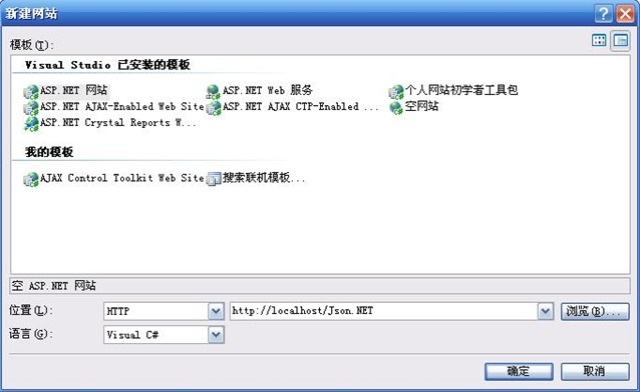
  1. 先新建一个ASP.NET 网站。

  2. 将下载到的Binary文件夹中的Newtonsoft.Json.dll和Newtonsoft.Json.XML放入网站的bin文件,当然要先新建bin文件夹。然后对dll添加引用。

  3. 切 换到设计模式,从标准工具箱向页面上添加三个Label,Text分别为EmployeeID、EmployeeName、EmployeeInfo;三 个Textbox,ID分别为txtID、txtName、txtInfo;然后添加一个Button,ID为btnToJSONString,Text 为Invoke ToJSONString;然后添加一个Textbox,ID为txtJSON,Textmode为MultiLine,rows设为5;接着再分别添加 一个Button和Textbox,ID为btnToObject、txtStrEmployee,Button的Text为Invoke ToStrEmployee。
  4. 添加一个WebService项目。 
    • 编写一个Employee类,然后两个WebMethod,接着在项目中对该Web服务添加引用。代码如下:

      using System;
      using System.Web;
      using System.Collections;
      using System.Web.Services;
      using System.Web.Services.Protocols;
      using Newtonsoft.Json;class Employee
      {
          
      private string[] employeeInfo;
          
          
      public int EmployeeID;
          
      public string EmployeeName;
          
      public string[] EmployeeInfo
          {
              
      get { return this.employeeInfo; }
              
      set { this.employeeInfo = value;}
          }
      }
      /**//// <summary>
      /// WebService 的摘要说明
      /// </summary>
      [WebService(Namespace = "http://tempuri.org/")]
      [WebServiceBinding(ConformsTo 
      = WsiProfiles.BasicProfile1_1)]
      public class WebService : System.Web.Services.WebService {public WebService () {//如果使用设计的组件,请取消注释以下行 
              
      //InitializeComponent(); 
          }

          [WebMethod]

      public string ToJSONString(int employeeID, string employeeName, string[] employeeInfo) 
          {
              Employee employee 
      = new Employee();
              employee.EmployeeID 
      = employeeID;
              employee.EmployeeName 
      = employeeName;
              employee.EmployeeInfo 
      = employeeInfo;return JavaScriptConvert.SerializeObject(employee);
          }

          [WebMethod]

      public string ToStrEmployee(string strJSON)
          {
              Employee decerializedEmployee 
      = (Employee)JavaScriptConvert.DeserializeObject(strJSON, typeof(Employee));
              
      return "ID: " + decerializedEmployee.EmployeeID + " "
                  
      + "Name: " + decerializedEmployee.EmployeeName + " "
                  
      + "Info: " + decerializedEmployee.EmployeeInfo.GetValue(0).ToString() 
          }   
      }

                          成员的属性类型分别为数字、字符串和数组。

5、对两个Button编写事件代码

    protected void btnToJSONString_Click(object sender, EventArgs e)
    {
        MyServ.WebService MyWebServ 
= new MyServ.WebService();
        
string employeeJSON = MyWebServ.ToJSONString(Int32.Parse(txtID.Text), txtName.Text, txtInfo.Text.Split(','));
        txtJSON.Text 
= employeeJSON;
    }
    
protected void btnToStrEmployee_Click(object sender, EventArgs e)
    {
        MyServ.WebService MyWevServ 
= new MyServ.WebService();
        
string strEmployee = MyWevServ.ToStrEmployee(txtJSON.Text);
        txtStrEmployee.Text 
= strEmployee;
    }

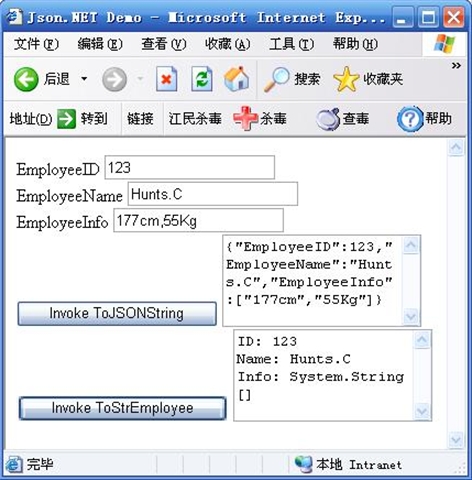
6、按Ctrl + F5运行;在EmployeeID、EmployeeName、EmployeeInfo中输入123、Hunts.C及一些个人信息(用逗号隔开);点 击Invoke ToJSONString,经服务器端序列化后,结果在txtJSON文本框中;然后点击Invoke ToStrEmployee,此时txtJSON文本框中的JSON文本传输给服务器端,服务器端读取该JSON并反序列化成对象,而后在 txtStrEmployee中写入Employee的成员值。 

                  \

只需要知道json里头除了name(名称)就是value(值),值有好几种格式,如果是数字就不用加引号,如果加了引号就是字符串,如果用[]包裹就是数组,如果出现{}就说明是嵌套的json。诸如此类。