






上节讲了对报表上的控件和section进行布局,这节讲解一下AR的打印参数设置。
AR默认的话,报表的纸张类型是就是Custom,宽高根据主模版的大小来。
用户可以通过AR自带的打印组件打印帐票。在popForm上,用于可以选择打印纸张等。


<!--[endif]-->
<!--[if !vml]-->
<!--[endif]-->
1,首先,先要弄清一个概念,AR报表的纸型和打印机打印出来的纸型是完全不同的概念。
1),AR报表的纸型是这张帐票的实际大小,不会随着打印机的纸型而变化的。
2),打印机打印出来的纸型,仅仅是个用来放报表的容器而已。
形象点说:AR纸型的大小就相当于工厂生产出来的产品的大小;而打印执行仅仅是用来放这个产品的外包装而已。
所以,对于A4横的AR报表来说,用A3来打印的话,虽然打印出来的纸大了,但报表本身的大小不会变。
假如用A5来打印的话,打印出来的纸变小了,但由于报表本身没变,所以1页会打印不下,可能有部份内容显示不出来。
本节讲讨论如何设置AR报表的纸型。
2,AR报表的一些主要打印参数,具体对照图来看:
<!--[if !vml]-->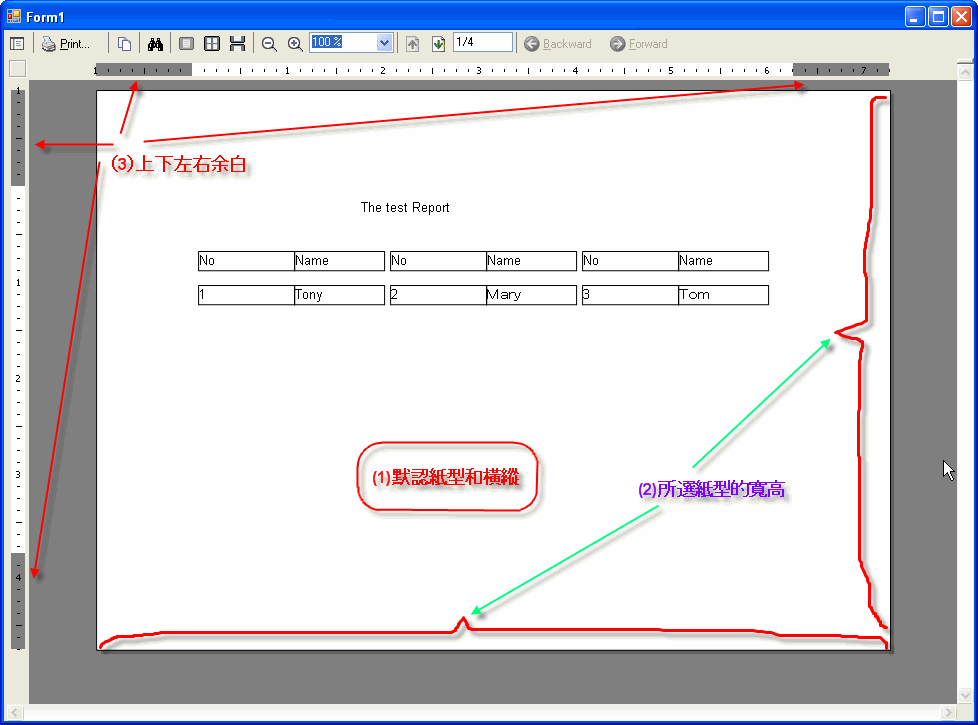
<!--[endif]-->
(1), AR报表的纸型,如下进行设置:
rpt.PageSettings.PaperKind = Printing.PaperKind.A4
rpt.PageSettings.Orientation = DataDynamics.ActiveReports.Document.PageOrientation.Portrait
該AR报表的纸型是A4,方向是横。
假如不进行设置的话,默认PaperKind就是0(Custom),横纵没有(应该是-1)。
AR纸型一般是可以有选项让用户可以设置的,这个在我们项目中已经写在Form基类中了。不过我们有些特殊帐票是禁用该选项的。
(2),当前纸型下的宽高
假如当前纸型是A4横的话,宽高如下:
rpt.PageSettings.PaperWidth=8.267716
rpt.PageSettings.PaperHeight=11.692914
恩,仔细看看,没错,PaperWidth竟然比PaperHeight小。
你把纸型切换成A4 纵看看,宽高还是这样不变。
不知道这算不算AR的bug,PaperWidth和PaperHeight是以“纵”为标准的,假如是“横”帐票的话,求宽高时,不要忘记反一下。
(3),上下左右打印的余白
不管哪种纸型,默认余白大小如下:
rpt.PageSettings.Margins.Top = 1
rpt.PageSettings.Margins.Bottom = 1
rpt.PageSettings.Margins.Left = 1
rpt.PageSettings.Margins.Right = 1
可以进行相应的修改,我们项目中,把余白的修改开放给了用户。
3,实际帐票内容的宽度设定。恩,这个是难点!
实际内容的宽度就是:PrintWidth
上一节中,我的PrintWidth设置如下:
'Set PrintWidth
Me.PrintWidth = Me.subReport2.Left + Me.subReport2.Width
实际显示的宽度,不管subReport2怎么变,总归把它显示出来,不管纸张类型是什么。
如果me.PrintWidth甚至比纸张的宽度还要大,则会显示红线,实际打印出来会以红线分割打印2张纸。
来举例:
1)我们把PrintWidth正好设置成纸型宽度(虽然是PaperHeight,但的确是宽)减去左右余白,看看效果,不错,效果很好。
Me.PrintWidth = Me.PageSettings.PaperHeight - Me.PageSettings.Margins.Left - Me.PageSettings.Margins.Right
<!--[if !vml]-->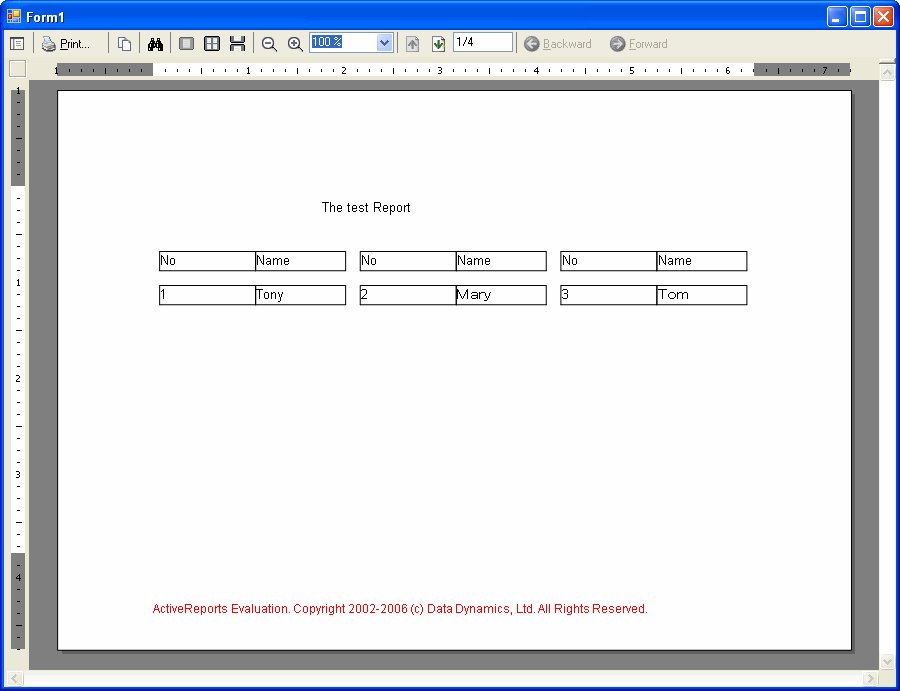
<!--[endif]-->
2)我们把PrintWidth设成刚刚的一半,效果会咋样呢?有一半的内容没显示出来。
Me.PrintWidth = (Me.PageSettings.PaperHeight - Me.PageSettings.Margins.Left - Me.PageSettings.Margins.Right) / 2
<!--[if !vml]-->
<!--[endif]-->
3)那我们把PrintWidth设成(1)的2倍,由于超过了纸张的宽度,所以出现红线了。
<!--[if !vml]-->
<!--[endif]-->
看了这么多例子,PrintWidth到底应该这么设置啊?
一种就是像例1那样,设置成纸型宽度减去左右余白。这样会有一个问题,有些分栏帐票分栏数过多,导致一页打不下,多余的部份会不显示出来。假如用户不介意或就是要求这样,那就用这种发法。
第二种就是把PrintWidth设成模版内实际内容的宽度。就像上节例子那样
Me.PrintWidth = Me.subReport2.Left + Me.subReport2.Width
这样,万一PrintWidth超过了纸型宽度的话,出红线。
我们项目中一般使用的方法是2者的结合体:
'先根据紙張的大小縱横算出黙認的PrintWidth
Dim defaultPrintWidth As Single = _
IIf(PageSettings.Orientation = PageOrientation.Portrait, PageSettings.PaperWidth, PageSettings.PaperHeight) _
- PageSettings.Margins.Left _
- PageSettings.Margins.Right _
- 0.02
'實際要求的寛度
Dim realPrintWidth As Single
realPrintWidth = Sub1.left + Sub1.Width + Sub2.Width + Sub3.Width
'如果實際要求的寛度大于纸张宽度,则用实际的宽度
If realPrintWidth > defaultPrintWidth Then
'如果實際要求的寛度大于黙認寛度
Me.PrintWidth = realPrintWidth
else
Me.PrintWidth = defaultPrintWidth
End If
哼哼!不要以为这样就结束了,客户的需求是千奇百怪的。
假如有一张动态分栏的帐票,实际宽度超过了纸张宽度,出现了红线,而红线正好把一个TextBox截成2断,用户可能希望从这个TextBox就开始换页(甚至比较过分的,换页之前面名字等固定栏还要显示出来)。而且AR纸型用户又是可以随意设置的,天知道红线会出现在哪里。如图:
<!--[if !vml]-->
<!--[endif]-->
这个我就给个思路吧,假如分栏的栏宽都是固定的,那算出实际宽度和纸张宽度作比较,然后添加标志位字段,控制换页。然后把No,Name在组织数据中组织好,使得page2显示出来。
假如连分栏地栏宽都是动态的(Maths,Chinese,English栏宽都是不相等的),那就更麻烦了,试着说服客户吧,这样应该更简单一点。呵呵,这个后面有机会再说吧。
4,ok,下面看看简单的代码吧(以A4 纵为例)
<!--[if !vml]-->
<!--[endif]-->
主模版
form的事件:
Private Sub Form1_Load(ByVal sender As Object, ByVal e As System.EventArgs) Handles Me.Load
'Show the table1
Dim conn As String = "Provider=Microsoft.Jet.OLEDB.4.0;Data Source=test.mdb;Persist Security Info=False"
Dim cmd As String = "Select * from table1"
Dim adapter As New OleDbDataAdapter(cmd, conn)
Dim ds As New DataSet
adapter.Fill(ds)
Dim rpt As New rpt1
rpt.DataSource = ds
rpt.DataMember = ds.Tables(0).TableName
'A4 Portrait
rpt.PageSettings.PaperKind = Printing.PaperKind.A4
rpt.PageSettings.Orientation = DataDynamics.ActiveReports.Document.PageOrientation.Portrait
rpt.Run()
Me.Viewer1.Document = rpt.Document
End Sub
主模版的事件:
Private Sub rpt1_ReportStart(ByVal sender As Object, ByVal e As System.EventArgs) Handles Me.ReportStart
'<--------Step (1)---------->
'Set contols' width
'me.lblClass.Width=xxx
'
'
'<--------Step (1)---------->
'<--------Step (2)---------->
'Arrange Controls.
Me.lblNo.Left = 0
Me.lblNo.Top = 0
Me.lblName.Left = Me.lblNo.Left + Me.lblNo.Width
Me.lblName.Top = Me.lblNo.Top
Me.txtNo.Left = Me.lblNo.Left
Me.txtNo.Top = 0
Me.txtName.Left = Me.txtNo.Left + Me.txtNo.Width
Me.txtName.Top = Me.txtNo.Top
'<--------Step (2)---------->
'<--------Step (3)---------->
'Set all sections & PrintWidth
Me.GroupHeader1.Height = Me.lblNo.Top + Me.lblNo.Height
Me.Detail.Height = Me.txtNo.Top + Me.txtNo.Height
Me.Detail.ColumnCount = 4
'caculate printwidth
Dim realWidth As Single = (Me.txtName.Left + Me.txtName.Width) * Me.Detail.ColumnCount
Dim defaultWidth As Single
If PageSettings.Orientation = PageOrientation.Portrait Then
defaultWidth = PageSettings.PaperWidth - PageSettings.Margins.Left - PageSettings.Margins.Right
Else
defaultWidth = PageSettings.PaperHeight - PageSettings.Margins.Left - PageSettings.Margins.Right
End If
If realWidth > defaultWidth Then
Me.PrintWidth = realWidth
Else
Me.PrintWidth = defaultWidth
End If
'<--------Step (3)---------->
End Sub
5,最终的效果:
<!--[if !vml]-->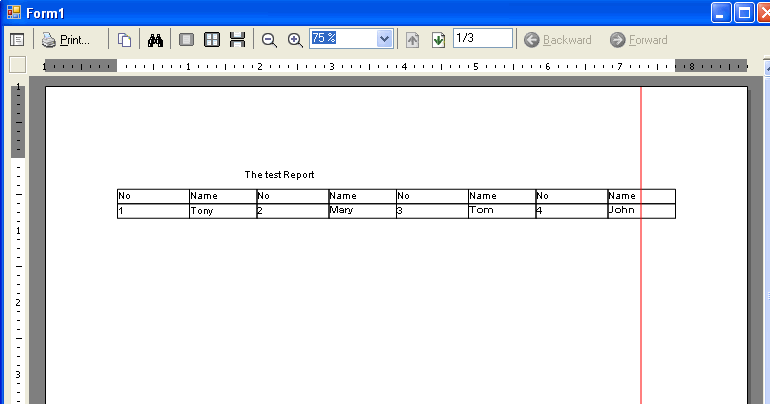
<!--[endif]-->
此内容由惯性聚合(RSS阅读器)自动聚合整理,仅供阅读参考。 原文来自 — 版权归原作者所有。