







Silverlight与其它系统通信的方式主要有三种,通过WCF或者Web Service,HTTP直接通信和Socket通信。
HTTP直接通信可以使用WebClient类和HttpWebRequest类。WebClient提供了一种简单的基于事件的模型来让你以流或者字符串的方式下载和上传资源, 而HttpWebRequest提供了更复杂的通信场景,使用.NET异步编程模式来发送请求。
这里我使用WebClient类来下载压缩成zip格式的图片, 这也是Silverlight的一个优点,就是图片,视频等资源文件可以压缩成zip格式,然后通过WebClient类下载到客户端, 然后把zip文件里面的资源与相应的MediaElement或者Image关联起来就可以显示了。本例运行之后的效果如下:
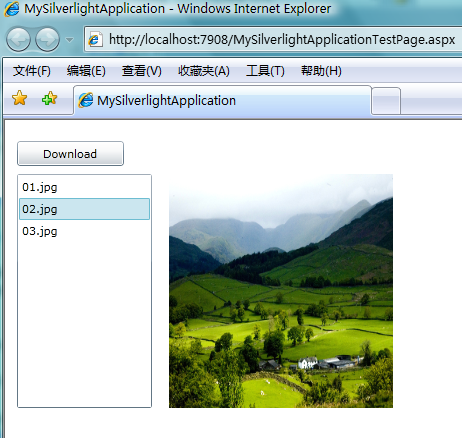
点击Download按钮去下载zip文件,ListBox是硬编码绑定了几张图片列表,在ListBox中点击图片列表在右边的Image控件中显示相应的图片。
先看一下XAML代码:
<Grid x:Name="LayoutRoot" Background="White">
        <Button Content="Download" Height="25" HorizontalAlignment="Left" Margin="12,21,0,0" Name="downloadButton" VerticalAlignment="Top" Width="107" Click="downloadButton_Click" />
        <ListBox Name="imageListBox" Height="234" HorizontalAlignment="Left" Margin="12,54,0,0" VerticalAlignment="Top" Width="135" SelectionChanged="imageListBox_SelectionChanged" Visibility="Collapsed"/>
        <Image Height="234" HorizontalAlignment="Left" Margin="164,54,0,0" Name="image" Stretch="Fill" VerticalAlignment="Top" Width="224" />
</Grid>
接下来看一下WebClient类的一些成员:
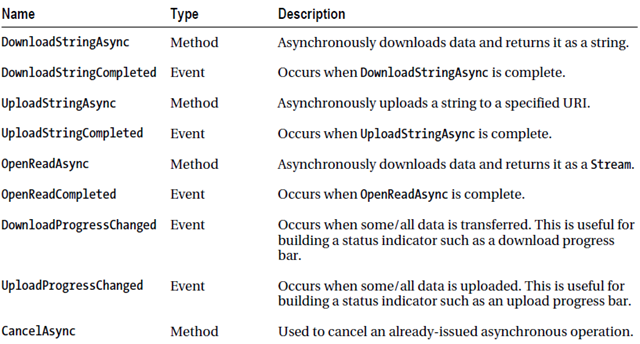
这里用到OpenReadAsync方法以流的方式异步下载zip文件, 并在OpenReadCompleted事件中即下载完成后获得这个流。代码如下所示:
        private StreamResourceInfo imageResources;

        private void downloadButton_Click(object sender, RoutedEventArgs e)
        {
            WebClient wc = new WebClient();

            wc.OpenReadCompleted += new OpenReadCompletedEventHandler(wc_OpenReadCompleted);
            wc.OpenReadAsync(new Uri("/Resource/images.zip", UriKind.Relative));
        }

        void wc_OpenReadCompleted(object sender, OpenReadCompletedEventArgs e)
        {
            if (e.Error == null)
            {
                imageResources = new StreamResourceInfo(e.Result, null);
                this.imageListBox.Visibility = System.Windows.Visibility.Visible;
            }
            else
            {
                throw e.Error;
            }
        }
在OpenReadCompleted事件若下载没有发生异常,ListBox被设置为可见并用System.Windows.Resources.StreamResourceInfo类对象来保存下载的zip流。
需要注意的是Uri路径的问题, 具有前导斜杠的相对 URI 表示相对于应用程序根的位置:

最后看一下取得图片并显示的代码:
        private void imageListBox_SelectionChanged(object sender, SelectionChangedEventArgs e)
        {
            BitmapImage bitmapImageSource = new BitmapImage();

            StreamResourceInfo imageResourceInfo = Application.GetResourceStream(imageResources, new Uri(this.imageListBox.SelectedItem.ToString(), UriKind.Relative));
            bitmapImageSource.SetSource(imageResourceInfo.Stream);

            this.image.Source = bitmapImageSource;
        }
这里使用Application.GetResourceStream去获得一个特定图片, 图片的相对路径是相对于zip文件的图片路径。
完整的后台代码如下:
    public partial class WebClientDemo : UserControl
    {
        private StreamResourceInfo imageResources;

        public WebClientDemo()
        {
            InitializeComponent();

            List<string> imageList = new List<string> { "01.jpg", "02.jpg", "03.jpg" };
            imageListBox.ItemsSource = imageList;
        }

        private void downloadButton_Click(object sender, RoutedEventArgs e)
        {
            WebClient wc = new WebClient();

            wc.OpenReadCompleted += new OpenReadCompletedEventHandler(wc_OpenReadCompleted);
            wc.OpenReadAsync(new Uri("/Resource/images.zip", UriKind.Relative));
        }

        void wc_OpenReadCompleted(object sender, OpenReadCompletedEventArgs e)
        {
            if (e.Error == null)
            {
                imageResources = new StreamResourceInfo(e.Result, null);
                this.imageListBox.Visibility = System.Windows.Visibility.Visible;
            }
            else
            {
                throw e.Error;
            }
        }

        private void imageListBox_SelectionChanged(object sender, SelectionChangedEventArgs e)
        {
            BitmapImage bitmapImageSource = new BitmapImage();

            StreamResourceInfo imageResourceInfo = Application.GetResourceStream(imageResources, new Uri(this.imageListBox.SelectedItem.ToString(), UriKind.Relative));
            bitmapImageSource.SetSource(imageResourceInfo.Stream);

            this.image.Source = bitmapImageSource;
        }
    }
参考书籍: Introducing Silverlight 4, MSDN
此内容由惯性聚合(RSS阅读器)自动聚合整理,仅供阅读参考。 原文来自 — 版权归原作者所有。