


环境
system: Windows 2012 R2
Redis: 5.0.10 64bit
原来只有一个节点进行读写,随着时间推移,时不时出现超时现象,于是改为1主(写)2从(读)方案。项目背景可以使 用 redis 只做缓存使用, 不需要持久化。
1,安装redis 后,再复制出两个文件夹。
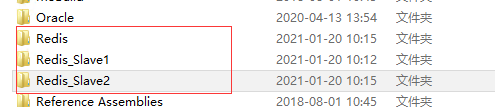
端口:
redis: 6379
redis_slave1: 6380
redis_slave2: 6381
2,分别打开 Redis_Slave1, Redis_Slave2 下的配置文件, redis.windows.conf, 在“Replication" 部位添加配置:
slaveof 127.0.0.1 6379
################################# REPLICATION #################################

# Master-Slave replication. Use slaveof to make a Redis instance a copy of
# another Redis server. A few things to understand ASAP about Redis replication.
#
# 1) Redis replication is asynchronous, but you can configure a master to
#    stop accepting writes if it appears to be not connected with at least
#    a given number of slaves.
# 2) Redis slaves are able to perform a partial resynchronization with the
#    master if the replication link is lost for a relatively small amount of
#    time. You may want to configure the replication backlog size (see the next
#    sections of this file) with a sensible value depending on your needs.
# 3) Replication is automatic and does not need user intervention. After a
#    network partition slaves automatically try to reconnect to masters
#    and resynchronize with them.
#
# slaveof <masterip> <masterport>
slaveof 127.0.0.1 6379
3,注册为windows service
分别到Redis_Slave1, Redis_Slave2 文件夹下执行命令。注意: redis-server.exe 前面有".\" , 如果不加".\" 执行的是系统全局命令,将无法启动多个服务。
# 文件夹 Redis_Slave1
.\redis-server.exe --service-install redis.windows.conf --service-name Redis6380
# 文件夹 Redis_Slave2
.\redis-server.exe --service-install redis.windows.conf --service-name Redis6381
在win服务里查看执行结果:

4,验证安装
通过redis-cli 命令分别登录服务,并测试一个key,

此内容由惯性聚合(RSS阅读器)自动聚合整理,仅供阅读参考。 原文来自 — 版权归原作者所有。