







最近看到很多人在问这个问题.就是如何在Mail的正文中如何显示附件的图片?本人也不会就去网上搜索.可是网上竟然没有(可能是太简单,很多人不屑提供代码),于是本人就尝试.
最先想到的就是outLook可以显示附件中的图片.于是在OutLook的邮件正文:右键->ViewSource 就看到了
1 " <img width=560 height=420 id="_x0000_i1025"
2src="cid:image001.jpg@01C8C4AF.C7E6ED20">"
这种代码 所以产生的第一个想法就是在写正文的时候,自动根据附件去生成类似代码.说干就干,马上动手!
新建一个网站,拖几个FileUpload 上去.如下图 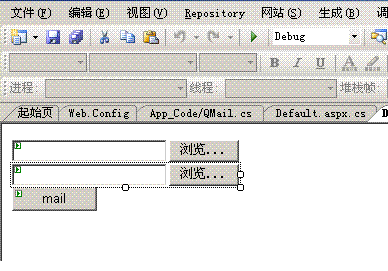
根据MicroSoft自带的System.Net.Mail 组件,完成发送方法,代码如下
1using System;
2using System.Collections.Generic;
3using System.Text;
4using System.Net.Mail;
5using System.Net;
6using System.IO;
7namespace STS.MailSystem.Common
8 {
{
9 public class QMail
10 {
{
11 /// <summary>
12 /// 描述:Email发送通用函数
13 /// </summary>
14 /// <param name="from">发件人</param>
15 /// <param name="to">收件人(多个收件人以逗号隔开)</param>
16 /// <param name="subject">主题</param>
17 /// <param name="text">内容</param>
18 /// <param name="attch">附件</param>
19 /// <returns></returns>
20 public string MailSend(string from, string to, string cc, string subject, string text, Attachment attch, string priority)
21 {
22 MailMessage message = new MailMessage(from, to);
23 message.CC.Add(cc);
24 message.Subject = subject;
25 message.Body = text;
26
27
28 //message.CC.Add(new MailAddress(from)); //超送给自己
29 //message.Bcc.Add(new MailAddress(""));
30
31 if (attch != null)
32 {
33 Attachment data = attch;
34 message.Attachments.Add(data);
35 }
36
37 message.BodyEncoding = System.Text.Encoding.UTF8;//编码方式
38 switch (priority.ToUpper())
39 {
40 case "HIGH":
41 message.Priority = MailPriority.High;//优先级
42 break;
43 case "NORMAL":
44 message.Priority = MailPriority.Normal;//优先级
45 break;
46 case "LOW":
47 message.Priority = MailPriority.Low;//优先级
48 break;
49 default:
50 message.Priority = MailPriority.Normal;//优先级
51 break;
52 }
53
54 message.IsBodyHtml = true;//是否是html格式
55 SmtpClient client = new SmtpClient();//不同情况更改
56
57 //client.Credentials = CredentialCache.DefaultNetworkCredentials;//匿名认证
58
59
60 try
61 {
62 client.Send(message);
63 return "1";
64 }
65 catch (Exception e)
66 {
67
68 return e.Message;
69 }
70
71 }
72
73
74
75 }
76 }
}
77
78
然后看看我们的前台代码
1using System;
2using System.Data;
3using System.Configuration;
4using System.Web;
5using System.Web.Security;
6using System.Web.UI;
7using System.Web.UI.WebControls;
8using System.Web.UI.WebControls.WebParts;
9using System.Web.UI.HtmlControls;
10using System.Net.Mail;
11using STS.MailSystem.Common;
12using System.Text;
13
14 public partial class _Default : System.Web.UI.Page
15 {
16 protected void Page_Load(object sender, EventArgs e)
17 {
18
19 }
20 protected void Button1_Click(object sender, EventArgs e)
21 {
22 QMail mail = new QMail();
23
24 Attachment attachment = null;
25 //File Name
26 string fileName = string.Empty;
27 string filePath = string.Empty;
28 StringBuilder mailBody = new StringBuilder();
29 //mailBody.Append("content-type:base64");
30 //mailBody.Append("content-transfer-encodinf:");
31 //mailBody.Append("content-disposition:inline");
32 //mailBody.Append("filename:aa");
33 //增加附件
34 //这里指去考虑附件是图片的情况.
35 //其他情况不考虑
36 if (File1.Value != "")
37 {
38 filePath = this.File1.PostedFile.FileName;
39 fileName = filePath.Substring(filePath.LastIndexOf("\\") + 1);
40 //增加显示图片
41 mailBody.Append("content-id:" + fileName);
42 mailBody.Append("<img src='cid:" + fileName+"' />");
43 attachment = new Attachment(filePath);
44 }
45
46
47 //Send Mail
48 mail.MailSend("minqiang.zhang@metinform.cn", "minqiang.zhang@metinform.cn",
49 "minqiang.zhang@metinform.cn", "演示如果在正文显示附件", mailBody.ToString(), attachment, "");
50
51 }
52 }
53
54
写完之后,点击发送,我靠!真的可以也.
代码其实很简单我们来总结一下:
这里最重要的东西是在正文中如何使用Img显示附件中的图片,从代码中我们可以看到content-id:附件中图片名字的方案解决的.
以上是自己方法,如果谁有更好的方法请贴出来,大家共享!
声明:由于代码是简单测试是否可以在附件中显示附件,所以代码写的很乱.大家看思路就行了.
此内容由惯性聚合(RSS阅读器)自动聚合整理,仅供阅读参考。 原文来自 — 版权归原作者所有。