





几个星期前我写了关于Windows Server AppFabric的博客,许多朋友问到如何安装和配置Velocity。确实,在beta版本里这有点让人困惑,但是,在release版本里这一切方便多了。
如下就是某位朋友给我的建议:
你有尝试过安装一个appfabric吗?我建议你写篇博客,兴许可以用dasblog作为例子,我会非常愿意知道如何安装它,这确实有点太难了。
没问题,非常愿意效劳。我不会用dasblog来演示,但是我会给你一个可以在10分钟内实现的简单例子。
你可以去http://msdn.com/appfabric直接下载,或者用Web Platform Installer.
使用installer选择AppFabric Cache。如果你使用的是windows 7,你可以安装IIS 7 Manager for Remote Administration从windows 7来管理你的远程IIS服务器。
注意:你也可以通过一个无人值守的安装,SETUP /i CACHINGSERVICE,来获得caching服务。
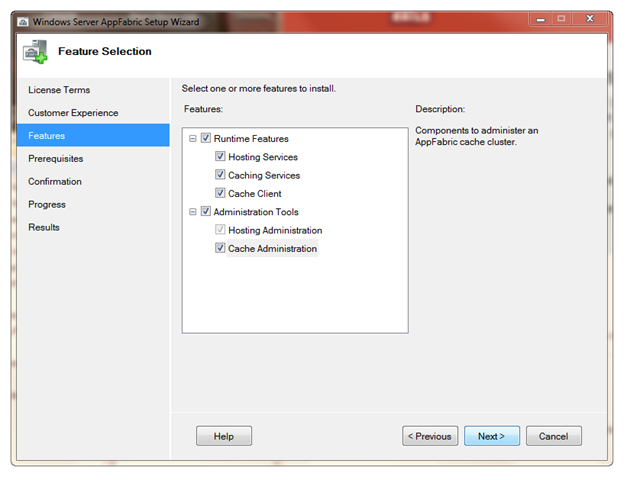
配置工具框会跳出,提示你进行一个简单的安装向导。你可以选择安装AppFabric Hosting Services中的Monitoring和Workflow Persistence,因为我只是为了实现caching,所以跳过了它。
Velocity Caching Service需要知道去哪里存储配置项,能用两种方式,数据库或者共享的XML文件。如果你使用XML,你需要确保service account有相应的权限。在这里,我选择使用数据库。向导会帮你完成配置工作。单击Next然后确认完成。
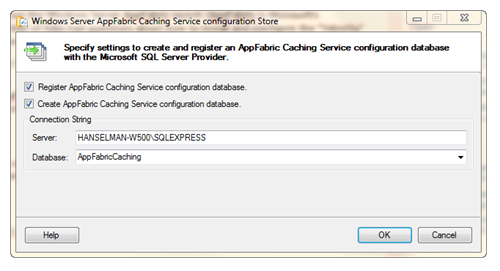
配置数据库。
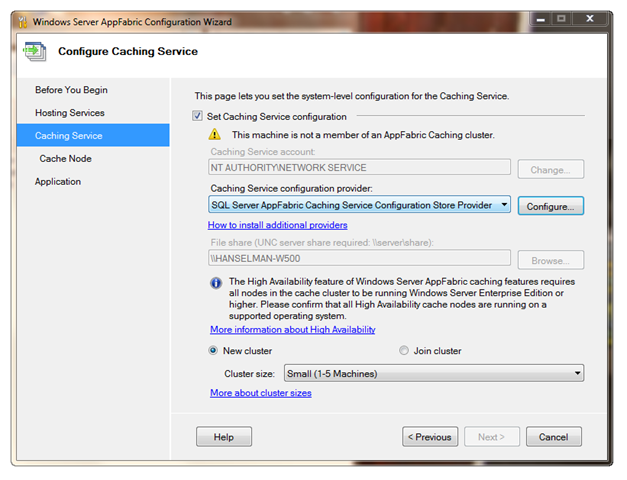
好了,我们看看它的功能吧。
咋弄呢?先去开始菜单,输入Caching,你会看到一个叫"Caching Administration Windows PowerShell"的选项。这里就是你连接到cache的入口,此外它还提供了检查状态,创建一个新的cache等功能。记得使用管理员的帐号运行它。

如果你键入"get-command *cache*"你会看cache management的所有不同的命令。我输入start-cachecluster。
C:\> Start-CacheCluster
HostName : CachePort Service Name &
;#160; Service Status Version Info
-------------------------------- --------------------------- ------------------ ---------------------
HANSELMAN-W500:22233 AppFabricCachingService UP 1 [1,1][1,1]
Cool,它开始工作了。如果你到配置数据库(或者你之前选择存储配置的XML文件)去看看,你会看到有一台机器已经在我的内存集群中了。我可以有很多台这样的机器,并且在其中某台机器当机的情况下系统仍然能够保持数据的高可靠性。
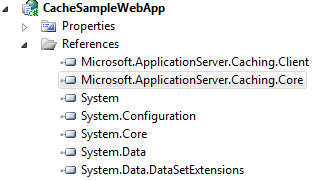
下载AppFabric Caching Samples,然后在Visual Studio中打开。我在web项目中发现了两个新的,不大常见的引用,Microsoft.ApplicationServer.Caching.Core 和.Client。
请记住,处于安全的考虑,所有的东西默认都是不启用的,所以你需要赋予账户相应权限。我正在使用的帐号是ScottHa,所以我需要运行
Grant-CacheAllowedClientAccount scottha
…你也需要为你的IIS运行账户执行相同的操作。
请记住你可以切分你的cache到不同的逻辑盘,同时,如果你愿意,一个cache集群也可以为多个应用服务。
你的cache可以与web.config或者代码挂钩。这里是一个手工创建Helper方法的代码例子,这些数据可以从你喜欢的任何地方获取,你只需要告诉机器去与特定的端口号沟通,其他的一切都是自动完成的。
Cache也能被分区。例如,我在使用一个名叫"default"的cahce,但我也可以使用多个逻辑分块,像"shoppingcart" and "productcatalog"。
1: using Microsoft.ApplicationServer.Caching;
2: using System.Collections.Generic;
3:
4: public class CacheUtil
5: {
6: private static DataCacheFactory _factory = null;
7: private static DataCache _cache = null;
8:
9: public static DataCache GetCache()
10: {
11: if (_cache != null)
12: return _cache;
13:
14: //Define Array for 1 Cache Host
15: List<DataCacheServerEndpoint> servers = new List<DataCacheServerEndpoint>(1);
16:
17: //Specify Cache Host Details
18: // Parameter 1 = host name
19: // Parameter 2 = cache port number
20: servers.Add(new DataCacheServerEndpoint("mymachine", 22233));
21:
22: //Create cache configuration
23: DataCacheFactoryConfiguration configuration = new DataCacheFactoryConfiguration();
24:
25: //Set the cache host(s)
26: configuration.Servers = servers;
27:
28: //Set default properties for local cache (local cache disabled)
29: configuration.LocalCacheProperties = new DataCacheLocalCacheProperties();
30:
31: //Disable tracing to avoid informational/verbose messages on the web page
32: DataCacheClientLogManager.ChangeLogLevel(System.Diagnostics.TraceLevel.Off);
33:
34: //Pass configuration settings to cacheFactory constructor
35: _factory = new DataCacheFactory(configuration);
36:
37: //Get reference to named cache called "default"
38: _cache = _factory.GetCache("default");
39:
40: return _cache;
41: }
42: }
一旦我们的cache设置好了,用起来是非常容易的。
1: m_cache.Add(orderid, order);
和
1: Order order = (Order)m_cache.Get(orderid);
或者更新已经存在的对象
1: m_cache.Put(orderid, order);
在cache中加入和取出了一大堆对象后,我可以到PowerShell去查看状态
C:\> get-cache
CacheName [Host]
Regions
--------------- ---------------
default [HANSELMAN-W500:22233]
Default_Region_0103(Primary)
C:\> Get-CacheStatistics default
Size : 2493
ItemCount : 5
RegionCount : 5
RequestCount : 17
MissCount : 3
你可以使用性能监控器,它提供了许多不同类别的计数器。之如我之前所提到的,你可以使用不同的cache分区,像"default" 或者 "poopypants",也可以分别或一起检查他们的状态。
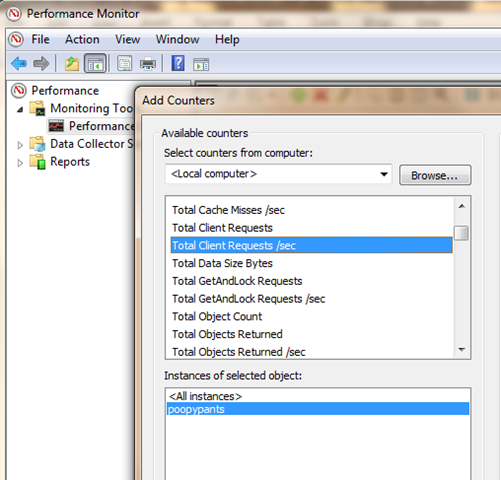
当然,在我重启了我的web服务器,我的订单仍然存在。你可以高效地维护一个庞大的,可分区存储,并跨机器的hashtable。
在ASP.NET 4中通过web.config用AppFabric替换默认的Session State存储方法也是件很容易的事情。下面是一个web.config的例子。
1: <?xml version="1.0" encoding="utf-8" ?>
2: <configuration>
3:
4: <!--configSections must be the FIRST element -->
5: <configSections>
6: <!-- required to read the <dataCacheClient> element -->
7: <section name="dataCacheClient"
8: type="Microsoft.ApplicationServer.Caching.DataCacheClientSection,
9: Microsoft.ApplicationServer.Caching.Core, Version=1.0.0.0,
10: Culture=neutral, PublicKeyToken=31bf3856ad364e35"
11: allowLocation="true"
12: allowDefinition="Everywhere"/>
13: </configSections>
14:
15: <!-- cache client -->
16: <dataCacheClient>
17: <!-- cache host(s) -->
18: <hosts>
19: <host
20: name="CacheServer1"
21: cachePort="22233"/>
22: </hosts>
23: </dataCacheClient>
24:
25: <system.web>
26: <sessionState mode="Custom" customProvider="AppFabricCacheSessionStoreProvider">
27: <providers>
28: <!-- specify the named cache for session data -->
29: <add
30: name="AppFabricCacheSessionStoreProvider"
31: type="Microsoft.ApplicationServer.Caching.DataCacheSessionStoreProvider"
32: cacheName="poopylands"
33: sharedId="MySharedApp"/>
34: </providers>
35: </sessionState>
36: </system.web>
37: </configuration>
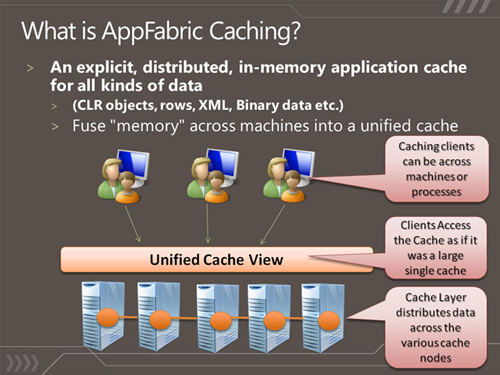
这里是一个Ron Jacobs提供的一个非常有用的幻灯片。Microsoft Windows Server AppFabric Slides at SlideShare.
像其他应用一样,相对抽象一点的应用总是更加好用的。如果你有一个已经存在的cache方案(EntLib或其他),你也可以将它们切换至AppFabric Caching.
此原文链接:Installing, Configuring and Using Windows Server AppFabric and the "Velocity" Memory Cache in 10 minutes, 作者是Scott Hanselman。
此文同发个人博客www.iamtonyzhou.com,欢迎访问:)
此内容由惯性聚合(RSS阅读器)自动聚合整理,仅供阅读参考。 原文来自 — 版权归原作者所有。