

惯性聚合 高效追踪和阅读你感兴趣的博客、新闻、科技资讯
阅读原文 在惯性聚合中打开

推荐订阅源

罗磊的独立博客
SecWiki News
SecWiki News
酷 壳 – CoolShell
酷 壳 – CoolShell
爱范儿
爱范儿
量子位
M
MIT News - Artificial intelligence
GbyAI
GbyAI
cs.AI updates on arXiv.org
K
KPMG report finds enterprise disconnect between AI and its ROI | CIO
TaoSecurity Blog
TaoSecurity Blog
博客园 - 【当耐特】
H
Heimdal Security Blog
腾讯CDC
The Last Watchdog
The Last Watchdog
Security Archives - TechRepublic
Hacker News: Ask HN
Hacker News: Ask HN
S
Schneier on Security
Microsoft Security Blog
WordPress大学
WordPress大学
博客园 - 司徒正美
Recent Commits to openclaw:main
C
Cybersecurity and Infrastructure Security Agency CISA
S
SegmentFault 最新的问题
大猫的无限游戏
大猫的无限游戏
Application and Cybersecurity Blog
F
Full Disclosure
有赞技术团队
有赞技术团队
T
Tailwind CSS Blog
Engineering at Meta
Engineering at Meta
cs.CV updates on arXiv.org
T
Threatpost
月光博客
月光博客
A
Arctic Wolf
OSCHINA 社区最新新闻
OSCHINA 社区最新新闻
雷峰网
雷峰网
T
Troy Hunt's Blog
freeCodeCamp Programming Tutorials: Python, JavaScript, Git & More
The Cloudflare Blog
D
DataBreaches.Net
O
OpenAI News
L
LINUX DO - 最新话题
宝玉的分享
宝玉的分享
小众软件
小众软件
V
Vulnerabilities – Threatpost
A
About on SuperTechFans
人人都是产品经理
人人都是产品经理
T
The Exploit Database - CXSecurity.com
Martin Fowler
Martin Fowler
美团技术团队
P
Privacy International News Feed

博客园 - L.Net

sql server不存在或拒绝访问【转】 更新Oracle中的long字段 Ora-28000 the account is locked windows2003与文件共享有关的几个进程 [转]“您试图从目录中执行CGI、ISAPI 或其他可执行程序...” 博文阅读密码验证 - 博客园 博文阅读密码验证 - 博客园 Windows XP .net3.5 环境搭建 showModalDialog数据缓存问题 - L.Net - 博客园 November Report Viewer工具栏显示英文 (转)Reference Equals,==,Equals sql declare声明变量 windows2003计划任务不能启动,"指定的错误是:0x80070005: 拒绝访问" 不可恢复的生成错误 每天知道多一点(二) 还是得继续努力 每天知道多一点--[转]静态构造函数 每天知道多一点
【转】RDLC使用经验
L.Net · 2009-04-18 · via 博客园 - L.Net

http://www.cnblogs.com/pennant/archive/2008/09/05/1285228.html

1.子报表的使用

   先在主报表中添加上子报表,再设置子报表属性,使主报表和子报表之间有值的关联。
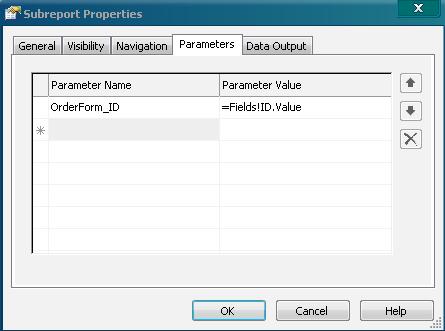
 

   转到子报表界面添加报表参数。
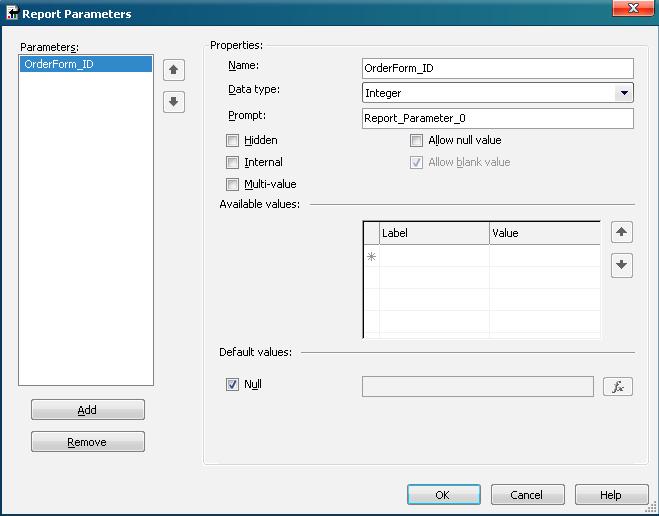
    Table还需要设置过滤

    代码方面:

    ReportViewer1.LocalReport.SubreportProcessing += new SubreportProcessingEventHandler(LocalReport_SubreportProcessing);

    void LocalReport_SubreportProcessing(object sender, SubreportProcessingEventArgs e)
    {
        if (dataTable != null)
            e.DataSources.Add(new ReportDataSource("DataSetAll_OrderFormInfo2", dataTable));
    }

2. 导出pdf时中文乱码

    显示中文的地方需要设置中文字体。

3. 实施

    实施时除了需要安装 ReportViewer.exe 和语言包外,还需要将 Microsoft.ReportViewer.Common.dll 和 Microsoft.ReportViewer.WebForms.dll 复制到 Bin文件夹中。

4.显示图片

    数据库中保持的是图片的相对地址,需要转换为服务器地址才能显示正常。

    @"http://" + Request.ServerVariables["SERVER_NAME"] + "/" + dr["PicUrl"].ToString();

    报表要显示外来图片时需要:

    ReportViewer1.LocalReport.EnableExternalImages = true;

5.提示:“无法加载客户端打印控件”

提示:“无法加载客户端打印控件”

是因为装了 补丁 kb956391,卸载这个补丁就好了