惯性聚合 高效追踪和阅读你感兴趣的博客、新闻、科技资讯
阅读原文 在惯性聚合中打开

推荐订阅源

T
The Blog of Author Tim Ferriss
cs.CV updates on arXiv.org
云风的 BLOG
云风的 BLOG
Cyber Security Advisories - MS-ISAC
P
Palo Alto Networks Blog
D
Docker
H
Hackread – Cybersecurity News, Data Breaches, AI and More
S
Schneier on Security
Engineering at Meta
Engineering at Meta
I
InfoQ
L
LangChain Blog
Cyberwarzone
Cyberwarzone
T
Tenable Blog
WordPress大学
WordPress大学
P
Privacy & Cybersecurity Law Blog
罗磊的独立博客
Apple Machine Learning Research
Threat Intelligence Blog | Flashpoint
Jina AI
Jina AI
C
CERT Recently Published Vulnerability Notes
Scott Helme
Scott Helme
博客园 - 三生石上(FineUI控件)
酷 壳 – CoolShell
酷 壳 – CoolShell
Know Your Adversary
Know Your Adversary
D
Darknet – Hacking Tools, Hacker News & Cyber Security
The Last Watchdog
The Last Watchdog
Last Week in AI
Last Week in AI
Cloudbric
Cloudbric
S
SegmentFault 最新的问题
爱范儿
爱范儿
Application and Cybersecurity Blog
博客园 - 叶小钗
AI
AI
T
Tor Project blog
I
Intezer
T
Threatpost
www.infosecurity-magazine.com
V
Visual Studio Blog
N
News and Events Feed by Topic
Latest news
Latest news
S
Security Affairs
博客园 - Franky
Microsoft Security Blog
C
Cyber Attacks, Cyber Crime and Cyber Security
K
KPMG report finds enterprise disconnect between AI and its ROI | CIO
B
Blog RSS Feed
C
Cybersecurity and Infrastructure Security Agency CISA
Hugging Face - Blog
Hugging Face - Blog
小众软件
小众软件
S
Securelist

博客园 - stonespawn

Vue 组件库2 Vue 的组件库 算法小题目 VS2019 自动代码补全功能 GIT 删除操作 vue-router 注意事项 Vue中axios访问 后端跨域问题 Vue2.0 搭配 axios Vue 脚手架搭建 grunt使用入门 Git相关操作及记录 Ajax在调用含有SoapHeader的webservice方法 关于JS 树形结构 导出EXCEL【Web方式HTML通过拼接html中table】 链接点击跳动问题 WatiN——Web自动化测试(三)【弹出窗口处理】 WatiN——Web自动化测试(二) 网页调用服务程序 - stonespawn - 博客园 小问题 小技巧 :创建虚拟目录并将IIS里面.net配置版本设为2.0 - stonespawn
WatiN——Web自动化测试(一)
stonespawn · 2011-04-02 · via 博客园 - stonespawn

软件测试行业目前在国内逐渐的发展起来了,但是国内的软件测试行业主要是 黑盒测试也就是我们平常所说的系统测试或功能测试,但真正做到像微软那样的所有测试开发还是很少。

下面言归正传,讲解一下WatiN

1、 WatiN是什么?

WatiN Web Application Testing in .Net,它是在.Net平台喜爱调用IE进行Web 程序测试的开源工具。WatiN的官方网站:http://watin.sourcefoge.net/

说到Web自动化测试工具,大家可能最熟悉的是QTPLoadRunner。此两者的强大之处我想大家都有耳闻,另外就是利用Ruby语言开发的自动化测试框架WatirWatiNWatir之间有很多相似之处,其最大的区别可能就是语言上的区别。

2、 WatiN什么用处以及特征?

1WatiN有什么用处,勿容置疑的是,它可以帮助我们进行Web的自动化测试,是不是我们不需要进行任何操作呢,并不是这样的,WatiN只是提供我们一个框架,要想是WatiN成为我们平时中应用的工具,还必须得开发WatiN相关的自动化工具。

 2WatiN是一种非常容易上手的自动化测试框架,可以帮助我们程序员平时作一些简单的调试和反复工作;WatiN是用C#语言进行开发的,所以我们只要了解C#语言就可以进行WatiN的开发。

3WatiN类库


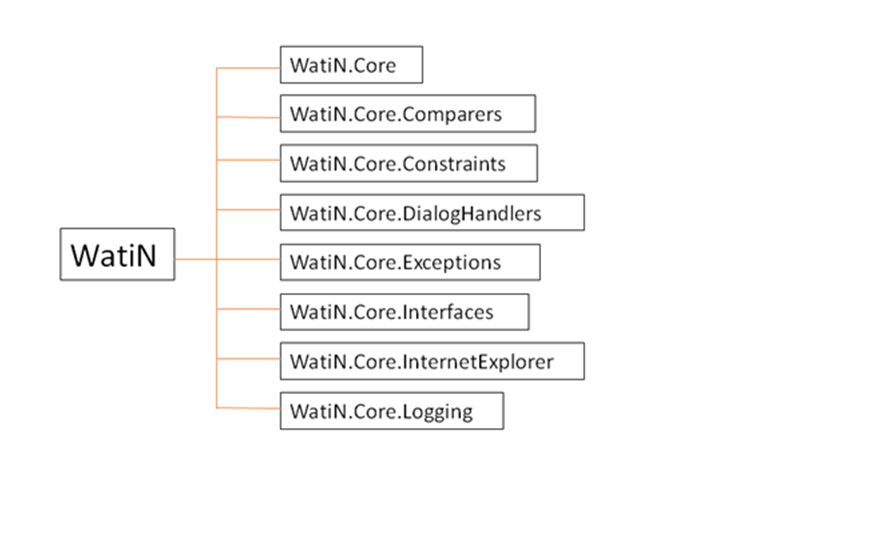
其实我们平时应用中主要的是在WatiN.Core下类以及方法。WatiN.Core中包括了我们平时网页中所有的元素我们只需要使用IE8进行查看,利用相应的类方法进行调用即可。

WatiN.Core下的类的展示及关系


由此看来WatiN真的还就不难。

3、 简单的示例展示

1)示例一

public static void TestBaiDu1()

        {

            //通过ID

            using (IE ie = new IE("http://www.baidu.com"))

            {

                ie.TextField("kw").TypeText("谷歌1");

                ie.Button("su").ClickNoWait();

                Thread.Sleep(2000);

                ie.Close();

            }

        }

IE ie = new IE("http://www.baidu.com") 直接打开百度的网页;

ie.TextField("kw").TypeText("谷歌1");将文本框进行赋值;

ie.Button("su").ClickNoWait();点击Button事件;

ie.Close();ie关闭。

2)实例二

public static void TestBaiDu2()

        {

            //通过Name

            using (IE ie = new IE("http://www.baidu.com"))

            {

                ie.TextField(txt => txt.Name == "wd").TypeText("谷歌2");

                ie.Button(btn => btn.Id == "su").ClickNoWait();

                Thread.Sleep(2000);

                ie.Close();

            }

        }

同样的是打开网页,将文本框的赋值和Button的点击事件通过其他的方法进行查找的。

以上就是WatiN的最基本的认识,希望大家拍砖,后续我将陆续的写上我研究WatiN的文章,将自己的心得分享给大家,在Web测试中将有很多的问题,包括IE的死锁、无法找到的控件等等。