



Okta Identity Engine (OIE) is an incredibly powerful platform. What other platform allows you to have this level of security, granularity and control?
“Only allow access to a highly sensitive application if the user authenticates with multiple authenticators that are at least one phishing-resistant, and only from a corporate-managed device with a strong EDR posture score.”
The more sensitive an application is, the more security context we might seek to verify to ensure the access is legitimate. For organizations with many applications, each with varying levels of sensitivity, it’s traditionally been difficult to create sign-in policies that account for the high assurance sensitive applications require, without over-complicating access to less sensitive resources. The scenario we should try to avoid is expecting end-users to re-authenticate using passwords and OTP codes multiple times throughout the day as they navigate the resources they require to do their job.
With Okta Identity Engine, Okta provides shareable authentication policies at the resource-level, and a contextual approach to access. Authentication policies give administrators an ability to define contextual access for each app or for groups of applications. Policy rules can evaluate identity context (group membership), device context (whether a device is known, registered or managed), device posture (the health of the device), network context (the network origin of the request), and patterns of previous user behavior. This provides the required granularity to secure access to applications based on risk.
This flexible framework is key in helping organizations achieve their required Levels of Assurance (LOA). Once the desired LOA threshold is met, those organizations can confidently say that the right users have the right level of access to the right resources at the right time. LOA is a major component of a Zero Trust architecture and helps ensure all access is verified, rather than providing implicit trust. OIE can be a foundational tool to meet OMB guidance (.pdf) on moving to Zero Trust security principles.
Authentication Policies in Okta Identity Engine verify that users signing in to an application meet specific conditions. The policy engine enforces factor requirements based on those conditions.
Authentication Risk is a measure of how much a request to Okta deviates from a previously established pattern of behavior for a user. Okta’s risk engine evaluates a range of contexts including IP history, behaviorial information about the user making the sign-in request, previous successful and failed sign-in attempts and routing information associated with the request.
Low Risk Auth: authentication that does not deviate from previous user’s behavior (same IP/device/location, etc.)
Medium Risk Auth: authentication that slightly deviates from a previous user’s behavior (new city, new device, etc.)
High Risk Auth: authentication that highly deviates from a previous user’s behavior (impossible travel and new device, first time user login, etc.)
NB: Risk-based Authentication requires an org to be licensed for Adaptive Multifactor Authentication.
Device State (sometimes called Device Context) assesses whether the device used for an authentication request is known, registered, managed or exhibiting a strong security posture.
Unregistered: A device/browser that is not registered with Okta Verify
Registered/Unmanaged: A device that is registered with the Okta Verify application to provide administrators with better visibility (OS, Device Type, Serial Number, etc.)
Device Assurance: Does the device meet certain security requirements? (OS version? Jailbroken? Encrypted? Screen lock configured?)
Managed: A registered device enrolled in a unified endpoint management (UEM) solution. This could be with a certificate and a SCEP profile for workstations (Windows/MacOS) or an application secret for mobile devices (Android, iOS)
Managed + EDR (sometimes called Secured): A managed workstation (Windows/MacOS) that is checked for a device posture score via an EDR solution (CrowdStrike orWindows Security Center)
NB: Device Assurance, Managed Device checks and Device Posture checks all require an org to be licensed for Adaptive Multifactor Authentication.
The final piece to this puzzle is to determine the sensitivity and impact of the application and its stored data. This exercise is somewhat subjective and may require involvement from risk and compliance teams. Some considerations to take into account when classifying apps are: production vs test, regulatory compliance (SOX, PCI-DSS, HIPAA, etc.), and personally identifiable information (PII). We recommend reviewing the NIST 800-30(.pdf) or FIPS 199(.pdf) standards for additional guidance.
Low Impact App: Everyday apps that do not contain sensitive data. Examples could be video conferencing, helpdesk, educational applications.
Medium Impact App: Apps that may contain some sensitive information or proprietary information. e.g. Communications, collaborations, sales and marketing applications.
High Impact App: Apps that provide access to very sensitive or proprietary information. (PII? SOX? Production? Apps with HR, healthcare or financial data?) Anything that would be extremely damaging to the company or customer if access was compromised.
Once all of these conditions have been taken into consideration, organizations will be able to apply the right levels of assurance to meet their desired outcome. One way to accomplish this would be to align closely to the NIST Authenticator Assurance Levels (AAL). While there can be some ambiguity around what specific authenticators meet each of the NIST requirements, we believe it is a great framework to start with. In the example below, we have set out our interpretation of how Okta policies and authenticators could align with the NIST AAL framework.
Considerations:
This could be any factor “something you have (Okta Verify, security key, etc.)”, “something you know (password/secrets)”, or “something you are” (WebAuthn/FIDO2-capable biometric checks like face or fingerprint matching)
Set re-authentication settings to 30 days
This satisfies NIST AAL1 requirements
Considerations:
This needs to contain two authentication factors, either (1) a physical authenticator and a memorized secret, or (2) a physical authenticator and biometrics linked to that authenticator
An example would be a password + Okta Verify OTP or password + Okta Verify FastPass with Biometric
Set re-authentication settings to 12 hours and idle session time to 30 minutes
This satisfies NIST AAL2 requirements
Considerations:
As of June 2024, Okta FastPass with user verification using biometrics or PIN can be used to satisfy NIST AAL3 requirements
Other options to satisfy AAL3 include a FIPS device-bound passkey and CAC-PIV Authentication.
Set re-authentication settings to 12 hours and idle session time to 15 minutes
This satisfies NIST AAL3 requirements
NB: Idle Session time is configured at the Global Session Policy level. Session lifetime and idle time applies to first party Okta apps (i.e Okta Dashboard, Okta Admin Console etc.). The majority of third party apps require a session lifetime and idle time specified within each respective application.
The final step is to configure access policies that balance user convenience and security. With Okta’s sharable application authentication policies, administrators have the ability to create differentiated access policies for every combination of contextual access.
Below is a reference table – for illustrative purposes only – that we have used with customers to inform their approach to creating authentication policies in OIE. Much like determining the sensitivity of an app, this exercise is highly subjective and the table should be populated according to your organization’s risk tolerance. We've added detailed screenshots of authentication policies and rules in the appendix to further illustrate.
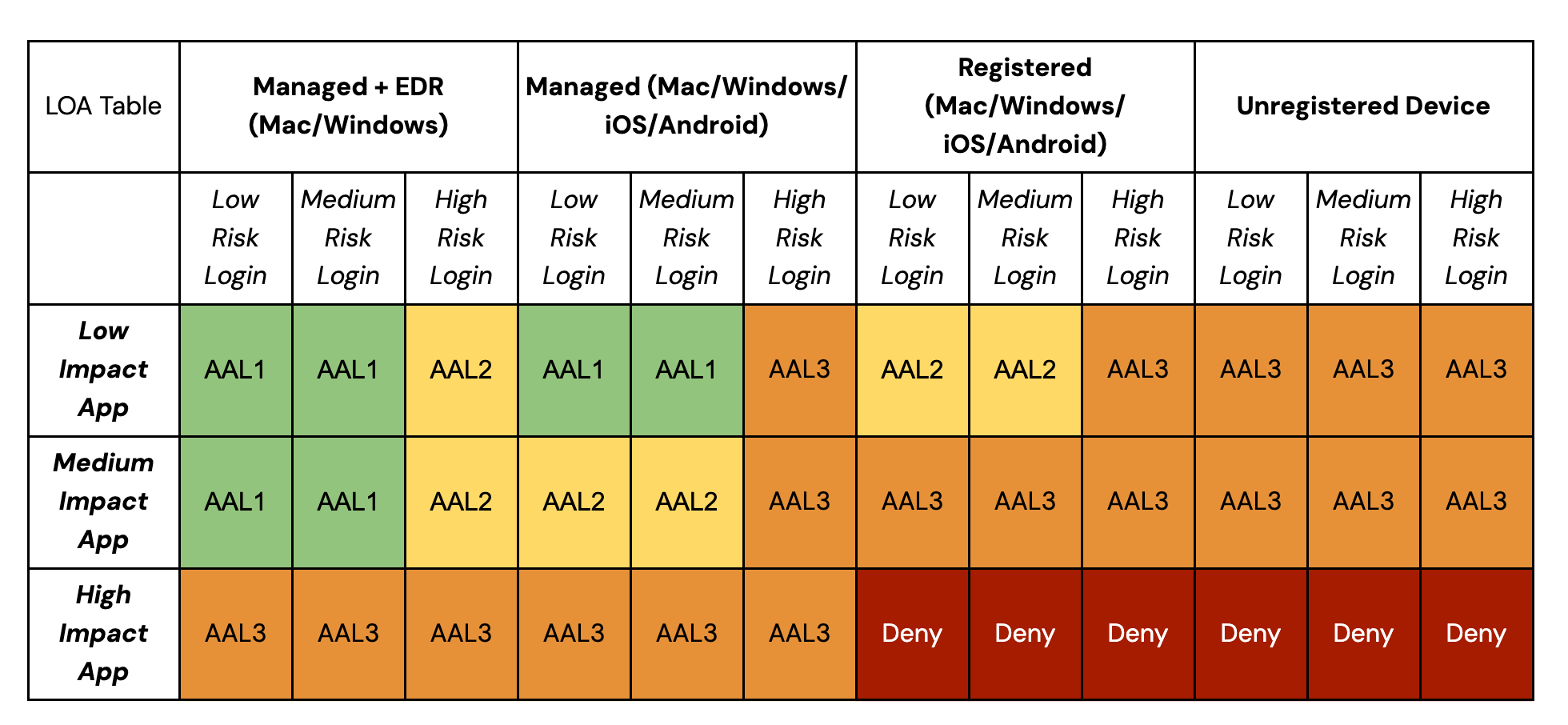
Using the approach taken in this example, a user attempting to access a relatively low sensitivity resource, from a device that has recorded a strong security posture and exhibiting known or trusted patterns of behavior (presenting lower authentication risk), should be subject to less friction to verify their identity. If the application is highly sensitive, the reverse applies - the strongest authenticator factors should be required.
Here’s an example of how the table above would play out in a real world situation.
Scenario 1:
John Doe wants to learn a new skill through a course from Udemy that’s offered through his company. (Udemy is classified as low impact by his company)
Outcome A - With a corporate-owned device, he’ll be able to access this application from a trusted location without having to enter in his username/password/MFA again. This provides a seamless login experience while trusting that the user is who they say they are.
Outcome B - With a personal Okta-registered device, John can still access the application as long as he provides two factors of authentication (e.g. password + Okta Verify).
Scenario 2:
Jane Doe needs to access the AWS console to deploy a new application (AWS is classified as high impact by her company)
Outcome A - With a corporate owned device, she'll be able to access it only after she has provided a phishing resistant authenticator like Okta Verify FastPass or FIDO2/WebAuthn (face or fingerprint matching, physical security key)
Outcome B - With a personal Okta-registered device, Jane will be denied access to AWS.
In a perfect world, every access attempt would be challenged with the highest level of authentication assurance. But in reality, that is not always possible. For example, some devices and applications do not have the necessary capabilities to support the highest levels of authentication and other authenticators may be required during enrollment or recovery flows.
This is why it is vital to develop Levels of Assurance for your organization, so that each of the different access requirements can be properly addressed. By leveraging Okta Authentication Policies, your organization can take a contextual approach to identity and access management that harmonizes end user experience and security assurance requirements.
The Okta Authenticator Assurance Levels are primarily enforced by the Authentication Policies, but the Global session policy is also required to specify Idle Session time. Below is an example of a configuration for the Global Session Policy to help address Okta Authenticator Assurance Level 2:
Create a Global Session policy for the everyone group and create a new rule
Keep Policy settings section to default selections
Ensure that Establish the user session with Any factor used is set to meet the Authentication Policy requirements
Ensure that Multi Factor Authentication (MFA) is set to “Not Required” (Authentication Policies will define this setting)
Set Maximum Okta session lifetime to 12 hours (based on NIST SP800-63-3 - this minimizes the risk of session cookies misuse or hijacking)
Set Expire session after user has been idle on Okta for to 30 minutes (based on NIST SP800-63-3 - this minimizes the risk of session cookies misuse or hijacking)
Set Persist session cookies across browser sessions to Disable
The re-authentication frequency can also be specified at the Authentication Policy level and should be set in accordance to the sensitivity/impact of the application being accessed. An example could be **every time ** for a high impact app and **never ** for a low impact app.
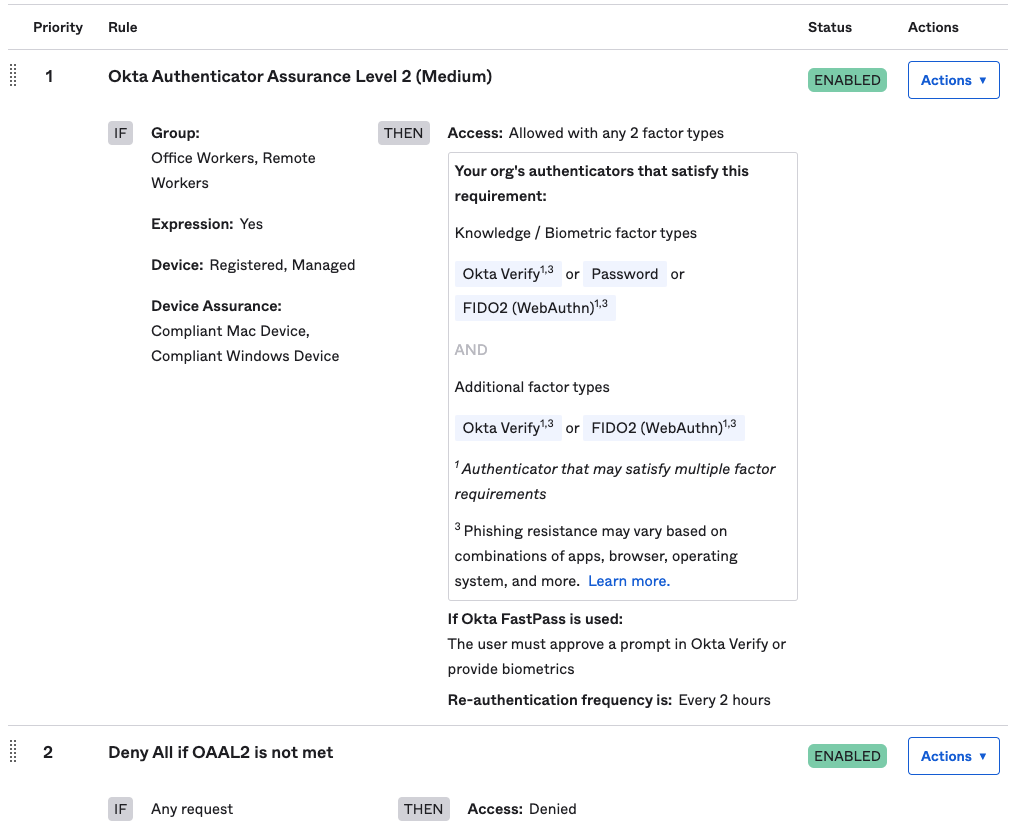
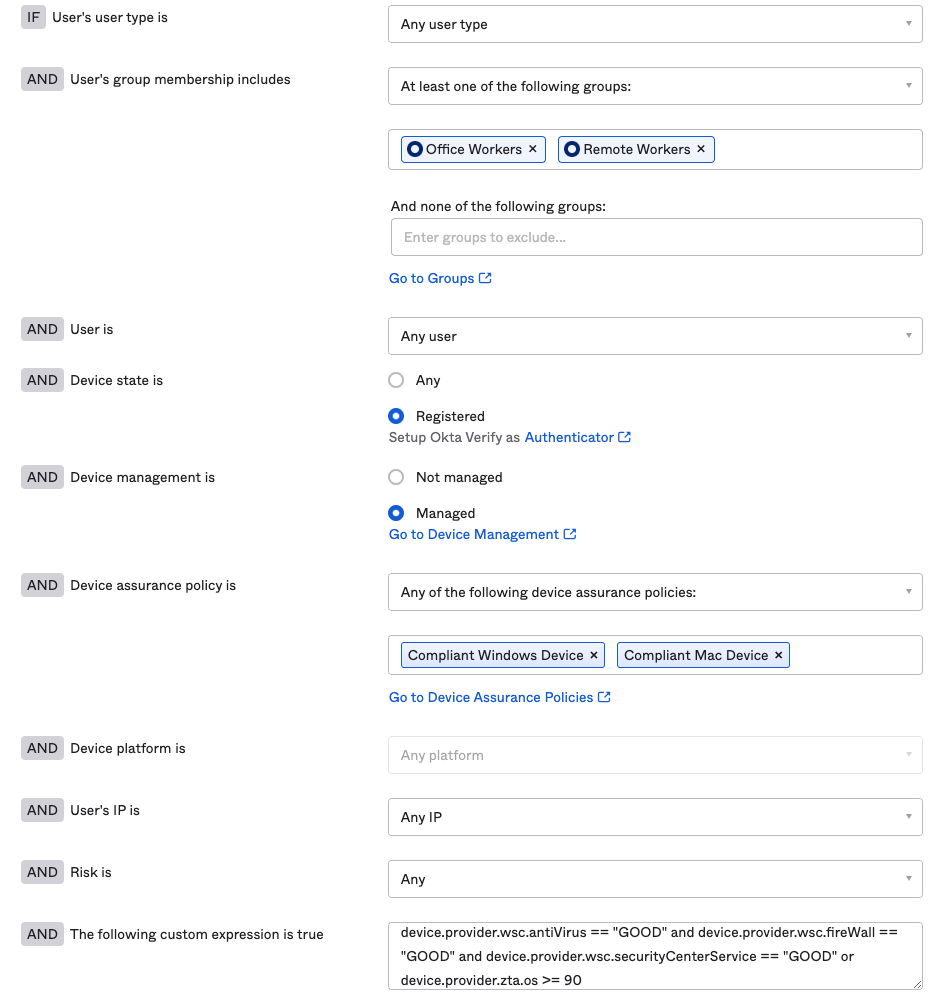
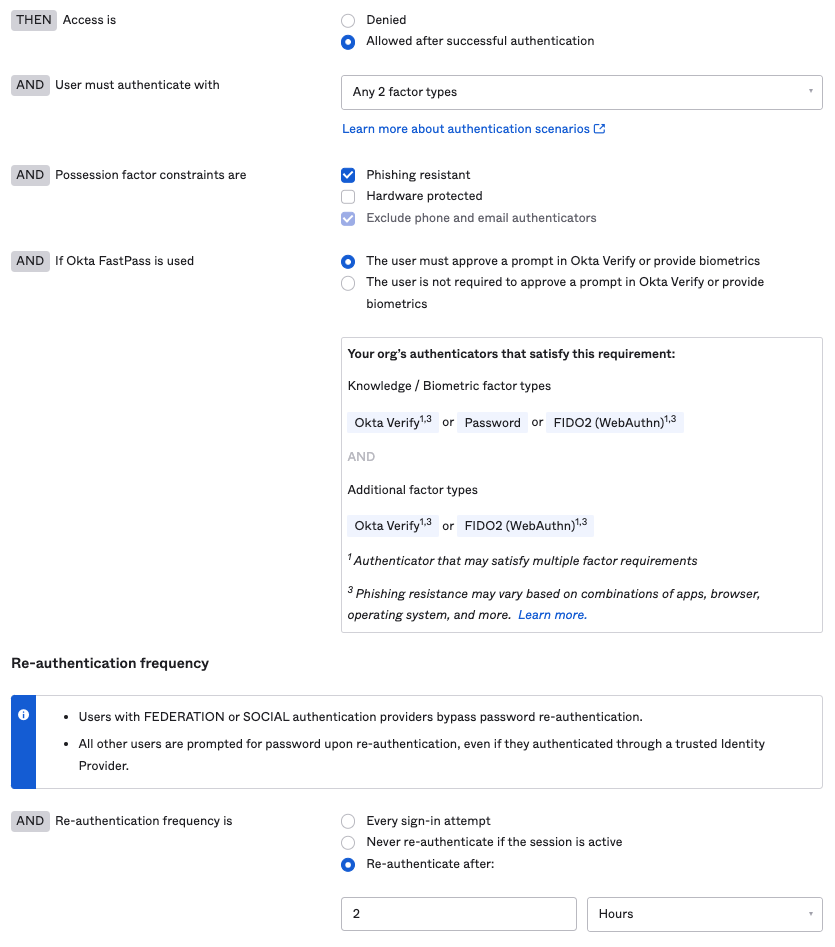
Below is an example of what an Authentication Policy that satisfies Okta Authenticator Assurance Level 2 (Medium) could look like. In this example multiple factors are required, users need to be on a managed device, EDR signals need to be met, device assurance requirements must be met, and phishing resistance is enforced. If all of these requirements are not met, then the user is denied access to the resource.
August 15, 2023: Edited AAL3 requirements to include FastPass with biometrics or PIN.
As a Solutions Engineer at Okta, Josh works closely with customers to identify challenges around identity and then craft solutions catered to the customer's business objectives. Prior to Okta, Josh worked as a Sales Engineer at Citrix where he focused on virtualization and SASE deployments. Josh has a B.S. in Chemical and Biochemical Engineering from the Colorado School of Mines and currently resides in Denver, Colorado where he enjoys skiing, climbing, hiking, and playing soccer.
Tin Nguyen manages a team of Solutions Engineers at Okta to help solve the many identity challenges that organizations face today. Before joining Okta, he spent years leading Identity and Security engagements at a consulting firm with an ultimate mission of enabling everyone to safely, seamlessly, and reliably use any technology.
此内容由惯性聚合(RSS阅读器)自动聚合整理,仅供阅读参考。 原文来自 — 版权归原作者所有。