


2015-12-16 16:12 麦舒 阅读(1710) 评论() 收藏 举报
注:项目分享系统,都是基于我开源的一个电商前端项目,为了帮助各位朋友理解那套代码而写。所以阅读的时候,最好能和项目结合起。
在我们这个项目里面,使用 konckout js 来进行数据绑定的,对面的更新,基本上都是通过对 model 的更新来实现的。我们以购物车作为实例,隐聊如何对页面进行更新。
购物车不但要把商品给显示出来,而且还要显示赠品,优惠的金额等等,这些数据都是在服务端运算出来的。所以购物车的数据,都是保存在服务端的,对购物车的操作,都需要和服务端进行通信,这些操作包括:增加商品数据、移除商品,商品的选择或者取消。服务端根据用户修改的数据,把计算好的结果,返回给客户端,然后客户端再把这些数据更新到页面。
在购物车 ShoppingCart.ts 文件所定义的 Model 里,有这么一个方法,这个方法是点击购物车商品中的 ”+“ 按钮时,所以调用的。
    increaseCount = (item) => {
        if (status == Status.updating)
            return;

        var count = item.Count();
        item.Count(new Number(count).valueOf() + 1);
    }
另外还定义了这么一段代码,这段代码涉及到 knockout mapping,如完整理解这段代码,还需要学习一下 knockout mapping。但是在这里,我们只需要 item.Count.subscribe 这个方法,当商品中数量发生了变化时,都会去调用 model.updateItem 方法。
 get map_conf(): any {
        var model = this;
        return {
            key: function (data) {
                return ko.utils.unwrapObservable(data.Id);
            },
            create: function (options) {
                var item = mapping.fromJS(options.data);
                item.Count.subscribe(function (value) {
                    var count = new Number(value).valueOf() || 1;
                    if (count != this.Count())
                        this.Count(count);

                    model.updateItem(this);
                }, item);

                return item;
            }
        }
    }
我们现在再来看一下 updateItem 方法,需要说明的是 shoppingCart.updateItem 是一个调用服务端的方法。当更新完成后,通过 knockout mapping 的 fromJS 函数,对本地的 model 进行更新。
    updateItem = (item) => {

        this.dialog.status(DialogStaus.update);

        shoppingCart.updateItem(item).done((items) => {
            mapping.fromJS(items, this.map_conf, this.shoppingCartItems);

            status = Status.done;
            this.dialog.status(DialogStaus.success);
            this.page.refreshUI();

        }).fail(() => {
            this.dialog.status(DialogStaus.fail);
        });
    }
值得注意的是,还有一个 page.refreshUI 的代码,为什么要刷新一下呢?因为页面用到 iscroll 组件,当页面高度发生变化,都需要刷新一下。
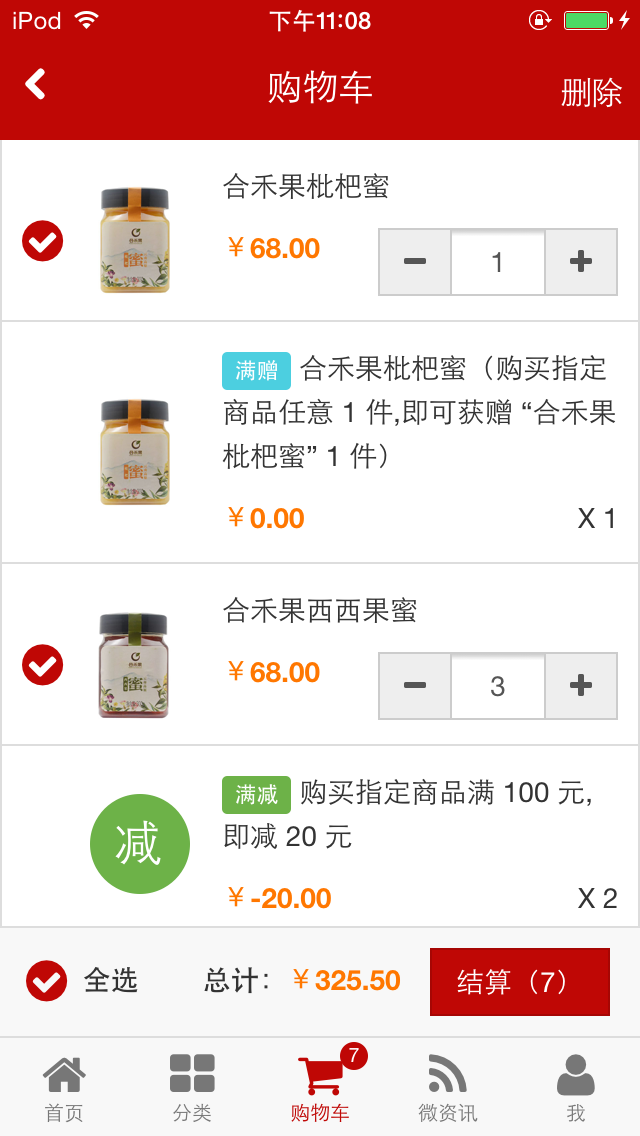
购物车整个购物流程大慨就是这样子,有任何疑问都可以给我留言。
此内容由惯性聚合(RSS阅读器)自动聚合整理,仅供阅读参考。 原文来自 — 版权归原作者所有。