






在Revit自带的导出功能中,我们可以知道,Revit可以导出如下格式文件:
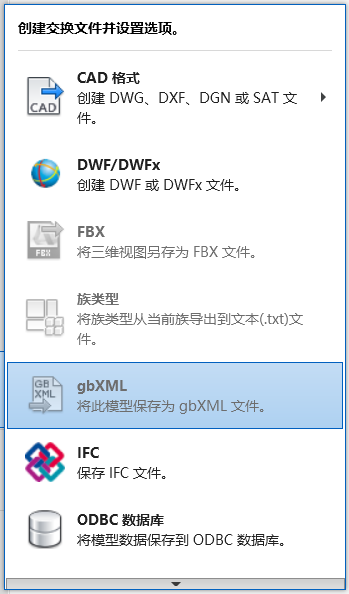
他们分别对应的API在Document类下面,主要包含以下方法
| 1 | Export(String, String, MassGBXMLExportOptions) |
从体量模型文档中导出gbXML文件。 |
| 2 | Export(String, String, GBXMLExportOptions) |
从当前模型文档中导出gbXML文件。 |
| 3 | Export(String, String, IFCExportOptions) |
从当前模型文档中导出IFC文件。 |
| 4 | Export(String, String, NavisworksExportOptions) |
从当前模型文档中导出.nwc文件。 |
| 5 | Export(String, String, ViewSet, DWFExportOptions) |
从当前模型文档中导出.dwf文件。 |
| 6 | Export(String, String, ViewSet, DWFXExportOptions) |
从当前模型文档中导出.dwfx文件。 |
| 7 | Export(String, String, ViewSet, FBXExportOptions) |
从当前模型文档中导出.fbx文件。 |
| 8 | Export(String, String, ICollection<(Of <<'(ElementId>)>>), DGNExportOptions) |
导出选择的视图为dgn |
| 9 | Export(String, String, ICollection<(Of <<'(ElementId>)>>), DWGExportOptions) |
导出指定视图为dwg |
| 10 | Export(String, String, ICollection<(Of <<'(ElementId>)>>), DXFExportOptions) |
导出指定视图为dxf |
| 11 | Export(String, String, ICollection<(Of <<'(ElementId>)>>), SATExportOptions) |
导出指定视图为.sat |
详细说明:
房间对应GBXMLExportOptions
| 编号 | Name | Description |
|---|---|---|
| 1 | Encoding |
设置当前的编码方式 |
| 2 | ExportEnergyModelType |
SpatialElement 房间和空间 BuildingElement 分析表面 |
| 2 | IsValidObject |
判断当前元素是否验证 |
分析表面对应:MassGBXMLExportOptions
| 编号 | Name | Description |
|---|---|---|
| 1 | MassGBXMLExportOptions(IList<(Of <<'(ElementId>)>>)) |
传入要导出的体量模型 |
| 2 | MassGBXMLExportOptions(IList<(Of <<'(ElementId>)>>), IList<(Of <<'(ElementId>)>>)) |
传入要导出的体量模型 |
此内容由惯性聚合(RSS阅读器)自动聚合整理,仅供阅读参考。 原文来自 — 版权归原作者所有。