








创建钢筋是revit的一个重要的功能,其主要是revit结构钢筋功能的部分,如下图所示:

钢筋有三种形式,其定义如下:
1、结构钢筋
主要是有Rebar类实现,其主要是通过对结构区域的表面积和路径为参照,实现钢筋的布置。
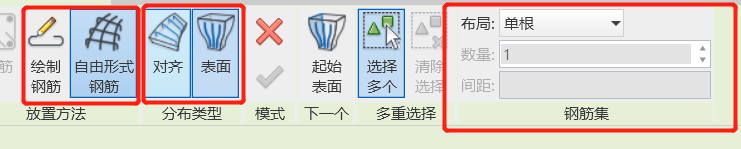
其具有放置方式、分布类型、钢筋集样式等多种方式组成。
绘制钢筋:分布方式只有这一种,对齐分布。其主要通过墙梁柱子的底部和顶部进行绘制一个指定的类型的钢筋进行布置
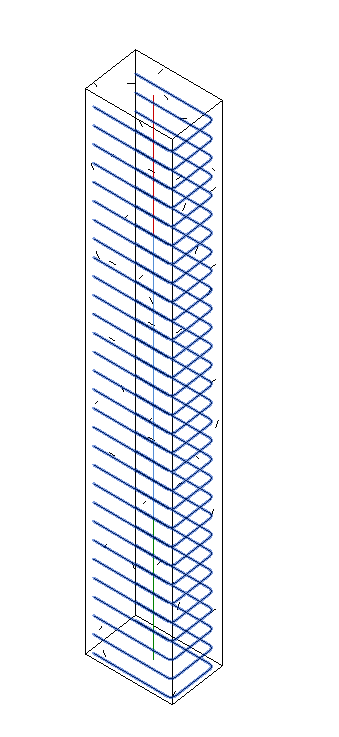
绘制一个形状,可以根据墙梁柱的方向,自由布置钢筋元素
自由形式钢筋:
表面分布:自由形式钢筋表面分布可使用变量非平面分布,来填充不规则形状主体的表面。
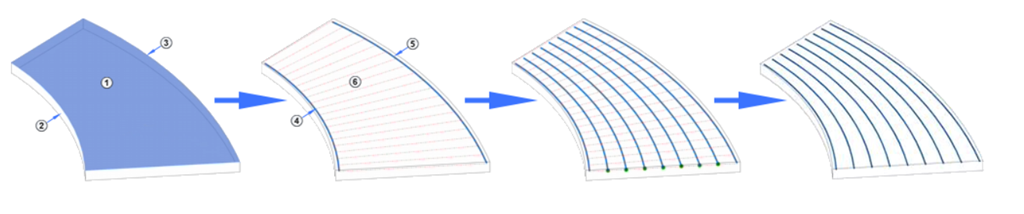
其根据起点曲面、主体表面和结束曲面三个面来确定,它会根据2、3曲面的形状,在1区域排布钢筋。
对齐分布:可使用变量平面分布填充规则形状主体的表面。其主要参数有主体曲面和路径组成,其基本逻辑如下:
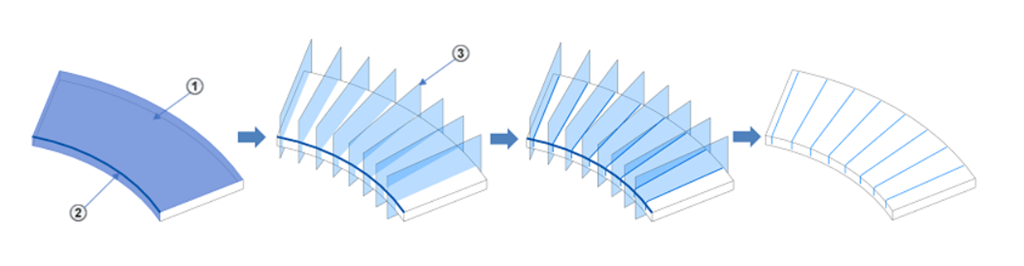
结构钢筋的主要API
通过给定的钢筋形状创建钢筋集,如下定义
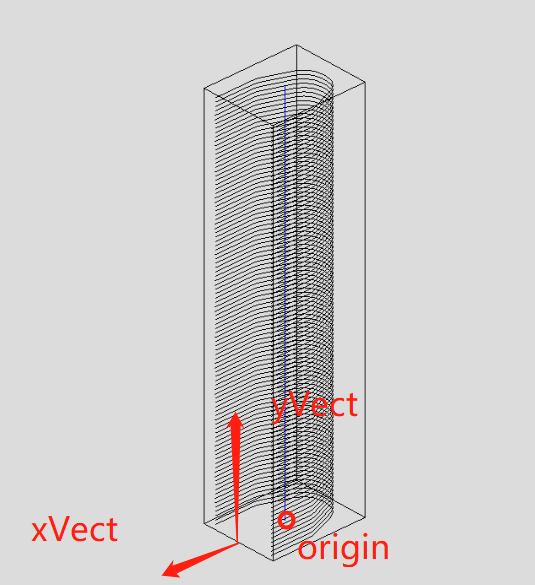
1.1、public static Rebar CreateFromRebarShape( Document doc, RebarShape rebarShape, RebarBarType barType, Element host, XYZ origin, XYZ xVec, XYZ yVec )。
origin:形状边界框的左下角将放置在项目中的该点。
xVec:形状定义中的x轴将映射到项目中的该方向。
yVec :形状定义中的y轴将映射到项目中的该方向。
1.2、public static Rebar CreateFromCurvesAndShape( Document doc, RebarShape rebarShape, RebarBarType barType, RebarHookType startHook, RebarHookType endHook, Element host, XYZ norm, IList<Curve> curves, RebarHookOrientation startHookOrient, RebarHookOrientation endHookOrient )
通过传入的钢筋形状,创建钢筋列表,其中需要传入一个钢筋端部信息
1.3、public static Rebar CreateFreeForm(Document doc,Guid serverGUID,RebarBarType barType,Element host){}
通过钢筋服务创建钢筋列表
1.4、public static Rebar CreateFreeForm( Document doc, RebarBarType barType, Element host, IList<CurveLoop> curves, out RebarFreeFormValidationResult error )
通过curves来确定一个循环的曲线来形成钢筋元素
1.5、public static Rebar CreateFreeForm( Document doc, RebarBarType barType, Element host, IList<IList<Curve>> curves, out RebarFreeFormValidationResult error )
此方法可以创建多种形状的钢筋元素,其中的curves是每种钢筋的一种集合
1.6、public static Rebar CreateFromCurves( Document doc, RebarStyle style, RebarBarType barType, RebarHookType startHook, RebarHookType endHook, Element host, XYZ norm, IList<Curve> curves, RebarHookOrientation startHookOrient, RebarHookOrientation endHookOrient, bool useExistingShapeIfPossible, bool createNewShape )
通过指定的形状创建钢筋元素
2、结构区域钢筋
主要用AreaReinforcement对象描述,结构区域钢筋是指在主体中,建立一个结构区域。其操作工作栏如下:

将钢筋布置在当前区域,结构区域钢筋的特点,是在指定区域形成上下两层网片,如图所示:
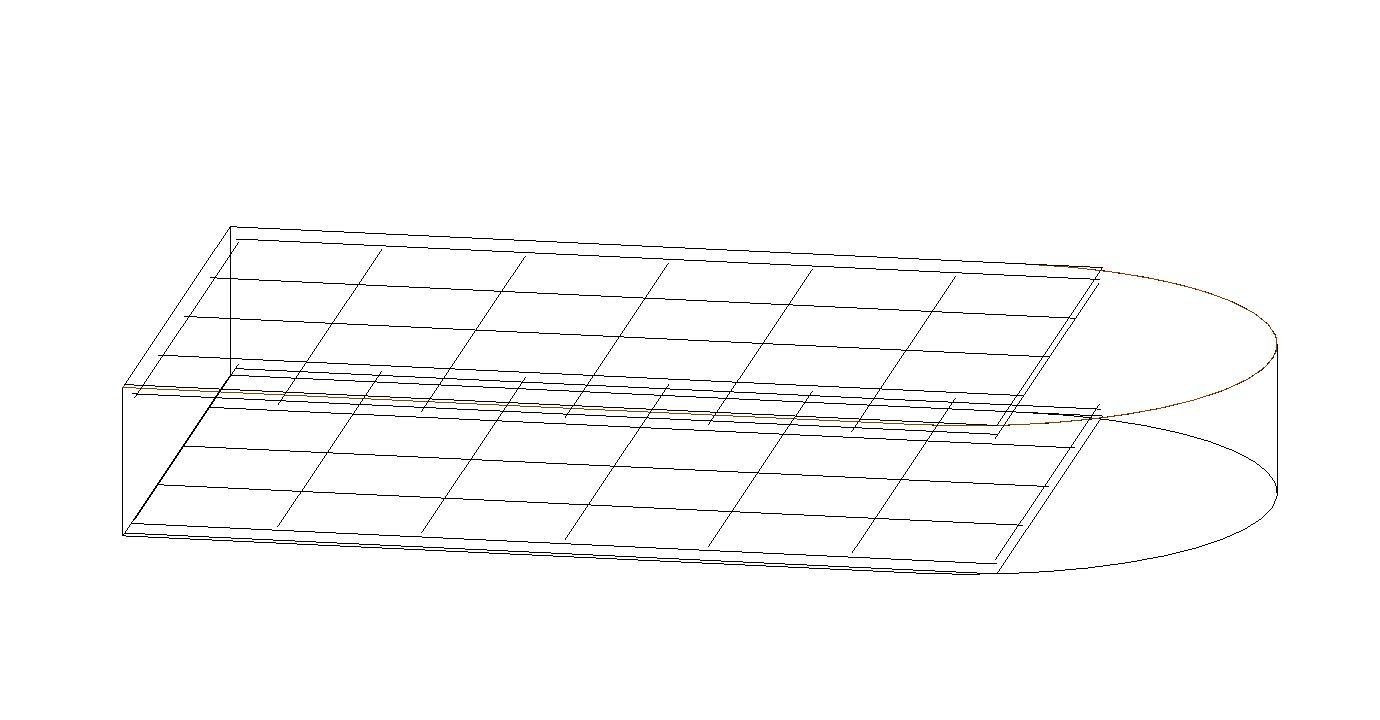
其主要有2个参数信息组成,钢筋区域和主筋方向
创建当前钢筋的函数如下:
public static AreaReinforcement Create( Document document, Element hostElement, IList<Curve> curveArray, XYZ majorDirection, ElementId areaReinforcementTypeId, ElementId rebarBarTypeId, ElementId rebarHookTypeId )
这个函数就是用于创建一个钢筋区域信息,其中curveArray定义钢筋钢筋区域的外轮廓信息
public static AreaReinforcement Create( Document document, Element hostElement, XYZ majorDirection, ElementId areaReinforcementTypeId, ElementId rebarBarTypeId, ElementId rebarHookTypeId )
其中majorDirection 就是主钢的方向,可以在实体上创建一个网片区域。
区域钢筋有一个核心方法
GetRebarInSystemIds方法
每个区域钢筋多少有多少RebarInSystem组成,所以区域钢筋可以通过GetRebarInSystemIds方法获取当前所有的RebarInSystem,且RebarInSystem和Rebar通过打散后可以转换。
RemoveAreaReinforcementSystem。其他以将区域钢筋打散为普通钢筋元素,如下所示:
public static IList<ElementId> RemoveAreaReinforcementSystem(
    Document doc,
    AreaReinforcement system
)
3、结构路径钢筋
主要用PathReinforcement对象描述,通过绘制一个路径,在结构主体中,沿着路径进行钢筋的生成。
PathReinforcement CreatePathReinforcement(Autodesk.Revit.DB.Document document, Wall wall)
{
    // 创建一个路径
    List<Curve> curves = new List<Curve>();
    LocationCurve location = wall.Location as LocationCurve;
    XYZ start = location.Curve.GetEndPoint(0);
    XYZ end = location.Curve.GetEndPoint(1);
    curves.Add(Line.CreateBound(start, end));

    // 设置钢筋默认的类型
    ElementId defaultRebarBarTypeId = document.GetDefaultElementTypeId(ElementTypeGroup.RebarBarType);
    ElementId defaultPathReinforcementTypeId = document.GetDefaultElementTypeId(ElementTypeGroup.PathReinforcementType);
    ElementId defaultHookTypeId = ElementId.InvalidElementId;

    //创建路径钢筋
    PathReinforcement rein = PathReinforcement.Create(document, wall, curves, true, defaultPathReinforcementTypeId, defaultRebarBarTypeId, defaultHookTypeId, defaultHookTypeId);
    if (null == rein)
    {
        throw new Exception("Create path reinforcement failed.");
    }

    // 反馈消息
    TaskDialog.Show("Revit","Create path reinforcement succeed.");

    return rein;
}
4、结构钢筋网区域
主要由FabricArea对象描述,其通过多个sheet组成网片一个钢筋网结构。
rebarHookTypeId )
此内容由惯性聚合(RSS阅读器)自动聚合整理,仅供阅读参考。 原文来自 — 版权归原作者所有。