







转载自
http://www.cnblogs.com/cjt-java/archive/2012/09/01/2666696.html
项目需要实现一个无刷新批量文件上传功能,仔细研究了下,发现JQuery 提供的Uploadify插件十分不错,不过官方的实例是基于php的,下面我用jsp+servlet简单实现了这个功能,废话少说,先看效果图:
1、初始化页面:

2、选择多个文件(可一次多选)后:
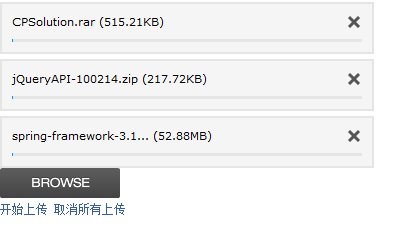
3、点击开始上传(上传完就自动消失)
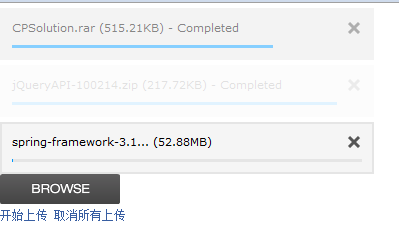
效果就是上面那样,页面不刷新。下面上代码:
1、首先先到官网下载最新的zip压缩包http://www.uploadify.com
2、项目结构:
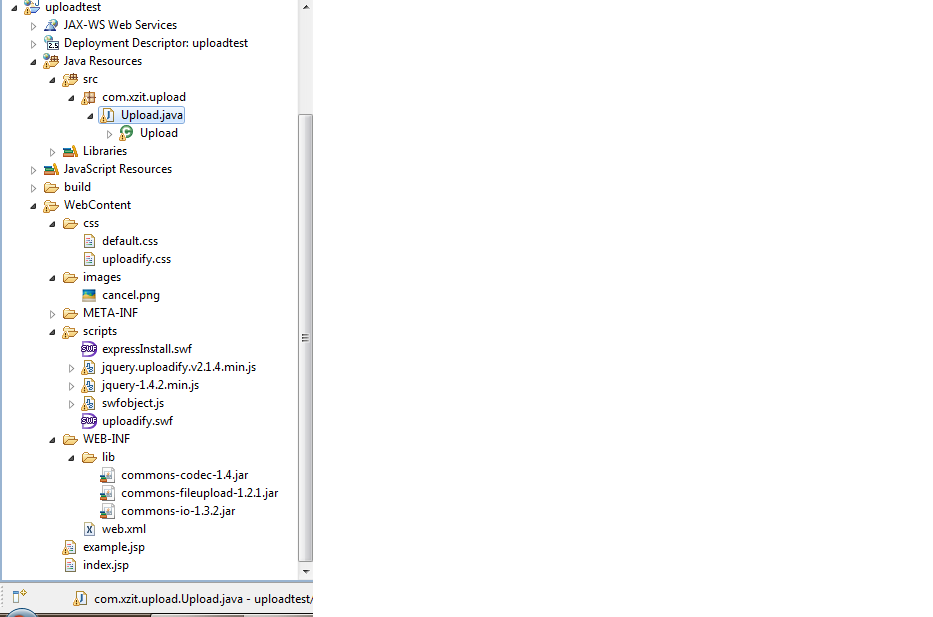
3、关键代码:
index.jsp
<%@ page language="java" contentType="text/html; charset=utf-8"%>
<%
String path = request.getContextPath();
String basePath = request.getScheme() + "://"
+ request.getServerName() + ":" + request.getServerPort()
+ path + "/";
%>
<!DOCTYPE HTML PUBLIC "-//W3C//DTD HTML 4.01 Transitional//EN">
<html>
<head>
<base href="<%=basePath%>">
<title>Upload</title>
<!--装载文件-->
<link href="css/default.css" rel="stylesheet" type="text/css" />
<link href="css/uploadify.css" rel="stylesheet" type="text/css" />
<script type="text/javascript" src="scripts/jquery-1.4.2.min.js"></script>
<script type="text/javascript" src="scripts/swfobject.js"></script>
<script type="text/javascript" src="scripts/jquery.uploadify.v2.1.4.min.js"></script>
<!--ready事件-->
<script type="text/javascript">
$(document).ready(function() {
$("#uploadify").uploadify({
'uploader' : 'scripts/uploadify.swf',
'script' : 'servlet/Upload',//后台处理的请求
'cancelImg' : 'images/cancel.png',
'folder' : 'uploads',//您想将文件保存到的路径
'queueID' : 'fileQueue',//与下面的id对应
'queueSizeLimit' : 5,
'fileDesc' : 'rar文件或zip文件',
'fileExt' : '*.rar;*.zip', //控制可上传文件的扩展名,启用本项时需同时声明fileDesc
'auto' : false,
'multi' : true,
'simUploadLimit' : 2,
'buttonText' : 'BROWSE'
});
});
</script>
</head>
<body>
<div id="fileQueue"></div>
<input type="file" name="uploadify" id="uploadify" />
<p>
<a href="javascript:jQuery('#uploadify').uploadifyUpload()">开始上传</a>
<a href="javascript:jQuery('#uploadify').uploadifyClearQueue()">取消所有上传</a>
</p>
</body>
</html>
web.xml
<?xml version="1.0" encoding="UTF-8"?>
<web-app version="2.4"
xmlns
="http://java.sun.com/xml/ns/j2ee"xmlns:xsi
="http://www.w3.org/2001/XMLSchema-instance"xsi:schemaLocation
="http://java.sun.com/xml/ns/j2eehttp://java.sun.com/xml/ns/j2ee/web-app_2_4.xsd"
><servlet>
<servlet-name>upload</servlet-name>
<servlet-class>com.xzit.upload.Upload</servlet-class>
</servlet>
<servlet-mapping>
<servlet-name>upload</servlet-name>
<url-pattern>/servlet/Upload</url-pattern>
</servlet-mapping>
<welcome-file-list>
<welcome-file>index.jsp</welcome-file>
</welcome-file-list>
</web-app>
upload.java
package com.xzit.upload;
import java.io.File;
import java.io.IOException;
import java.util.Iterator;
import java.util.List;
import java.util.UUID;
import javax.servlet.ServletException;
import javax.servlet.http.HttpServlet;
import javax.servlet.http.HttpServletRequest;
import javax.servlet.http.HttpServletResponse;
import org.apache.commons.fileupload.FileItem;
import org.apache.commons.fileupload.FileUploadException;
import org.apache.commons.fileupload.disk.DiskFileItemFactory;
import org.apache.commons.fileupload.servlet.ServletFileUpload;
@SuppressWarnings("serial")
public class Upload extends HttpServlet {
@SuppressWarnings("unchecked")
public void doPost(HttpServletRequest request, HttpServletResponse response)
throws ServletException, IOException {
String savePath = this.getServletConfig().getServletContext()
.getRealPath("");
savePath = savePath + "/uploads/";
File f1 = new File(savePath);
System.out.println(savePath);
if (!f1.exists()) {
f1.mkdirs();
}
DiskFileItemFactory fac = new DiskFileItemFactory();
ServletFileUpload upload = new ServletFileUpload(fac);
upload.setHeaderEncoding("utf-8");
List fileList = null;
try {
fileList = upload.parseRequest(request);
} catch (FileUploadException ex) {
return;
}
Iterator<FileItem> it = fileList.iterator();
String name = "";
String extName = "";
while (it.hasNext()) {
FileItem item = it.next();
if (!item.isFormField()) {
name = item.getName();
long size = item.getSize();
String type = item.getContentType();
System.out.println(size + " " + type);
if (name == null || name.trim().equals("")) {
continue;
}
//扩展名格式:
if (name.lastIndexOf(".") >= 0) {
extName = name.substring(name.lastIndexOf("."));
}
File file = null;
do {
//生成文件名:
name = UUID.randomUUID().toString();
file = new File(savePath + name + extName);
} while (file.exists());
File saveFile = new File(savePath + name + extName);
try {
item.write(saveFile);
} catch (Exception e) {
e.printStackTrace();
}
}
}
response.getWriter().print(name + extName);
}
}
此内容由惯性聚合(RSS阅读器)自动聚合整理,仅供阅读参考。 原文来自 — 版权归原作者所有。