



惯性聚合 高效追踪和阅读你感兴趣的博客、新闻、科技资讯
阅读原文 在惯性聚合中打开

推荐订阅源

cs.CV updates on arXiv.org
Threat Intelligence Blog | Flashpoint
C
CERT Recently Published Vulnerability Notes
V
Vulnerabilities – Threatpost
cs.CL updates on arXiv.org
L
Lohrmann on Cybersecurity
C
CXSECURITY Database RSS Feed - CXSecurity.com
Schneier on Security
T
Threatpost
P
Proofpoint News Feed
MongoDB | Blog
MongoDB | Blog
OSCHINA 社区最新新闻
OSCHINA 社区最新新闻
大猫的无限游戏
大猫的无限游戏
T
Threat Research - Cisco Blogs
罗磊的独立博客
Security Latest
Security Latest
D
Docker
S
Secure Thoughts
博客园 - 聂微东
A
Arctic Wolf
Recorded Future
Recorded Future
雷峰网
雷峰网
Microsoft Azure Blog
The Cloudflare Blog
P
Palo Alto Networks Blog
Project Zero
Project Zero
Blog — PlanetScale
Blog — PlanetScale
D
Darknet – Hacking Tools, Hacker News & Cyber Security
H
Help Net Security
T
The Blog of Author Tim Ferriss
Latest news
Latest news
AWS News Blog
AWS News Blog
U
Unit 42
Stack Overflow Blog
Stack Overflow Blog
The GitHub Blog
The GitHub Blog
Know Your Adversary
Know Your Adversary
Vercel News
Vercel News
WordPress大学
WordPress大学
Spread Privacy
Spread Privacy
F
Full Disclosure
Martin Fowler
Martin Fowler
T
The Exploit Database - CXSecurity.com
Attack and Defense Labs
Y
Y Combinator Blog
Microsoft Security Blog
V
V2EX
M
MIT News - Artificial intelligence
P
Proofpoint News Feed
小众软件
小众软件
宝玉的分享
宝玉的分享

博客园 - springsnow

npoi读取word 内容控件 Vue3中 watch、watchEffect 详解 如何使用 Vue SFC Playground toRefs学习 Vue3中如何响应式解构 props useTemplateRef使用 以后台方式启动RealVNC 在VS2022和VS2012共存的电脑上安装VS212扩展注意事项 VS中配置AnkhSVN源代码比较文件排列方式 使用VSCode撰写和发布博客园文章 DBever导入越南文Excel 复制对象中的一部分属性给另一个对象(对象部分属性解构到新对象) 使用metaWebBlog接口实现博客文章同步 .Net Core3.1上用EFCore的反向工程生成 水淼·文件批量处理器 如何高效的在博客园上编写MD格式的博客(插件pycnblog,推荐) 自动备份软件 —— Syncovery 7.98s Pro、Enterprise 第三方百度网盘客户端 PanDownload、速盘、panlight 本地电脑视频播放器推荐PotPlayer、KMPlayer
VMware
springsnow · 2022-05-12 · via 博客园 - springsnow

vmware
是业界非常稳定且安全的桌面虚拟机软件,VMware虚拟机可让你在一台机器上同时运行二个或更多Windows、DOS、LINUX系统。在虚拟网路,实时快照,拖曳共享文件夹,支持PXE等方面均有特别之处,使用vmware,用户可在单一的桌面上同时运行不同的操作系统,进行开发、测试、部署新的应用程序。

官网:https://www.vmware.com/

一、VMware版本

  • workstation: 单机级,用在个人桌面系统中,需要操作系统支持。是给开发者使用的,性能一般。 (我装的就是这个)
  • servier:工作组级,用于服务器,需要操作系统支持。是给企业级用户使用的,性能针对workstation有很大的提升
  • esxi:企业级,用于服务器,不需要操作系统支持,是针对电信级企业使用的,性能是最好的

Workstation Player和Workstation Pro的区别

VMware Workstation Pro 支持以上列出的所有功能,而 Workstation Player 仅支持部分功能。VMware
Workstation Pro 要比 Workstation Player 完整。
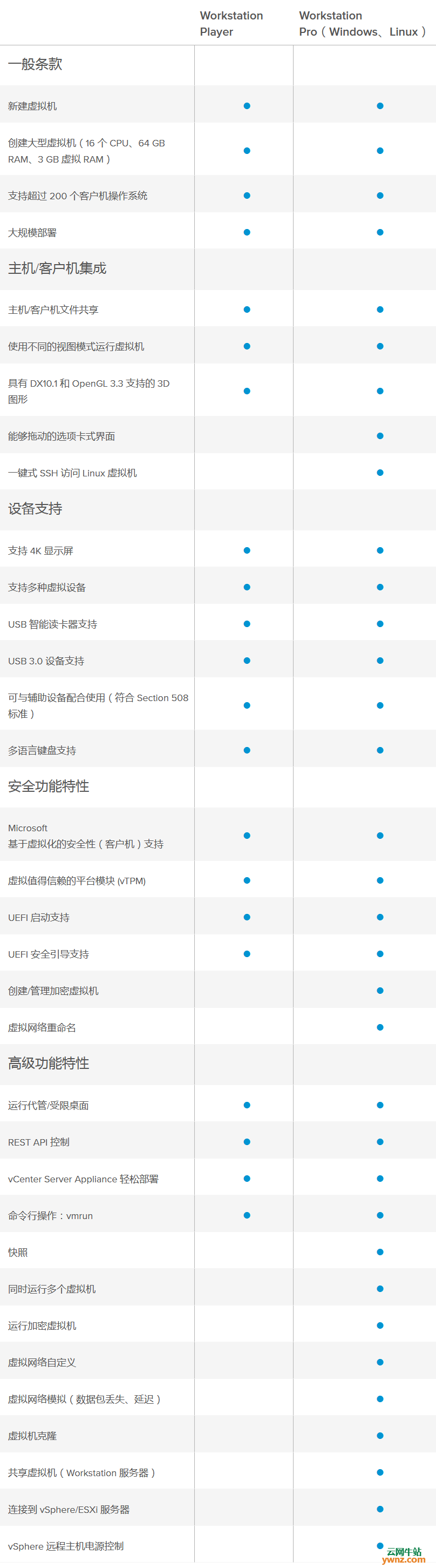
Workstation Player和Workstation
Pro介绍,两者的区别

二、下载地址

10.0.7:<https://download3.vmware.com/software/wkst/file/VMware-workstation-
full-10.0.7-2844087.exe>

12.5.9:<https://download3.vmware.com/software/wkst/file/VMware-workstation-
full-12.5.9-7535481.exe>

14.1.5:<http://download3.vmware.com/software/wkst/file/VMware-workstation-
full-14.1.5-10950780.exe>

15.5.1:<https://download3.vmware.com/software/wkst/file/VMware-workstation-
full-15.5.1-15018445.exe>

链接:https://pan.baidu.com/s/1zT8e_XEQxIxouywHjmnPYQ

提取码:06cr

三、各版本序列号

  • 10.x:1Z0G9-67285-FZG78-ZL3Q2-234JG
  • 11.x:YG74R-86G1M-M8DLP-XEQNT-XAHW2
  • 12.x:ZC3TK-63GE6-481JY-WWW5T-Z7ATA
  • 14.x:AU108-FLF9P-H8EJZ-7XMQ9-XG0U8
  • 15.x:FC7D0-D1YDL-M8DXZ-CYPZE-P2AY6

15.x可参考的许可证(来源于网络):

  • GZ7JU-04F13-084TY-RZWGG-Q3HEF
  • ZA502-6DFD5-M84CZ-GGQQT-NQUUD
  • FZ3M2-4PD94-H843Y-A4Z5G-MVAX8
  • UU352-48Z04-H894P-MEW5E-WZ8XF
  • AV5EU-6GYE3-08ENZ-KMZQC-X7KC

注意

从VM11开始就不再支持32位系统了,所以32位系统用户和XP系统用户请使用10.0.7版本;

从VM14开始,对硬件要求进一步提高,所以低配电脑用户请使用12.5.9版本;