

惯性聚合 高效追踪和阅读你感兴趣的博客、新闻、科技资讯
阅读原文 在惯性聚合中打开

推荐订阅源

罗磊的独立博客
SecWiki News
SecWiki News
酷 壳 – CoolShell
酷 壳 – CoolShell
爱范儿
爱范儿
量子位
M
MIT News - Artificial intelligence
GbyAI
GbyAI
cs.AI updates on arXiv.org
K
KPMG report finds enterprise disconnect between AI and its ROI | CIO
TaoSecurity Blog
TaoSecurity Blog
博客园 - 【当耐特】
H
Heimdal Security Blog
腾讯CDC
The Last Watchdog
The Last Watchdog
Security Archives - TechRepublic
Hacker News: Ask HN
Hacker News: Ask HN
S
Schneier on Security
Microsoft Security Blog
WordPress大学
WordPress大学
博客园 - 司徒正美
Recent Commits to openclaw:main
C
Cybersecurity and Infrastructure Security Agency CISA
S
SegmentFault 最新的问题
大猫的无限游戏
大猫的无限游戏
Application and Cybersecurity Blog
F
Full Disclosure
有赞技术团队
有赞技术团队
T
Tailwind CSS Blog
Engineering at Meta
Engineering at Meta
cs.CV updates on arXiv.org
T
Threatpost
月光博客
月光博客
A
Arctic Wolf
OSCHINA 社区最新新闻
OSCHINA 社区最新新闻
雷峰网
雷峰网
T
Troy Hunt's Blog
freeCodeCamp Programming Tutorials: Python, JavaScript, Git & More
The Cloudflare Blog
D
DataBreaches.Net
O
OpenAI News
L
LINUX DO - 最新话题
宝玉的分享
宝玉的分享
小众软件
小众软件
V
Vulnerabilities – Threatpost
A
About on SuperTechFans
人人都是产品经理
人人都是产品经理
T
The Exploit Database - CXSecurity.com
Martin Fowler
Martin Fowler
美团技术团队
P
Privacy International News Feed

博客园 - greystar

LightSwitch OOB发布模式下 Title的处理 个性化lightswitch登录屏幕(附源码) LightSwitch登录界面如何设置背景 LightSwitch学习阶段疑难问答 使用 OfficeIntegration.Word 实现lightswitch导出WORD的功能(续) 使用 OfficeIntegration.Word 实现lightswitch导出WORD的功能 lightswitch自定义扩展实现示例教程 devexpress套餐中UploadControl实现自定义参数传递的例子 lightswitch中自动完成框与查询参数的联动效果 如何在LightSwitch中创建多栏自动完成的下拉框 自定义lightswitch主屏幕 SQL Server 2008中的MERGE(不仅仅是合并) 一段XSLT转换XML节点名的测试代码 SL相关的感想 使用LINQ取得已选中的CheckBox Batch Updating in Entity Framework 利用Register protocol实现网页调用桌面程序 路径标记语法 邮件合并中图片字段的处理
lightswitch如何实现文件批量上传功能
greystar · 2011-10-31 · via 博客园 - greystar

 本例中使用devexpress uploadcontrol来实现上传,主要介绍如何集成到LS中的具体步骤。

1.将lightswitch项目切换到文件视图状态.

2.在client工程里添加一个自定义的控件进来,(silverlight 中一样的操作方式,)并实现自己需要的功能。

<controls:ChildWindow x:Class="LightSwitchApplication.Screens.SelectUploadFile"
           xmlns="http://schemas.microsoft.com/winfx/2006/xaml/presentation"
           xmlns:x="http://schemas.microsoft.com/winfx/2006/xaml"
           xmlns:controls="clr-namespace:System.Windows.Controls;assembly=System.Windows.Controls"
           Width="600" Height="400"
           xmlns:local="clr-namespace:LightSwitchApplication.Screens"
           Title="上传附件">
    <Grid x:Name="LayoutRoot" Margin="2">
        <Border Background="White">
            <local:CustomUploadControl  x:Name="uploadControl1"   UploadServerPath="UploadFiles" 
                FileUploadCompleted="OnFileUploadCompleted"
                TotalUploadCompleted="OnTotalUploadCompleted"
                UploadItemRemoved="OnUploadItemRemoved"
                UploadCancelled="OnUploadCancelled" AllowDrop="True" Width="532" FileNameFilter="所有文件 (*.*)|*.*"  FontSize="12"  />
        </Border>
    </Grid>
</controls:ChildWindow>

CustomUploadControl  在DEVEXPRESS的基础上重新包装了一下,增加了上传文件唯一编号。

在需要上传的地方执行如下:

  partial void ShowUpload_Execute()
        {
            // Write your code here.

            Dispatchers.Main.BeginInvoke(() =>
            {
                SelectUploadFile selectFileWindow = new SelectUploadFile();
                selectFileWindow.uploadControl1.BeforeStartUpload += new EventHandler(dxUploadControl_BeforeStartUpload);
                selectFileWindow.uploadControl1.FileUploadCompleted += new EventHandler<UploadItemEventArgs>(FileUploadCompletedHandler);
                selectFileWindow.uploadControl1.UploadItemRemoved += new EventHandler<UploadItemEventArgs>(dxUploadControl_UploadItemRemoved);
                var webHandlerUri = new Uri(System.Windows.Application.Current.Host.Source, "../FileUploader.ashx");
                selectFileWindow.uploadControl1.WebHandlerUri = webHandlerUri; //上传服务器路径,谁来处理,可参考Dev示例
                selectFileWindow.uploadControl1.UploadServerPath = uploadServerPath;
                selectFileWindow.Show();
            });
        
        }

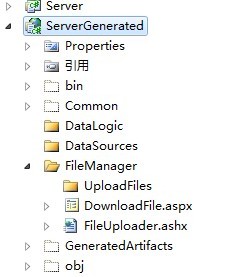
3.进入ServerGenerated,添加相关自定义处理的功能,如下图: downloadfile.aspx, fileuploader.ashx ,一个下载,一个上传。具体代码就不显示了

4.集成刚才增加的二个功能(上传、下载),需要LS将二个文件进行编译到工程中。

先将项目卸装,然后手动编辑LS解决方案文件。
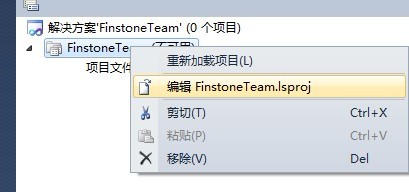
打开文件,找到项目包含文件的位置,手工加入如下:
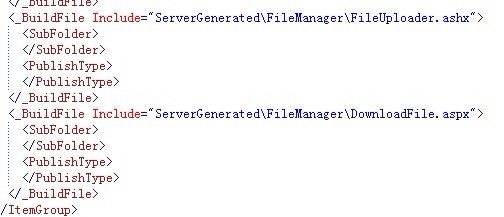
保存,并重新载入工程。此时我们需要的自定义的功能都集成到LS中去了,可以正常工作。一起来尝试一下吧,