


惯性聚合 高效追踪和阅读你感兴趣的博客、新闻、科技资讯
阅读原文 在惯性聚合中打开

推荐订阅源

阮一峰的网络日志
阮一峰的网络日志
D
Darknet – Hacking Tools, Hacker News & Cyber Security
S
Schneier on Security
The Last Watchdog
The Last Watchdog
Cyberwarzone
Cyberwarzone
S
Securelist
Threat Intelligence Blog | Flashpoint
C
Cyber Attacks, Cyber Crime and Cyber Security
L
Lohrmann on Cybersecurity
钛媒体:引领未来商业与生活新知
钛媒体:引领未来商业与生活新知
博客园 - 司徒正美
The Cloudflare Blog
V
V2EX
博客园_首页
博客园 - 聂微东
Vercel News
Vercel News
人人都是产品经理
人人都是产品经理
G
GRAHAM CLULEY
T
Tenable Blog
Last Week in AI
Last Week in AI
Y
Y Combinator Blog
L
LINUX DO - 最新话题
cs.CL updates on arXiv.org
SecWiki News
SecWiki News
博客园 - 三生石上(FineUI控件)
S
Secure Thoughts
N
News | PayPal Newsroom
T
The Blog of Author Tim Ferriss
The GitHub Blog
The GitHub Blog
T
Troy Hunt's Blog
博客园 - 【当耐特】
Forbes - Security
Forbes - Security
H
Hacker News: Front Page
A
About on SuperTechFans
B
Blog RSS Feed
Engineering at Meta
Engineering at Meta
MongoDB | Blog
MongoDB | Blog
CTFtime.org: upcoming CTF events
freeCodeCamp Programming Tutorials: Python, JavaScript, Git & More
罗磊的独立博客
D
DataBreaches.Net
P
Privacy & Cybersecurity Law Blog
Schneier on Security
Application and Cybersecurity Blog
Google DeepMind News
奇客Solidot–传递最新科技情报
奇客Solidot–传递最新科技情报
OSCHINA 社区最新新闻
OSCHINA 社区最新新闻
Jina AI
Jina AI
D
Docker
P
Proofpoint News Feed

博客园 - newr2006

HttpWebRequest 模拟浏览器访问网站 jquery check box Fiddler Post Debug symbol MC 3090 upgrade to symbol MC 3190 ALTER TABLE unable to add host to SCVMM 2008R2 Cannot generate SSPI context ASP.NET代码对页面输出进行清理 - newr2006 - 博客园 提前两天发邮件 线程 Thread 传参数 好的博客 Login failed for user 'NT AUTHORITY\NETWORK SERVICE'. 解决办法 - newr2006 Hashtable(HashSet),ListDictionary,HybridDictionary 和 NameValueCollection Pocket pc 与 Smartphone 开发的区别 XMl 文件属性的读取 USA 的网站终于把中国的名字排上去了. Menu 控件弹出窗口(popupwindow) 删除一些难删除的程序 Page_ClientValidate 用法
Android adb.exe 开发模试安装
newr2006 · 2019-09-18 · via 博客园 - newr2006

1.安装 adb . 让它直接能在cmd 窗口运行

下载:platform-tools  这个就行: Download SDK Platform-Tools for Windows 下载完成后直接解压到你的电脑硬盘里,我解压在: C:\platform-tools_r29.0.4-windows\platform-tools
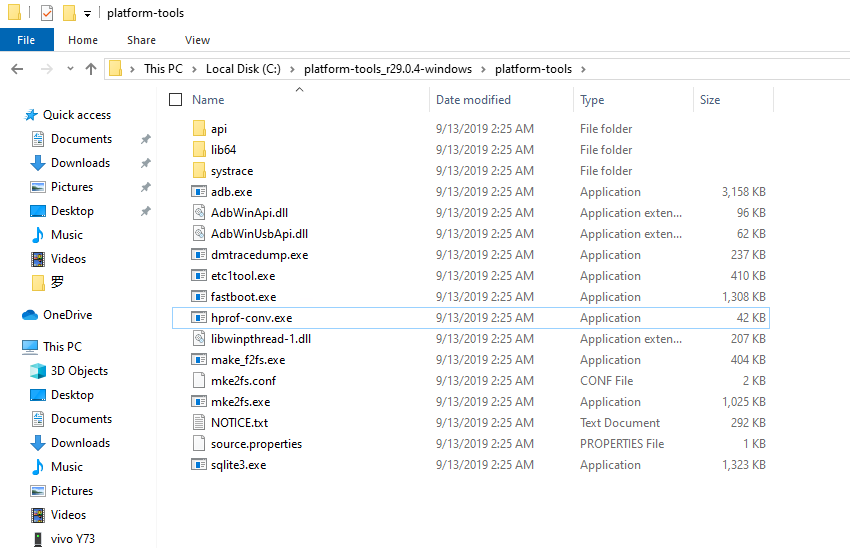
 2.添加环境变量 C:\platform-tools_r29.0.4-windows\platform-tools 到 Path  下
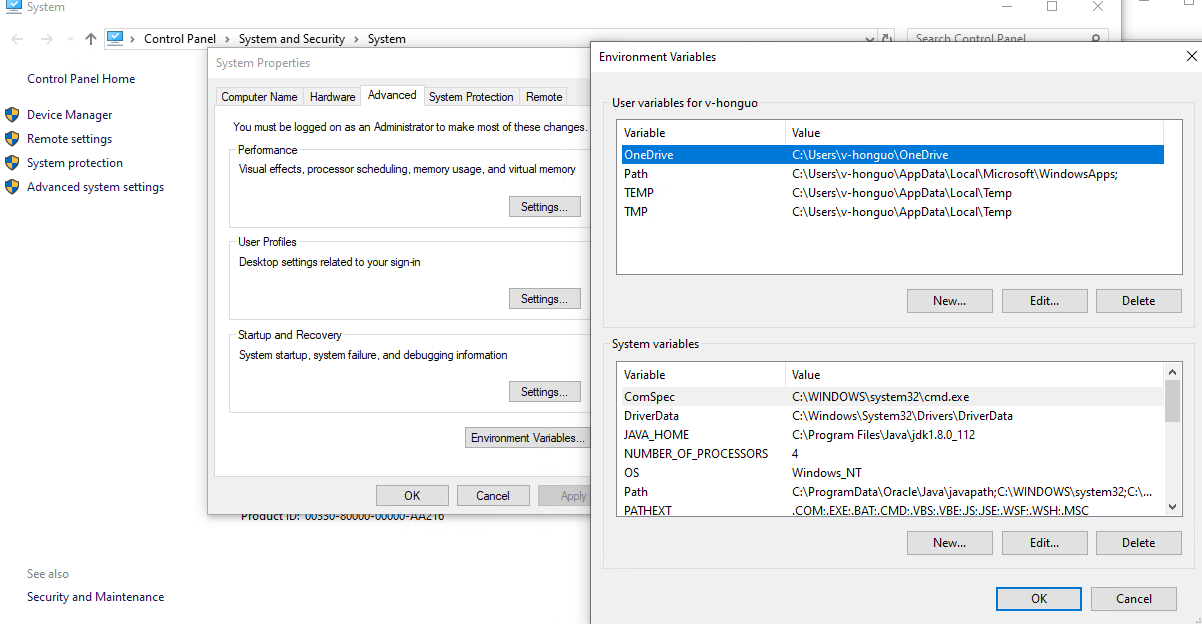
双击 Path后 增加: C:\platform-tools_r29.0.4-windows\platform-tools,点OK 保存即可

 3. 测试是否成功打开 cmd 窗口 输入 adb
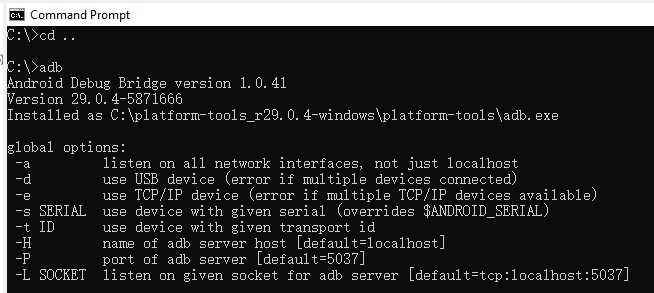
 如果你的Android 手机打开了usb 开发者模式,输入 adb devices ,将会出现设备号
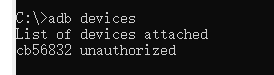
 

 这时就可以对你的Android手机发adb 指令了如:点亮屏幕:

adb shell input keyevent 26

本人用这次方法做了一个微信打卡和钉钉自动打卡的程序,大家如果需要的话可以随时联系我。