






keepalived:http://www.keepalived.org/index.html
它是一个基于VRRP协议来实现的WEB服务高可用方案,可以利用其来避免单点故障。一个WEB服务至少会有2台服务器运行Keepalived,一台为主服务器(MASTER),一台为备份服务器(BACKUP),但是对外表现为一个虚拟IP,主服务器会发送特定的消息给备份服务器,当备份服务器收不到这个消息的时候,即主服务器宕机的时候,备份服务器就会接管虚拟IP,继续提供服务,从而保证了高可用性。(摘)
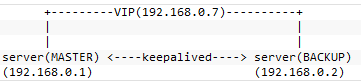
可以使用lvs或haproxy+keepalived做高可用的负载均衡方案
记录一下安装过程和问题处理过程
首先需要安装ipvsadm:
或者:
1: #在这里查找适合的版本http://www.linuxvirtualserver.org/software/ipvs.html
2: wget http://www.linuxvirtualserver.org/software/kernel-2.6/ipvsadm-1.24-6.src.rpm
3: tar –zxvf ipvsadm-1.24.tar.gz
4: cd ipvsadm-1.24
5: make&&make install
然后安装keepalived
1: wget http://www.keepalived.org/software/keepalived-1.2.2.tar.gz
2: tar –zxvf keepalived-1.2.2.tar.gz
3: cd keepalived-1.2.2
4: ./configure
5: make && make install
configure时若出现以下结果:
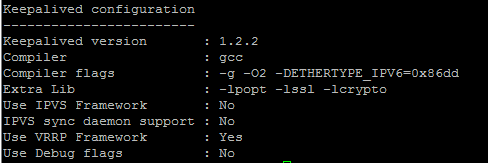
只有一项为yes,因为keepalived没有找到内核目录导致的,解决的方法是在编译的时候:
./configure --with-kernel-dir=/usr/src/kernels/2.6.18-194.el5-i686/
若/usr/src/kernel目录下没有内核目录,则需要安装内核开发包:
用命令uname -a查看内核版本,然后可以在这里查找对应的http://zid-luxinst.uibk.ac.at/linux/rpm2html/centos/5/os/i386/CentOS/kernel-devel-2.6.18-194.el5.i686.html
不推荐使用yum install -y kernel-devel安装
安装完成后建立一下链接:
ln -s /usr/src/kernels/2.6.18-194.el5-i686/ /usr/src/linux/
上述过程完毕后,在进行configure:
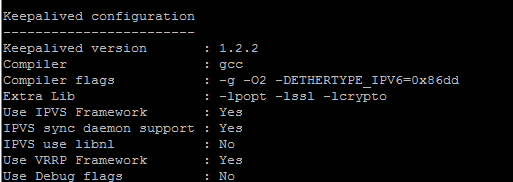
若还是出现no或者make的时候出现:“ error: linux/ip_masq.h: No such file or directory”之类的错误时,在/usr/src/kernels/2.6.18-194.el5-i686/include/linux/version.h中增加声明:
#define UTS_RELEASE "2.6.18"
再进行configure就会都是yes了:
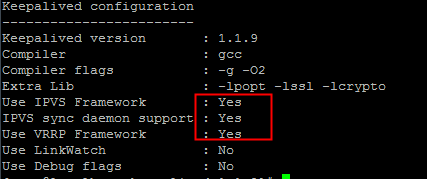
接着执行make是若出现“types.h:62: error: conflicting types for ‘dev_t’”错误,需要修改源码目录下的keepalived/libipvs-2.6/ip_vs.h
把#include linux/types.h移到#include sys/types.h 这行的下面
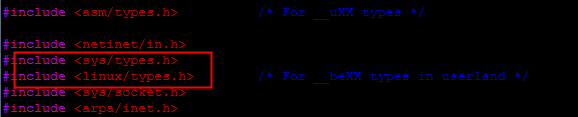
上述错误都解决后make&&make install就可以通过了,然后运行:
#查看帮助
keepalived -h
#运行 由于keepalived配置文件不是在启动时一次性加载并读取完成的,所以必须是完整路径,可以根据log判断是否加载了正确的配置文件
keepalived –f /usr/local/etc/keepalived/keepalived.conf
运行过程可以查看log:
此内容由惯性聚合(RSS阅读器)自动聚合整理,仅供阅读参考。 原文来自 — 版权归原作者所有。