







1.子页面的滚动条设置
由于目前在网页的结构设计方面还是处于初级阶段,这时候一般都是采用div、Iframe或者Table组合进行架构
但是有时候存在一个严重的问题,因为工程项目从系统开发的,工程人员开发的页面都是在IFrame中展示的,很多时候页面高度超过的屏幕高度,总是不能完全显示页面内容,更加遗憾的是,也不能控制IFrame的父窗口。这种情况,尤其实在开发页面嵌入IFrame,总是让人摸不着头脑!几天下来,也算是小有收获,不过也还是比较粗糙的!希望大家能给出更好的建议。下面分别讨论一下:
首先明确一下页面的结构:
主框架结构大概是这样
<body>
//......
<IFrame id="IFrame_Main" src=""/>
//......
</body>
子页面结构根据页面内容主要的存放位置分为(1)DIV (2)IFrame
再者必须明确的一点是这时候无论是IFrame还是DIV,最好都是嵌入到Table中,因为当把IFrame或者DIV放在DIV中,无论在DIV或者IFRAME中怎么设置,滚动条怎么都出不来
也就是说子页面中需要出现滚动条的内容对应的TABLE结构如下
<table>
<tr><td>
<div></div>
</td></tr>
</table>
或者
<table>
<tr><td>
<IFrame src=""/>
</td></tr>
</table>
紧接着分情况讨论怎么设置,才能出现滚动条?
IFrame中嵌入DIV......

关于子页面的大概结构如下:
 <table id="table" style="overflow:auto;">
<tr><td>
<div style="width:100%;" id="div" style="overflow:auto;">
<div style="border:solid 1px #799BC8;margin:5px 5px 5px 5px;"></div>
</td></tr>
</table>
脚本如下:
window.onload = function()
 {
{
 var w = screen.width;
var h = screen.height;
document.getElementById("table").style.width = parseInt(w) - 20;
document.getElementById("table").style.height = parseInt(h) - 300;
document.getElementById("div").style.height = parseInt(h) - 300;
 }
}
这样基本上,在功能上能够满足要求,至于细节部分,慢慢完善!
IFrame中嵌入IFrame.......
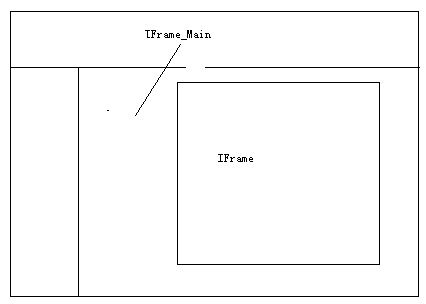
关于子页面的大概结构如下:
<table>
<tr><td id="table_clxx" style="overflow:auto;">
<iframe id="clxx" style="margin:5px 5px 5px 5px;width:100%;height:100%" frameBorder=0 scrolling="yes" allowTransparency="true">
</iframe>
</td></tr>
</table>
脚本如下:
window.attachEvent("onload",function()
{
document.frames["clxx"].location.href="";
//document.frames["clxx"].document.body.scrollTop = document.all.div_clxx.scrollTop;
var w = screen.width;
var h = screen.height;
document.getElementById("div_clxx").style.width = parseInt(w) - 120;
document.getElementById("div_clxx").style.height = parseInt(h) - 150;
});
<table width="200" border="1">
<tr>
<td>在今天的比赛中,虽然说姚明在得分上面并不如麦蒂,而且在小牛的小个子阵容面前,姚明也并没有和前三场比赛一样得到淋漓尽致的发挥。在今天的比赛中,火箭更多的是和小牛以快打。但是姚明的作用,在这样的比赛中更加被凸现了出来。虽然说经过了上赛季的锻炼之后,查克-海耶斯基本上已经能够达到一名合格大前锋的标准;而从季前赛看来,路易斯-斯科拉的表现也绝对是一名出色的前锋。而今天里克-阿德尔曼作出的正是这样的选择,在火箭小个子阵容中搭档内线的正是斯科拉和海耶斯,其他三名球员中,除了麦蒂之外,另外两名球员的组合不一定。
</td>
</tr>
</table>
当<td>中的汉字全部换成数字或者字母,就会发现表格还是被撑开了。这种问题的解决办法就是:<td style="word-break:break-all;"></td>
如果说要把单元格的高度固定,需要设置table:<table style="table-layout:fixed;"></table>
基本上问题都能够解决。这又带来一种问题,没有显示完全的内容,怎么展现出来?可以通过设置省略号,已title的形式展现(只是想当然,还没有动手去做呢)
有点类似下面吧:<div style="overflow: hidden;Text-overflow:ellipsis;width:100px;">很长的一段字符串很长的一段字符串</div>
3. 复制带格式的文本
很简单,如下:
<textarea id="demo">yourText</textarea>
<input type=button value=setData onclick=demo.select();document.execCommand("Copy")>
此内容由惯性聚合(RSS阅读器)自动聚合整理,仅供阅读参考。 原文来自 — 版权归原作者所有。