

惯性聚合 高效追踪和阅读你感兴趣的博客、新闻、科技资讯
阅读原文 在惯性聚合中打开

推荐订阅源

Know Your Adversary
Know Your Adversary
小众软件
小众软件
L
LangChain Blog
月光博客
月光博客
博客园 - Franky
Microsoft Azure Blog
Y
Y Combinator Blog
有赞技术团队
有赞技术团队
奇客Solidot–传递最新科技情报
奇客Solidot–传递最新科技情报
MongoDB | Blog
MongoDB | Blog
Recorded Future
Recorded Future
V
Visual Studio Blog
TaoSecurity Blog
TaoSecurity Blog
S
Schneier on Security
C
Cybersecurity and Infrastructure Security Agency CISA
P
Privacy & Cybersecurity Law Blog
T
Threat Research - Cisco Blogs
D
DataBreaches.Net
L
LINUX DO - 热门话题
C
Check Point Blog
F
Fortinet All Blogs
Hugging Face - Blog
Hugging Face - Blog
The Hacker News
The Hacker News
钛媒体:引领未来商业与生活新知
钛媒体:引领未来商业与生活新知
Microsoft Security Blog
酷 壳 – CoolShell
酷 壳 – CoolShell
V
V2EX
让小产品的独立变现更简单 - ezindie.com
The GitHub Blog
The GitHub Blog
P
Proofpoint News Feed
L
Lohrmann on Cybersecurity
博客园 - 司徒正美
T
Threatpost
P
Palo Alto Networks Blog
A
About on SuperTechFans
Spread Privacy
Spread Privacy
Engineering at Meta
Engineering at Meta
N
News | PayPal Newsroom
T
Tailwind CSS Blog
The Last Watchdog
The Last Watchdog
Blog — PlanetScale
Blog — PlanetScale
A
Arctic Wolf
量子位
Exploit-DB.com RSS Feed
博客园 - 聂微东
Google Online Security Blog
Google DeepMind News
www.infosecurity-magazine.com
V
Vulnerabilities – Threatpost
H
Hacker News: Front Page

博客园 - RedSoft

需求分析——你好,我好,大家好! [收藏]mysql 性能的检查和调优方法 【收藏】hibernate 集合映射inverse和cascade详解 个人网站开通。 【原】轻量级的数据交换格式——初识Json(下) 【原】轻量级的数据交换格式——初识Json(上) 【原】初学Jquery 【原】初学Flex之简单图片查看器 【原】基于asp.net的Web开发架构探索 JavaScript使用技巧精萃 WinForm UI设计与开发思路(转) C#编程风格约定 C#常用正则表达式 将目录下的图片文件写成一个二进制大文件 写了个MVC/多层的Demo…… EnableViewState,与TextBOx控件状态改变的关系 文本框+层模拟下拉框,并实现输入自动提示和过滤 软件史上最伟大的十大程序员(图文) sql 常用语句积累
PHP问题列表(持续更新)
RedSoft · 2010-11-30 · via 博客园 - RedSoft

 1、安装

     环境:windows xp+Apache HTTP Server (httpd) 2.2.15+php5.3

     (1)、windows xp安装略。

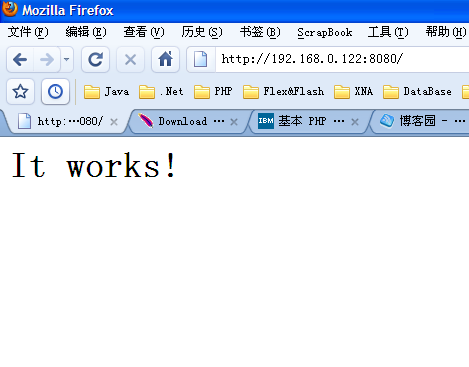
     (2)、Apache HTTP Server (httpd) 2.2.15,下载地址:http://httpd.apache.org/download.cgi 。我下载的是:Win32 Binary including OpenSSL 0.9.8m (MSI Installer): httpd-2.2.15-win32-x86-openssl-0.9.8m-r2.msi。安装成功之后,启动。在浏览器地址栏:敲入localhost:8080(你的端口),一切正常的话,会出现一下页面:
image

    如遇到问题可参阅:http://blog.sina.com.cn/s/blog_53f716d40100hvd9.html

    (3)、PHP5.3,下载地址:http://www.php.net/downloads.php。这里注意一下,如果你在windows系统下部署,请选择http://windows.php.net/download/。特别注意的地方:这里有VC9 x86 Non Thread Safe、VC9 x86 Thread Safe、VC6 x86 Non Thread Safe、VC6 x86 Thread Safe等版本。

怎么选择它们:

Non Thread Safe:无线程安全的(这个版本下找不到php5apache2.dll以及php5apache2_2.dll);

Thread Safe:线路安全的,一般apache模块、iis的ISAPI需要使用(所以应该选择它);

VC6:这是给Apache用的。

VC9:这是给IIS用的。

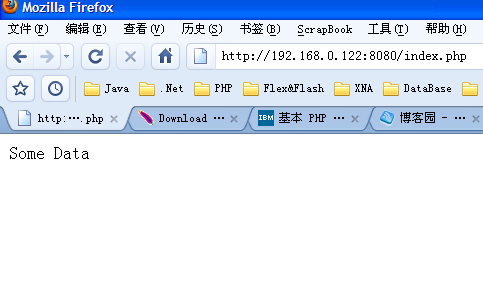
因为综上,应该选择VC6 x86 Thread Safe这个版本,下载地址:http://windows.php.net/downloads/releases/php-5.3.2-Win32-VC6-x86.zip,你也可以选择安装版:http://windows.php.net/downloads/releases/php-5.3.2-Win32-VC6-x86.msi。安装PHP,可参阅:http://blog.sina.com.cn/s/blog_53f716d40100hvd9.html。编写一个PHP页面,放在Apache-HTTP-Server\htdocs测试一下:

PHP页面内容:

<?php echo "Some Data"; ?>

如果幸运的话你会看到:
image 

可查阅相关网址得到帮助:

    (4)、Apache HTTP Server Version 2.2 文档:http://lamp.linux.gov.cn/Apache/ApacheMenu/

PHP 5.0和Apache HTTP Server 2.0 整合记录:http://heavyz.sourceforge.net/homepage/homepage_zh/comp/notes/php-5.0.html

待续……