
惯性聚合 高效追踪和阅读你感兴趣的博客、新闻、科技资讯
阅读原文 在惯性聚合中打开

推荐订阅源

酷 壳 – CoolShell
酷 壳 – CoolShell
H
Hacker News: Front Page
P
Palo Alto Networks Blog
T
ThreatConnect
Apple Machine Learning Research
博客园_首页
T
True Tiger Recordings
P
Privacy & Cybersecurity Law Blog
B
Blog
IT之家
IT之家
Last Week in AI
Last Week in AI
F
Full Disclosure
Hacker News: Ask HN
Hacker News: Ask HN
C
Comments on: Blog
Microsoft Azure Blog
C
Cybersecurity and Infrastructure Security Agency CISA
Microsoft Security Blog
博客园 - 【当耐特】
N
News and Events Feed by Topic
NISL@THU
NISL@THU
腾讯CDC
雷峰网
雷峰网
Security Latest
Security Latest
李成银的技术随笔
M
Microsoft Research Blog - Microsoft Research
L
LangChain Blog
L
Lohrmann on Cybersecurity
cs.CL updates on arXiv.org
C
Check Point Blog
Y
Y Combinator Blog
Recent Announcements
博客园 - Franky
N
News | PayPal Newsroom
V
V2EX
A
About on SuperTechFans
The Register - Security
月光博客
月光博客
奇客Solidot–传递最新科技情报
奇客Solidot–传递最新科技情报
Google Online Security Blog
MyScale Blog
MyScale Blog
Cisco Talos Blog
Cisco Talos Blog
Vercel News
Vercel News
WordPress大学
WordPress大学
C
Cyber Attacks, Cyber Crime and Cyber Security
The Hacker News
The Hacker News
IntelliJ IDEA : IntelliJ IDEA – the Leading IDE for Professional Development in Java and Kotlin | The JetBrains Blog
爱范儿
爱范儿
A
Arctic Wolf
L
LINUX DO - 最新话题
freeCodeCamp Programming Tutorials: Python, JavaScript, Git & More

Kaspersky official blog

A lost art finds its way into phishing emails Is your TV box renting out your network? How to turn off unapproved AI tools across organization Subscription security: how to protect your account, your wallet… and your sanity Real-world usage of Kaspersky Container Security | Kaspersky official blog LLM raiders and how to repel them The evolution of SIEM correlation rules Cracked in under a minute: (nearly) every other password New VoidStealer Trojan bypasses Chrome’s stored data protection Supply chain attack via DAEMON Tools What’s wrong with “Star Wars” droids’ motivation? Is your car spying on you? How to mitigate vibe-coding risks Crypto thieves ramping up attacks on Apple users Eavesdropping via fiber-optic cables – theory and reality Tax filings free from phishing, scams, or malware How and why cybercriminals are targeting software developers The iPhone — invincible no more: a look at DarkSword and Coruna Spotting cyberthreats: a guide for blind and low-vision users | Kaspersky official blog Three Rowhammer attacks targeting GDDR6 | Kaspersky official blog How to protect your privacy while using smart sex toys | Kaspersky official blog AirSnitch: attacking Wi-Fi client isolation and guest networks Fake ticket websites exploiting BTS world tour Is your security system secure? Is telehealth actually safe? Open-source vulnerability management architecture Open-source vulnerabilities: now a problem for every business Ransomware now taking aim at personal backups Why AI agents need an iron curtain The most notable supply-chain attacks of 2025
CrystalX RAT can flip your screen and steal your crypto
2026-04-01 · via Kaspersky official blog

While this post comes out on April 1, the threat described has little to do with April Fools’ Day — except for the fact that the CrystalX malicious RAT, discovered by Kaspersky experts, can do more than just gain remote access to a victim’s device, steal cryptocurrency and credentials from browsers and apps, or conduct actual surveillance. It can also flip the victim’s screen, swap mouse buttons, write nonsense directly onto the screen, and even block keyboard input. Furthermore, it’s advertised as malware-as-a-service (MaaS) — meaning it’s subscription-based — on Telegram and through instructional videos on YouTube.

In this post, we explain some basics as to how this new malware was built, what makes it difficult to detect, and what to do so you don’t end up among its victims.

A Swiss army knife for attackers

In March 2026, our experts discovered previously unknown malware circulating on private Telegram channels. Borrowing from classic marketing tactics, the Trojan was offered for purchase via three different subscription tiers. Its capabilities cover a fairly broad spectrum: judge for yourself what it can do to a victim’s computer:

  • Change desktop wallpaper to an image from a specified link
  • Rotate the screen by 90, 180, or 270 degrees
  • Simply shut down the computer
  • Swap mouse button assignments
  • Chat with the victim
  • Block both keyboard input and monitor output
  • Display any notification text chosen by the attacker
  • Disable specific components, such as Task Manager, the command prompt, and the Windows taskbar

Yet that’s only the harmless side of the malware — the prank functionality that harks back to the joke viruses of past decades. The real damage from CrystalX comes from its stealing login credentials for Steam, Discord, Telegram, and all Chromium-based browsers. It can also monitor and change the contents of the clipboard; typically, attackers watch for a crypto wallet address to be copied, and then swap it with their own. This is a popular scheme for stealing crypto: while intending to make a legitimate transfer, the victim copies the recipient’s wallet address, but ends up pasting the scammers’ address instead.

But there’s more: a keylogger feature and full device control with remote access to the screen, camera, and microphone — including video and sound recording capabilities.

The malware was first mentioned in January 2026 in a private Telegram chat for RAT developers. At that time, this Windows Trojan was called WebCrystal RAT and, based on technical details, was revealed to be a clone of another RAT known as WebRat. A short time later, the author of WebCrystal rebranded it as CrystalX RAT, and began touting the Trojan on a newly created Telegram channel.

The initial infection vector for this stealer is currently unknown, but according to telemetry the victims at the time of writing are predominantly located in Russia. And since we’re continuing to find new versions of the malware, we deem it a rapidly growing and evolving threat.

Anyone can become a hacker

Developing any complex cyberattack used to come with a steep learning curve. You needed to understand cryptography and network protocols, and know how to write code that could fool antivirus solutions. It was a high bar to clear, but the malware-as-a-service model has been changing the game.

These days, an attacker only needs basic computer literacy to rent a ready-made platform with a user-friendly user interface. The threat is becoming widespread specifically because malware creators aren’t carrying out the attacks themselves anymore — they’re selling shovels during a gold rush. They focus on supporting their customers, improving the user interface, and pouring money into aggressive marketing.
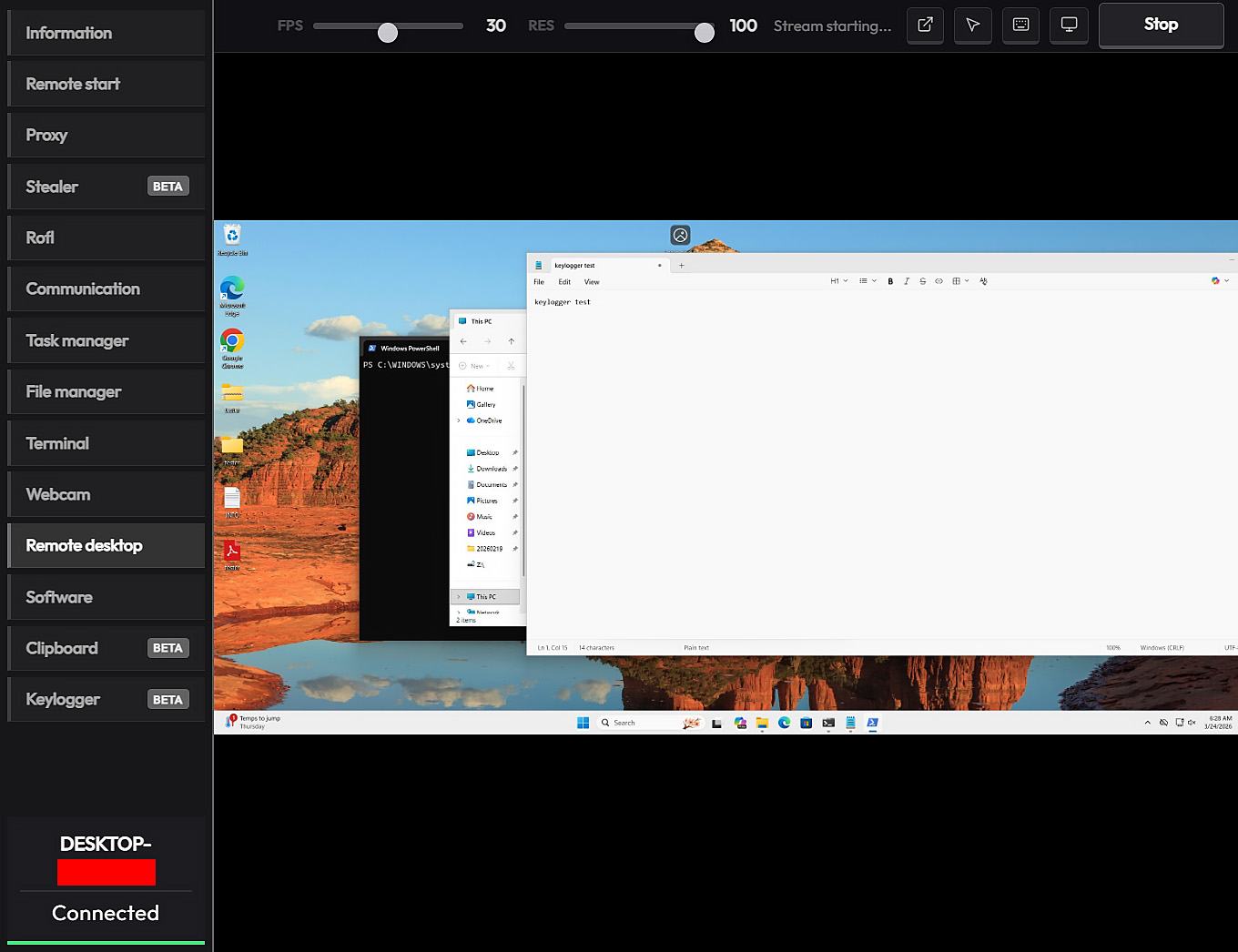
CrystalX malware control panel

CrystalX malware control panel

Hackers are even setting up YouTube channels where they use the pretext of “for educational and entertainment purposes” to explain how to manage the Trojan from the control panel. Instructional videos that were once buried in the dark web have gone mainstream, putting hacking techniques in front of a broad, general audience.

How CrystalX bypasses security

No matter how technically advanced a hacking app’s code is, it will die as a project without a constant stream of new clients. This makes marketing efforts vital to its survival — even if they significantly increase the risk of the developer ending up behind bars. However, the creators of CrystalX have figured out how to protect their creation.

The control panel allows clients to build their own unique versions of the Trojan with extensive configuration options. For example, they can enable location filtering to target users in specific countries, choose an icon for the executable file, and toggle anti-analysis features. The finished Trojan is compressed using zlib and then encrypted with a ChaCha20 stream cipher using a 256-bit key and a 96-bit nonce. This ensures that every customer receives a unique version of the malware.

CrystalX is also capable of detecting virtual machines and checking if it’s running in a test or debugging environment, which complicates discovery. You can read more about the structure and functionality of this new Trojan in our Securelist story.

The good news for Kaspersky users is that our security solutions both detect and neutralize CrystalX.

How to avoid becoming a victim

Here are a few simple tips to help you avoid infection by CrystalX and other similar malware:

  • Pay attention if your computer starts acting up. Spontaneous screen rotation, the keyboard or mouse behaving erratically or locking up, and random notifications or chat windows can all be signs of a CrystalX infection. If anything like that happens, kill the internet connection immediately by physically unplugging the Ethernet cable or toggling off the Wi-Fi. Then, use a flash drive to install our security suite to root out the virus.
  • Make sure you download software only from official websites and trusted marketplaces. Avoid pirated software, license key generators, and free versions of paid applications: these builds are the most common hiding spots for Trojans.
  • Don’t fall for “tutorial” videos that push questionable tools for “administration”, “optimization”, or “security testing”. If the blogger says you should disable your antivirus to complete installation, that’s a major red flag and a reason to stop watching.
  • Be careful with files you receive through messaging apps. Password-protected archives containing “important documents” or “cool private builds” are typical containers for malicious software.
  • Keep your accounts secure. Enable two-factor authentication and passkeys for your most critical services: email, messaging apps, gaming platforms, and crypto exchanges. Kaspersky Password Manager is an excellent tool for this.
  • Regularly update your operating system and apps. Fresh patches plug security holes that let malware slip onto your system silently and without any interaction from your side.
  • Use a reliable security suite, such as Kaspersky Premium. It detects and blocks Trojan installation or download attempts.

Read more about remote access Trojans, miners, crypto-stealers, and other digital nasties: